Hydrogen: `No kernel for language python found` on Hydrogen run command
I am new to Atom and Hydrogen so forigive me if the answer here is obvious, but I can't seem to get Hydrogen to run on a python file and not sure how exactly to adjust my Hydrogen options. Here is my situation, please advise!
I have a one-line python file open with Python indicated in the bottom right status bar.

When I run Hydrogen: Run, I get the following 2 errors on startup:
No kernel for language python found
Check that the language for this file is set in Atom and that you have a Jupyter kernel installed for it.
Can't parse neither 'ipython kernelspecs nor 'jupyter kernelspecs'

Use kernelspec option in Hydrogen options OR update
your ipython/jupyter to version that supports kernelspec option:
$ jupyter kernelspec list --json || ipython kernelspec list --json
Jupyter and python 2.7 are installed and Jupyter notebooks work great on my system.
I have run $ jupyter kernelspec list --json || ipython kernelspec list --json but does not help. Running $ jupyter kernelspec list --json alone yields this:
(global)[14:01:34] rishi:~ $ jupyter kernelspec list --json
{
  "kernelspecs": {
    "bash": {
      "resource_dir": "/usr/local/share/jupyter/kernels/bash",
      "spec": {
        "language": "bash",
        "display_name": "Bash",
        "env": {},
        "argv": [
          "/Users/rishi/Virtualenvs/global/bin/python",
          "-m",
          "bash_kernel",
          "-f",
          "{connection_file}"
        ]
      }
    },
    "python2": {
      "resource_dir": "/Users/rishi/Virtualenvs/global/lib/python2.7/site-packages/ipykernel/resources",
      "spec": {
        "language": "python",
        "display_name": "Python 2",
        "env": {},
        "argv": [
          "/Users/rishi/Virtualenvs/global/bin/python",
          "-m",
          "ipykernel",
          "-f",
          "{connection_file}"
        ]
      }
    }
  }
}
 rkpatel33
All 36 comments
Could you post your settings for Hydrogen?
 n-riesco
on 30 Mar 2016
n-riesco
on 30 Mar 2016
Sure, here they are:

rkpatel33
on 30 Mar 2016
OK, those are the default values. It also shows Hydrogen was unable to run jupyter kernelspec.
Could you try to run Hydrogen again and then open the dev console (shift-ctrl-i) to see what errors have been reported?
n-riesco
on 30 Mar 2016
It looks like those were in a virtualenv, which Atom won't pick up unless Atom is launched as atom . within the virtualenv. The alternative is to create a kernel specifically for a virtualenv.
 rgbkrk
on 31 Mar 2016
rgbkrk
on 31 Mar 2016
Thanks for that, makes sense. I have a global default env that get's activated automatically.
I fixed the problem by pasting the entire json from jupyter kernelspec list --json into the package settings.
One thing I note in the settings view, you can't actually see the entire json field when there is something in there besides the default. Seems like a bug? Not sure who's it would be if it is one.

rkpatel33
on 31 Mar 2016
I'm running Atom 1.7.0-dev-7040035 and I don't this issue. What version are you using? Is there any one else seeing this problem?
n-riesco
on 31 Mar 2016
I'm running Atom 1.6.0 and I don't have this issue.
But on my system this setting gets populated by hydrogen. Maybe that has something to do with it.
 lgeiger
on 1 Apr 2016
lgeiger
on 1 Apr 2016
Sorry for the delay, I am running 1.6.1, the latest release.
FYI - the formatting on the setting page looks fine when I installed the beta just now.
rkpatel33
on 2 Apr 2016
[ Problem solved ] " no kernel for python language found"
I am using Linux Operating System ubuntu 16:04
Atom 1.7.4
Open your Terminal Beloved <3
$ sudo apt autoremove ipython
$ sudo apt install python-pip -y
$ pip install --upgrade pip
then, install ipython[notebook]
$ sudo pip install ipython[notebook]
Done
 jamil912
on 4 Jun 2016
jamil912
on 4 Jun 2016
TODO
- [ ] Update TROUBLESHOOTING.md with https://github.com/nteract/hydrogen/issues/243#issuecomment-203686955
n-riesco
on 7 Aug 2016
I'm not sure if this is the right place to put this issue, but it seems appropriate because it is pretty much the same issue. I get the same message except the language is for ruby.
I copied and pasted the kernel specs default example into the kernel specs field which didn't solve the problem. I followed the instructions posted by jamil912 but when I got to the last - sudo pip install ipython[notebook] - it was told that ipython[notebook] couldn't be found.
I'm not entirely sure what to do. I'm wondering if it has something to do with the language mappings, but I'm not sure how to change it or how to find the language name for the kernel.
Would someone be able to help me on this one?
 codeinaire
on 12 Apr 2017
codeinaire
on 12 Apr 2017
The issue is quite old so things might have changed.
Let's start debugging from a clean state:
I copied and pasted the kernel specs default example into the kernel specs field which didn't solve the problem.
This shouldn't be necessary, please remove this for now and run ("Hydrogen: Update Kernels") so we can be sure that this setting doesn't interfere 😄
- Install jupyter with
pip install jupyterorcondadepending on your setup. - Could you post the exact error you get?
- Could you post the output of
jupyter kernelspec list --json?
lgeiger
on 12 Apr 2017
I installed jupyter. It seemed to install fine.
I ran Hydrogen and got this error:
No kernel for language ruby found
Check that the language for this file is set in Atom and that you have a Jupyter kernel installed for it.
- The output of
jupyter kernelspec list --jsonis this:
{
"kernelspecs": {
"python2": {
"resource_dir": "/usr/local/share/jupyter/kernels/python2",
"spec": {
"language": "python",
"display_name": "Python 2",
"env": {},
"argv": [
"python",
"-m",
"ipykernel_launcher",
"-f",
"{connection_file}"
]
}
}
}
}
I'm not sure where I run "Hydrogen: Update Kernels". Is this for the command line?
codeinaire
on 13 Apr 2017
Are you trying to start a ruby kernel? If so you'll need to install this first as you only have a python2 kernel so far.
To run package commands in atom an easy way to remember is opening the "command palette" with ctrl-shift-p then searching for the command. Try this to run the update kernels command you mentioned.
 BenRussert
on 13 Apr 2017
BenRussert
on 13 Apr 2017
I don't know if I'm trying to start the Ruby kernel. I'm pressing ctrl + enter to run the inline calculations that are available with Hydrogen, but I'm getting the above error. Is the ctrl + enter command meant to run the kernel specific for the language that is being used to code? Do I get the error because it cannot load the ruby kernel?
I updated the kernel by running the "command palette" and it told me the python kernel update. I'm still having the same error as above.
codeinaire
on 13 Apr 2017
This doesn't look likas a problem with Hydrogen itself.
Since jupyter kernelspec list cannot find the ruby kernel, it looks like you didn't install it properly.
Take a look at https://github.com/SciRuby/iruby#quick-start on how to install the ruby kernel.
lgeiger
on 13 Apr 2017
@alucinare I'm guessing you have a ruby file open which is why Hydrogen is looking for a ruby kernel. If you post the code you are trying to run that would help.
BenRussert
on 13 Apr 2017
I had the same trouble. What worked for me was when I ran the atom as sudo atom.
 prajwal309
on 1 May 2017
prajwal309
on 1 May 2017
Hi, I guess I'm having a similar issue ... I'm trying to use a remote Jupyter notebook.
This are the steps I followed on a fresh OS X system:
- homebrew python3
- Jupiter notebook installed in a virtual environment
- Atom 1.17.0-beta5
On the remote server I've installed with 'jupyter_kernel_gateway' using pip and then run it :
pip3.6 install jupyter_kernel_gateway
jupyter kernelgateway --ip="*"
I start atom-beta from the bash shell where I activated my virtualenv, In Atom I used this json configuration:
[{"name": "Remote Notebook",
"options": { "baseUrl": "my.domain:8890" }
}
]
Run from the editor toolbar: Packages -> Hydrogen -> Connect to remote Kernel : no errors
In Atom kernel spec I used this gist (which is the output from the remote server)
Then as language mapping I used: {"python3": "python"}
Now in the editor I've this simple code:
print('epi')
import sys
print(sys.executable)
From the atom toolbar I use: connect to remote kenrel then run all, this the output:
/Users/epi/Envs/jupyter/bin/python
Which shows the local python executable, not the one on the server.
Have you any clue on what I'm doing wrong?
 epifanio
on 11 May 2017
epifanio
on 11 May 2017
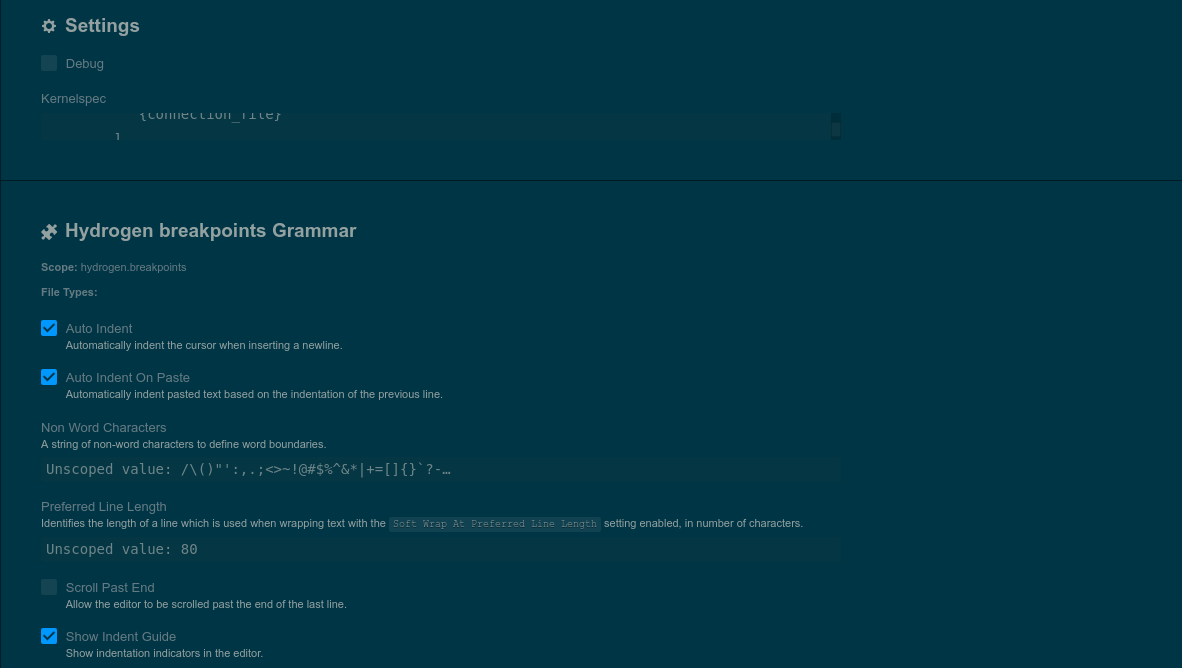
Hi,
I am unable to run Hydrogen and settings look different on my system (Please see the image).
How can I fix it?
Thanks.
 codemeleon
on 30 Jun 2017
codemeleon
on 30 Jun 2017
@codemeleon I'm guessing a reinstall of hydrogen will fix that. Let me know if that works!
BenRussert
on 30 Jun 2017
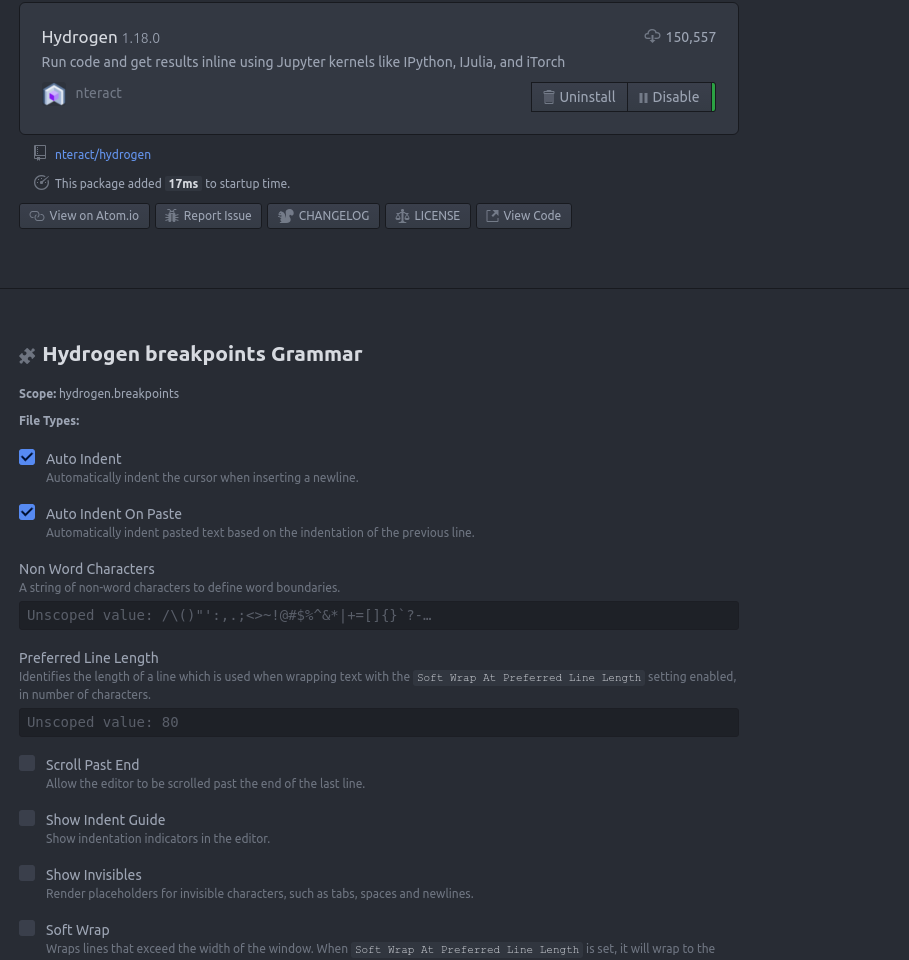
@BenRussert Nope, it didn't. I also reset atom configurations by removing .atom folder from my home directory. Now hydrogen settings looks like attached image. I am using Atom 1.8 on ubuntu 16.04.
Thanks.
codemeleon
on 30 Jun 2017
Hi @BenRussert . I made it working by installing older version of Hydrogen using command "apm install [email protected]".However, upgrading to latest version (1.18.0) breaks it.
Thanks.
codemeleon
on 3 Jul 2017
When you said atom 1.8 did you mean atom 1.18?
BenRussert
on 3 Jul 2017
I mean [email protected].
Sorry for confusion.
codemeleon
on 3 Jul 2017
Do you have custom config on config.cson?
If so I want to know if removing Hydrogen config from config.cson and restart Atom then reconfigire manually solve issue.
 t9md
on 4 Jul 2017
t9md
on 4 Jul 2017
Hi @t9md . No I do not have custom config on config.cson. As you can see in previous message, I deleted .atom folder from my home directory to reset whole Atom configuration.
codemeleon
on 4 Jul 2017
I am having the same issue. I opened Atom 1.18 and installed Hydrogen via the settings GUI, but whatever type of code I try to run it on, like a JS file, it gives me "No kernel specs found" and "No kernel grammar for JavaScript found".
 andrewbanchich
on 18 Jul 2017
andrewbanchich
on 18 Jul 2017
@andrewbanchich You'll need to have a kernel installed for the language you want to run (In your case e.g. IJavascript). Check out the installation guide.
lgeiger
on 18 Jul 2017
Where should I run this command: Hydrogen: Run?
 sAs59
on 26 Jul 2017
sAs59
on 26 Jul 2017
Open the command palette (cmd-shift-p on Mac) then start typing hydrogen.
rgbkrk
on 26 Jul 2017
For anyone still looking for a solution for this issue -- especially those who insert the kernelspec json details into Hydrogen and get "python can't be spawned. Is it in the path?"
The solution for me was to write the installed python envs (Anaconda) to the kernel.json file for Jupyter.
This link serves well for all purposes: https://ipython.readthedocs.io/en/latest/install/kernel_install.html
Specifically, this line of code was all I needed to push through the Anaconda prompt:
python -m ipykernel install --user
Do this for however many kernels you want to link back to Jupyter by activating each python env.
 madmansn0w
on 3 Aug 2017
madmansn0w
on 3 Aug 2017
Note that if you install a new kernel, you'll need to run Hydrogen: Update Kernels for Hydrogen to find it. For performance reasons, Hydrogen only looks for available kernels when it first starts.
 wsjz
on 17 Jan 2019
wsjz
on 17 Jan 2019
Looking for solution. Error appeared when using Hydrogen --> Run

The output of jupyter kernelspec list --json as below:
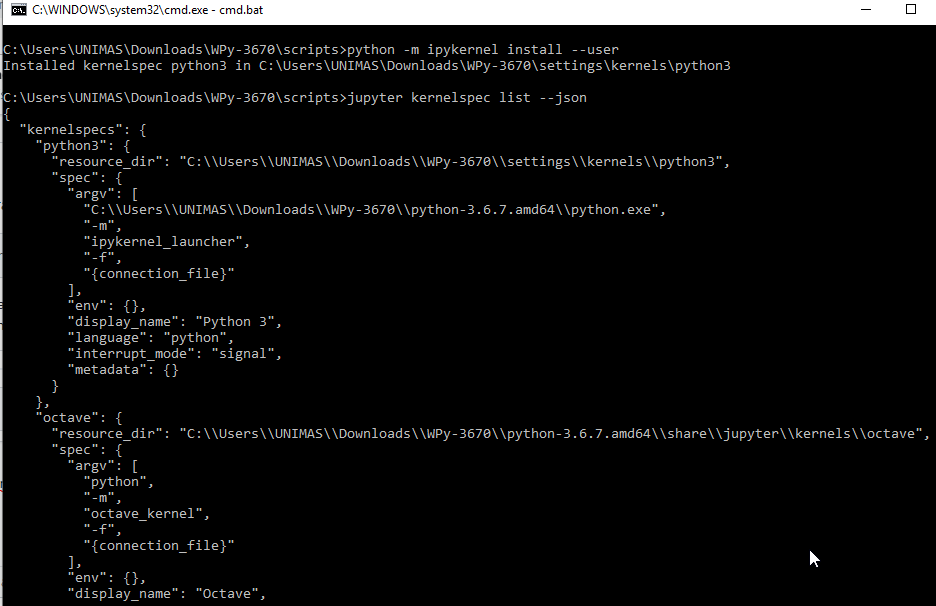
How to solve?
 etmdchua
on 18 Jun 2019
etmdchua
on 18 Jun 2019
Maybe the path to your kernels is not recognised by Atom.
Make sure your environment variable includes paths to Jupyter kernels, not sure what the exactly path would be if you install Jupyter without Anaconda tho.
 aviatesk
on 18 Jun 2019
aviatesk
on 18 Jun 2019
Looking for solution. Error appeared when using Hydrogen --> Run
The output of jupyter kernelspec list --json as below:
How to solve?
After running into the same error, the following steps worked for me:
Step 1: Install Python 3.6
- open the conda prompt: conda create -n py36 python=3.6 anaconda
Step 2: Launch Atom
- open the conda prompt: atom --new-instance
 tkind
on 17 Jul 2019
tkind
on 17 Jul 2019
Related issues
 DannyDannyDanny
·
3Comments
DannyDannyDanny
·
3Comments
 nils-werner
·
3Comments
nils-werner
·
3Comments
 Mike-MU10
·
4Comments
Mike-MU10
·
4Comments
 mda6
·
3Comments
mda6
·
3Comments
 gepcel
·
3Comments
gepcel
·
3Comments
Most helpful comment
It looks like those were in a virtualenv, which Atom won't pick up unless Atom is launched as
atom .within the virtualenv. The alternative is to create a kernel specifically for a virtualenv.