Hugo-theme-zzo: Theme switching is broken after last update
I just updated the git sub module. Switching the theme from the drop down has no effect.
 nisrulz
All 18 comments
I also noticed click on the ^ button to goto top also doesn't work. Seems like last few changes, broke some actions.
nisrulz
on 11 Jan 2020
I checked it on Ubuntu but seems to work well.
Do you have any error messages in the browser?
Or did you override the baseof.html file to yours?(layouts/_default/baseof.html)
 zzossig
on 12 Jan 2020
zzossig
on 12 Jan 2020


I am clicking on all options in the drop down
nisrulz
on 12 Jan 2020
did you override the baseof.html file to yours?
zzossig
on 12 Jan 2020
No. I have not overridden anything. This is why I am able to update via the git Sub module.
nisrulz
on 12 Jan 2020
Can you delete root/resources folder? Hugo will generate a new one.
zzossig
on 12 Jan 2020
I did that. I restarted hugo server. No change.
nisrulz
on 12 Jan 2020
Can you check the download version of Zzo theme
- download this repo
- make folder
themes/test - unzip the downloaded zip file to the
themes/testfolder - in your config.toml file(
config/_default/config.toml)
...
theme = "test"
...
- run Hugo and check if it works
zzossig
on 12 Jan 2020
I don't understand this point:
unzip the downloaded zip file to the themes/test folder
I already downloaded this repo in first step.
nisrulz
on 12 Jan 2020
I suspect the git submodule crash some code.
So, just want to check if we use the source(not in git submodule) makes it work.
This is just for the test. So you don't have to touch the submodule.
zzossig
on 12 Jan 2020
Tried that. Doesn't work either :/
nisrulz
on 12 Jan 2020
Can you share some repo?
I can't reproduce on my end even on Ubuntu environment
zzossig
on 12 Jan 2020
nisrulz
on 12 Jan 2020
I can tell you if I revert to last git sub module commit, the theme change works. It is definitely broken by last 2 commits.
nisrulz
on 12 Jan 2020
I reproduced it. I'll check what is happening behind.
zzossig
on 12 Jan 2020
Ok, I found an unnecessary file
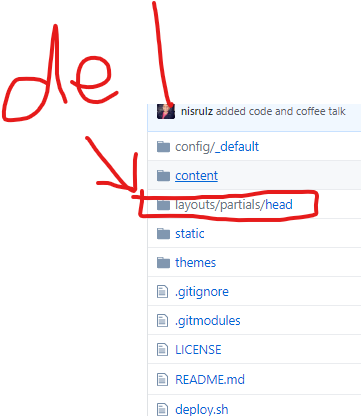
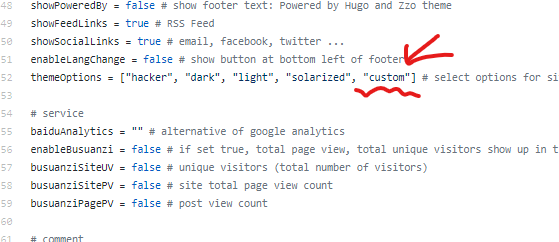
You have to delete the layouts folder. In this folder, scripts.html file override the theme's scripts.html file.
And replace custom to kimbie
zzossig
on 12 Jan 2020
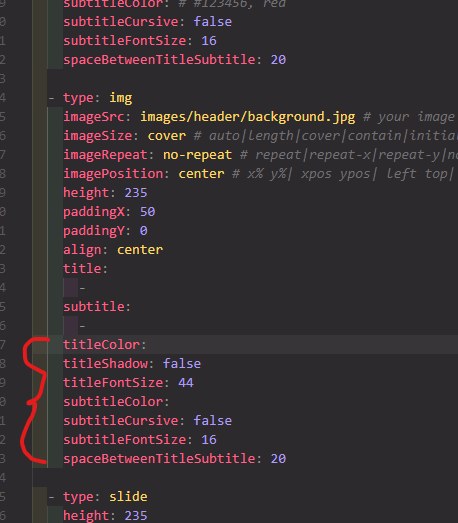
@nisrulz I added some options for the site header font.https://github.com/zzossig/hugo-theme-zzo/commit/9ffe2fd9656aab48c7365c44248072a051f76506
You can set options in the content/_index.md file
zzossig
on 12 Jan 2020
Everything works now. Thank you for your help here :)
nisrulz
on 12 Jan 2020
Related issues
nisrulz
·
8Comments
 jtara
·
7Comments
nisrulz
·
3Comments
jtara
·
7Comments
nisrulz
·
3Comments
 Gictorbit
·
3Comments
nisrulz
·
5Comments
Gictorbit
·
3Comments
nisrulz
·
5Comments