Huginn: [Event Formatting Agent | Liquid] Iterate through an array
Hi everyone !
I'll do it fast enough:
I'm new to Huginn and Liquid, but I'm not too bad (I think è_é). I'm using the event formatting agent and ... An example is better than an explication :
WHAT I HAVE (JSON build through several agents)
{
  "login": "login",
  "password": "password",
  "id": "surperLongHashCode",
  "response": [
    {
      "name_value_list": {
        "name": {
          "name": "name",
          "value": "Mr. A"
        },
        "account_name": {
          "name": "account_name",
          "value": "SUPER_A"
        },
        "email1": {
          "name": "email",
          "value": "[email protected]"
        },
        "phone_work": {
          "name": "phone_work",
          "value": "0123456789"
        }
      }
    },
    {
      "name_value_list": {
        "name": {
          "name": "name",
          "value": "Mr. B"
        },
        "account_name": {
          "name": "account_name",
          "value": "SUPER_B"
        },
        "email1": {
          "name": "email1",
          "value": "[email protected]"
        },
        "phone_work": {
          "name": "phone_work",
          "value": "0123456788"
        }
      }
    }
  ]
}
WHAT I WANT
{
  "login": "login",
  "password": "password",
  "id": "surperLongHashCode",
  "response": [
    {
      "name": "Mr. A",
      "account_name": "SUPER_A",
      "email1": "[email protected]",
      "phone_work": "0123456789"
    },
    {
      "name": "Mr. B",
      "account_name": "SUPER_B",
      "email1": "[email protected]",
      "phone_work": "0123456788",
    }
    ]
}
You should know that the array contained in "response" can be any size.
I know how to read a single element of it, but not how to iterate through them to get this cleaned new array ...
Have a nice day ;)
 TOrfevres
All 3 comments
The idea is to write something like that :
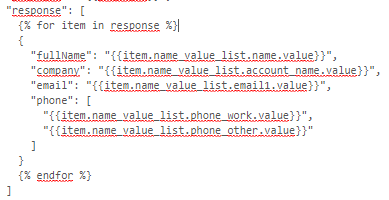
(it doesn't work : "Sorry, there appears to be an error in your JSON input. Please fix it before continuing.")
TOrfevres
on 28 Jul 2017
Hi @TOrfevres,
in general your idea is correct, however the problem is that the Liquid template needs to be a string. You can put it in instructions message, but even if that works it will return a string and not an object. I think for transformations like this a JavascriptAgent works best:
Agent.receive = function() {
  var events = this.incomingEvents();
  for(var i = 0; i < events.length; i++) {
    var event = events[i];
    event.payload.response = event.payload.response.map(function (res) {
      return {name: res.name_value_list.name.value,
              account_name: res.name_value_list.account_name.value,
              email1: res.name_value_list.email1.value,
              phone_work: res.name_value_list.phone_work.value};
    })
    this.createEvent(event.payload);
  }
}
 dsander
on 28 Jul 2017
dsander
on 28 Jul 2017
Oh god, it's solve so many problems >_<"
Thank you so much !
very huginn
much dsander
wow
TOrfevres
on 28 Jul 2017
Related issues
 Cameri
·
6Comments
Cameri
·
6Comments
 hillerliao
·
3Comments
hillerliao
·
3Comments
 xnaas
·
7Comments
xnaas
·
7Comments
 b0red
·
6Comments
b0red
·
6Comments
 0xdevalias
·
9Comments
0xdevalias
·
9Comments
Most helpful comment
Hi @TOrfevres,
in general your idea is correct, however the problem is that the Liquid template needs to be a string. You can put it in
instructionsmessage, but even if that works it will return a string and not an object. I think for transformations like this a JavascriptAgent works best: