Htop: Broken background colors under tmux
I'm using htop a lot under tmux (terminal multiplexer). Since upgrade from 2.0.2 to 2.1.0 I'm experiencing some defects in htop not present in 2.0.x .
To illustrate what am I talking about I attach two images - one with htop and tmux and one without tmux:
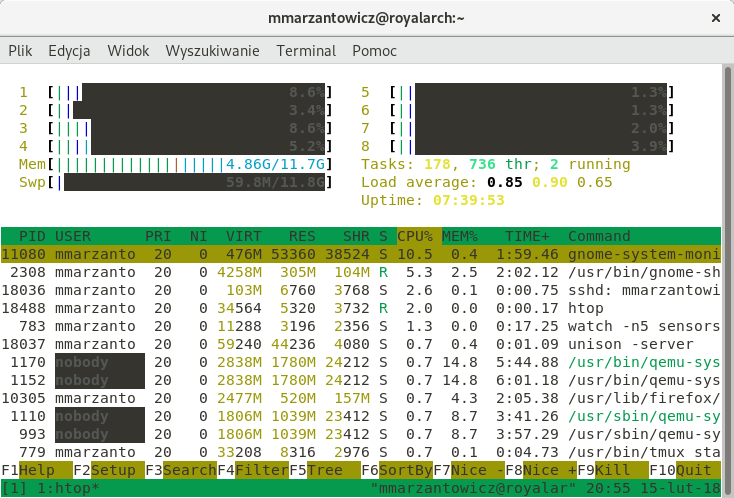
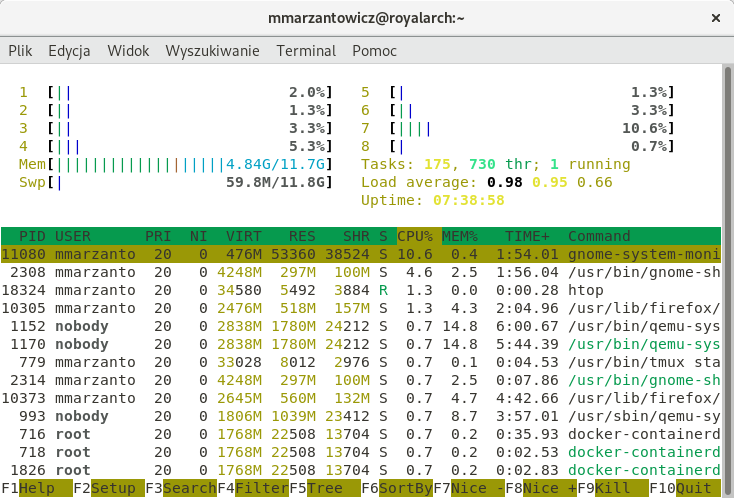
What is the recommended way to debug this issue or maybe it's already known?
 mmarzantowicz
All 3 comments
This is fixed in the latest master, 2.1.1 is coming :)
 hishamhm
on 17 Feb 2018
hishamhm
on 17 Feb 2018
I'm using version 2.6 but I'm still seeing the black squares as above.
 karimn
on 8 Nov 2019
karimn
on 8 Nov 2019
I'm using version 2.6 but I'm still seeing the black squares as above.
To clarify for anyone else reading, I believe karimn was looking at his tmux version, while this is fixed in htop itself. I am on ubuntu 18.04 and unfortunately the new version of htop (>=2.1.1) is not in the repos (only 2.1.0: https://launchpad.net/ubuntu/bionic/+source/htop ), so I had to install it from the provided tars like this:
sudo apt-get install libncursesw5-dev
wget https://hisham.hm/htop/releases/2.2.0/htop-2.2.0.tar.gz
tar xvf htop-2.2.0.tar.gz
cd htop-2.2.0/
./configure && make
sudo make install
This fixed the black bars issue in tmux for me. Hopefully it helps.
 usbhub
on 16 Jan 2020
usbhub
on 16 Jan 2020
Related issues
 sbibauw
·
7Comments
sbibauw
·
7Comments
 kaefer
·
4Comments
kaefer
·
4Comments
 edouard-lopez
·
3Comments
edouard-lopez
·
3Comments
 ghost
·
4Comments
ghost
·
4Comments
 FlorentATo
·
7Comments
FlorentATo
·
7Comments
Most helpful comment
To clarify for anyone else reading, I believe karimn was looking at his tmux version, while this is fixed in htop itself. I am on ubuntu 18.04 and unfortunately the new version of htop (>=2.1.1) is not in the repos (only 2.1.0: https://launchpad.net/ubuntu/bionic/+source/htop ), so I had to install it from the provided tars like this:
This fixed the black bars issue in tmux for me. Hopefully it helps.