I'm using my terminal with black background.
As seen in the screenshot: the text from the cpu/memory meter is not auto converted to white as it is done with the load average text or in the process list.
It's only visible if selected (second screen).
is it expected behaviour to set the load-average to different color?
edit: system: OS X 10.9.1, htop version: current master


 kaefer
All 4 comments
Are you using the default Terminal app?
This happens because bold+black produces gray on Linux terminals. Try the "Broken Gray" color scheme (F2 → Colors → [x] Broken Gray) and let me know if it fixes it.
 hishamhm
on 14 Sep 2015
hishamhm
on 14 Sep 2015
I'm using the default terminal app, but with a bit of customizing to color / font style.
Broken Gray: jep. this is working as expected :) thanks!
kaefer
on 14 Sep 2015
I encounter the exact same issue on Ubuntu server 18.04. It used to work fine with 16.04, it broke down after the distro upgrade. I am using htop version 2.1.0.
The Broken Gray schema removes the bug but the places, which are supposed to be gray, are regular white. In consequence, e.g., "shadow other users processes" does not work as the gray is white.
 KarelCemus
on 10 May 2018
KarelCemus
on 10 May 2018
I can also report that the same problem appears on other Linux distributions (screenshots from Ubuntu 16.04 and Debian 9.5).
I wasn't sure about the correct behavior, but the screenshot at the main htop site shows clearly that this is a rendering error.

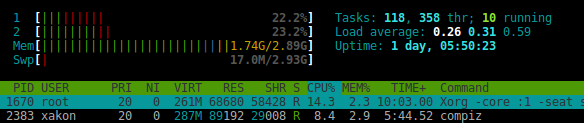
 xakon
on 24 Aug 2018
xakon
on 24 Aug 2018
Related issues
 ghost
·
4Comments
ghost
·
4Comments
 rafis
·
7Comments
rafis
·
7Comments
 BenBE
·
5Comments
BenBE
·
5Comments
 nuno-agostinho
·
6Comments
nuno-agostinho
·
6Comments
 edouard-lopez
·
5Comments
edouard-lopez
·
5Comments
Most helpful comment
Are you using the default Terminal app?
This happens because bold+black produces gray on Linux terminals. Try the "Broken Gray" color scheme (F2 → Colors → [x] Broken Gray) and let me know if it fixes it.