Howdy: Downloading 3 required data files... Too SLOW !
sudo dpkg -i howdy_2.6.1.deb
(正在读取数据库 ... 系统当前共安装有 258887 个文件和目录。)
准备解压 howdy_2.6.1.deb  ...
Backup of Howdy config file created in /tmp/howdy_config_backup_v2.6.1.ini
正在解压 howdy (2.6.1) 并覆盖 (2.6.1) ...
正在设置 howdy (2.6.1) ...
Attempting installation of missing data files
Downloading 3 required data files...
Then there is noting happened :cry:
I have try it over 5 times , with or without VPN in China :sob:
Other part of install howdy seems ok.
 forliuyifei
All 26 comments
Can you tell me what data files does howdy need?
Maybe there is another way to fetch them for me.
forliuyifei
on 11 Mar 2021
This is the second issue opened by a user with their system language in Chinese where the data files fail to download. Could you give me the output of wget https://github.com/davisking/dlib-models/raw/master/dlib_face_recognition_resnet_model_v1.dat.bz2?
 boltgolt
on 11 Mar 2021
boltgolt
on 11 Mar 2021
This is the second issue opened by a user with their system language in Chinese where the data files fail to download. Could you give me the output of
wget https://github.com/davisking/dlib-models/raw/master/dlib_face_recognition_resnet_model_v1.dat.bz2?
Thx, I will have a try.
forliuyifei
on 12 Mar 2021
This is the second issue opened by a user with their system language in Chinese where the data files fail to download. Could you give me the output of
wget https://github.com/davisking/dlib-models/raw/master/dlib_face_recognition_resnet_model_v1.dat.bz2?
hello, i get the dlib_face_recognition_resnet_model_v1.dat.bz2 after i run the command, but i also get the false:
bzip2: Can't open input file *.bz2: No such file or directory.
Error while running last command
could you help me?
 aiaiai-czh
on 14 Mar 2021
aiaiai-czh
on 14 Mar 2021
Are you located in mainland china @aiaiai-czh? Does opening the downloaded archive with your normal archive manager work?
boltgolt
on 14 Mar 2021
Are you located in mainland china @aiaiai-czh? Does opening the downloaded archive with your normal archive manager work?
yes, i located in china, and my ubuntu20.04 can't open de downloaded archive, it tips that "TGA image type not supported", how could i solve this problem?
aiaiai-czh
on 14 Mar 2021
@aiaiai-czh seems like the archive is corrupted. Could you give me exactly what wget prints in the terminal and send me the file that it saves? I'll debug it for you
boltgolt
on 14 Mar 2021
this file is the wget prints in the terminal
------------------ 原始邮件 ------------------
发件人: "boltgolt/howdy" @.>;
发送时间: 2021年3月14日(星期天) 下午5:25
*@.>;
@.@.*>;
主题: Re: [boltgolt/howdy] Downloading 3 required data files... Too SLOW ! (#517)
@aiaiai-czh seems like the archive is corrupted. Could you give me exactly what wget prints in the terminal and send me the file that it saves? I'll debug it for you
—
You are receiving this because you were mentioned.
Reply to this email directly, view it on GitHub, or unsubscribe.
aiaiai-czh
on 14 Mar 2021
@aiaiai-czh I don't think the file got send, can you upload it somewhere and post the link here?
boltgolt
on 14 Mar 2021
@aiaiai-czh I don't think the file got send, can you upload it somewhere and post the link here?
this is the result:
czh@czh-Inspiron-5493:~$ wget https://github.com/davisking/dlib-models/raw/master/dlib_face_recognition_resnet_model_v1.dat.bz2
--2021-03-14 17:28:31-- https://github.com/davisking/dlib-models/raw/master/dlib_face_recognition_resnet_model_v1.dat.bz2
Connecting to 127.0.0.1:58591... connected.
Proxy request sent, awaiting response... 302 Found
Location: https://raw.githubusercontent.com/davisking/dlib-models/master/dlib_face_recognition_resnet_model_v1.dat.bz2 [following]
--2021-03-14 17:28:32-- https://raw.githubusercontent.com/davisking/dlib-models/master/dlib_face_recognition_resnet_model_v1.dat.bz2
Connecting to 127.0.0.1:58591... connected.
Proxy request sent, awaiting response... 200 OK
Length: 21428389 (20M) [application/octet-stream]
Saving to: ‘dlib_face_recognition_resnet_model_v1.dat.bz2’
dlib_face_recogniti 100%[===================>] 20.44M 2.45MB/s in 8.2s
2021-03-14 17:28:42 (2.50 MB/s) - ‘dlib_face_recognition_resnet_model_v1.dat.bz2’ saved [21428389/21428389]
aiaiai-czh
on 14 Mar 2021
This is the second issue opened by a user with their system language in Chinese where the data files fail to download. Could you give me the output of
wget https://github.com/davisking/dlib-models/raw/master/dlib_face_recognition_resnet_model_v1.dat.bz2?
export http_proxy=127.0.0.1:7890 ; export https_proxy=127.0.0.1:7890
This is my proxy.
wget https://github.com/davisking/dlib-models/raw/master/dlib_face_recognition_resnet_model_v1.dat.bz2
--2021-03-16 09:41:31--  https://github.com/davisking/dlib-models/raw/master/dlib_face_recognition_resnet_model_v1.dat.bz2
正在连接 127.0.0.1:7890... 已连接。
已发出 Proxy 请求,正在等待回应... 302 Found
位置:https://raw.githubusercontent.com/davisking/dlib-models/master/dlib_face_recognition_resnet_model_v1.dat.bz2 [跟随至新的 URL]
--2021-03-16 09:41:32--  https://raw.githubusercontent.com/davisking/dlib-models/master/dlib_face_recognition_resnet_model_v1.dat.bz2
正在连接 127.0.0.1:7890... 已连接。
已发出 Proxy 请求,正在等待回应... 200 OK
长度:21428389 (20M) [application/octet-stream]
正在保存至: “dlib_face_recognition_resnet_model_v1.dat.bz2”

dlib_face_recogni 100%[===========>]  20.44M  6.31MB/s  用时 3.2s

2021-03-16 09:41:37 (6.31 MB/s) - 已保存 “dlib_face_recognition_resnet_model_v1.dat.bz2” [21428389/21428389])
Now I've download it successfully.
But
sudo dpkg -i howdy_2.6.1.deb
(正在读取数据库 ... 系统当前共安装有 299522 个文件和目录。)
准备解压 howdy_2.6.1.deb  ...
Backup of Howdy config file created in /tmp/howdy_config_backup_v2.6.1.ini
正在解压 howdy (2.6.1) 并覆盖 (2.6.1) ...
正在设置 howdy (2.6.1) ...
Attempting installation of missing data files
Downloading 3 required data files...
Nothing goes on still :cry:
forliuyifei
on 16 Mar 2021
sudo dpkg -i howdy_2.6.1.deb
(正在读取数据库 ... 系统当前共安装有 299522 个文件和目录。)
准备解压 howdy_2.6.1.deb ...
Backup of Howdy config file created in /tmp/howdy_config_backup_v2.6.1.ini
正在解压 howdy (2.6.1) 并覆盖 (2.6.1) ...
正在设置 howdy (2.6.1) ...
Attempting installation of missing data files
Downloading 3 required data files...
你好,我的ubuntu20.04的系统是英文版的,也没有成功,也是在Downloading 3 required data files...卡着,然后提示bzip2: Can't open input file *.bz2: No such file or directory.
aiaiai-czh
on 16 Mar 2021
sudo dpkg -i howdy_2.6.1.deb
(正在读取数据库 ... 系统当前共安装有 299522 个文件和目录。)
准备解压 howdy_2.6.1.deb ...
Backup of Howdy config file created in /tmp/howdy_config_backup_v2.6.1.ini
正在解压 howdy (2.6.1) 并覆盖 (2.6.1) ...
正在设置 howdy (2.6.1) ...
Attempting installation of missing data files
Downloading 3 required data files...你好,我的ubuntu20.04的系统是英文版的,也没有成功,也是在Downloading 3 required data files...卡着,然后提示bzip2: Can't open input file *.bz2: No such file or directory.
这不是中文英文版的问题, 而是因为所需文件在境外, 不开代理无法连接, 但是我并不知道 dpkg 时如何开启代理, 不知道上面的 " Downloading 3 required data files..." 走的是什么协议, 我明明配置好了 http 、https 代理,ftp 也尝试过,就是无法下载,最好的办法可能是用一部能开代理中继的手机或者路由器实现真正的全局代理,但无奈的是我现在不具备这两种条件.
forliuyifei
on 16 Mar 2021
我的破手机救回来了,现在已经成功用上 howdy 。
此问题继续保留。
forliuyifei
on 18 Mar 2021
我的破手机救回来了,现在已经成功用上 howdy 。
此问题继续保留。
你好,能告诉我具体如何操作吗,我开了vpn没用
aiaiai-czh
on 18 Mar 2021
Please keep your comments in english, i can't help here
boltgolt
on 18 Mar 2021
Please keep your comments in english, i can't help here
@forliuyifei say he use his phone make howdy work, i just want to ask him how to do?
aiaiai-czh
on 18 Mar 2021
i have post the record of the terminal, but i don't konw how to solve this problem
aiaiai-czh
on 18 Mar 2021
Please keep your comments in english, i can't help here
Sorry, I almost gave up before.
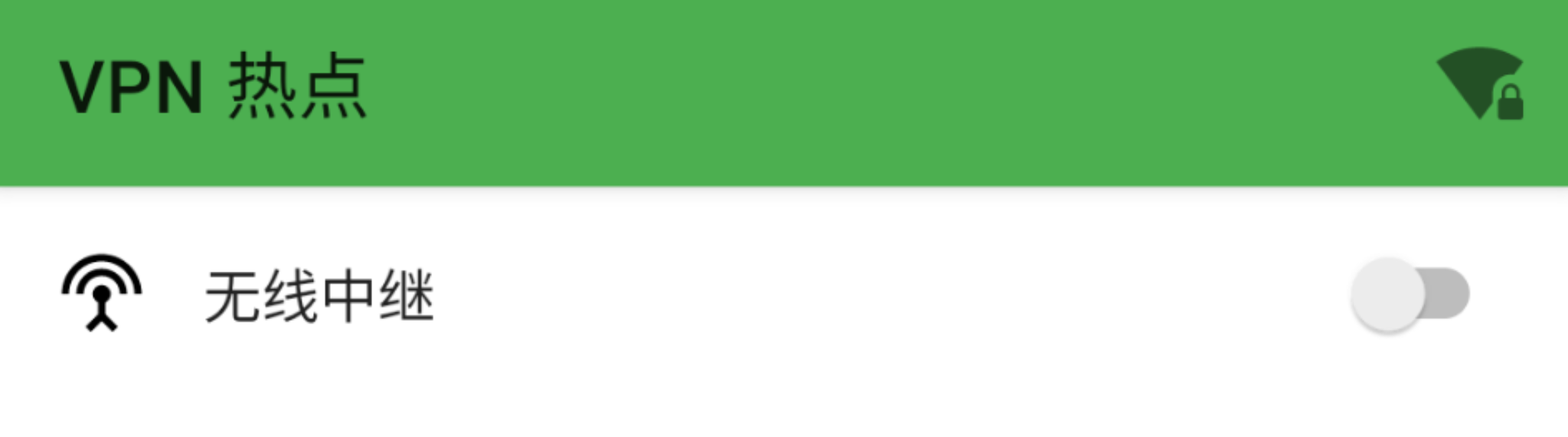
I enabled proxy (which helps me connect to the Internet out of China), and used this VPN Hotspot to enable "Repeater" on a rooted phone, then my computer connected to this "hotspot" , and now it can download the required files successfully.
forliuyifei
on 18 Mar 2021
我的破手机救回来了,现在已经成功用上 howdy 。
此问题继续保留。你好,能告诉我具体如何操作吗,我开了vpn没用
- A rooted Android phone.
- A proxy tool that works fine on your phone.
- Download and install VPN Hotspot from Google Play.
- Make sure that your phone connect to a Wi-Fi.
- Enable both the proxy & Repeater
- Let your computer connect the hotspot which is created by your phone.(It's not same as the system one)
sudo dpkg -r howdysudo dpkg -i howdy*.deb, wait and go on.
forliuyifei
on 18 Mar 2021
Please keep your comments in english, i can't help here
Sorry, I almost gave up before.
I enabled proxy (which helps me connect to the Internet out of China), and used this VPN Hotspot to enable "Repeater" on a rooted phone, then my computer connected to this "hotspot" , and now it can download the required files successfully.
我直接电脑连接vpn下载不可以吗
aiaiai-czh
on 18 Mar 2021
Please keep your comments in english, i can't help here
Sorry, I almost gave up before.
I enabled proxy (which helps me connect to the Internet out of China), and used this VPN Hotspot to enable "Repeater" on a rooted phone, then my computer connected to this "hotspot" , and now it can download the required files successfully.我直接电脑连接vpn下载不可以吗
反正我没有找到真正的全局代理方法😓
forliuyifei
on 18 Mar 2021
Please keep your comments in english, i can't help here
Sorry, I almost gave up before.
I enabled proxy (which helps me connect to the Internet out of China), and used this VPN Hotspot to enable "Repeater" on a rooted phone, then my computer connected to this "hotspot" , and now it can download the required files successfully.
我直接电脑连接vpn下载不可以吗
反正我没有找到真正的全局代理方法😓
好的,多谢了🙏
aiaiai-czh
on 18 Mar 2021
Thanks all for figuring it out, was unfortunately not much i could do from here. Closing this now because the problem is not with Howdy
boltgolt
on 29 Mar 2021
On my Ubuntu, I use method below to install howdy when data downloading failed.
- cd into your howdy library directory, which should in /lib/security/howdy/dlib-data
- modify install.sh, I use proxychains4 to enable wget to use my proxy
- cd into dpkg library, which in /var/lib/dpkg/info, and run
sudo ./howdy.preinst install
to generate howdy_picked_device to make dpkg think it's fresh configuration mode - modify line 131 in howdy.postinst, change it from
LOADER_CMD = [loader, "--tries", "5", "--output-document"]
to
LOADER_CMD = ["proxychains4", "-q", loader, "--tries", "5", "--output-document"]
so that wget can use proxy to download file - finally you can run
sudo apt install howdy
or whatever command that can make apt continue installing howdy
Here is some advise
- You can specify which python3 packages howdy needs in README so people can install them before, in case root's pip use different pypi mirror.
- You can keep howdy_picked_device file existing until installation finally complete, in case installation failed. It took me a while to find why the script can't run properly again after I modified it because the file was deleted.
 Syize
on 22 Apr 2021
Syize
on 22 Apr 2021
        Thanks for your advice! I will try it later.


        On 04/22/2021 23:59, Syize wrote:
On my Ubuntu, I use method below to install howdy when data downloading failed.
cd into your howdy library directory, which should in /lib/security/howdy/dlib-data
modify install.sh, I use proxychains4 to enable wget to use my proxy
cd into dpkg library, which in /var/lib/dpkg/info, and run
sudo ./howdy.preinst install
to generate howdy_picked_device to make dpkg think it's fresh configuration mode
modify line 131 in howdy.postinst, change it from
LOADER_CMD = [loader, "--tries", "5", "--output-document"]
to
LOADER_CMD = ["proxychains4", "-q", loader, "--tries", "5", "--output-document"]
so that wget can use proxy to download file
finally you can run
sudo apt install howdy
or whatever command that can make apt continue installing howdy
Here is some advise
You can specify which python3 packages howdy needs in README so people can install them before, in case root's pip use different pypi mirror.
You can keep howdy_picked_device file existing until installation finally complete, in case installation failed. It took me a while to find why the script can't run properly again after I modified it because the file was deleted.
—You are receiving this because you were mentioned.Reply to this email directly, view it on GitHub, or unsubscribe.
[
{
@.": "http://schema.org",
*@.": "EmailMessage",
"potentialAction": {
@.": "ViewAction",
"target": "https://github.com/boltgolt/howdy/issues/517#issuecomment-824969477",
"url": "https://github.com/boltgolt/howdy/issues/517#issuecomment-824969477",
"name": "View Issue"
},
"description": "View this Issue on GitHub",
"publisher": {
@.*": "Organization",
"name": "GitHub",
"url": "https://github.com"
}
}
]
aiaiai-czh
on 22 Apr 2021
Related issues
 VanishingTacos
·
8Comments
VanishingTacos
·
8Comments
 gabrielspadon
·
6Comments
gabrielspadon
·
6Comments
 ozls
·
5Comments
ozls
·
5Comments
 NICHOLAS85
·
7Comments
NICHOLAS85
·
7Comments
 Kelvin858
·
5Comments
Kelvin858
·
5Comments
Most helpful comment
On my Ubuntu, I use method below to install howdy when data downloading failed.
sudo ./howdy.preinst installto generate howdy_picked_device to make dpkg think it's fresh configuration mode
LOADER_CMD = [loader, "--tries", "5", "--output-document"]to
LOADER_CMD = ["proxychains4", "-q", loader, "--tries", "5", "--output-document"]so that wget can use proxy to download file
sudo apt install howdyor whatever command that can make apt continue installing howdy
Here is some advise