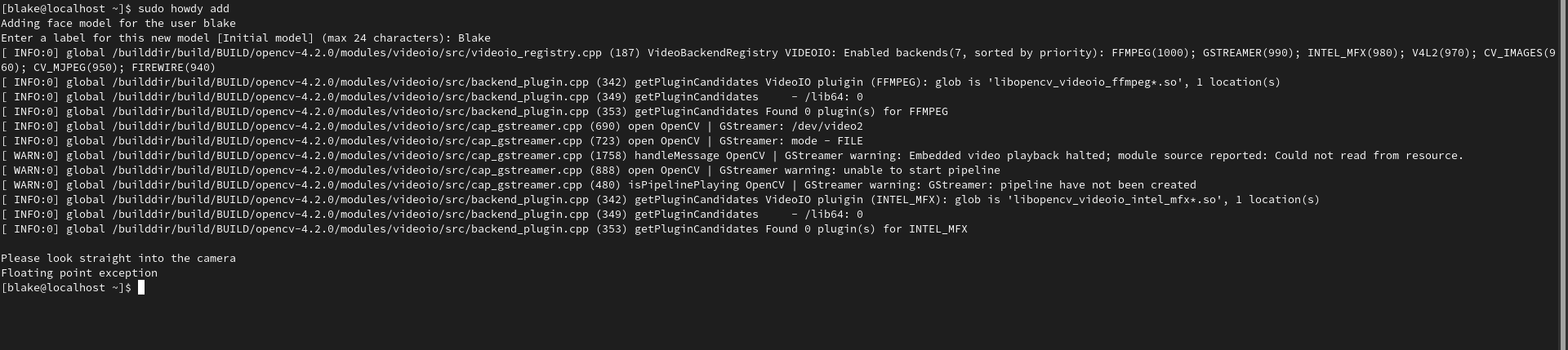
I am running Fedora 32. I've run "sudo howdy add", howdy asks for a name, then it says "please look straight into the camera" and the IR sensor blinks. then howdy returns "Floating point exception" and quits
 twodollarblake
All 13 comments
This is an issue with OpenCV, you could try reinstalling that and it's python bridge
 boltgolt
on 7 Aug 2020
boltgolt
on 7 Aug 2020
I'm in the same situation, hence it worked until one day I run update of system.
I have dug deeper ;) by running coredumpctl and got following debug output:
Core was generated by `/usr/bin/python3 /usr/bin/howdy add'.
Program terminated with signal SIGFPE, Arithmetic exception.
0 0x00007f82bcb5588f in sgemm_thread_tn (args=0x7fff37af4c50, range_m=0x0, range_n=0x0, sa=0x7f8296000000, sb=0x7f8296064000, mypos=) at level3_thread.c:759
759 nthreads_n = (n + SWITCH_RATIO * nthreads_m - 1) / (SWITCH_RATIO * nthreads_m);
[Current thread is 1 (Thread 0x7f82da9d0740 (LWP 31604))]
The formula comes from /usr/lib64/libopenblas.so.0 vesrion 0.3.9-3, no downgrade possible through dnf.
Re-installation of OpenCV and python3-opencv does not help.
 tomoshokas
on 7 Aug 2020
tomoshokas
on 7 Aug 2020
The formula comes from /usr/lib64/libopenblas.so.0 vesrion 0.3.9-3, no downgrade possible through dnf.
Re-installation of OpenCV and python3-opencv does not help.
Actually you can downgrade openblas to 0.3.9-2 but still it does not solve the situation, just like it doesn't after downgrading opencv and python3-opencv.
 ghost
on 12 Aug 2020
ghost
on 12 Aug 2020
Same here. Fedora 32.
 s256
on 5 Sep 2020
s256
on 5 Sep 2020
Same issue here, also Fedora 32. Any ideas on a workaround?
 simonerlic
on 6 Sep 2020
simonerlic
on 6 Sep 2020
This copr repo works for me instead of the one from readme, it also has a clear instruction there.
https://copr.fedorainfracloud.org/coprs/principis/howdy/
I have also tried running python directly from the latest src/cli.py and it's working fine.
 dswij
on 6 Sep 2020
dswij
on 6 Sep 2020
This copr repo works for me instead of the one from readme, it also has a clear instruction there.
https://copr.fedorainfracloud.org/coprs/principis/howdy/
I have also tried running python directly from the latest src/cli.py and it's working fine.
Confirm working for me too. Thank you!
s256
on 6 Sep 2020
This copr repo works for me instead of the one from readme, it also has a clear instruction there.
https://copr.fedorainfracloud.org/coprs/principis/howdy/
I have also tried running python directly from the latest src/cli.py and it's working fine.
Can also confirm working! Thanks!
simonerlic
on 6 Sep 2020
@boltgolt Since it seems that this fixes the issue for the newer fedora, could we add this alternative repo to the readme? I think I saw the maintainer here on some other issue @principis
dswij
on 7 Sep 2020
@dswij I'd rather not actually. I'm quite new at packaging (It's mostly just trial and error), and I don't think I have the time to quickly fix other people's issues. I do use it myself, so I'll keep maintaining it so that it at least works for most people.
 principis
on 7 Sep 2020
principis
on 7 Sep 2020
I have arch linux and fedora. https://copr.fedorainfracloud.org/coprs/principis/howdy/ solve the floating point exception (probably because it uses howdy 2.6.1 ? not sure) arch linux is on 2.6.1 too.
But the instructions to setup selinux are mandatory on fedora (unknown error: 1 is shown if not configured)
@principis I would just add that instructions on principis are only for kde. I setup /etc/pam.d/login and it works for gdm (GNOME desktop)
auth     [success=done ignore=ignore default=bad] pam_selinux_permit.so
auth       sufficient   pam_python.so /lib64/security/howdy/pam.py
 albfan
on 10 Sep 2020
albfan
on 10 Sep 2020
@albfan the floating point exception has nothing to do with howdy 2.6.1 I suspect dlib.
@principis I would just add that instructions on principis are only for kde. I setup /etc/pam.d/login and it works for gdm (GNOME desktop)
I do mention that those are only for kde, can you elaborate what you specifically mean?
principis
on 11 Sep 2020
@principis just that /etc/pam.d is little complex so any guidance on other desktop is great.
On arch Linux system-local-login is enough, but on fedora there's no such script, so some guidance would help. I guess login works, but maybe is not the exact best location
albfan
on 11 Sep 2020
Related issues
 Kelvin858
·
5Comments
Kelvin858
·
5Comments
 NICHOLAS85
·
7Comments
NICHOLAS85
·
7Comments
 nhusby
·
4Comments
nhusby
·
4Comments
 VanishingTacos
·
8Comments
VanishingTacos
·
8Comments
 joshlangley
·
5Comments
joshlangley
·
5Comments
Most helpful comment
This copr repo works for me instead of the one from readme, it also has a clear instruction there.
https://copr.fedorainfracloud.org/coprs/principis/howdy/
I have also tried running python directly from the latest src/cli.py and it's working fine.