Howdy: IR camera flashing loop after auth
After authentication IR camera continues flashing on/off on loop until disabled.
Linux Mint 19.1 tessa. Same problem on Kubuntu 18.10.
Howdy version: 2.5.0
Did not have this problem on 2.4.0. Started with 2.5.0.
Lenovo x1 extreme laptop.
 ericvhileman
All 17 comments
So _after_ a successful auth Howdy keeps looping, even without any authentication prompts open?
 boltgolt
on 1 Feb 2019
boltgolt
on 1 Feb 2019
Correct, after successful authentication. I see it when doing sudo from shell and also when prompted to auth inside ui. Login is another story, that doesn't appear to work at all on mint cinnamon, but did on other distros... so thinking diff issue.
ericvhileman
on 1 Feb 2019
Could you take a look at /var/log/auth.log and see if there are any python errors or login loops logged there?
boltgolt
on 2 Feb 2019
It auth's ok but then loops this line many times, ir lights flashing, eventually stopping on it's own:
Feb 4 15:33:05 oomkillah sudo: eric : TTY=unknown ; PWD=/home/eric ; USER=root ; COMMAND=/usr/bin/timeout 1 loginctl unlock-sessions --no-ask-password
Feb 4 15:33:05 oomkillah sudo: pam_unix(sudo:session): session opened for user root by (uid=0)
Feb 4 15:33:05 oomkillah sudo: pam_unix(sudo:session): session closed for user root
And ends with:
Feb 4 15:33:12 oomkillah sudo: pam_unix(sudo:session): session opened for user root by (uid=0)
Feb 4 15:33:12 oomkillah sudo: pam_unix(sudo:session): session closed for user root
Feb 4 15:33:17 oomkillah sudo: pam_unix(sudo:auth): conversation failed
Feb 4 15:33:17 oomkillah sudo: pam_unix(sudo:auth): auth could not identify password for [eric]
ericvhileman
on 4 Feb 2019
Could you try setting dismiss_lockscreen back to false? It's experimental and can misbehave on some systems.
boltgolt
on 5 Feb 2019
Hi, I get the same behaviour, to login I have no_confirmation = true
based on this https://github.com/boltgolt/howdy/issues/28#issuecomment-396231042
and I have dismiss_lockscreen = false
Howdy version: 2.5.0
My system runs LinuxMint Cinnamon 19.1 Tessa
Dell Inspiron 15 7000 Series
 rgarcia7
on 12 Feb 2019
rgarcia7
on 12 Feb 2019
I get auth could not identify password for [username] on the log, but the lockscreen gets unlocked succesfuly with no problem, just the loop that keeps flashing the IR Led
Feb 12 14:54:20 linuxmint-Inspiron-7573 cinnamon-screensaver-pam-helper: gkr-pam: no password is available for user
Feb 12 14:54:21 linuxmint-Inspiron-7573 sudo: username : TTY=unknown ; PWD=/home/username ; USER=root ; COMMAND=/usr/bin/timeout 1 loginctl unlock-sessions --no-ask-password
Feb 12 14:54:21 linuxmint-Inspiron-7573 sudo: pam_unix(sudo:session): session opened for user root by (uid=0)
Feb 12 14:54:21 linuxmint-Inspiron-7573 sudo: pam_unix(sudo:session): session closed for user root
Feb 12 14:54:22 linuxmint-Inspiron-7573 sudo: username : TTY=unknown ; PWD=/home/username ; USER=root ; COMMAND=/usr/bin/timeout 1 loginctl unlock-sessions --no-ask-password
Feb 12 14:54:22 linuxmint-Inspiron-7573 sudo: pam_unix(sudo:session): session opened for user root by (uid=0)
Feb 12 14:54:22 linuxmint-Inspiron-7573 sudo: pam_unix(sudo:session): session closed for user root
Feb 12 14:54:23 linuxmint-Inspiron-7573 sudo: username : TTY=unknown ; PWD=/home/username ; USER=root ; COMMAND=/usr/bin/timeout 1 loginctl unlock-sessions --no-ask-password
Feb 12 14:54:23 linuxmint-Inspiron-7573 sudo: pam_unix(sudo:session): session opened for user root by (uid=0)
Feb 12 14:54:23 linuxmint-Inspiron-7573 sudo: pam_unix(sudo:session): session closed for user root
Feb 12 14:54:25 linuxmint-Inspiron-7573 sudo: username : TTY=unknown ; PWD=/home/username ; USER=root ; COMMAND=/usr/bin/timeout 1 loginctl unlock-sessions --no-ask-password
Feb 12 14:54:25 linuxmint-Inspiron-7573 sudo: pam_unix(sudo:session): session opened for user root by (uid=0)
Feb 12 14:54:25 linuxmint-Inspiron-7573 sudo: pam_unix(sudo:session): session closed for user root
Feb 12 14:54:26 linuxmint-Inspiron-7573 sudo: username : TTY=unknown ; PWD=/home/username ; USER=root ; COMMAND=/usr/bin/timeout 1 loginctl unlock-sessions --no-ask-password
Feb 12 14:54:26 linuxmint-Inspiron-7573 sudo: pam_unix(sudo:session): session opened for user root by (uid=0)
Feb 12 14:54:26 linuxmint-Inspiron-7573 sudo: pam_unix(sudo:session): session closed for user root
Feb 12 14:54:27 linuxmint-Inspiron-7573 sudo: username : TTY=unknown ; PWD=/home/username ; USER=root ; COMMAND=/usr/bin/timeout 1 loginctl unlock-sessions --no-ask-password
Feb 12 14:54:27 linuxmint-Inspiron-7573 sudo: pam_unix(sudo:session): session opened for user root by (uid=0)
Feb 12 14:54:27 linuxmint-Inspiron-7573 sudo: pam_unix(sudo:session): session closed for user root
Feb 12 14:54:28 linuxmint-Inspiron-7573 sudo: username : TTY=unknown ; PWD=/home/username ; USER=root ; COMMAND=/usr/bin/timeout 1 loginctl unlock-sessions --no-ask-password
Feb 12 14:54:28 linuxmint-Inspiron-7573 sudo: pam_unix(sudo:session): session opened for user root by (uid=0)
Feb 12 14:54:28 linuxmint-Inspiron-7573 sudo: pam_unix(sudo:session): session closed for user root
Feb 12 14:54:29 linuxmint-Inspiron-7573 sudo: username : TTY=unknown ; PWD=/home/username ; USER=root ; COMMAND=/usr/bin/timeout 1 loginctl unlock-sessions --no-ask-password
Feb 12 14:54:29 linuxmint-Inspiron-7573 sudo: pam_unix(sudo:session): session opened for user root by (uid=0)
Feb 12 14:54:29 linuxmint-Inspiron-7573 sudo: pam_unix(sudo:session): session closed for user root
Feb 12 14:54:30 linuxmint-Inspiron-7573 sudo: username : TTY=unknown ; PWD=/home/username ; USER=root ; COMMAND=/usr/bin/timeout 1 loginctl unlock-sessions --no-ask-password
Feb 12 14:54:30 linuxmint-Inspiron-7573 sudo: pam_unix(sudo:session): session opened for user root by (uid=0)
Feb 12 14:54:30 linuxmint-Inspiron-7573 sudo: pam_unix(sudo:session): session closed for user root
Feb 12 14:54:34 linuxmint-Inspiron-7573 sudo: username : TTY=unknown ; PWD=/home/username ; USER=root ; COMMAND=/usr/bin/timeout 1 loginctl unlock-sessions --no-ask-password
Feb 12 14:54:34 linuxmint-Inspiron-7573 sudo: pam_unix(sudo:session): session opened for user root by (uid=0)
Feb 12 14:54:34 linuxmint-Inspiron-7573 sudo: pam_unix(sudo:session): session closed for user root
Feb 12 14:54:39 linuxmint-Inspiron-7573 sudo: pam_unix(sudo:auth): conversation failed
Feb 12 14:54:39 linuxmint-Inspiron-7573 sudo: pam_unix(sudo:auth): auth could not identify password for [username]
This is the log when I do sudo -i on the terminal
Feb 12 15:00:47 linuxmint-Inspiron-7573 sudo: username : TTY=pts/1 ; PWD=/home/username ; USER=root ; COMMAND=/bin/bash
Feb 12 15:00:47 linuxmint-Inspiron-7573 sudo: pam_unix(sudo:session): session opened for user root by (uid=0)
Feb 12 15:00:47 linuxmint-Inspiron-7573 sudo: username : TTY=pts/1 ; PWD=/home/username ; USER=root ; COMMAND=/usr/bin/timeout 1 loginctl unlock-sessions --no-ask-password
Feb 12 15:00:47 linuxmint-Inspiron-7573 sudo: pam_unix(sudo:session): session opened for user root by (uid=0)
Feb 12 15:00:47 linuxmint-Inspiron-7573 sudo: pam_unix(sudo:session): session closed for user root
Are you sure that dismiss_lockscreen is set to false? The loop is caused by the unlock-sessions command asking for authentication, which a new Howdy instance tries to provide.
boltgolt
on 14 Feb 2019
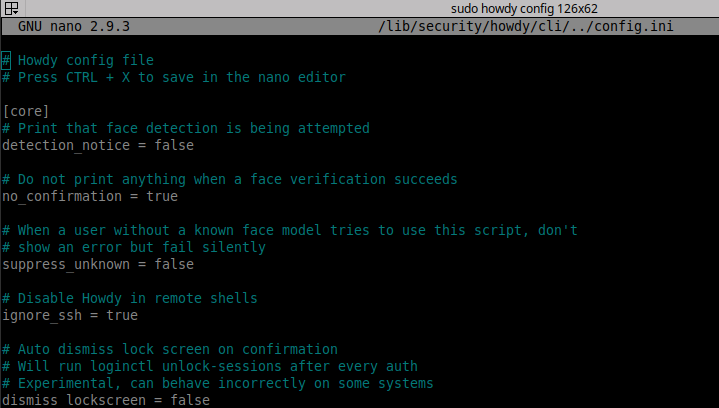
Yes i'm sure about the dismiss_lockscreenset to false
After the installation, i realize it didn't work on lockscreen so i changed it to true, but even with that it ditn't work
So I revert dismiss_lockscreen back to false, and follow the guide to enable no_confirmation
And this time the screen unlocks but with IR led loop
Could it be that once its set to true the command gets changed permanently?
rgarcia7
on 14 Feb 2019
This behaviour can be shown in any application that doesn't have a tty attached
For example login screens, or a auth dialog for sudo
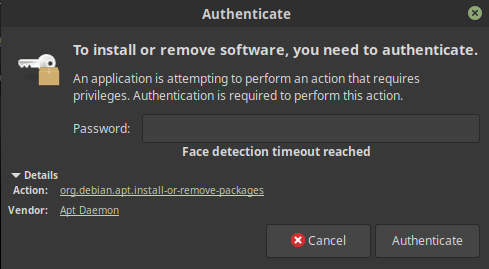
The dialog gets authenticated, but it keeps flashing the IR led
rgarcia7
on 15 Feb 2019
My dismiss_lockscreenset to false as well and I have same problem.
ericvhileman
on 15 Feb 2019
So i found the bug, the line reading the dismiss_lockscreen config value is:
if config.get("core", "dismiss_lockscreen"):
Which reads the value as a string instead of a boolean and the value is thus always read as true. A temporary fix for this would be to empty the config value. For example:
# Auto dismiss lock screen on confirmation
# Will run loginctl unlock-sessions after every auth
# Experimental, can behave incorrectly on some systems
dismiss_lockscreen =
Nice that you found the bug!
Just tested the temporary fix, and it works!
Thanks for your help
rgarcia7
on 18 Feb 2019
Works for me everywhere after logged in. But doesn't work when trying to login. Maybe separate issue because login screen doesn't loop, just a quick flash then stops. I'll open a separate ticket.
Thank you for solving this one :+1:
ericvhileman
on 20 Feb 2019
Just for completeness: I have the same problem in Arch (I'm using dwm). Setting the config to empty instead of false indeed fixes it.
 scarlehoff
on 3 Mar 2019
scarlehoff
on 3 Mar 2019
Fixed in 2.5.1, as auto dismiss of the lockscreen has been removed
boltgolt
on 29 Mar 2019
Related issues
 bobzhu418
·
3Comments
bobzhu418
·
3Comments
 joshlangley
·
5Comments
joshlangley
·
5Comments
 akxer
·
6Comments
akxer
·
6Comments
 nhusby
·
4Comments
nhusby
·
4Comments
 ANDROID2468
·
5Comments
ANDROID2468
·
5Comments
Most helpful comment
So i found the bug, the line reading the
dismiss_lockscreenconfig value is:Which reads the value as a string instead of a boolean and the value is thus always read as true. A temporary fix for this would be to empty the config value. For example: