Homebridge-xiaomi-roborock-vacuum: Filter sensors&Switch
Please add filter (occupancy) sensors and filter reset switch 😉
 netRunner0
All 13 comments
Related to https://github.com/homebridge-xiaomi-roborock-vacuum/homebridge-xiaomi-roborock-vacuum/issues/111
 bedrin
on 22 May 2020
bedrin
on 22 May 2020
Also related to #145
The sensors are already in place. But HomeKit simply hides the filters statuses and it understands Fans (the type of device we use to report this device) do not require filters.
They can be handled in the Eve app.
Additionally, I understand many of the features requested for automation purposes and, maybe, some useful Siri commands. However, sometimes I feel like we are simply trying to replicate all the features in the Xiaomi app to the Home app just for the sake of it... 🤔
Maybe it's me, that I'm missing the point and need further understanding of the use case. But these robots' APIs are highly undocumented. They require lots of testing and hacking around and the spare time I personally can pay to this module is fairly limited.
I try to quickly jump on fixing bugs and answering to Pull Requests and Issues. I don't want to be a blocker for anyone's ideas nor keep them waiting. But the more features we provide, the more likely we'll have bugs or opened issues to support them for other models or simply asking how these features work. That adds a lot of overhead to keeping a clean list of issues.
I, personally, use the homebridge-automation-switches plugin to automate any switches/sensors I may need based on other plugins values (i.e.: I only want the robot to clean once a day when I leave, so I set a switch when it starts cleaning and reset it every morning. Then check the state of that switch whenever I leave to trigger the full house cleaning or not).
That said, I'll leave this request open should anyone else wants to implement it.
 afharo
on 22 May 2020
afharo
on 22 May 2020
@afharo You can use the global variables plugin, and not clog HomeKit with unnecessary devices:
Global Variable for HomeKit
I want to present you an easy plug-in for Homebridge, which will allow you to store and exchange data in JSON format between automation and other systems:
sudo npm i -g homebridge-netrunner-http-db --unsafe-perm
This plugin will allow you to write complex logic for your automation, exchange data between automation, enable or disable other automation, as well as use the recorded data in other systems.
To add a new variable or overwrite an existing one, use a POST request from the Shortcuts component set - http://ip:15015/variablename
Data can also be sent as an attached file in dictionary format.
To update or add a key in a variable, use a request of type PUT
To get a variable, use a query like GET
Data is stored in JSON format (dictionary). The number of keys in a variable is unlimited.
To get a list of variables, use a GET request without specifying a variable name - http://ip:15015/
I also wrote a convenient editor for already created variables (please use it only for existing variables).
Be sure to change the URL to yours at the beginning of the command!
Have a good use!
https://www.icloud.com/shortcuts/98a1ec782ec04526a1bbd9fbbe445e75
netRunner0
on 22 May 2020
As for filters, but now there is an opportunity to see the status, but there is no way to check it every time I start, for example, to notify me via telegram or push
netRunner0
on 22 May 2020
Thank you for the plugin suggestion. I'll check it out.
Re the filters, the Xiaomi app already notifies you out of the box when any of the filter, brushes, sensors and even the dust bin needs any attention. That's why I can't see the need to add more switches and services to this plugin (that we have to maintain and also increases the number of switches in the Home app).
But, if you still want to react to any of those values, you can set any triggers and automation via the Eve app (no need for the Shortcuts app at this point). Also, please, check the version 0.10.0 which adds a unified Filter status, merging all filter + main and side brush + sensors statuses into one as explained in #203
Nevertheless, feel free to create a pull request adding that feature and I'll be happy to merge it.
afharo
on 22 May 2020
Plugins mentioned here could go to https://github.com/homebridge-xiaomi-roborock-vacuum/homebridge-xiaomi-roborock-vacuum/issues/202 as well!
bedrin
on 22 May 2020
@afharo I understand how you would not want to add the filter, brushes and sensors as extra accessories, but is there a chance to have them 'alarm' as statuses on the accessories? For example how a temperature sensor has the status for a battery level (sorry if I am not using the right terminology) and it will put an alert or alarm condition on the accessory to say something is wrong with it. Can we not do that for these? Personally I turn off all notifications from the Xiaomi app as I do not want it to tell me every time it starts or finishing vacuuming, the only notifications I want are these ones for the maintenance. I find now I am always behind on maintaining my robot as I turned off the notifications...
 mitch7391
on 6 Oct 2020
mitch7391
on 6 Oct 2020
They already exist registered as Filters.
HomeKit doesn't allow you to add more than 1 filter per accessory.
So there's a general one, showing the worse value assigned to the fan accessory:

And one individual one for each indicator.
The problems are:
- HomeKit doesn't expect filters to be attached to fan accessories (that's why you may have noticed a few
HAP Warning... Adding Anywayentries in the logs). So it doesn't allow you to build any automation via the Home/Shortcuts app. - The Home app doesn't show the additional Filter accessories.
You can use the Eve app to access those _non-official_ indicators. You can set automations in that app and they'll work in the Home app. Personally, when I started in this, I was surprised how powerful the Homekit automations can be, but also how limited the Home app's UI is to set them. The Eve app is the solution for these issues 😉
More info: https://github.com/homebridge-xiaomi-roborock-vacuum/homebridge-xiaomi-roborock-vacuum/issues/145
afharo
on 7 Oct 2020
Also, known missing piece re the Filters: https://github.com/homebridge-xiaomi-roborock-vacuum/homebridge-xiaomi-roborock-vacuum/issues/211
afharo
on 7 Oct 2020
@afharo thanks for the info. I have avoided Eve for a long time as I have tried to keep all of the apps all my devices use to a minimum and would prefer Homekit to be the one place everything is controlled (at the cost of better automations by the looks haha). Maybe this screenshot (from google) better describes what I mean (except in the is particular case they have an issue where the battery fault appears whilst the battery level is not low; ignore that aspect). This shows that a warning ! or a status 'Battery Low' can be displayed based for these characteristics (filter, battery, etc) on the accessory; that is what I am asking if it is possible so that the accessory shows me that something needs attention.
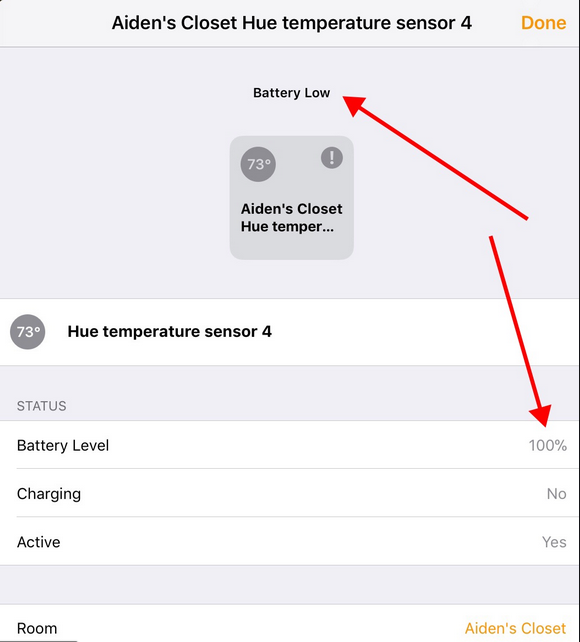
I only have a quick skim read for now, but it looks like that is being touched on by netRunner0 in issue 145, where they point out these characteristics. But I am not sure if these ones have something like 'Status Fault' or not.
mitch7391
on 7 Oct 2020
@mitch7391 I understand what you are saying.
But the reason it is shown in the screenshot you shared is that HomeKit officially supports the battery status in TemperatureSensors: in this piece of code, maintained in the library HAP-NodeJS by generating it from the Homekit specifications, you can see TemperatureSensor has the optional characteristic StatusLowBattery.
The Fan service though doesn't _accept_ it. We report it anyway and (luckily) it is shown in the Home app. However, the Home app doesn't show it for notifications or automation rules.
You can use the Eve app to build any automation rules you may want and then uninstall it. You don't need it installed in order for them to work. You only need it because it has a more flexible UI to build automation rules and to see all the characteristics, both: officially supported and non-officially ones.
afharo
on 7 Oct 2020
Ahh yep that makes more sense and a shame the fan service doesn’t cater for this; hopefully Apple will just give us a real robot vacuum accessory soon! Also I didn’t know you could do that with Eve, I’m going to have a look into it :)
mitch7391
on 8 Oct 2020
hopefully Apple will just give us a real robot vacuum accessory soon!
Can't wait for that to happen!
afharo
on 8 Oct 2020
Related issues
 JonoHaysom
·
11Comments
JonoHaysom
·
11Comments
 normen
·
14Comments
normen
·
14Comments
 piiong
·
9Comments
piiong
·
9Comments
 costispavlou
·
11Comments
costispavlou
·
11Comments
 matzZz
·
15Comments
matzZz
·
15Comments