Homebridge-config-ui-x: Plugins Disappearing on Update
Describe The Bug:
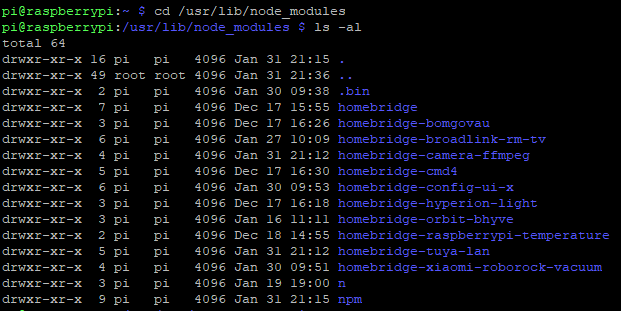
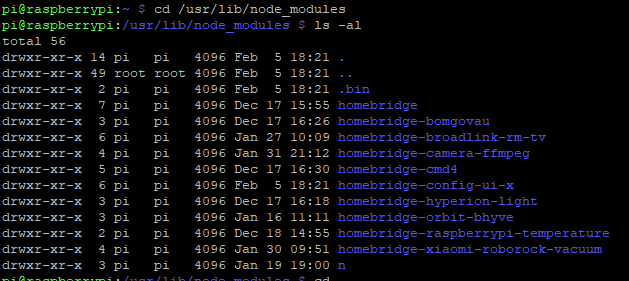
I am not 100% sure this is due to config-ui-x but it definitely happened this time while updating to the new version, last time I had updated a few plugins at the same time as config-ui-x. I took a screenshot of my node_modules before and after the update and it seemed to have happened again. Both NPM and homebridge-tuya-lan have disappeared from my node_modules directory after the install. I cant seem to get NPM to reinstall unlike last time...
To Reproduce:
Update a plugin through config-ui-x. When I reinstalled them separately of config-ui-x no other plugins or npm disappeared.
Expected behavior:
Plugins NPM and homebridge-tuya-lan disappear from node_modules directory.
Logs:
Only see a quick flash of a couple of warnings through the config-ui-x updater, but then the changelogs stop me from seeing what the warnings are.
No logs.
Homebridge Config:
No issues with my config.
Screenshots:
Before:
After:
Environment:
- Node.js Version: 12.4.1
- NPM Version: Latest stable (cant check as NPM is now gone...)
- Homebridge Version: 0.4.50
- Homebridge Config UI X Version: Latest
- Operating System: Raspbian
- Process Supervisor: Systemd
 mitch7391
All 21 comments
Reinstall npm using this command:
curl -L https://www.npmjs.com/install.sh | sh
I'll check the actual issue out later.
 oznu
on 5 Feb 2020
oznu
on 5 Feb 2020
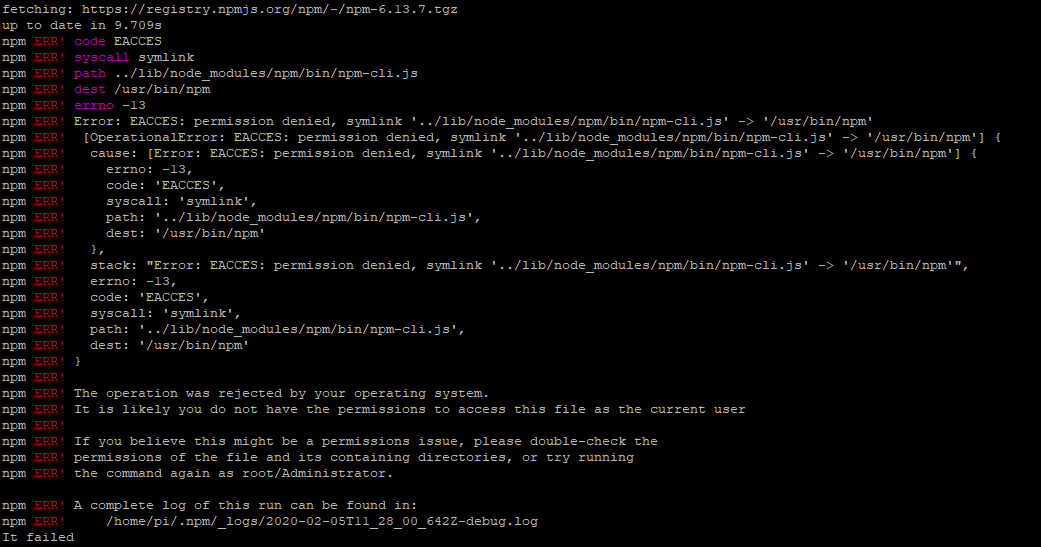
I got these errors trying that one @oznu
mitch7391
on 5 Feb 2020
Also thanks for the quick help, my homebridge is down until I can get NPM back and then use it to download tuya-lan plugin again. Or if you can remember where my config,json is (I have forgotten since I have been using your config editor), then I can remove the tuya-lan config from there to at least get homebridge service running again.
mitch7391
on 5 Feb 2020
Scrap that last part, found my config.
mitch7391
on 5 Feb 2020
Run it as root. The permission/access error is the hint to do this.
sudo su
That did it :) thanks @oznu, I am back in business!
mitch7391
on 5 Feb 2020
Hi @mitch7391,
Can you try the latest @test version?
You can "fake" a plugin update by lowing the version number in the package.json of one of your other installed plugins under /usr/lib/node_modules.
oznu
on 6 Feb 2020
@oznu I saw that homebridge-xiaomi-roborock-vacuum had an update available through your UI and gave that ago. Once again there were some warnings that quickly flashed during the update before the change log appeared over it. I think I saw WARN EONOTE (maybe?) and a pathway to /usr/lib/something/something.package. As I said it was quick and I didn't get it on screenshot, but once again my NPM is gone, I didn't lose any other plugins but I never reinstalled tuya-lan which was one that disappeared each time before. On reddit someone told me perhaps my SD card is corrupted, and in the issues section of homebridge-broadlink-rm-tv I had change some file path stuff (https://github.com/AlexanderBabel/homebridge-broadlink-rm/issues/64) that may also be the cause? If I can figure out this isn't caused by your recent updates, I will remove the issue.
mitch7391
on 6 Feb 2020
Hi @mitch7391,
Looking at that other issue I can see some problems with the advice given. You shouldn't need to mess with PATH on a correctly setup system, chowing and chmod-ing everything to 755 was a bad idea too.
oznu
on 7 Feb 2020
Hey @oznu it would be getting off topic here, but what is my best option to rectify this? I had originally followed this guide to set it all up (https://github.com/nfarina/homebridge/wiki/Running-HomeBridge-on-a-Raspberry-Pi). Then later down the track I have followed those instructions for that plugin’s merge test.
mitch7391
on 7 Feb 2020
Ok here are some destructive commands that should clean things up; use at your own risk.
Assuming your config is stored under /var/lib/homebridge you shouldn't need to re-pair Homebridge with HomeKit.
Step 1: Assuming you setup Homebridge using systemd previously, unload the service:
sudo systemctl disable homebridge
sudo systemctl stop homebridge
If you setup as a service using another method, figure out how to stop and remove the service.
Step 2: Remove all versions of Node.js, node_modules and plugins:
sudo curl -fL https://gist.githubusercontent.com/oznu/312b54364616082c3c1e0b6b02351f0e/raw/remove-node.sh | sudo bash
After running this script logout of the SSH session and start a new one.
Step 3: Follow this guide to install Node.js again, and setup Homebridge as a service:
https://github.com/oznu/homebridge-config-ui-x/wiki/Homebridge-&-Systemd-(Raspbian,-Ubuntu,-Debian)
Step 4: Ensure npm is up-to-date:
sudo npm install -g npm
Step 5: Reinstall your plugins. You can do this via the UI or via the command line.
sudo npm install -g --unsafe-perm homebridge-bomgovau homebridge-broadlink-rm-tv homebridge-camera-ffmpeg homebridge-cmd4 homebridge-hyperion-light homebridge-orbit-bhyve homebridge-raspberrypi-temperature homebridge-tuya-lan homebridge-xiaomi-roborock-vacuum
Updated comment above to add sudo before each command.
oznu
on 7 Feb 2020
I should be familiar with destructive commands by now with how many times Iv wrecked my Homebridge learning over the last two years lol
Yep that is where my config is located and I am using systemd. I will give this a go when I get home from work tonight and worst case I wipe it all and start again haha.
mitch7391
on 7 Feb 2020
@oznu I have followed your guide and am all up and running smoothly again :) I have been meaning to switch from systemd to your hb-service (I love what you have done and how easy you have made it!). Only one issue I faced was when I tried to install all of my plug-ins in the final step up, I got the following errors:
`pi@raspberrypi:~ $ sudo npm install -g --unsafe-perm homebridge-bomgovau homebridg e-broadlink-rm-tv homebridge-camera-ffmpeg homebridge-cmd4 homebridge-hyperion-lig ht homebridge-orbit-bhyve homebridge-raspberrypi-temperature homebridge-tuya-lan h omebridge-xiaomi-roborock-vacuum
npm ERR! code 128
npm ERR! Command failed: git clone --mirror -q https://github.com/homespun/hap-nodejs-community-types.git /root/.npm/_cacache/tmp/git-clone-64e4811e/.git
npm ERR! fatal: could not create leading directories of '/root/.npm/_cacache/tmp/git-clone-64e4811e/.git'
npm ERR!
npm ERR! A complete log of this run can be found in:
npm ERR! /root/.npm/_logs/2020-02-08T12_28_49_191Z-debug.log`
However, they all install with no errors or warnings when installing through the UI. A quick question on this, does this mean I cannot install through ssh terminal anymore? Thank you so much for your help by the way!
mitch7391
on 8 Feb 2020
Did you update npm?
sudo npm install -g npm
No I had not -_- sorry it has been a long day at work haha... Updated it now!
mitch7391
on 8 Feb 2020
Installing homebridge-bomgovau should now work again 😄
oznu
on 8 Feb 2020
Just tried it again for good measure and no problems :) now back on task again ;) to 'update' your plug-in through the UI to see if it knocks off any of my other plug-ins like before, I should run sudo npm install -g --unsafe-perm homebridge-config-ui@test? I have a feeling it was the other issues I introduced into my setup and not your plug-in now.
mitch7391
on 8 Feb 2020
Run this, it will trick Homebridge Config UI X into thinking an update is available for homebridge-xiaomi-roborock-vacuum:
sed -i s/0.6.8/0.1.0/g /usr/lib/node_modules/homebridge-xiaomi-roborock-vacuum/package.json
No need to update to @test, I already removed the change I made earlier that did not work.
oznu
on 9 Feb 2020
@oznu I gave this a quick go before heading to work. The command you gave lowered the version number of the plug-in, then I updated it through the UI and all is well; no plug-ins disappeared. I would say this was never an issue with your plug-in, but thank you so much for helping me sort it out, I really appreciate it :)
mitch7391
on 9 Feb 2020
You're welcome. I'm glad you got it sorted.
oznu
on 9 Feb 2020
Related issues
 chromusphil
·
5Comments
chromusphil
·
5Comments
 Finch106
·
3Comments
Finch106
·
3Comments
 DJay-X
·
6Comments
DJay-X
·
6Comments
 mafyata
·
3Comments
mafyata
·
3Comments
 mbierman
·
5Comments
mbierman
·
5Comments