Homebridge-config-ui-x: Log scrolling not working
Describe The Bug:
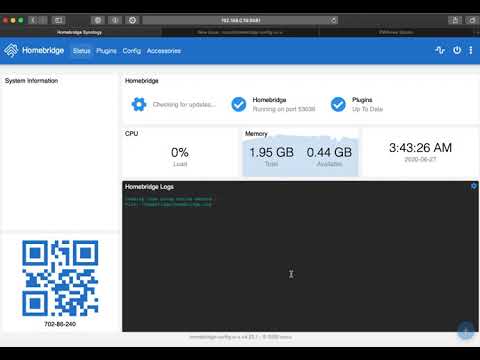
http:/homebridge:8581/logs only shows 1 screen full of logs. It won't scroll. When a new log entry is added to 1 screen worth of logs, the old one goes away and there is no way to scroll into the past logs.
To Reproduce:
(using Safari _macOS_ and _iPadOS_)
- Go to http:/homebridge:8581/logs
- Wait until the screen is full of log entries.
- Watch for new log entry.
- Try to scroll up.
- Scrolling isn't working.
Seems to work o.k. on Chrome macOS
Expected behavior:
Scroll back to previous log entries
Logs:
homebridge.log.zip
Show the Homebridge / Homebridge Config UI X logs here.
Homebridge Config:
{
    "bridge": {
        "name": "Homebridge Synology",
        "username" : "*****",
        "port": *****
        "pin" : "*****"
    },
    "accessories": [
        {
            "accessory": "PowerlossIFTTTNotifier",
            "name": "PowerlossIFTTTNotifier",
            "IFTTTkey : "*****",
            "IFTTTservice: "*****",
            "IFTTTvalue2": "Homebridge started at",
            "IFTTTvalue3": false
        },
        {
            "accessory": "Synology",
            "name": "Pigpen",
            "ip" : "*****",
            "mac" : "*****",
            "port": "5001",
            "secure": true,
            "account" : "*****",
            "password" : "*****",
            "version": 6,
            "timeout": *****
            "disabled": [
                ""
            ],
            "doPolling": true,
            "pollingInterval": 120
        },
        {
            "accessory": "neurio",
            "name": "neurio",
            "location" : "*****",
            "username" : "*****",
            "password" : "*****",
            "options": {
                "ttl": 30,
                "verboseP": false
            }
        },
        {
            "name": "Garage Door",
            "username" : "*****",
            "password" : "*****",
            "accessory": "Chamberlain"
        },
        {
            "accessory": "HTTP-SWITCH",
            "name": "Flo",
            "switchType": "stateful",
            "pullInterval": 5000,
            "debug": false,
            "statusPattern": "true",
            "onUrl" : "*****",
                "url" : "https://...",
                "method": "GET"
            },
            "offUrl": {
                "url" : "https://...",
                "method": "GET"
            },
            "statusUrl": {
                "url" : "https://...",
                "method": "GET",
                "headers": {
                    "Accept": "application/json",
                    "Authorization": "Basic ****"},
                }
            }
        },
        {
            "accessory": "HTTP-SWITCH",
            "name": "Pigpen Notify",
            "switchType": "stateless",
            "timeout": 1000,
            "onUrl" : "*****",
        },
        {
            "accessory": "AutomationCalendar",
            "name": "AutomationCalendar",
            "latitude" :   ***,
            "longitude" :   ***,
        },
        {
            "accessory": "Schedule",
            "name": "Hourly",
            "interval": 60
        }
    ],
    "platforms": [
        {
            "name": "Config",
            "port": 8581,
            "auth": "form",
            "theme": "blue",
            "tempUnits": "f",
            "lang": "auto",
            "sessionTimeout": *****
            "log": {
                "method": "null"
            },
            "accessoryControl": {
                "debug": true
            },
            "platform": "config"
        },
        {
            "name": "Smart Life",
            "platform": "TuyaWebPlatform",
            "options": {
                "username" : "*****",
                "password" : "*****",
                "countryCode": "1",
                "platform": "smart_life",
                "pollingInterval": 120
            }
        },
        {
            "platform": "Nest",
            "name": "Nest",
            "access_token" : "****",
        },
        {
            "platform": "WeatherPlus",
            "units": "us",
            "interval": 5,
            "stations": [
                {
                    "nameNow": "Now",
                    "service": "openweathermap",
                    "key": "******",
                    "locationGeo": [
                        *****
                        -121.96
                    ],
                    "locationCity" : "*****",
                    "language": "en",
                    "compatibility": "both",
                    "forecast": [
                        0
                    ],
                    "conditionCategory": "detailed",
                    "now": true,
                    "extraHumidity": false,
                    "hidden": [
                        "Air Pressure",
                        "Observation Station",
                        "Observation Time",
                        "Snow"
                    ],
                    "tresholdCloudCover": 30,
                    "tresholdUvIndex": 4,
                    "tresholdWindSpeed": 10
                }
            ]
        }
    ]
}
Screenshots:
Video
Environment:
- Node.js Version :12.18.1
- NPM Version: 6.14.5
- Homebridge Version: 1.1.1
- Homebridge Config UI X Version: v4.23.1
- Operating System: Docker
- Process Supervisor: Docker
 mbierman
All 5 comments
Same here, since update to [email protected]. Homebridge on Raspberry Pi; Safari on macOS. Chrome on macOS does scroll. Also an issue for Safari on iPadOS.
 ebaauw
on 27 Jun 2020
ebaauw
on 27 Jun 2020
Still can't replicate this on Safari 13.1.1.
I've reverted the xtermjs dep from 4.7.0 to 4.6.0; maybe that will fix it. Could you try test to confirm?
https://github.com/oznu/homebridge-config-ui-x/wiki/How-To-Test-Upcoming-Changes
 oznu
on 28 Jun 2020
oznu
on 28 Jun 2020
Scrolling works again on v4.23.2-test.1. Both with Safari on macOS as well as with Safari on iPadOS.
ebaauw
on 28 Jun 2020
Scrolling works again on v4.23.2-test.1 on MacOS Safari and Microsoft Edge.
 DMBlakeley
on 28 Jun 2020
DMBlakeley
on 28 Jun 2020
Test build solves for me too. Also confirmed Edge on iPad is working.
mbierman
on 29 Jun 2020
Related issues
 mafyata
·
3Comments
mafyata
·
3Comments
 DJay-X
·
3Comments
DJay-X
·
3Comments
 ronald8192
·
6Comments
ronald8192
·
6Comments
 johannrichard
·
4Comments
johannrichard
·
4Comments
 eximiusvir
·
5Comments
eximiusvir
·
5Comments