Homebrew-emacs-plus: Title bar text color broken
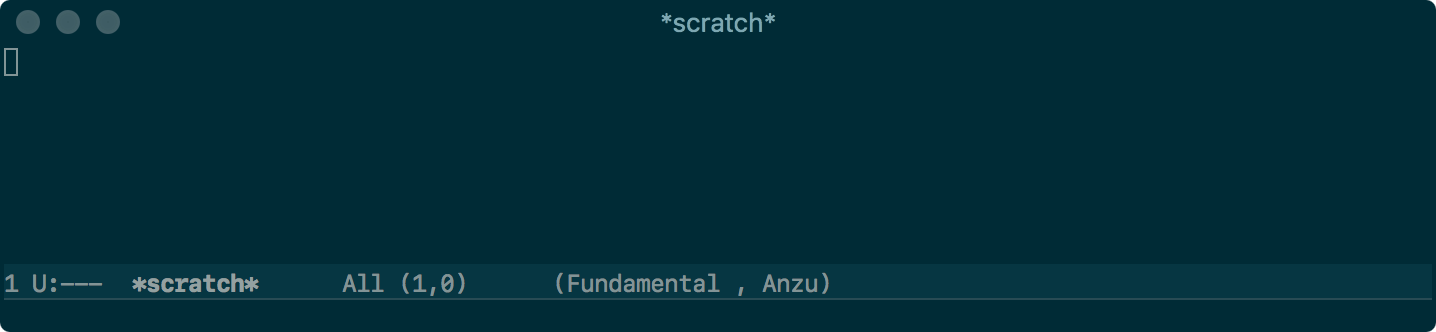
I am having an issue with the transparent title bar.
I am using Spacemacs, and the config for the title bar can be seen at the top of this screenshot. I have seen screenshots where it doesn't look like this. Is there a way to fix it?

 sphw
sphw
All 19 comments
Hey,
Did you find a solution?
 d12frosted
on 25 Dec 2017
d12frosted
on 25 Dec 2017
I'm having the same problem with the latest --HEAD. I also noticed the font becomes more visible when the frame is in the background (behind Safari, etc). Is there an option to determine the font color in the frame title? My configuration is the following.
;;; Transparent titlebar
;; https://github.com/d12frosted/homebrew-emacs-plus/blob/master/Formula/emacs-plus.rb#L98
;; https://github.com/d12frosted/homebrew-emacs-plus/issues/55
;; https://www.gnu.org/software/emacs/manual/html_node/elisp/Properties-in-Mode.html#Properties-in-Mode
(when (memq window-system '(mac ns))
  (add-to-list 'default-frame-alist '(ns-appearance . 'dark))
  (add-to-list 'default-frame-alist '(ns-transparent-titlebar . t)))
 kaz-yos
on 31 Dec 2017
kaz-yos
on 31 Dec 2017
I've noticed a similar issue with the natural color title bar option.
When using light themes the title bar font is rendered in white, so very hard to see. Oddly covering it with another window/frame from emacs or another application (I'm on MacOS High Sierra) it turns grey, then back to white on focus. Ah, like kaz-yos noticed.
Does anyone know where to set this kind of thing?
 malloryerik
on 18 Feb 2018
malloryerik
on 18 Feb 2018
I'd rather have a blank title bar than one with ugly text, so I'm currently using this hack to remove the title bar text:
(setq frame-title-format nil)
 jhacksworth
on 19 Feb 2018
jhacksworth
on 19 Feb 2018
Try
(add-to-list 'default-frame-alist '(ns-appearance . dark))
 rsrock
on 3 Mar 2018
rsrock
on 3 Mar 2018
Thanks @rsrock! That worked 🎉
I had tried a similar configuration, but had quoted dark, i.e., 'dark, which doesn't work.
Just to be clear, this works for me:
(add-to-list 'default-frame-alist '(ns-appearance . dark))
This doesn't work (note the single quote in front of dark):
(add-to-list 'default-frame-alist '(ns-appearance . 'dark))
@kaz-yos I see that you have the single quote in front of dark in your configuration above. Have you tried without the quote?
jhacksworth
on 4 Mar 2018
@rsrock @jhacksworth Thanks. Dropping the single quote did solve the issue!
kaz-yos
on 5 Mar 2018
@kaz-yos Great to hear! 😄
jhacksworth
on 5 Mar 2018
I'm also experiencing what @malloryerik mentioned on light themes. Dark themes look fine.
I tried the suggested fixes with both dark and light values but they don't work. Maybe there should be a way to change the color of the title's face?
Here's the difference with both solarized theme variants:

 vmsp
on 1 May 2018
vmsp
on 1 May 2018
Thanks @rsrock! It has fixed the issue for spacemacs on macos high sierra.

 hsg777
on 20 May 2018
hsg777
on 20 May 2018
Emacs 26.1 is out. Closing this issue 😸
Let me know if you have any questions/problems.
d12frosted
on 28 May 2018
(add-to-list 'default-frame-alist '(ns-appearance . dark)) is the solution, but the result is not natural.
The more suitable answer:
(dolist (x '((ns-transparent-titlebar . unbound)
          (ns-appearance . unbound)))
   (add-to-list 'frameset-filter-alist x))

 junjiemars
on 22 Jul 2018
junjiemars
on 22 Jul 2018
@junjiemars It's interesting. First of all, when I try using unbound value Emacs behaves the same as with default values. And also, I don't see unbound value handing in the nsterm.m file of Emacs.
Regarding ns-appearance:
  if (EQ (new_value, Qdark))
    {
      window.appearance = [NSAppearance
                            appearanceNamed: NSAppearanceNameVibrantDark];
      FRAME_NS_APPEARANCE (f) = ns_appearance_vibrant_dark;
    }
  else
    {
      window.appearance = [NSAppearance
                            appearanceNamed: NSAppearanceNameAqua];
      FRAME_NS_APPEARANCE (f) = ns_appearance_aqua;
    }
As you can see, if it's not dark, then the default value is used. And this is also described in the info pages.
‘ns-appearance’
     Only available on macOS, if set to ‘dark’ draw this frame’s
     window-system window using the “vibrant dark” theme, otherwise use
     the system default.  The “vibrant dark” theme can be used to set
     the toolbar and scrollbars to a dark appearance when using an Emacs
     theme with a dark background.
Similar story with ns-transparent-titlebar:
if ([window respondsToSelector: @selector(titlebarAppearsTransparent)]
      && !EQ (new_value, old_value))
    {
      window.titlebarAppearsTransparent = !NILP (new_value);
      FRAME_NS_TRANSPARENT_TITLEBAR (f) = !NILP (new_value);
    }
It differentiates only nil and any non-nil values. And this is exactly what info says.
‘ns-transparent-titlebar’
     Only available on macOS, if non-‘nil’, set the titlebar and toolbar
     to be transparent.  This effectively sets the background color of
     both to match the Emacs background color.
So I have a question - where did you get the idea to set this value to unbound?
P. S. I've checked the sources both on master and emacs-26 branches.
d12frosted
on 25 Jul 2018
@d12frosted The key in frameset.el, when desktop-save been called frameset should be saved,
and whatever the value of ns-transparent-titlebar and ns-appearance is, the saved frameset should be (ns-transparent-titlebar . unbound) (ns-appearance . unbound) and the frame title bar will sucked.
You can disable desktop-save-mode to check the frame title bar is OK or sucked.
junjiemars
on 25 Jul 2018
@junjiemars I didn't get what you mean by 'sucking frame title'. If I understand you correctly, you can configure it (or leave it empty).
I've looked at frameset.el and didn't find any mentions of unbound symbol. Also, I've checked desktop-save function definition (from desktop.el) and there is no usages of ns-* variables, which are used only for setting up Cocoa window.
But then I realised that you are talking about frameset-filter-alist (sorry, missed that) and I've looked at this function and it seems that you are setting filtering actions to unbound. But the documentation says that action can be one of
 nil       The parameter is copied to FILTERED.
 :never    The parameter is never copied to FILTERED.
 :save     The parameter is copied only when saving the frame.
 :restore  The parameter is copied only when restoring the frame.
 FILTER    A filter function.
Since unbound is not defined, you get the nil behaviour.
Just to avoid any confusion, I am not trying to say that you are wrong :) I just want to understand what you are trying to achieve. 😸 Because maybe your goal is useful for me as well 😸
d12frosted
on 25 Jul 2018
@d12frosted missing (ns-appearance . unbound) cons cell in frameset diffs with (ns-appearance . nil) or (ns-appearance . dark). If frameset has any (ns-appearance . ...) cons cells, Emacs will use ns appearance 'nil or 'dark.
desktop-save => frameset-save => reopen Emacs => frame title bar sucked.
After frameset-save, (ns-transparent-titlebar . unbound) (ns-appearance . unbound) will be saved into desktop file.
junjiemars
on 25 Jul 2018
I see. Thanks.
So yeah, maybe it worth mentioning in the documentation that one might want to set the value of frameset-filter-alist.
d12frosted
on 27 Jul 2018
With Homebrew Emacs 27.1, the below addition fixes the titlebar text/font:
(add-to-list 'default-frame-alist '(ns-appearance . dark))
 sauhrabh
on 18 Sep 2020
sauhrabh
on 18 Sep 2020
From to the Emacs manual:
When the desktop restores the frame and window configuration, it uses
the recorded values of frame parameters, disregarding any settings for
those parameters you have in your init file. This
means that frame parameters such as fonts and faces for the restored
frames will come from the desktop file, where they were saved when you
exited your previous Emacs session; any settings for those parameters in
your init file will be ignored. To disable this, customize the value of
‘frameset-filter-alist’ to filter out the frame parameters you don’t
want to be restored.
From the description of the frameset-filter-alist variable:
On saving, PARAMETERS is the parameter alist of each frame processed,
and FILTERED is the parameter alist that gets saved to the frameset.On restoring, PARAMETERS is the parameter alist extracted from the
frameset, and FILTERED is the resulting frame parameter alist used
to restore the frame.Elements of ‘frameset-filter-alist’ are conses (PARAM . ACTION),
where PARAM is a parameter name (a symbol identifying a frame
parameter), and ACTION can be:nil The parameter is copied to FILTERED.
:never The parameter is never copied to FILTERED.
:save The parameter is copied only when saving the frame.
:restore The parameter is copied only when restoring the frame.
FILTER A filter function.
So we just need to ensure that frame parameters ns-transparent-titlebar and ns-appearance are never copied to FILTERED:
(add-to-list 'frameset-filter-alist '(ns-transparent-titlebar . :never))
(add-to-list 'frameset-filter-alist '(ns-appearance . :never))
 mshkrebtan
on 8 Nov 2020
mshkrebtan
on 8 Nov 2020
Related issues
 nwolfe
·
6Comments
d12frosted
·
8Comments
nwolfe
·
6Comments
d12frosted
·
8Comments
 smallzhan
·
7Comments
smallzhan
·
7Comments
 tshu-w
·
6Comments
tshu-w
·
6Comments
 Blaisorblade
·
6Comments
Blaisorblade
·
6Comments
Most helpful comment
Try