Homebrew-emacs-plus: Stop using Spacemacs icon by default
Historically, emacs-plus was created just to add Spacemacs icon. But since the first commit (6c85ae3), emacs-plus has grown into something bigger and it is used by many users outside of Spacemacs project. While I love this icon, I am leaning towards making it optional.
Since it's a breaking change in the visuals, I can't make it without consulting the users and especially maintainers of Spacemacs and Doom Emacs, as they both advice people to use emacs-plus. I might miss other places, so please let me know if I forgot someone 😸
Relevant places where instructions might require update:
Please let me know, what you think 😸
CC @syl20bnr @hlissner
P. S. I will keep this issue for at least till the end of this month and if there will be no objections, I will replace default icon and will send PRs for relevant readmes.
 d12frosted
All 8 comments
I would replace it with one of the https://emacs.sexy icons :)
 daviderestivo
on 15 May 2020
daviderestivo
on 15 May 2020
I love the idea. Go for https://emacs.sexy
 mrprofessor
on 26 May 2020
mrprofessor
on 26 May 2020
I just want to be clear here :smile_cat: I don't want to change one custom icon for another custom icon. From the maintenance perspective there is no difference between Spacemacs icon and other custom icons :smile_cat: So the proposal is to install default Emacs icon by default and let users decide if they want anything else instead of enforcing one or another icon.
d12frosted
on 26 May 2020
I would even love the default emacs icon over spacemacs one.
mrprofessor
on 30 May 2020
As an emacs beginner starting out with spacemacs, I like the spacemacs icon but I would not be upset if I had to specify the flag.
 eccentric-j
on 1 Jun 2020
eccentric-j
on 1 Jun 2020
The change was introduced as part of #226.
d12frosted
on 7 Jun 2020
Is it possible to swap the icon without a reinstall?
 eddiegroves
on 17 Jun 2020
eddiegroves
on 17 Jun 2020
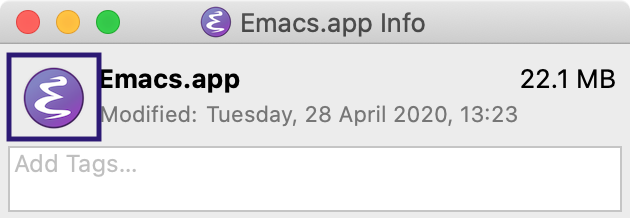
Apart from reinstalling emacs-plus, one can change the icon my modifying Emacs.app itself. First, you need to locate where you installed it (for example, I am using emacs-plus@28):
$ brew --prefix emacs-plus@28
/usr/local/Cellar/emacs-plus@28/28.0.50
Then when you open that directory you will find Emacs.app that needs to be modified. You just click cmd+i to open up the info window of Emacs.app and from there you can change the icon. Drag and drop the icon you want into the highlighted area. You can actually also replace the icon without wysiwyg, just replace the Emacs.app/Contents/Resources/Emacs.icns file.
d12frosted
on 18 Jun 2020
Related issues
 rudedogg
·
7Comments
rudedogg
·
7Comments
 frankjonen
·
3Comments
d12frosted
·
6Comments
frankjonen
·
3Comments
d12frosted
·
6Comments
 oguzserbetci
·
4Comments
oguzserbetci
·
4Comments
 nwolfe
·
6Comments
nwolfe
·
6Comments
Most helpful comment
I would even love the default emacs icon over spacemacs one.