Highcharts: Highcharts flickers when hovering
Expected behaviour
Normal Chart usage
Actual behaviour
Crazy flickering when hovering
Live demo with steps to reproduce
See gif

I'm currently writing a jsfiddle, but it seems hard to reproduce.
I will try to deliver it in the next few hours.
Maybe there was already a similar Issue? Couldn't find one.
Product version
Highstock v6.0.4
Affected browser(s)
Only Chrome
Tested also Firefox and Edge
 TrAnn3l
All 44 comments
Here the jsfiddle: https://jsfiddle.net/550apnxr/
It is the exact same setup as i have on my webpage, but it doesn't happen on jsfiddle.
TrAnn3l
on 13 Jan 2018
We're seeing this on some of our charts too. It varies across machines - despite both viewing the same deploy on Chrome on OSX, I couldn't reproduce it but my colleague reliably could. We're on Highcharts 6.0.1. Both my colleague and I are on Macs using Chrome 63.
 goodforenergy
on 15 Jan 2018
goodforenergy
on 15 Jan 2018
Thanks for reporting the issue. That part sounds bad:
It varies across machines - despite both viewing the same deploy on Chrome on OSX, I couldn't reproduce it but my colleague reliably could
@goodforenergy - Can this be related to graphic card's drivers? Like a general rendering problem in a browser? Was the hardware the same for both machines?
It looks like a duplicate of #7528 - could you try the workaround posted by Kacper?
Just in case: fiddle works fine for me..
 pawelfus
on 15 Jan 2018
pawelfus
on 15 Jan 2018
Tried it on a different machine and also wasn't able to reproduce.
7528 looks similar, but i'm unsure if it is really the same. Does the distortion stay when he hovers it? Or does it also flicker?
I will try the workaround when i'm back at home.
TrAnn3l
on 15 Jan 2018
Does the distortion stay when he hovers it? Or does it also flicker?
I wasn't able to recreate issue in #7528 too. According to OP, distortion was visible on initial rendering and could be fixed by resizing window.
pawelfus
on 15 Jan 2018
Resizing also fixes the Issue for me, but only when i resize to about 1/2 of the original size. While resizing it still flickers.
The additional css seems to resolve the issue. No more flickering on my machine :)
TrAnn3l
on 15 Jan 2018
Hi @pawelfus - I'll get back to you tomorrow with specs, my colleague is offline for the day. I'll get him to try with that CSS added too and see if that resolves things :)
goodforenergy
on 16 Jan 2018
Ok, well now of course none of us can reproduce it, so I couldn't test that CSS. We have redeployed, though the chart config hasn't changed - so no idea what would have fixed it.
Our machine specs:
Could reproduce:
- 2017 Macbook Pro with 2.9 GHz i7, 16GB Ram, basic graphics setup, MacOS High Sierra
- 2017 iMac Pro with 3.2 GHz Intel Xeon W, 32GB Ram, graphics Radeon Pro Vega 56 8 GB, MacOS High Sierra
Couldn't reproduce:
- MacBook Pro (Retina, 13-inch, Early 2015) with 2.9 GHz Intel Core i5, 8 GB Ram, Intel Iris Graphics 6100 1536 MB, MacOS Sierra
goodforenergy
on 17 Jan 2018
Thank you for the details, I couldn't reproduce on:
- MacBook Pro (Retina, 13-inch, Early 2015) with 2.7GHz Intel Core i5, 8 GB RAM, Intel Iris Graphics 6100 1536 MB, OSX El Capitan (10.11.6)
Edit:
Tested also on:
- MacBook Air (11-inch, Mid 2012) with 2 GHz Intel Core i7, 8 GB 1600 MHz DDR3, Intel HD Graphics 4000 1536 MB, MacOS Sierra 1-.12.6
@TrAnn3l - could you share your machine details?
pawelfus
on 17 Jan 2018
Machine on which the flickering was visible:

TrAnn3l
on 17 Jan 2018
I also have this issue, and only on chrome. The flickering specifically happens when moving the cursor from the chart area to outside the chart area. Changing the zoom on the chart seems to fix it. If it helps, these are my system specs as well:
https://www.acer.com/ac/en/US/content/model/DT.B7ZAA.003
This occurs on Chrome 63.
 bradbesserman
on 22 Jan 2018
bradbesserman
on 22 Jan 2018
Did you tried to turn off the graphics acceleration in Chrome (in extended settings)? If this solves the problem, the issue may be connected to a faulty graphic pipeline in Chrome.
 ghost
on 25 Jan 2018
ghost
on 25 Jan 2018
Disabling graphics acceleration in Chrome did seem to fix this issue for me (Chrome 63), although it's difficult to be sure as the issue isn't fully reproducible.
 prophet-on-that
on 1 Feb 2018
prophet-on-that
on 1 Feb 2018
this seems like a bug in highcharts 6 frankly. it wasnt present in highcharts 5.
 pdeva
on 27 Feb 2018
pdeva
on 27 Feb 2018
Workaround:
.highcharts-series path {
stroke-linecap: initial;
}
@pawelfus since the workaround is a simple css fix, is there a reason this issue isnt already fixed for the next patch? its a major issue affecting a lot of people...
pdeva
on 27 Feb 2018
It's a workaround, not a fix for the issue. I won't implement possible solution into the core until I'm able to recreate the issue. Note that not a single user reported a live demo that we can work with. Please, provide one (not a screencast/gif) and we will start works immediately.
pawelfus
on 27 Feb 2018
I have a live demo available at https://www.davidpayne.net/highstockbug/
I also posted more details in this forum thread: https://forum.highcharts.com/post139551.html#p139551
Also the listed workaround doesn't work for me.
 dwrpayne
on 27 Feb 2018
dwrpayne
on 27 Feb 2018
To follow up, I'm happy to update this page to point at different js sources if you have some ideas of potential fixes.
dwrpayne
on 27 Feb 2018
Hi @dwrpayne thank you! I was able to recreate the issue on a 10+ years old mac :) I will work on it.
Could you check this demo: http://jsfiddle.net/BlackLabel/dpe0vuzm/56/ ? It has three charts: dynamic chart, static generated SVG and copy&paste SVG. I can see the issue on the first two charts, but the third one is fine - could you confirm?
Edit:
With the workaround, it works fine: http://jsfiddle.net/BlackLabel/dpe0vuzm/57/ - @dwrpayne could you check this demo too?
Edit2:
@pdeva - just tested all versions from 5.0.0 to 5.0.14 - every version has the same issue. Still, looks like an issue in Chrome.
pawelfus
on 28 Feb 2018
@pawelfus Oddly I don't see the issue in any of the charts in either of your jsfiddles.
I'm happy to hear you were able to repro though! Please let me know if I can help any further.
Also yes, that workaround does fix the issue for me. I'm not sure why it didn't seem to yesterday - I must have done something wrong while applying it.
dwrpayne
on 28 Feb 2018
@pawelfus just wanted to confirm @dwrpayne's response. I can recreate the issue in his fiddle, but not on your recreation.
bradbesserman
on 28 Feb 2018
With a great help of @ppotaczek we get standalone SVG that is broken:
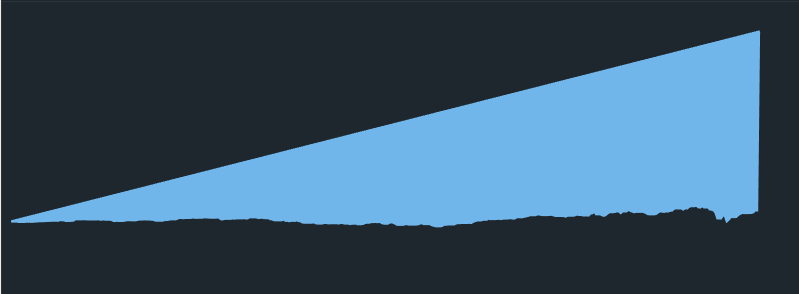
Live demo: http://jsfiddle.net/BlackLabel/kpq4wfLq/
Browser/osx: Chrome 64 (Mozilla/5.0 (Macintosh; Intel Mac OS X 10_11_6) AppleWebKit/537.36 (KHTML, like Gecko) Chrome/64.0.3282.186 Safari/537.36") on OS X 10.11.6
It works fine with: "Mozilla/5.0 (Macintosh; Intel Mac OS X 10_13_3) AppleWebKit/537.36 (KHTML, like Gecko) Chrome/64.0.3282.186 Safari/537.36" on OSX 10.13.3
If we change in the SVG stroke-linecap="round" to anything else it works. I will report this to Chrome devs.
pawelfus
on 6 Mar 2018
pawelfus
on 6 Mar 2018
It looks like issue is connected to the --ignore-gpu-blacklist flag in Chrome, which by default is disabled (but enabled in my env). Could you check your settings and let us know? @robinsoncrus0e @dwrpayne @pdeva @prophet-on-that @TrAnn3l @goodforenergy
If this doesn't resolve the issue, please setup demo once again - the one posted by @dwrpayne is dead. If you could setup demo in jsFiddle that would be great. Thanks!
pawelfus
on 7 Mar 2018
Ah sure, I will try that.
And I took my demo down since I was under the impression it had been
reproduced.
I am happy to put it back up if it helps. It doesn't seem to work in
jsfiddle.
On Mar 7, 2018 07:46, "Paweł Fus" notifications@github.com wrote:
It looks like issue is connected to the "--ignore-gpu-blacklist" flag in
Chrome, which by default is disabled. Could you check your settings and let
us know? @robinsoncrus0e https://github.com/robinsoncrus0e @dwrpayne
https://github.com/dwrpayne @pdeva https://github.com/pdeva
@prophet-on-that https://github.com/prophet-on-that @TrAnn3l
https://github.com/trann3l @goodforenergy
https://github.com/goodforenergyIf this doesn't resolve the issue, please setup demo once again - the one
posted by @dwrpayne https://github.com/dwrpayne is dead. If you could
setup demo in jsFiddle that would be great. Thanks!—
You are receiving this because you were mentioned.
Reply to this email directly, view it on GitHub
https://github.com/highcharts/highcharts/issues/7662#issuecomment-371181331,
or mute the thread
https://github.com/notifications/unsubscribe-auth/AFmGt0i7uYZBiZ0qKnclnGa0lVkvMkmjks5tcADEgaJpZM4RdTz_
.
dwrpayne
on 7 Mar 2018
@pawelfus I've put the demo back up at https://www.davidpayne.net/highstockbug/
--ignore-gpu-blacklist doesn't fix the bug for me.
dwrpayne
on 8 Mar 2018
Thank you @dwrpayne - can I post your demo on the https://bugs.chromium.org/p/chromium/issues/detail?id=819211 ? It looks like chrome devs can not recreate the issue too..
If you could provide more details about your mac, that would be great (GPU, CPU etc.).
pawelfus
on 8 Mar 2018
I posted a bunch of details on the chromium thread.
I'm actually running Windows 10 Pro, with dual GPUs (GTX570 and GTX750Ti)
dwrpayne
on 8 Mar 2018
Has there been any update on this? The CSS workaround doesn't work for me, and it's getting to the stage where I have to ask integrators of my app to not upgrade to the latest version of Electron, for example, to avoid this issue.
Thanks for any help.
prophet-on-that
on 25 Apr 2018
@pawelfus Even though the Chrome team has verified and partially identified the issue, it doesn't seem like they have fixed it, so it's probably time for us to add a temporary workaround inside Highcharts.
I don't have access to a rig that reproduces the problem, but a suggestion is that we try to narrow down on the circumstances, and remove the round linecap only in the cases where the issue may happen. Something like this:
Highcharts.wrap(Highcharts.Series.prototype, 'drawGraph', function (proceed) {
proceed.call(this);
if (
/Chrome/.test(navigator.userAgent) &&
this.graph.attr('stroke-width') <= 2 &&
this.graph.attr('stroke-linejoin') === 'round'
) {
this.graph.attr('stroke-linecap', 'square');
}
});
So we know it only happens in Chrome. Are there other things we can use to narrow it down? Does the line width affect it? The default line width is 2px. The navigator's like width is 1px, does it happen there? Does it happen with greater than 2px? This is good to know, because the visual difference between round or square linecaps is neglectagle with 2px, but very visible with 10px. Does the issue appear with Retina displays?
 TorsteinHonsi
on 26 Apr 2018
TorsteinHonsi
on 26 Apr 2018
@TorsteinHonsi
The problem with this issue I am able to recreate issue only when I manually change some of the default options in Chrome. It's similar case to "In IE10, turn on IE8 compatibility mode and see xxx error". In last ~2 months we didn't get any new report about this issue, so I assume (and hope..) that probably Chrome devs fixed this accidentally.
Does the line width affect it? The default line width is 2px.
Yes, it does. It happens with 2px and 3px line width. We will check other widths.Does the issue appear with Retina displays?
It's not related to OSX only, we had reports from Windows machines too. It looks like issue is connected to the GPU. Didn't reproduce Retina displays reports.
@prophet-on-that
Could you provide more details (e.g. Electron versions that works and not)? Simple app with predefined width/height and static data (can be random) would be great. We will check demo on Electron, maybe it's the same issue.
pawelfus
on 27 Apr 2018
In my case this bug occurs with line width 2 - 6
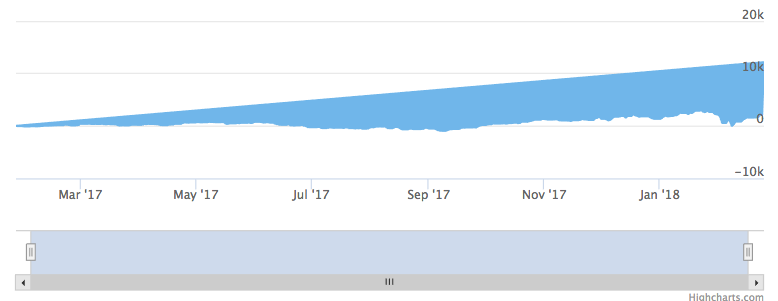
Working fine with line width: 1 and 7+
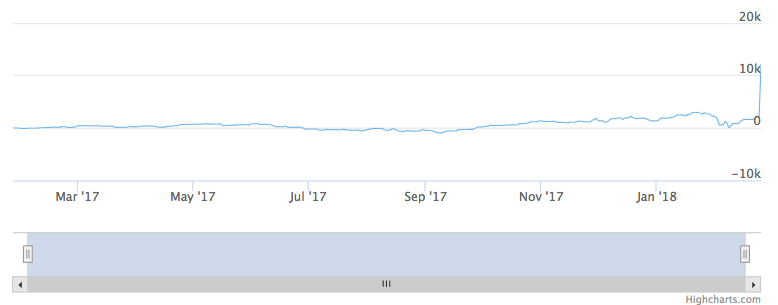
Live demo: http://jsfiddle.net/BlackLabel/8rxLr5bv/
 ppotaczek
on 27 Apr 2018
ppotaczek
on 27 Apr 2018
@pawelfus I've experienced the issue with Electron 2.0.0 (just released), which uses Chrome v61; I did not experience the issue when testing Electron 1.8.5 (Chrome v59). This is consistent with my own records, where the first time I experienced it directly in the browser was with Chrome version 61. In particular, I was able to replicate ppotaczek's demo (not through JS fiddle, only when hosting a standalone file) in Electron 2.0.0 and not in Electron 1.8.5.
I'm assuming the issue also affects other Chromium-based libraries, like CefSharp (already using v63), but I don't yet have evidence for this.
prophet-on-that
on 2 May 2018
Also noticed this using area chart.
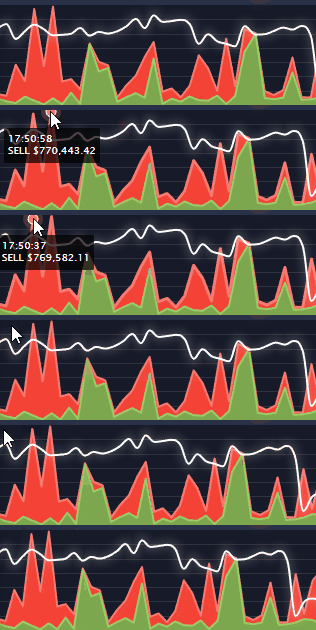
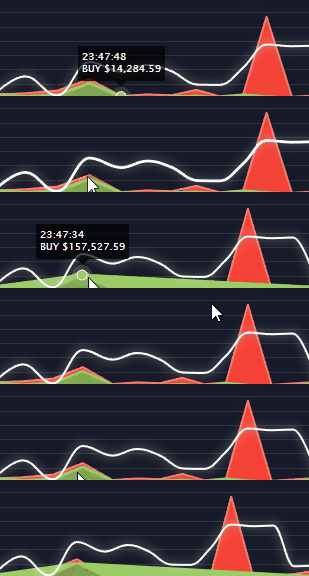
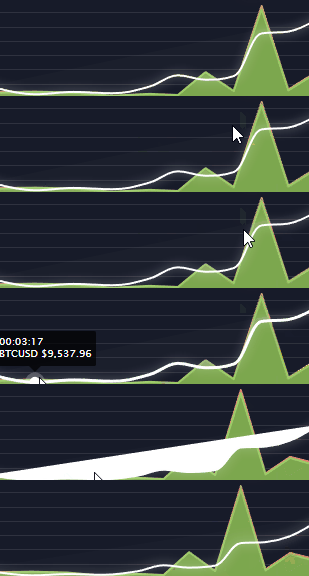
On windows, chrome 66.
Doesn't seems to have that issue on OSX.
 Tucsky
on 6 May 2018
Tucsky
on 6 May 2018
@prophet-on-that and @Tucsky - could you test this plugin? Snippet:
Highcharts.wrap(Highcharts.Series.prototype, 'drawGraph', function (proceed) {
var lineWidth;
proceed.call(this);
if (this.graph) {
lineWidth = this.graph.attr('stroke-width');
if (
/Chrome/.test(navigator.userAgent) &&
lineWidth >= 2 &&
lineWidth <= 6 &&
this.graph.attr('stroke-linecap') === 'round'
) {
this.graph.attr('stroke-linecap', 'square');
}
}
});
@pawelfus You're testing stroke-linejoin but applying stroke-linecap - is that deliberate?
TorsteinHonsi
on 7 May 2018
Good point, updated! We have both set to round, that was probably the reason. Updated snippet the above.
pawelfus
on 7 May 2018
Also encountered this problem, I am now testing with the code snippet, will update if it keeps happening or not.
had to add:
if (!this.graph) {
      return;
    }
to the code since sometimes I got that this.graph is undefined
EDIT:
12 days, and it is working fine since.
 kfir124
on 9 May 2018
kfir124
on 9 May 2018
@pawelfus Your code snippit seems to work for me, at least for a somewhat reproducible example that I'm encountering. I had to adjust the lineWidth bounds, and check for an undefined this.graph (as kfir124 mentioned). I'll keep testing and see if I encounter the issue again.
The snippet didn't seem to work for bubble-type series - what change would be required?
Thank you!
prophet-on-that
on 21 May 2018
@prophet-on-that
Please add a live demo for debugging and testing possible solutions.
 KacperMadej
on 21 May 2018
KacperMadej
on 21 May 2018
@pawelfus Thanks man it seems to be working for me too, Im only pushing the update on my app today so will se how it goes after a few days of use
EDIT: fixed ! no more flickering
Tucsky
on 21 May 2018
Thank you @Tucsky @prophet-on-that and @kfir124 ! Updated my solution to check if this.graph exists.
Bubbles issue - demo would be great, so we could check if this is the same issue. Maybe we could integrate/merge fixes if possible.
pawelfus
on 29 May 2018
Issue was fixed long time ago in Chrome, closing this report then.
pawelfus
on 13 Jun 2019
Related issues
 vviikk
·
36Comments
vviikk
·
36Comments
 scott-ho
·
23Comments
scott-ho
·
23Comments
 madepiet
·
39Comments
madepiet
·
39Comments
 bre1470
·
32Comments
bre1470
·
32Comments
 aatifbandey
·
24Comments
aatifbandey
·
24Comments
Most helpful comment
Also encountered this problem, I am now testing with the code snippet, will update if it keeps happening or not.
had to add:
if (!this.graph) {
      return;
    }
to the code since sometimes I got that this.graph is undefined
EDIT:
12 days, and it is working fine since.