Highcharts: Pie Chart - The chart does not display the original size after exiting full screen mode
Actual behaviour
The initial demo version of the pie chart is displayed as with the given sizes.
After running "View full screen" / "Exit full screen" note that the size of the chart changes (it has been reduced or increased).
The problem occurs in the official Highcharts demo:
https://www.highcharts.com/demo/pie-basic
As well as in the editor with a simplified code:
https://jsfiddle.net/BlackLabel/weo19uvy/
Product version
Highcharts v8.0.4
Affected browser(s)
Chrome 80.0.3987.149
 madepiet
All 39 comments
FYI @raf18seb
madepiet
on 30 Mar 2020
Thanks for reporting @madepiet
This is a known issue. After exiting from the fullscreen, some browsers restore the original height (height before calling fullscreen) but others don't.
Workaround:
You can define the container's height rigidly (see the updated demo), but then some browsers (like IE11) don't display container in 100% height of fullscreen mode but only with the height that was defined (which is not really a fullscreen).
Maybe we could write the logic that would remember the original height and restore it after exiting from the fullscreen. @sebastianbochan what do you think?
 raf18seb
on 30 Mar 2020
raf18seb
on 30 Mar 2020
As a wrokaround you can set width/height in CSS styles. (Works only with values in px, not percents).
Demo:
@raf18seb its good idea and I think that is not also very complicated solution. However we need to verify if (after exit of fullscreen) chart.setSize is not called multiple times. We would like to avoid many re-renders.
 sebastianbochan
on 30 Mar 2020
sebastianbochan
on 30 Mar 2020
Hi, we're seeing this in our usage of lines charts and it's actually happening in the demo below on
https://www.highcharts.com/demo/line-basic
We can't set width/height to be static because the chart needs to be responsive with in it's container.
Browser & Operating System
https://www.whatsmybrowser.org/b/D78K2
 gkemp94
on 7 May 2020
gkemp94
on 7 May 2020

after setting up fix height to container still issue is not resolved issue. issue is not with the container height it is with SVG height is not reformed.
Please see the attachment
 v-abkhot
on 13 May 2020
v-abkhot
on 13 May 2020
can some body provide inputs on this ?
v-abkhot
on 18 May 2020
@v-abkhot
How about the workaround from the post above?
sebastianbochan
on 18 May 2020
this is no working that only i have reported
v-abkhot
on 18 May 2020
because the issue is not about the container height it is about svg. height
v-abkhot
on 18 May 2020
Please share your live demo i.e reproduced by jsfiddle.net
sebastianbochan
on 18 May 2020
i have already share screen shot of it what is happening after adding fix width to that container
v-abkhot
on 18 May 2020
i have identified the issue... there is issue with svg height
v-abkhot
on 18 May 2020
and this need to be fixed.
v-abkhot
on 18 May 2020
so can some body actually look into this ?
v-abkhot
on 18 May 2020
Hi @v-abkhot,
The screenshot does not allow us to reproduce the problem, because of missing informations like chart options, CSS styles etc. Please update this demo: https://jsfiddle.net/BlackLabel/0t6necqd/ with your simplified code for the further debugging.
ps. please use edit instead of sending so many short messages.
sebastianbochan
on 18 May 2020
https://codepen.io/v-abkhot/pen/vYNQxQg?editors=1100
in this second graph when you open in full screen and exit to normal it is modified size
v-abkhot
on 18 May 2020
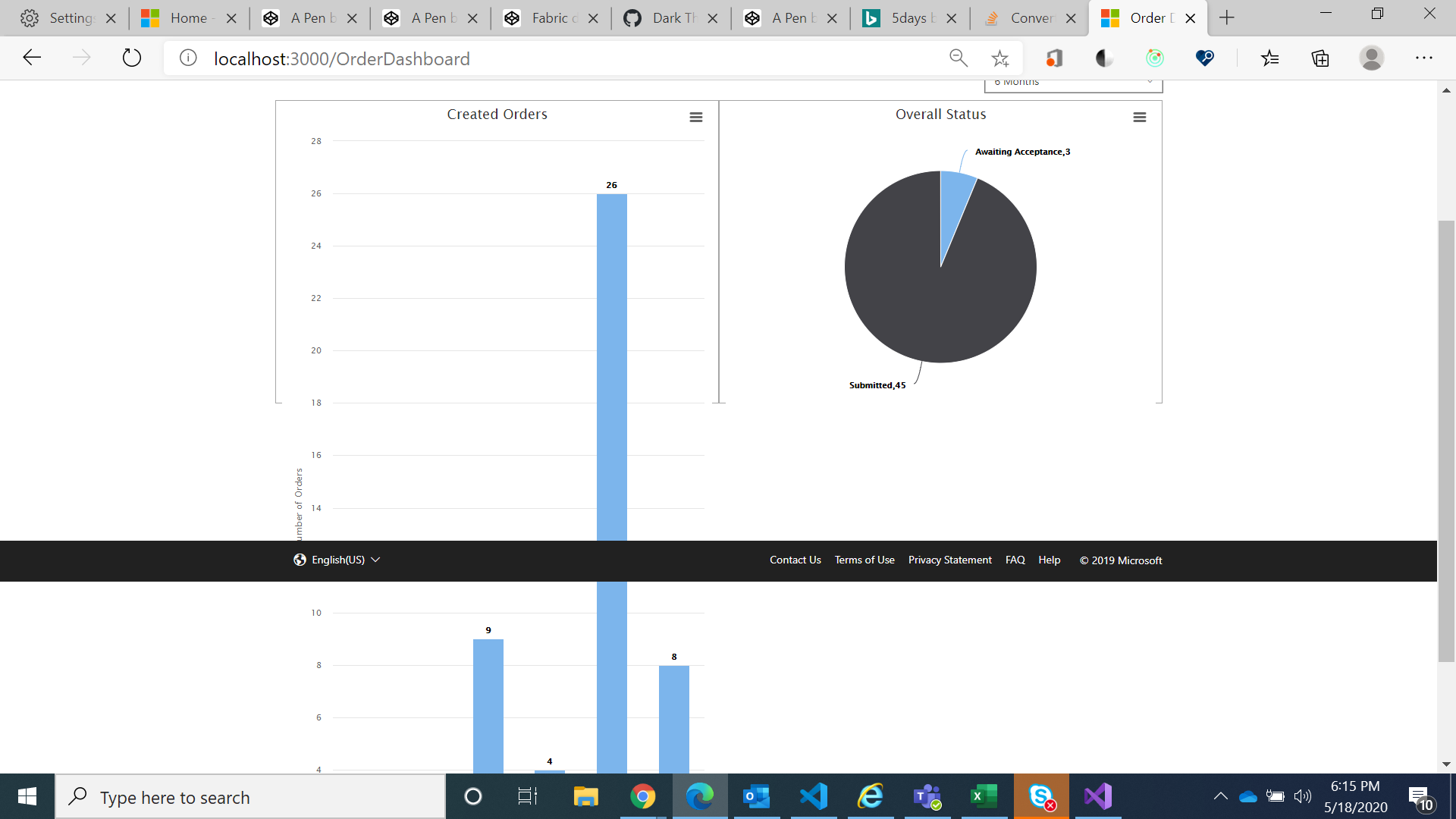
after applying fix height to container
v-abkhot
on 18 May 2020

there is height automatic set to SVG in above screen you can see that
v-abkhot
on 18 May 2020
i am using react wrapper
v-abkhot
on 18 May 2020
Hi @v-abkhot,
Let me explain how our github issues work.
- Please, please use the EDIT mode of your messages, it allows us to keep the readability.
- Always share live demo, if problem is related with native highcharts, report on Highcharts repo, if related only with wrapper, report on wrapper's repo.
- We have 24h for an answer according to our internal rules. You can find more informations here: http://www.highcharts.com/support
- Creating many topics and duplicates like: https://github.com/highcharts/highcharts-react/issues/218 or https://github.com/highcharts/highcharts/issues/13470 increase amount of threads, messages etc. As a result instead of debugging and solve problem, we close and "clean" our repo. Its really time-consuming for all of us in our team.
- Please be aware, that we have many issues and we need to debug each of them.
sebastianbochan
on 18 May 2020
@raf18seb you work around is not working for hichart- react
v-abkhot
on 19 May 2020
Hi @v-abkhot, could you provide a simplified online demo of your chart so I can debug it?
The one you provided: https://codepen.io/v-abkhot/pen/vYNQxQg?editors=1100 is just a demo with 2 charts. You set the height on the first container, but not for the second one - that's why workaround is not working for the second chart.
Please, try to set
#container, #container1 {
  height: 400px;
}
Hi @raf18seb i have added to code pen in that for direct highchart if we set height then it is working fine but if we use it in hichart-react-officials as above screen shot issue with the svg height
v-abkhot
on 19 May 2020
Hi @raf18seb can you please try this same with hichart-react-officials
v-abkhot
on 19 May 2020
@v-abkhot Please, use edit button if you wish to add something to your previous post. Writing many posts makes our GitHub messy.
I tested it with highcharts-react-official wrapper and my workaround works fine. Have you defined styles on your both chart components using containerProps component property?
Docs: https://github.com/highcharts/highcharts-react#options-details
This works fine for me:
render() {
    return (
      <div>
        <div>
            <HighchartsReact
                constructorType={"chart"}
                ref={this.chartComponent}
                highcharts={Highcharts}
                options={this.state.options}
                containerProps = {{ style: {height: '400px'} }}
            />
        </div>
        <div>
            <HighchartsReact
                constructorType={"chart"}
                ref={this.chartComponent}
                highcharts={Highcharts}
                options={this.state.options}
                containerProps = {{ style: {height: '400px'} }}
            />
        </div>
      </div>
    );
  }
yah this works thank you so much
v-abkhot
on 19 May 2020
I am also getting the same issue, please check the following screenshot
Before clicking on option(view in full screen)
https://snipboard.io/WRNQSZ.jpg
After clicking on option(exit in full screen)
https://snipboard.io/7HY3Js.jpg
Could u please help me, anyone
 dharmatv
on 27 Jul 2020
dharmatv
on 27 Jul 2020
Hi @dharmatv, have you tried the solution from the above comments?
raf18seb
on 27 Jul 2020
Hi @dharmatv, have you tried the solution from the above comments?
lol it's a bit of a stretch calling it a "solution"
Could we have an official fix?
In the app I am working on, the chart can't have fixed dimensions because it depends on the screen size and the dynamic changing nav bar. Essentially the chart is on the bottom half of the page, taking up the remaining space.
 dolanmiu
on 27 Jul 2020
dolanmiu
on 27 Jul 2020
@raf18seb, I tried CSS solution but it didn't work and remaining solutions are related to react-js but I am from Vue js. Could u please provide any solution for this
@dolanmiu You are right
dharmatv
on 28 Jul 2020
Hey Highcharts Team (@raf18seb ),
Could you please take the time to resolve this bug?
It's been more than a year since the bug was reported:
https://www.highcharts.com/forum/viewtopic.php?t=43608
Thank you in advance.
 Jakartoine
on 15 Sep 2020
Jakartoine
on 15 Sep 2020
Hi! I will take a closer look at it and let you know about the status within the next few days.
raf18seb
on 16 Sep 2020
Here's a workaround snippet working on all browsers except IE. I'll investigate IE further
edit: screen.height works fine for IE so no browsers excluded: https://jsfiddle.net/BlackLabel/6vpgLje5/
(function(H) {
  var addEvent = H.addEvent,
    isMS = H.isMS,
    wrap = H.wrap;

  H.Fullscreen.prototype.open = function() {
    var fullscreen = this,
      chart = fullscreen.chart,
      originalHeight = chart.chartHeight;

    chart.setSize(void 0, screen.height, false);
    fullscreen.originalHeight = originalHeight;

    // Handle exitFullscreen() method when user clicks 'Escape' button.
    if (fullscreen.browserProps) {
      fullscreen.unbindFullscreenEvent = addEvent(chart.container.ownerDocument, // chart's document
        fullscreen.browserProps.fullscreenChange,
        function() {
          // Handle lack of async of browser's fullScreenChange event.
          if (fullscreen.isOpen) {
            fullscreen.isOpen = false;
            fullscreen.close();
            chart.setSize(void 0, originalHeight, false);
          } else {
            fullscreen.isOpen = true;
            fullscreen.setButtonText();
          }
        });
      var promise = chart.renderTo[fullscreen.browserProps.requestFullscreen]();
      if (promise) {
        // No dot notation because of IE8 compatibility
        promise['catch'](function() {
          alert( // eslint-disable-line no-alert
            'Full screen is not supported inside a frame.');
        });
      }
      addEvent(chart, 'destroy', fullscreen.unbindFullscreenEvent);
    }
  };

  wrap(H.Fullscreen.prototype, 'close', function(proceed) {
    proceed.apply(this, Array.prototype.slice.call(arguments, 1));
    var fullscreen = this;

    fullscreen.chart.setSize(void 0, fullscreen.originalHeight, false);
  });

})(Highcharts)
hi @raf18seb, how can I use this script in react?
 haor3
on 7 Oct 2020
haor3
on 7 Oct 2020
@haor3 - right after importing Highcharts:
import Highcharts from 'highcharts';

(function(H) {
...
})(Highcharts);
 pawelfus
on 8 Oct 2020
pawelfus
on 8 Oct 2020
@pawelfus thanks but the issue still occurs
haor3
on 8 Oct 2020
@haor3 could you provide more info? What exactly is not working for you? Could you provide an online demo showing your case so we can take a closer look at it? Thanks!
raf18seb
on 9 Oct 2020
@raf18seb thanks for your example, works for me!
i did some changes, mostly add this:
// @see https://github.com/highcharts/highcharts/issues/13220
chart.pointer.chartPosition = null;
because i have problems with mouse position after enter in fullscreen mode.
my version:
export const fullscreenEventListener = (H) => {
  if (!H.Fullscreen) {
    return;
  }

  const { addEvent, wrap } = H;

  H.Fullscreen.prototype.open = function () {
    const fullscreen = this;
    const { chart } = fullscreen;
    const originalWidth = chart.chartWidth;
    const originalHeight = chart.chartHeight;

    // eslint-disable-next-line no-restricted-globals
    chart.setSize(screen.width, screen.height, false);
    // @see https://github.com/highcharts/highcharts/issues/13220
    chart.pointer.chartPosition = null;

    fullscreen.originalWidth = originalWidth;
    fullscreen.originalHeight = originalHeight;

    // Handle exitFullscreen() method when user clicks 'Escape' button.
    if (fullscreen.browserProps) {
      fullscreen.unbindFullscreenEvent = addEvent(chart.container.ownerDocument, // chart's document
        fullscreen.browserProps.fullscreenChange,
        () => {
          // Handle lack of async of browser's fullScreenChange event.
          if (fullscreen.isOpen) {
            fullscreen.isOpen = false;
            fullscreen.close();
            chart.setSize(originalWidth, originalHeight, false);
            chart.pointer.chartPosition = null;
          } else {
            fullscreen.isOpen = true;
            fullscreen.setButtonText();
          }
        });
      const promise = chart.renderTo[fullscreen.browserProps.requestFullscreen]();
      if (promise) {
        // No dot notation because of IE8 compatibility
        promise['catch'](() => {
          // eslint-disable-next-line no-alert
          alert('Full screen is not supported inside a frame.');
        });
      }
      addEvent(chart, 'destroy', fullscreen.unbindFullscreenEvent);
    }
  };

  wrap(H.Fullscreen.prototype, 'close', function (proceed) {
    // eslint-disable-next-line prefer-rest-params
    proceed.apply(this, Array.prototype.slice.call(arguments, 1));
    const fullscreen = this;
    fullscreen.chart.setSize(fullscreen.originalWidth, fullscreen.originalHeight, false);
    fullscreen.chart.pointer.chartPosition = null;
  });
};
 siropkin
on 18 Oct 2020
siropkin
on 18 Oct 2020
And one more thing i want to tell about - workaround for scatter plot mouse positioning problems in fullscreen mode.

I thought that I fixed this problem with:
// @see https://github.com/highcharts/highcharts/issues/13220
chart.pointer.chartPosition = null;
But I found out, that this solution not working for a scatter plot.
For scatter you need to add this:
  Highcharts.Pointer.prototype.getChartPosition = function () {
    const { chart } = this;
    const { container } = chart;
    // eslint-disable-next-line no-return-assign
    return (this.chartPosition = Highcharts.offset(container));
  };
Related issues
 KacperMadej
·
3Comments
sebastianbochan
·
3Comments
KacperMadej
·
3Comments
sebastianbochan
·
3Comments
 madreason
·
3Comments
KacperMadej
·
3Comments
madreason
·
3Comments
KacperMadej
·
3Comments
 bbonczek
·
3Comments
bbonczek
·
3Comments
Most helpful comment
Hi! I will take a closer look at it and let you know about the status within the next few days.