Heidisql: [wine] HeidiSQL can't connect to update check website
Describe the bug
Check for updates is unable to connect to https://www.heidisql.com/updatecheck.php
To Reproduce
Steps to reproduce the behaviour:
- Either from the connection screen or from the Help menu
- Click on 'Check for updates'
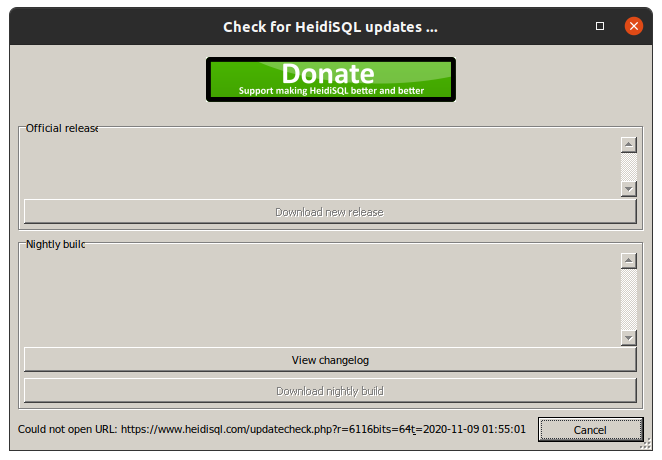
- The dialog gives you the error on the lower left corner
Could not open URL: https://www.heidisql.com/updatecheck.php?r=6116&bits=64&t={DATETIME}
Expected behaviour
It should connect to the above mentioned site and get the INI style data the site provides but it reports it's unable to do it as you can see on below screenshot.
When it began to show
This started happening since version 11.0 or the last 10.x version, not sure.
Efforts to assess if it's a wine or HeidiSQL issue
Connecting to the URL provided by the error message via a Web Browser(Firefox on the Ubuntu side) returns the expected data.
It does not appear to be a SSL issue since I've checked and you guys ship the *.dlls to deal with that.
_Added_
under wineconsole:
Microsoft Windows 10.0.17134

Z:\home\gcarreno>ping www.heidisql.com
Pinging www.heidisql.com [5.175.26.196] with 32 bytes of data:
Request timed out.
Request timed out.
Request timed out.
Request timed out.

Ping statistics for 5.175.26.196
        Packets: Sent = 4, Received = 0, Lost = 4 (100% loss)

Z:\home\gcarreno>
As you can see, ping is able to resolve the address but then cannot contact your site, which makes perfect sense since you guys must be protected from ping DDOS. So it seems DNS is somewhat out of the way.
_Added_
Using curl(7.73.0):
c:\users\gcarreno>curl --version
curl 7.73.0 (x86_64-pc-win32) libcurl/7.73.0 OpenSSL/1.1.1h (Schannel) zlib/1.2.11 brotli/1.0.9 zstd/1.4.5 WinIDN libssh2/1.9.0 nghttp2/1.41.0
Release-Date: 2020-10-14
Protocols: dict file ftp ftps gopher http https imap imaps ldap ldaps mqtt pop3 pop3s rtsp scp sftp smb smbs smtp smtps telnet tftp
Features: AsynchDNS HTTP2 HTTPS-proxy IDN IPv6 Kerberos Largefile MultiSSL NTLM SPNEGO SSL SSPI TLS-SRP Unicode UnixSockets brotli libz zstd

c:\users\gcarreno>curl "https://www.heidisql.com/updatecheck.php?r=6116&bits=64&t=2020-11-08+23:00:00"
[Release]
Version=11.1

URL=https://www.heidisql.com/installers/HeidiSQL_11.1.0.6116_Setup.exe
Revision=6116

Date=2020-11-02

[Build]
URL=https://www.heidisql.com/builds/heidisql64.r6118.exe
Revision=6118
Date=2020-11-10
Note=(r6118) Tab restoring: simplify check for keyword in ProcessExists(), don't throw a regular expression at it%||%(r6117) Tab restoring: avoid restoring tab file only if the owner is a *HeidiSQL* process. Fixes non-restored tabs when an old Heidi process id is re-assigned to another application. Happened here at least one time.%||%(r6116) Bump version for v11.1 release%||%(r6115) In the data sorting dialog, make sure we work on a copy of the currently used list with sorted columns, not on the original. Closes #849%||%(r6114) Remove default text from column when changing data type to one that does not support a default text. See https://www.heidisql.com/forum.php?t=37142%||%(r6113) Allow free typing in collation drop-down for collations in a column. Set to empty string if user typed a non existent item. See https://www.heidisql.com/forum.php?t=37117%||%(r6112) Make connection properties dialog available through a new context menu item in the database tree. The click event on the status bar panel can likely not be found by many users.%||%(r6111) Emergency fix: Turn asLibrary again into a session based setting. Broken in commit b22c3fd81549edba525e526cb6429aad2fa1faf3. Closes #1199%||%(r6110) Dynamic default value for library session setting, depending on its network type. Closes #1010%||%(r6107) Set SQL_NOTES to 0 in SQL export, to silence warnings due to unsupported "ALTER TABLE .. DISABLE/ENABLE KEYS" on InnoDB tables. Closes #756%||%
Size=7597367
Yet another tool running under wine 5.0 that return the intended result.
_Edited_
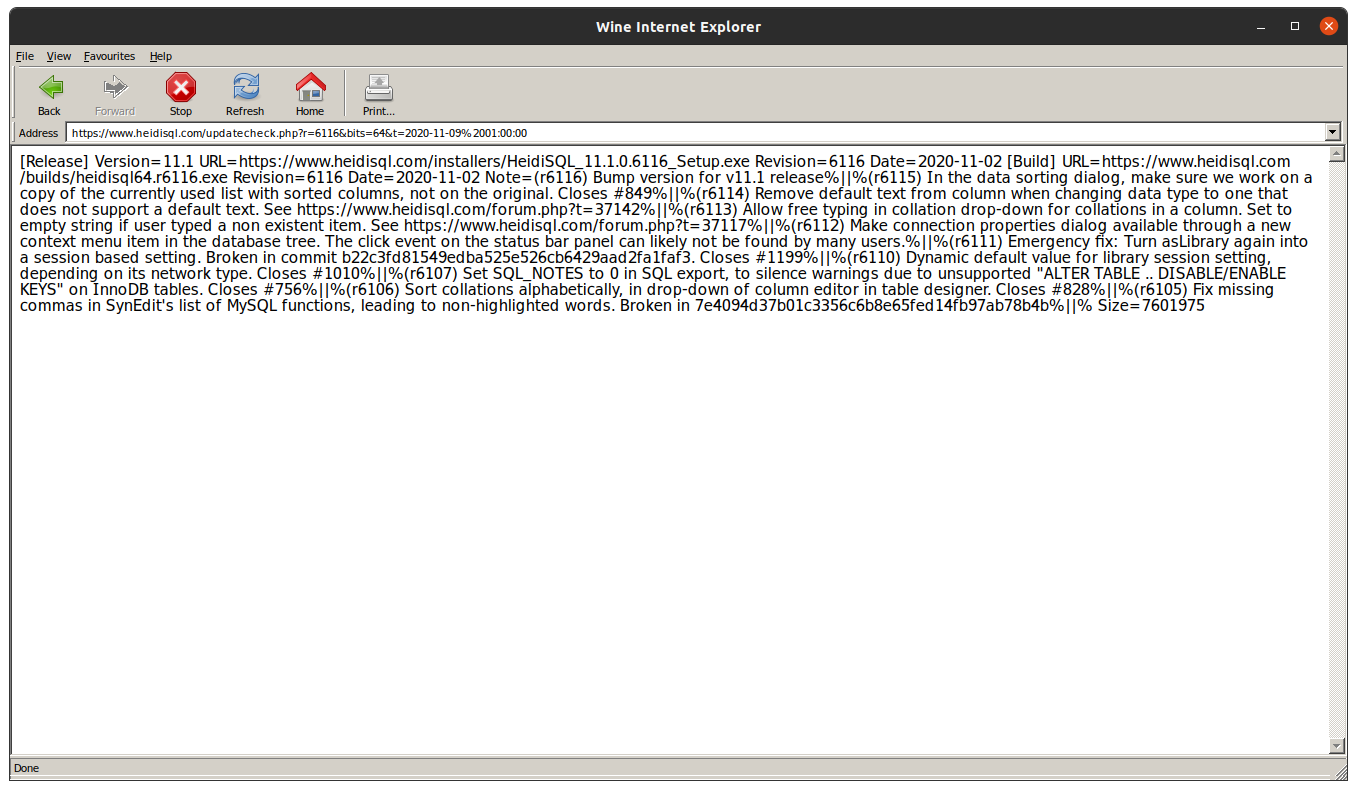
After some Googling I was able to download the wine-gecko *.tar.bz2 and uncompress it to /usr/share/wine/gecko to get the iexplorer.exe to work.
Using iexplorer.exe and going to https://www.heidisql.com/updatecheck.php returns the INI data as you can see in below screenshot.
The last thing I did was to completely erase my wine prefix and install HeidiSQL on a fresh prefix, but still the error remains.
I'm a bit out of other ways I can try and see if it's a wine issue or a HeidiSQL issue.
Screenshots
Screenshot:
Environment:
- OS: Ubuntu/Wine5.0
- HeidiSQL version 11.1.0.6116
 gcarreno
All 19 comments
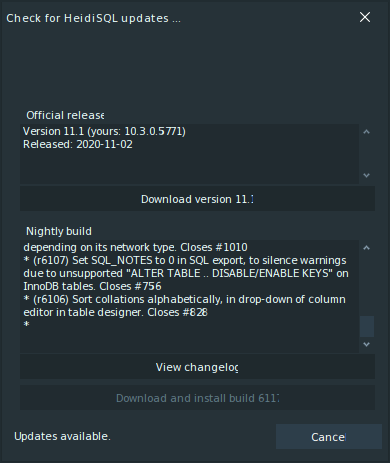
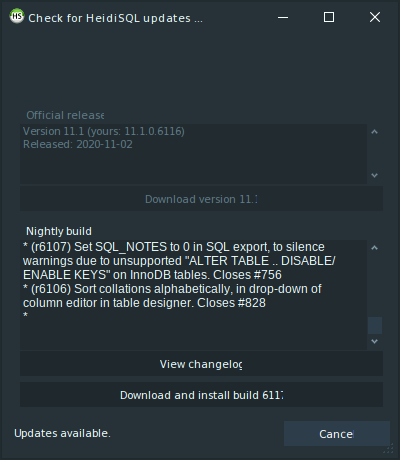
Works for me, wine-3.0 (Ubuntu 3.0-1ubuntu1)
 cookieguru
on 10 Nov 2020
cookieguru
on 10 Nov 2020
Hey @cookieguru
Works for me, wine-3.0 (Ubuntu 3.0-1ubuntu1)
I'm really sorry to be the one to tell you this, but you just landed a bad "It works on my computer..." programmers cliché.
I'm quoting wine-5.0 (Ubuntu 5.0-3ubuntu1) 64b and your quoting v3.0. How is that even Apples to Apples?
Sorry, I'm being aggressive... It's just that I love this application, I love the language it's built on and I'm really protective of it.
Cheers,
Gus
gcarreno
on 10 Nov 2020
I'm quite aware that I'm using a different version: my point was that the updater function _does_ work in v10 and v11 and it _does_ work in Wine. You should try an older version of Wine (may I suggest 3.0) and if you still can't get the updater to work try the Wine mailing list
cookieguru
on 10 Nov 2020
Hey @cookieguru
Please do not take my following statements in any belligerent context.
I'm trying to use logic to address this issue and I apologise in advance if I seem brisk.
When you state that HeidiSQL v10 and HeidiSQL v11 work under wine 3.0, the only thing that you are asserting is that HeidiSQL v10 and HeidiSQL v11 work under wine 3.0.
Your assertion draws no parallel since you only matched 1 breaking point with my situation: HeidiSQL v10/v11.
If you look closely at my issue, you'll notice that there's a section I added called Efforts to assess if it's a wine or HeidiSQL issue.
On that section, if you consult the edit history of my issue, you'll notice that I went through a bit of testing to try and see if I could narrow down the investigation side of this issue so the Developer assigned to it would have less to wander about.
In more efforts to narrow down the wine/HeidiSQL blame assertion I can download a windows version of curl and try with that.
I can also try and cross-compile a Free Pascal command line and a GUI Lazarus win64 applications to try and see what's up.
I'll probably do that in a near future.
You should try an older version of Wine (may I suggest 3.0)
I'm sorry but I don't think it makes sense to do this radical downgrade just to prove that HeidiSQL has no issue under wine 3.0 but can't guaranty it works under wine 5.0.
Have you considered that I may have other installed applications that depend on wine 5.0 and if I downgrade they will be the ones not working?
If you have the time and the patience to give me a detailed tutorial on how to run wine 3.0 and wine 5.0 side by side on an Ubuntu 20.10 64b, then I'll strongly think about testing it under wine 3.0!
But the kicker is: If we finally agree that HeidiSQL works with wine 3.0, then that doesn't really fix the issue that in my computer HeidiSQL and wine5.0 don't play nice, does it?
and if you still can't get the updater to work try the Wine mailing list
At this moment in time, from your evidence and mine, the only thing we have proof of is that the combination HeidiSQL-wine 3.0 works on your computer and the combination HeidiSQL-wine 5.0 doesn't work on my computer, hence we have zilch conclusive evidence that it's a wine issue and I should go and complain on their mailing list.
The next things I need to test are:
- Is it a DNS issue
- Is it a TCP/IP connection issue
I'll do that next when I test a connection with curl and/or my cross-compiled Free Pascal applications.
@cookieguru Please Note:
At this point in time I'm getting a bit tired of having to write an essay to answer to your one-liners.
If you don't show some effort to constructively contribute to this discussion and continue on the one-liner path, I'll just add you to the Troll column and I won't feed you any more.
If you do put some effort in trying to suss out this issue, I'll most gladly thank you for said effort and will add you to the Friend column and if you ever need some help with food, I'll try my best to help you out :smiley:, even if I have to take the shirt off my back!
Cheers,
Gus
gcarreno
on 10 Nov 2020
Have you seen Heidi's compatibility notes?
- HeidiSQL runs fine on Windows 7, 8 and 10
- Running HeidiSQL on newer Wine releases is currently quite unstable. Preferring Wine 4.0 likely solves various issues.
Heidi has a long history of flaky compatibility under Wine and I don't think the author has ever come out stating guaranteed compatibility with Wine. IMHO it's always been a "best effort"
When you state that HeidiSQL v10 and HeidiSQL v11 work under wine 3.0, the only thing that you are asserting is that HeidiSQL v10 and HeidiSQL v11 work under wine 3.0.
I didn't post the results from my Windows machine either; and it works there:
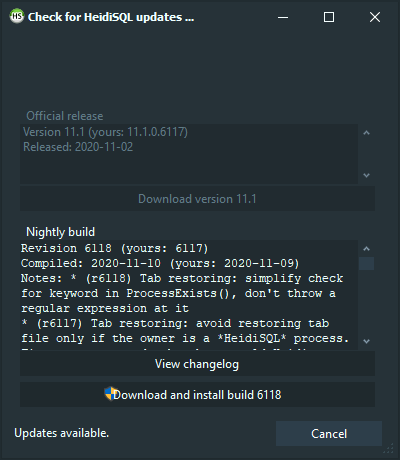
So now we know it works in two other envs but not yours. Sounds like you have an environmental problem and I'm not sure how you can insist that there is something wrong with the updater when it works for others. Do you have access to a Windows installation where you can test it? Perhaps another version of Wine or a different machine? Your troubleshooting is limited and inconclusive.
if you consult the edit history of my issue
Sorry, I don't have time to dig through your edit history. If you want it to be known, state it instead of making me dig for it
At this point in time I'm getting a bit tired of having to write an essay
Then don't
cookieguru
on 10 Nov 2020
@cookieguru is absolutely right - Wine compatibility in Heidi always had and still has a certain priority, but only as I am not able to provide a native binary. Things are now and then broken under Wine, some issues were caused by Wine, some could be solved by me, but currently there are some known and probably unknown issues.
I would also recommend to try out Wine 3.0, that would have taken less time than writing this report.
In the meantime, you can always update your builds by downloading them from http://www.heidisql.com/download.php
 ansgarbecker
on 10 Nov 2020
ansgarbecker
on 10 Nov 2020
Hey @cookieguru and @ansgarbecker
Ok, I can take a hint.
I know when I'm out numbered and I'll shut up about this issue and if there's nothing else to add I'll close it or @ansgarbecker can close it.
Cheers,
Gus
P.S.: I just want to leave this hanging: Every other means of contacting https://www.heidisql.com I used was able to do it fine. Only HeidiSQL is having an issue, so you take your own conclusions.
gcarreno
on 10 Nov 2020
Hey @ansgarbecker ,
Thanks for reminding me about http://www.heidisql.com/download.php, really appreciated, no sarcasm I swear!
I did remember I had another machine, already running with a freshly updated Ubuntu 20.10. This one didn't even had wine.
So I installed wine, the version that comes when you type sudo apt install wine and I got wine 5.0.
The first thing I ran was wine path/to/HeidiSQL-latest-nightly-version-setup.exe, so wine had to create and update the default prefix for the very first time, hence giving me a really fresh prefix.
I ran HeidiSQL and got the same error. So this eliminates wine config rot, I think...
Where does this last test puts us? Install wine 3.0?
Explain to me why I should downgrade wine when everything I test is working fine and only HeidiSQL is having http/https problems?
Yes, I'm not complaining that HeidiSQL doesn't work under wine 5.0, on the contrary, it works just fine, I'll repeat that, it works really good, well apart from an issue with http/https on the update checker :stuck_out_tongue:
Cheers,
Gus
gcarreno
on 11 Nov 2020
As a bug reporter it's your responsibility to explain why the behavior you're seeing is a bug, and not everyone else's responsibility to explain why it doesn't work in your environment
cookieguru
on 11 Nov 2020
Hey @cookieguru
I'm sorry that that is your take on what I've said up 'til this moment.
I can't really convince you of anything different since you've made your mind and you're just gonna dig your heals and spat "acid" at me.
That a you problem, not a me problem.
In the mean time I'm messing with Lazarus and wininet.dll since it's what the update checker uses.
I don't have access to a windows machine nor have I the budget to get a Delphi license, so Imma debug the sh*it ot of this using the tools I can find.
So, mr. Bond, this will be my last comment directed at you. There was really no effort on your part to be social or helpfull, so your in the Troll column.
Cheers,
Gus
gcarreno
on 11 Nov 2020
Hey @ansgarbecker
After having a look at updatecheck.pas and apphelpers.pas I've realised that you guys are relying on wininet.dll.
My system reports:
c:\>sigcheck windows\system32\wininet.dll

Sigcheck v2.80 - File version and signature viewer
Copyright (C) 2004-2020 Mark Russinovich
Sysinternals - www.sysinternals.com

c:\windows\system32\wininet.dll:
        Verified:       Unsigned
        Link date:      00:00 01/01/1970
        Publisher:      n/a
        Company:        Microsoft Corporation
        Description:    Wine Internet Connectivity
        Product:        Wine
        Prod version:   8.00.7601.17601
        File version:   8.00.7601.17601
        MachineType:    64-bit
I'm not sure if this is a recent version or not since the only date shown here is not a realistic date (01/01/1970)
I'm going to install fpcupdeluxe under the wine prefix and have a play around with wininet and the code you have on apphelpers.THttpDownload.SendRequest() to see if I can reproduce the error and have a solution for it.
Well, a solution that doesn't involve using synapse. This would make you guys have to add a dependency and I don't think you're in that mood.
BTW, while Googling for Lazarus wininet, I found someone saying that wininet has been deprecated from windows, and the post is dated more than 2 years from now. Is this true?
Cheers,
Gus
gcarreno
on 11 Nov 2020
Hey @ansgarbecker
I was finally able to reproduce this error under Lazarus.
After not getting a handle from InternetOpenURL() I call GetLastError, welp, GetLastOSErrorsince this is the Free Pascal version, and I get a 12006 error code.
After some digging on Dr. Google I found a forum post that explains how to get a string for that error code:
Post
Case 12006: TranslateErrorCode = "The URL scheme could not be recognized, or is not supported."
MS Docs
Microsoft constant: 12006 ERROR_INTERNET_UNRECOGNIZED_SCHEME
This seems quite discouraging since it seems it's REALLY a crappy wininet.dll that comes with wine 5.0.
If it's not able to deal with https, nor http(I tested), what is it good for?
This only means that I need to dig deeper into the wininet.dll that comes with wine 5.0 and see if anyone has ad the same issue.
Cheers,
Gus
gcarreno
on 11 Nov 2020
Could it be the wininet library cannot just load https urls? Like some older HeidiSQL versions could not on Windows XP, see #65 . Well you won't be able to test that, so I'll go and add a http-fallback, like I did for the donor check in 36c5d90d39fd294bde1ef803d08ab527c1f3aa57
ansgarbecker
on 11 Nov 2020
Next build should fall back to http if https does not work, in all places where that wininet lib is used. Please use the updater download from https://www.heidisql.com/download.php#r6119 in hald an hour and retry. Watch out for messages in the bottom log panel when opening Help > Check for updates.
ansgarbecker
on 11 Nov 2020
Hey @ansgarbecker
Could it be the wininet library cannot just load https urls?
The wininet.dll is absolutely fubar'ed.
I tested https, http and even ftp and they all returned 12006.
And I'm using YOUR THttpDownload so I can replicate this thing properly.
I changed the APPDOMAIN from https://www.heidisql.com to http://www.heidisql.com and even tried ftp://www.heidisql.com and all gave 12006 back.
I now need to test for the file:/// URI SCHEMA to see if wininet.dll relies on other construction blocks to deal with different URIs, just like PHP does.
BTW, http://www.heidisql.com/updatecheck.php works like a charm. Looks like you guys forgot to redirect http->https :smile:
I really appreciate you making the effort to go around this, now obvious "not an HeidiSQL" issue, but I'm gonna ask you to not put the fall back. And thank you from the bottom of my heart.
Well, unless something goes really wrong with the SSL *.dlls you ship, that is.
Please use the updater download from https://www.heidisql.com/download.php#r6119 in hald an hour and retry.
Since you already did this, I'll have a look then and I'll report back here, even if it's closed.
I'm closing this issue since I now need to go and knock on Wine's Bugtrack door to report that their wininet.dll is all kinds of borked :smiley:
Cheers,
Gus
gcarreno
on 11 Nov 2020
To whom this may be of interest:
gcarreno
on 11 Nov 2020
I don't think the http fallback is a bad idea or should be removed. In many corporate environments, all http traffic goes through a transparent proxy which re-encrypts data with the company's own certs. Browsers are configured to trust the cert, but many other applications are not. I don't know if it's possible trust a custom cert in this situation. The http fallback ensures the update check fails even if there is a cert error.
cookieguru
on 11 Nov 2020
Hey @ansgarbecker
I completely agree with all you said. I always forget the firewalled employee masses. Such privilege :-\
When I said to not do that it was more of a "Don't do that on my account" kinda thing. I really hate to impose and this thread has been borderline whining and nagging from me, which I hate to get into, I'm sorry!
But again, what you're saying makes tons of sense and I'm glad a wine wininet issue was able to provide this fallback :smile:
Cheers,
Gus
gcarreno
on 11 Nov 2020
Hey @ansgarbecker
I finally took the plunge and decided to use the WineHQ/Ubuntu stable version.
The immediate difference is that the wininet.dll on WineHQ stable 5.0 is not borked and the update now works.
An FYI, they have updated stable to version 6.0 and all is still working. I still have to see if with version 6.0 there are no issues of disappearing windows on GNOME. But I'll report this on the other issue that deal with it.
Cheers,
Gus
gcarreno
on 22 Jan 2021
Related issues
 BraveOtter
·
4Comments
BraveOtter
·
4Comments
 yz778
·
4Comments
yz778
·
4Comments
 dzintb
·
3Comments
dzintb
·
3Comments
 slaFFik
·
3Comments
slaFFik
·
3Comments
 cautionbug
·
4Comments
cautionbug
·
4Comments