Heidisql: why comma in field length for int big int
Steps to reproduce this issue
- Step 1; open any database for mysql 8.0
- Step 2; create a table having double(10,3) , int(10), enum (Y,N)
Current behavior
after table is created when you see table details in editor it displays comma separator in field length for int and bigint which is giving error.
also enum default value appears without single quote crashing down query for alter table, create table code
current appearance
INT(10,3)
enum default value N
Expected behavior
enum default value should appear with single quote 'N'
int and bigint length should appear without comma .
Possible solution
should be as expected output
Environment
wnidows 10 pro 64 bit
- HeidiSQL version:
heidisql 10.3.0.5850 - Database system and version:
database mysql 8.0.19 - Operating system:
windows 10 pro 64 bit
 mailparikshit
All 9 comments
I could not re-produce the comma issue. Everything as expected in HeidiSQL 10.3.0.5862 & MySQL 5.7.23.
As per quoted for the default enum, I can confirm it. But I'd create separate bug report for this with better explanation.
 fifonik
on 5 Feb 2020
fifonik
on 5 Feb 2020
Same here.
I Have to remove the part after the comma everytime before i can save the table which makes HeidiSQL practically unusable.

mysql version 8.0.19
edit:
HeidiSQL version 11.0.0.5919 (64Bit)
Windows 10 64Bit
 marthieme
on 19 Mar 2020
marthieme
on 19 Mar 2020
Is that reproducible with HeidiSQL 11.0?
 ansgarbecker
on 19 Mar 2020
ansgarbecker
on 19 Mar 2020
@ansgarbecker I could not reproduce at r5919 (11.0). I will check when it was fixed. BTW, where I can search the full archive of versions? I can't download 5850 via site.
Edit: I have checked 5870 (minimum that I have access) and it seems works fine. I suggests @mailparikshit to update to the last available version.
CREATE TABLE `test_869` (
    `double` DOUBLE(10,3) NULL DEFAULT NULL,
    `int` INT(10) NULL DEFAULT NULL,
    `enum` ENUM('Y','N') NULL DEFAULT NULL COLLATE 'utf8mb4_general_ci'
)
COLLATE='utf8mb4_general_ci'
ENGINE=InnoDB;
 rentalhost
on 19 Mar 2020
rentalhost
on 19 Mar 2020
Is that reproducible with HeidiSQL 11.0?
I edited my comment above. I use HeidiSQL version 11.0.0.5919 (64Bit).
marthieme
on 19 Mar 2020
@ansgarbecker @marthieme @mailparikshit
Ok, I could reproduce with MySQL 8.0.19 at least, using r5919. But INT(10, 0) will not cause any error, except if you try to rename the column, for instance.
In this case, it will generate the following code:
ALTER TABLE `test_869`
    CHANGE COLUMN `int` `int2` INT(10,0) NULL DEFAULT NULL AFTER `double`;
About the ENUM case, I still can't reproduce. In case, I am setting the default value as "custom text", and it wrap with a single quote correctly.
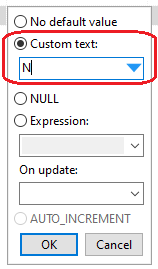
ALTER TABLE `test_869`
    CHANGE COLUMN `enum` `enum` ENUM('Y','N') NULL DEFAULT 'N' COLLATE 'utf8mb4_general_ci' AFTER `int`;
I already broke something here for #876. Just pushed a modification which should now never add that numeric scale value to integer typed columns. Please update to the latest build and retry.
ansgarbecker
on 19 Mar 2020
Fix checked and now works fine.
rentalhost
on 19 Mar 2020
@rentalhost thanks for all your feedback, also in other threads!
ansgarbecker
on 19 Mar 2020
Related issues
 mpaland
·
5Comments
mpaland
·
5Comments
 chrysler5798
·
5Comments
chrysler5798
·
5Comments
 BraveOtter
·
4Comments
BraveOtter
·
4Comments
 altmvogi
·
5Comments
altmvogi
·
5Comments
 catamphetamine
·
3Comments
catamphetamine
·
3Comments
Most helpful comment
@rentalhost thanks for all your feedback, also in other threads!