Heidisql: Windows10 SlateGray theme problems in "Save as snippet..." and "Save as..."
Steps to reproduce this issue
- Set the Style Theme to
Windows10 SlateGray - Right click on a query window and select "Save as snippet..." or "Save as..."
Current behavior
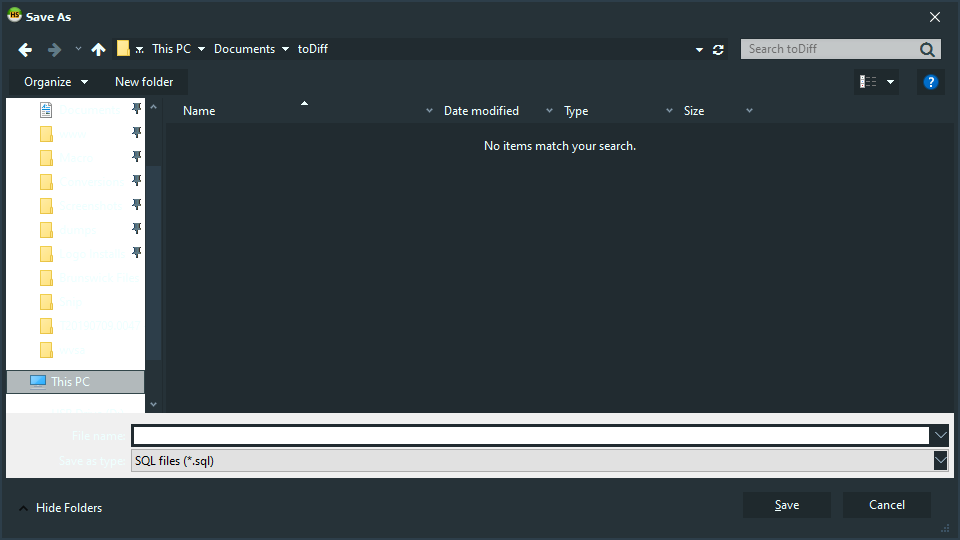
The left tree and the items on the dropdown list while typing a new appear in white.

Expected behavior
The items on the window should all adopt the themes properties
Possible solution
Don't know
Environment
- HeidiSQL version:
10.1.0.5555 - Operating system:
Windows 10 64bit 1809
 anselal
All 11 comments
Also having this issue with Material. Thought this was due to my session background setting, but I changed it from 'Default' to 'None' and it didn't seem to change anything. On Heidi 10.2.0.5629.
 WesleyM77
on 15 Jul 2019
WesleyM77
on 15 Jul 2019
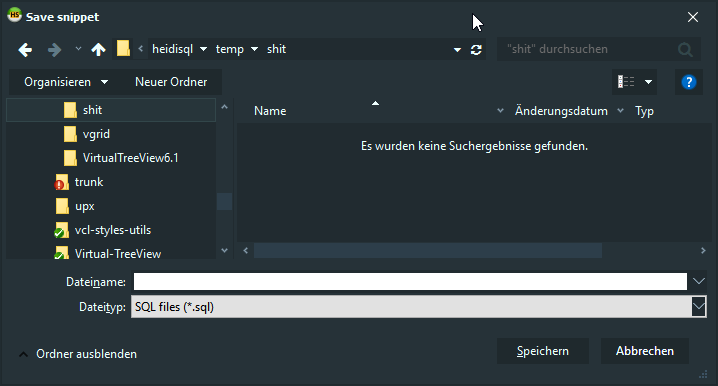
I cannot reproduce that white panel any more, for some reason:
I am going to push updates from the vcl-styles-utils project.
 ansgarbecker
on 21 Jul 2019
ansgarbecker
on 21 Jul 2019
cfe412e12c155c4a8d86a4802272332cb92094a5 has various updates for themes. Please test by updating to the latest build of HeidiSQL in a few minutes.
ansgarbecker
on 21 Jul 2019
Yeap,
that fixed the background.
Thanks a lot !!!
anselal
on 22 Jul 2019
Although the white background remains the in dropdown when you type a filename.
I guess this is not related to any bug of the software so we can close this issue ??
anselal
on 22 Jul 2019
I'm not sure. According to https://github.com/RRUZ/vcl-styles-utils/issues/249 the edit and dropdown boxes should be painted in the right color, not in white.
ansgarbecker
on 22 Jul 2019
Updated to the latest 10.2.0.5736.
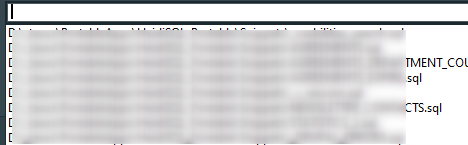
The issue is not completely resolved. When I start typing the background has the desired color (not white)

but when I don't type anything and expand the dropdown then the background is still white.
anselal
on 4 Nov 2019
I'll have a look if the changed file from https://github.com/salvadordf/vcl-styles-utils/commit/16730fd00f7426b1985d53565c1f6e8209fd7ff5 is really used in HeidiSQL.
ansgarbecker
on 4 Nov 2019
The dialog for loading an SQL file is a TOpenTextFileDialog, while e.g. the session manager's startup script selector is a TOpenDialog. The latter one paints correctly, so there is some difference in their code which is apparently not caught up by the above mentioned fix.
I just asked why these differences exist on delphipraxis.net.
ansgarbecker
on 10 Nov 2019
Sorry for the confusion - I mixed up the save dialog with the open dialog. The save dialog has this wrong background color in the dropdown. The open text file dialogs have even more issues - they look like in old XP.
I could go and exchange the old-style open dialog with a newer dialog and extend it like described in this blog post, but to be honest, that is too much effort for now.
For these background colors on the save dialog, I suppose we just accept that. I have no clue how to fix that.
ansgarbecker
on 11 Nov 2019
If it is too much trouble that is ok. I just pointed out the issue.
It would be nice to be fixed but the main reason I use HeidiSQL is not the dark themes but it's features !!
anselal
on 12 Nov 2019
Related issues
 hrvoj3e
·
4Comments
hrvoj3e
·
4Comments
 magnetik
·
4Comments
magnetik
·
4Comments
 rkmaier
·
5Comments
rkmaier
·
5Comments
 cammudito
·
3Comments
cammudito
·
3Comments
 chrysler5798
·
5Comments
chrysler5798
·
5Comments