Heidisql: WISH: Remove newline characters when copying by CTRL-SHIFT-C
It would be useful to have an option to remove (or replace) newline chars inside the fields when "Copy Selected Rows" (or even during the export)
Steps to reproduce this issue
Execute below query:
SELECT * FROM (
    SELECT 1 AS ID, 'line1\nline2' AS txt UNION ALL
    SELECT 2 AS ID, 'line1\nline2' AS txt
) AS T
Right click on grid and select Copy Selected Rows
Current behavior
ID col1
1  line1
line2
2  ...
Expected behavior
Removed (replaced with space)
ID col1
1  line1 line2
2  ...
Possible solution
As a work around I export grid with Line Terminator = |||, paste into a text editor replace newlines with space, then replace ||| with newline.
Environment
- HeidiSQL version:
v9.5.0.5424
 endo64
All 16 comments
So you want to have \n and other newlines replaced by a space?
Isn't that a very special use case you have, which is not something for the majority?
 ansgarbecker
on 8 Jan 2019
ansgarbecker
on 8 Jan 2019
I want all newline chars (rn, r or n) replaced by space or "n" string or preferably a char chosen by the user.
I don't think is a spacial case for me, because the grid data cannot simply copied & pasted into an Excel file (because of the newlines in the data), you see, let's say 100 rows in the grid but when you paste that data into Excel or text file you see that there are more than 100 lines.
When export to SQL you see:
'line1\nline2'
but when you export to Excel CSV or Delimited Text, you see:
line2
Just after posting this comment I copied some rows from a grid in HeidiSQL and pasted to Excel to send someone to further examine, as there was HTML texts inside two columns the copied data was not tabular anymore and difficult to fix it.
Note that this feature is in PhpMyAdmin:
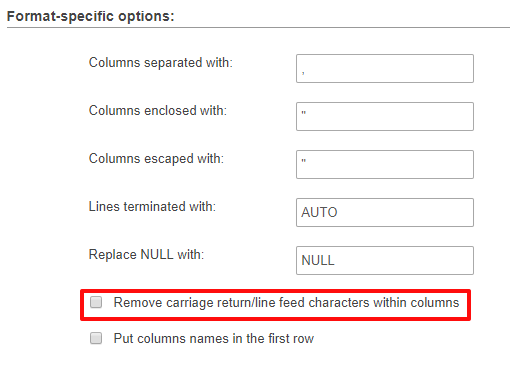
Replace Null is also a nice feature to have :)
endo64
on 9 Jan 2019
NULL values can already be "replaced" during the grid export:

For that "replace linefeeds" I could add another checkbox.
ansgarbecker
on 9 Jan 2019
NULL values can already be "replaced" during the grid export
Ah, sorry, I should have checked that before writing.
Replace linefeeds would be great, thanks!
endo64
on 9 Jan 2019
I still do not understand why you need an option to blindly modify data in so strange way.
You should use the Export tool if you'd like to copy/paste it into Excel.
It might be user data somewhere (like bb-coded python code for example) that would be broken with such replacement.
So
"Right click on grid and select Copy Selected Rows"
=>
"Right click on grid and select Export grid rows"
 fifonik
on 14 Jan 2019
fifonik
on 14 Jan 2019
I just want one line for each row in the table, to be able to further work on it. Excel is just an example, if I paste the copied data into a text file then it is very difficult to work on it anymore because of the newline. And it is annoying to write a bunch of REPLACEs in the SQL to remove/replace the newlines.
I don't think it is strange or special for my case, as I see other programmers who mostly works with data need this feature and use PHPMyAdmin (or other tools) just for that (ok, not thousands of people may be),
It is a feature, users who don't want to use it can easily turn it off, but the other way around is difficult.
endo64
on 14 Jan 2019
if I paste the copied data into a text file then it is very difficult to work on it anymore
Why do you need to do this?
What would you like to do with the file then?
fifonik
on 16 Jan 2019
Why do you need to do this?
What would you like to do with the file then?
Well, I'm constantly work on data but not always inside the database, exporting data, do something on it and then import into same db or somewhere else (sqlite, prepare a json to import into mongodb, put as a static data in my programs etc.) or sending to someone to examine further (in Excel, CSV or whatever format they require)
Programmers like me who work on data a lot constantly need this kind of features, the more export options the better. And I know there are many other programmers like me (even in my company there are a few).
I can live without this feature for sure, using other tools that have this feature or using the workaround I explained above (if there are hundreds of thousands rows it takes time). But it is easy to implement and nice to have.
If it is that useless PHPMyAdmin wouldn't have that feature, would it?
endo64
on 16 Jan 2019
exporting data, do something on it and then import into same db or somewhere else
With such replacements you will ruin your data in non-reversible way.
or sending to someone to examine further (in Excel, CSV or whatever format they require)
I believe CSV is the best format for this and no such replacement required. It can be opened in text editor or in Excel.
Programmers like me who work on data a lot constantly need this kind of features
I'm programmer and working with different SQL servers (and data) for quite a long time. Never ever wanted a feature that would break my data.
Probably there are situations when this is fine so I wanted to know user cases.
Your examples do not look good for me (sorry for that) so I would not implement the feature.
However, it is up to ansgar to implement or not to implement it.
fifonik
on 18 Jan 2019
Well if that new checkbox is off by default it should not harm most users.
Just for the records: If I export in "Excel CSV" format, and paste this into Excel, I get new lines in one cell:
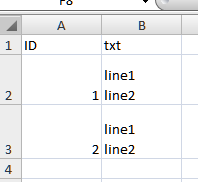
@endo64 I suppose you did not use the "Excel CSV" option when clicking on "Save clibboard settings", but "Delimited text"?
ansgarbecker
on 18 Jan 2019
@ansgarbecker That's correct I used Delimited Text, using Excel CSV solves the issue to paste to the Excel file.
For text files I would still need that feature. My need is very simple, one line for each row, so I can work on the text easily, for example I can replace newlines by literal n string so I can easily convert that part to JSON by just adding { and } around the string.
endo64
on 18 Jan 2019
I think I can live with that new checkbox, which will be disabled by default:

ansgarbecker
on 3 Dec 2019
Great! Thanks a lot!
endo64
on 4 Dec 2019
Just pushed my required changes here. Please update and report back if that works for you.
ansgarbecker
on 8 Dec 2019
Thanks @ansgarbecker , I confirm that the feature is working well. No more switch to other tools when I need this!
endo64
on 9 Dec 2019
Related issues
 rkmaier
·
5Comments
rkmaier
·
5Comments
 yz778
·
4Comments
yz778
·
4Comments
 mpaland
·
5Comments
mpaland
·
5Comments
 dzintb
·
3Comments
dzintb
·
3Comments
 chrysler5798
·
5Comments
chrysler5798
·
5Comments