Heidisql: Does not display correctly special chars like é, à etc
HeidiSQL does not display correctly special chars like é, à etc.
And I don't see any way to change the displaed encoding
Steps to reproduce this issue
- Step 1;
Create a WebAPI application and add via the interface a string like "salut, été à Québec !", that should be saved in a MySQL database (5.1.73-community). - Step 2;
Open the HeidiSQL and have a look on the results. - Step N;
You can also export the results in text file, the "é" would be represented as "é".
Now, if you modify in the text file the "é" with "é" and imports into the DB(or just simply modifies the text in the HeidiSQL data table view), the HeidiSQL will correctly display the string. BUT it will be broken in the Web interface
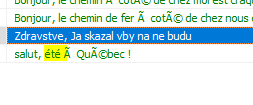
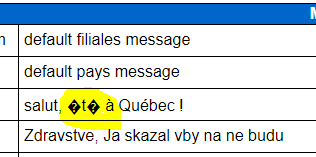
Current behavior
"salut, été à Québec !"

Expected behavior
"salut, été à Québec !"
Possible solution
Provide a way to change display encoding.
Environment
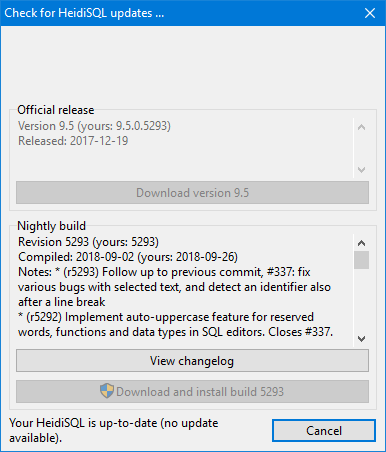
- HeidiSQL version: 9.5.0.5293
- Database system and version: MySQL 5.1.73-community
- Operating system: Windows
 serhioV
All 13 comments
This is not an error in HeidiSQL, but a wrong usage of charsets. You should check what charset your webpage uses to communicate with MySQL. Often you will find some SET NAMES utf8 query in your application, or a call to mysqli_set_charset(). If you cannot find such a call or query, your communication falls back to the server variable character_set_server. Please check with SHOW VARIABLES LIKE 'character_set%' and post the results here.
Also, the columns/table charset is relevant here. Please post the result of SHOW CREATE TABLE mytable here.
 ansgarbecker
on 27 Sep 2018
ansgarbecker
on 27 Sep 2018
This is not an error in HeidiSQL, but a wrong usage of charsets. You should check what charset your webpage uses to communicate with MySQL. Often you will find some
SET NAMES utf8query in your application, or a call tomysqli_set_charset(). If you cannot find such a call or query, your communication falls back to the server variablecharacter_set_server. Please check withSHOW VARIABLES LIKE 'character_set%'and post the results here.Also, the columns/table charset is relevant here. Please post the result of
SHOW CREATE TABLE mytablehere.

mysql> SHOW CREATE TABLE sources;
+---------+-----------------------------------------------------------------------------------------------------------------------------------------------------------------------------------------------------------------------------+
| Table | Create Table |
+---------+-----------------------------------------------------------------------------------------------------------------------------------------------------------------------------------------------------------------------------+
| sources | CREATE TABLE sources (
SourceId int(11) NOT NULL AUTO_INCREMENT,
Label longtext,
Description longtext,
IconUrl longtext,
PRIMARY KEY (SourceId)
) ENGINE=InnoDB AUTO_INCREMENT=3 DEFAULT CHARSET=utf8 |
+---------+-----------------------------------------------------------------------------------------------------------------------------------------------------------------------------------------------------------------------------+
1 row in set (0.00 sec)
serhioV
on 27 Sep 2018
Your character_set_server is latin1. So, unless you fire SET NAMES utf8 in your web application, or call mysqli_set_charset() at some point, you store latin1 text in your table. You also _read_ the latin1 encoded text, so everything seems right (in your web application!). When you access the table with any utf8-capable client (like HeidiSQL, but also Workbench and others), you see garbled text.
Solution is to fire SET NAMES utf8 or to call mysqli_set_charset() in your web application. Unfortunately, this will show you the same garbled text as you now see in HeidiSQL. So you need to convert the contents in your tables from latin1 to utf8 first.
ansgarbecker
on 27 Sep 2018
how do you comment the DEFAULT CHARSET=utf8 on the create table script?
serhioV
on 27 Sep 2018
anyway, what is the problem to HeidiSQL to be able to display its table data in "latin1" encoding, if someone use it?
actually there is any way to personalize the encoding of the displayed data in the sql client.
the database encoding is one thing. but the HeidiSQL interface is another one.
serhioV
on 27 Sep 2018
The table structure is very ok, only you store latin1 in it instead of utf8 text. And this is what is broken here.
HeidiSQL cannot know that your table contains latin1 chars. As the table and columns are defined as utf8, HeidiSQL reads them as such. Also any other client won't be able to know that. Please test any other sql client on your table.
ansgarbecker
on 27 Sep 2018
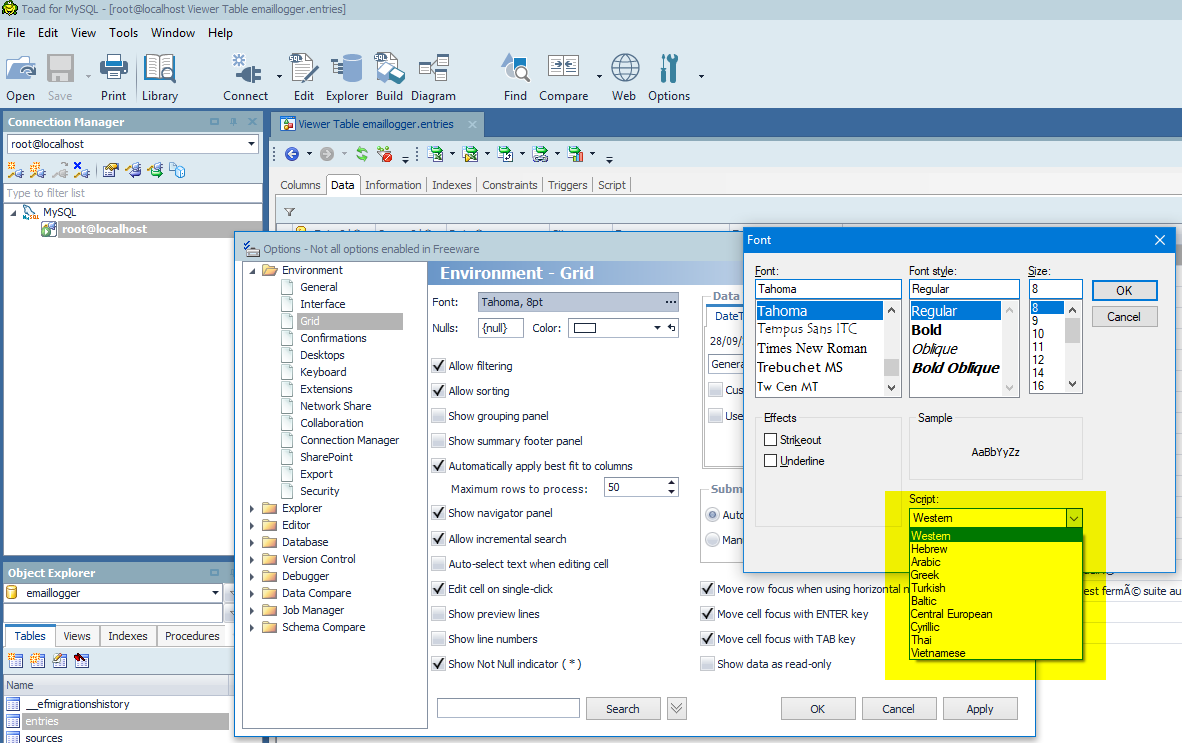
the clients shoult not know anything. just It should be able to display different encodings, when asked to change the display encoding by the user.
This is how, say, TOAD manages it
serhioV
on 28 Sep 2018
The table structure is very ok, only you store latin1 in it instead of utf8 text. And this is what is broken here.
HeidiSQL cannot know that your table contains latin1 chars. As the table and columns are defined as utf8, HeidiSQL reads them as such. Also any other client won't be able to know that. Please test any other sql client on your table.
How do I store latin1 if the create table script says
DEFAULT CHARSET=utf8 |
serhioV
on 28 Sep 2018
How do I store latin1 if the create table script says
DEFAULT CHARSET=utf8 |
Just by leaving the connection in latin1 mode. I already explained that earlier.
You could show how Toad or some other client displays your table contents. (without tweaking the font)
ansgarbecker
on 28 Sep 2018
Please use mysqli_set_charset() or SET NAMES utf8 in your web application, or set utf8 encoding for the connection in the way your application needs it. I'll close this issue for now, until we see if there really is an issue in HeidiSQL.
ansgarbecker
on 4 Oct 2018
How to handle "shit":
https://heiglandreas.github.io/slidedeck/HowToHandlePILE_OF_POO/20180922-phpdd/index_online.html#/52
MySQL is a charset mess.
 oliveru
on 4 Oct 2018
oliveru
on 4 Oct 2018
The problem of collations and charsets is chronic, its not happens only in
MySQL (because we have other factors to interfer). The explanation is very
good (really), but it did "shit" when it wrote ~ "or use a (real) database
like PostgreSQL" ~
:/
Lucas Augusto Milanes
Skype: Lucas Augusto Milanes
Cel: +55 (11) 98160-3130
Em qui, 4 de out de 2018 às 10:43, Oliver Ulpts notifications@github.com
escreveu:
How to handle "shit":
https://heiglandreas.github.io/slidedeck/HowToHandlePILE_OF_POO/20180922-phpdd/index_online.html#/52
MySQL is a charset mess.
—
You are receiving this because you are subscribed to this thread.
Reply to this email directly, view it on GitHub
https://github.com/HeidiSQL/HeidiSQL/issues/356#issuecomment-427023680,
or mute the thread
https://github.com/notifications/unsubscribe-auth/AKtbtS34ZULTfOZPK3OOldwmxeITD2rfks5uhhB2gaJpZM4W6TWW
.
 lukinhaspm
on 4 Oct 2018
lukinhaspm
on 4 Oct 2018
How to handle "shit":
https://heiglandreas.github.io/slidedeck/HowToHandlePILE_OF_POO/20180922-phpdd/index_online.html#/52MySQL is a charset mess.
Really helpful, I just didn't understand what @ansgarbecker tried to explain to me, now I see, I chan change the connection charset, that, it seems, is not UTF8 by default ! (
serhioV
on 9 Oct 2018
Related issues
 altmvogi
·
5Comments
altmvogi
·
5Comments
 hrvoj3e
·
4Comments
hrvoj3e
·
4Comments
 catamphetamine
·
3Comments
catamphetamine
·
3Comments
 BraveOtter
·
4Comments
BraveOtter
·
4Comments
 Ivan-Perez
·
3Comments
Ivan-Perez
·
3Comments
Most helpful comment
How to handle "shit":
https://heiglandreas.github.io/slidedeck/HowToHandlePILE_OF_POO/20180922-phpdd/index_online.html#/52
MySQL is a charset mess.