Heidisql: Ctrl + Backspace in Textboxes: delete whole word, not add rectangle
Steps to reproduce this issue
- type two search terms in database or table filter
- separate them with some regex (I often use
pipe) - remove the filter with
Ctrl + backspaceto delete entire word
Current behavior
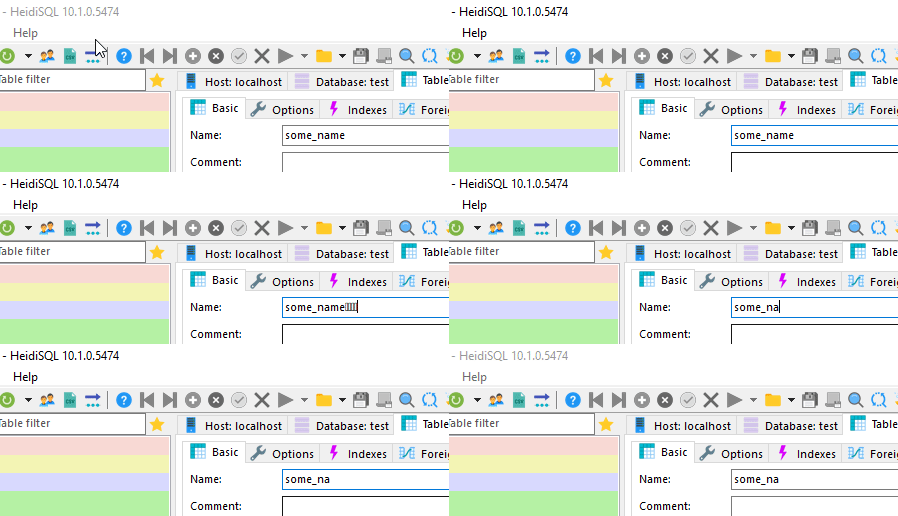
at present Ctrl + backspace will write a rectangle
Expected behavior
the entire word in front of the cursor is removed
this works well in the query editor or quick filters (multi line text boxes)
Other areas
this could be applied in most textboxes but won't be as relevant. See table tabs in Basic, Options, Indexes and Foreign keys. I suppose it's the same issue as in Win Forms; all Textboxes show this behaviour. If it only deleted one letter but adding a box is just weird.
Possible solution
- I know this from WinForms where I have to check the keys typed and then remove the last word manually up and including the next non-letter and non-digit character from the end
- see answer by Patrick McDonald to get some idea how this could be fixed manually
Environment
- HeidiSQL version:
9.5.0.5253 - Operating system:
Win 10 1709
 penCsharpener
All 21 comments
yes, I'm always using the latest nightly and it's still there. It's not in the Query tab textbox but all the text fields like search.
penCsharpener
on 7 Feb 2019
Still an issue in 5565. It would be a nice little enhancement!
 okneloper
on 14 May 2019
okneloper
on 14 May 2019
Same for me.
And I want to add that Ctrl+Delete doesn't work in Query tab (but works in other inputs). It should delete word from the right side of a cursor.
 decadence
on 25 Sep 2019
decadence
on 25 Sep 2019
And I want to add that Ctrl+Delete doesn't work in Query tab (but works in other inputs)
How can it be you're experiencing the exact opposite than the other reporters here? Maybe on Wine?
 ansgarbecker
on 25 Sep 2019
ansgarbecker
on 25 Sep 2019
No, I'm on Windows 10.
Seems like you misread my message. I told about Ctrl+Delete on Query tab. Ctrl+Backspace issue is still there for me.
decadence
on 25 Sep 2019
Yes, I misread that. Indeed, I can confirm that Ctrl+Backspace does not work in single line edit-boxes, and Ctr+Delete does not work in SQL areas.
ansgarbecker
on 25 Sep 2019
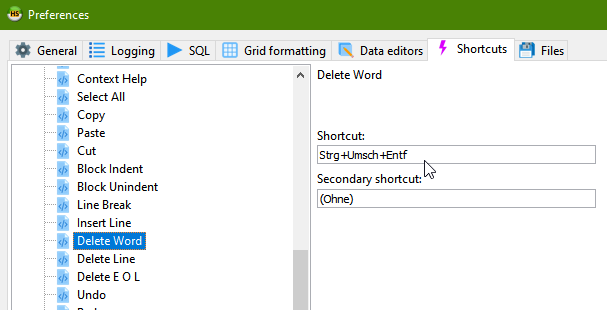
Though SynEdit supports that "delete next word" - by default it has Ctrl+Shift+Delete Ctrl+T. You can change that in Tools > Preferences > Shortcuts > SQL editing:
ansgarbecker
on 25 Sep 2019
Thanks.
But it's strange default shortcut because all text editors use Ctrl+Delete.
decadence
on 25 Sep 2019
According to the relevant line in SynEdit this is by default Ctrl+T, which is overridden by HeidiSQL for "new tab". I'm scratching my head where this Ctrl+Shift+Delete comes from.
ansgarbecker
on 25 Sep 2019
Is there any chance to make Ctrl+Delete default for consistency with other editors?
decadence
on 25 Sep 2019
Yes, I can try to initialize it by default to that.
ansgarbecker
on 25 Sep 2019
Thanks 👏
decadence
on 25 Sep 2019
I just pushed a few changes, which should enable Ctrl+Backspace on most (if not all) edit boxes in HeidiSQL. This implements a workaround I found here, though it works very good for me here. For those who want to check, please wait half an hour and download the next build.
ansgarbecker
on 25 Sep 2019
yes, it works. Thanks so much.
penCsharpener
on 25 Sep 2019
New default shortcut for "delete next word" in the next build is changed from Ctrl+T to Ctrl+Del.
No complaints so far, so I'll close this issue. Please shout if I am missing something.
ansgarbecker
on 26 Sep 2019
Shit: The popup text editor now does not accept the Enter key - instead it selects the text.
ansgarbecker
on 27 Sep 2019
Next build leaves that hack away for multi-line memos, for which the Enter key was broken. I have no clue how to fix that Ctrl+Backspace for these.
ansgarbecker
on 28 Sep 2019
@ansgarbecker I found another strange default hot key: why default key for Undo is Alt+Backspace and not Ctrl+Z as in all programs in the world? :)
In Query tab Ctrl+Z cancels only few steps. Alt+Backspace works normal.
decadence
on 3 Oct 2019
Unfortunately, I had to revert my previous solution for supporting Ctrl+Backspace. This introduced too many new bugs. I will have to find a better one.
Here's another approach: simulating the selection and removal of the word left to the cursor in an OnKeyPress event. (or maybe better using some Windows message event)
ansgarbecker
on 8 Oct 2019
Just pushed a new attempt to support Ctrl+Backspace, using an application wide OnShortCut event:
- works in all one-line edit controls, multi-line editors and editable comboboxes
- does not break Enter key in multi-line editors
- does not break Tab key in grid field editors
- new issue: breaks undo history :/
Works well enough for me. No clue how to fix the undo issue though.
Could someone please test the new build?
ansgarbecker
on 19 Oct 2019
- undo works, now that i delete the word via
EM_REPLACESELmessage
ansgarbecker
on 19 Oct 2019
Related issues
 yz778
·
4Comments
yz778
·
4Comments
 magnetik
·
4Comments
magnetik
·
4Comments
 andreybatalof
·
4Comments
andreybatalof
·
4Comments
 dzintb
·
3Comments
dzintb
·
3Comments
 cammudito
·
3Comments
cammudito
·
3Comments
Most helpful comment
I just pushed a few changes, which should enable Ctrl+Backspace on most (if not all) edit boxes in HeidiSQL. This implements a workaround I found here, though it works very good for me here. For those who want to check, please wait half an hour and download the next build.