Heidisql: enhancement: (add option) restore unsaved queries
Current behavior
- new queries open in a new tab and have a
*when unsaved - on closing HeidiSQL user is asked whether to save those queries
- unsaved queries are lost when restarting HeidiSQL next time
Expected behavior
- Option for the user to restore unsaved queries next time
- Notepad++ has it by default, that unsaved tabs are automatically saved and restored
- also browser have option to restore tabs on next restart
- if HeidiSQL crashes it won't lose those user queries
Possible solution
- HeidiSQL could automatically save it's query tabs in
%appdata%\HeidiSQL\unsaved Queries - if this in enabled HeidiSQL won't ask anymore to save them.
Environment
- HeidiSQL version:
9.5.0.5248 - Operating system:
Windows 10 1709
Comment
I use those queries for debugging. They are not relevant enough to save them for ever but I'd like them to be there for 1-2 weeks until they aren't relevant anymore.
 penCsharpener
All 43 comments
additionally it would be nice to be useful to hit F2 on a query tab to rename it in place (without save file dialog) because Query 1, Query 2, Query 3, Query 4 is hard to tell apart.
I also often have multiple Windows open of HeidiSQL. In that case it could check whether ie. Query 1.sql already exists in the %appdata% folder and iterate the number up until there is no file collision.
When all HeidiSQL Windows are close and a new instance is started, all those unsaved queries would open again in one instance. This could get messy but I guess there is no way around that. That's the time to tidy up.
Thanks for the best SQL-Browser on Windows!
penCsharpener
on 16 Feb 2018
I think the problem with multiple instances could be partially solved if the unsaved tabs are saved in subfolders by connection name like:
%appdata%HeidiSQL\unsaved Queries\[CONNECTION_NAME]\query_*.sql in my case I'm used to have several instances opened but connected to a different DBs.
 jcguevara
on 21 Feb 2018
jcguevara
on 21 Feb 2018
Please, remember this enhancement was requested for the first time in 2012:
https://sourceforge.net/p/heidisql/tickets/2991/
A couple of issue-tracker migrations since then...
Thank you for your efforts, guys. I really like HeidiSQL, but I'm scared of using it sometimes because it does not backup your work.
Kind regards
 carlosfrutos
on 10 Apr 2018
carlosfrutos
on 10 Apr 2018
I vote for this as well. Pretty simple (seemingly) change, but a major enhancement to the user experience!
 okneloper
on 17 Aug 2018
okneloper
on 17 Aug 2018
MySql workbench even reopens tabs that were saved but visible when the program is closed and reopened, not just unsaved queries. This is helpful when you are working on a project that needs input from several queries to figure out, but spans multiple days because of phb interruptions :)
 sloboy
on 25 Aug 2018
sloboy
on 25 Aug 2018
I also would like to see this.
I use Heidi for any MySQL queries I do, and this would be a very nice enhancement.
 kiltannen
on 30 Oct 2018
kiltannen
on 30 Oct 2018
This is a critical feature. I love Heidi and appreciate all great effort, but I would prioritize this over other enhancements.
 johnnyPescarul
on 10 Jan 2019
johnnyPescarul
on 10 Jan 2019
This feature would greatly increase my workflow, since i do not have the time to save every query - but might need them later.
 Miktarbad
on 24 Jan 2019
Miktarbad
on 24 Jan 2019
Been looking for this as well. My co-worker told me he loves Heidi but this is a feature that is missing and would help him a lot. Hope it gets implemented soon.
 phiter
on 2 Feb 2019
phiter
on 2 Feb 2019
I am also looking forward for this feature. Will improve my experience a lot.
 styler2go
on 15 Feb 2019
styler2go
on 15 Feb 2019
This would also save those who get frequent crashing of HeidiSQL and lose large queries that they were working on. Often when a crash occurs an exception dialog will popup and sometimes clicking on "continue" will actually close the program, or "continue" won't be available. In either case, trying to copy the query out of the tab before closing the exception box is not possible and unsaved queries are lost. Notepad++ also has this feature and it's saved me countless times.
 mfaustusi
on 26 Feb 2019
mfaustusi
on 26 Feb 2019
Hi @ansgarbecker, since quite a few people would find this useful can you give us an idea whether you have already been working on this or when we can expect this in a nightly version? Of course you have a bunch of other things in your 10.2 milestone. This is not to rush anything, just informational.
penCsharpener
on 27 Feb 2019
This is one of the most and longest wish from many users, so it will be one of the next feature I am going to implement.
 ansgarbecker
on 28 Feb 2019
ansgarbecker
on 28 Feb 2019
Fantastic news, thanks @ansgarbecker !
phiter
on 28 Feb 2019
Notepad++ has this restore-feature, and its preference dialog looks like this:

While HeidiSQL only has this option:

So, the approach in Notepad++ is missing the option to ignore unsaved text in a tab without even auto-saving it.
In order not to break this old feature of HeidiSQL, I should add a new "Files" tab to the preferences dialog, containing that old "_Prompt to save_" checkbox. Additionally, we will have a new checkbox like in Notepad++, labelled "_Automatically backup unsaved files_". This option applies to tabs _left open_ when exiting HeidiSQL, not to _closed_ tabs, in contrast to the _Prompt_ option.
And finally I think there is no need to even customize the interval for saving these backups, like in Notepad++. Instead, Heidi should save these temporary files every 10 seconds, and only if content was changed.
By the way, is it a good idea to leave out files bigger than let's say 10MB? I'm quite sure such bigger files are normally automatically generated. And it may introduce a performance issue if HeidiSQL e.g. has to save a 5GB file every 10 seconds.
ansgarbecker
on 10 Mar 2019
10MB sound way too much I find. If I export data as SQL and paste it in a tab, then I don't want that saved.
10kb or 100kb would already be very big queries.
What about putting the file size as another option if you already create a new settings tab? My limit would likely be around 10kb.
penCsharpener
on 10 Mar 2019
Yeah I think 10MB is huge for a file. If you want to go full customization, this can be a configurable field where you set max size in kb.
phiter
on 11 Mar 2019
To ensure this feature is done right there should be some forethought about being able to recover from a corrupt cache that prevents HeidiSQL from loading properly, such as a command line option to skip loading background-saved queries, or on launch after a crash give the option to skip loading background saved queries that may be preventing it from starting up.
Also, in regards to file size I would assume it would be fairly trivial to compress the queries before saving to disk since SQL text is highly compressible. Very large queries likely have a lot of repeating text and could be reduced in size drastically with most compression algorithms.
mfaustusi
on 11 Mar 2019
I would like this feature very much. I would also like some sushi.
 pipanni
on 12 Mar 2019
pipanni
on 12 Mar 2019
I would appreciate this feature.
 dig314
on 12 Mar 2019
dig314
on 12 Mar 2019
I think I have most parts of this new feature ready to use. Some translation strings are missing yet, and probably not done enough testing yet. For all who want to test the new auto-restore feature:
- update to the new nightly build
- watch out for unsaved query tabs, either after loading a file from harddisk or without a file in the back
- if you want to know more exactly what's going on:
- activate Preferences > Logging > "Debug" messages
- watch the auto-created directory
C:\Users\<yourUsername>\AppData\Roaming\HeidiSQL\Backups\ - watch the new setup file
C:\Users\<yourUsername>\AppData\Roaming\HeidiSQL\tabs.ini
The auto-restore feature is activated by default, and can be disabled in Preferences > Files > "Reopen previously used SQL files..."
ansgarbecker
on 7 Apr 2019
I think the current implementation is not yet safe against running multiple instances... Please be aware of that if you already use this feature.
ansgarbecker
on 8 Apr 2019
nothing important should remain unsaved anyway. It can't be worse than before the feature implementation when all the unsaved queries were gone by default.
penCsharpener
on 8 Apr 2019
Not really. Previously it was warning about unsaved queries, and wouldn't close until you save or discard them.
If atm it's closing without prompt and overwriting other queries, that's unsafe indeed. Thanks for flagging @ansgarbecker
okneloper
on 8 Apr 2019
- watch the auto-created directory
C:\Users\<yourUsername>\AppData\Roaming\HeidiSQL\Backups\- watch the new setup file
C:\Users\<yourUsername>\AppData\Roaming\HeidiSQL\tabs.ini
Will it also be implemented for the portable version?
 pantantrollo
on 10 Apr 2019
pantantrollo
on 10 Apr 2019
The portable is the same executable as the normal version, it just gets flagged via the portable.lock file. But I suppose your question was meant for the directories, which are not "quite portable". Well I did not see the need for it yet, but it may make sense. In the portable version, the tabs.ini could live in the directory with heidisql.exe, and the "Backups" directory could be auto-created as a subfolder of it. Does that make sense?
ansgarbecker
on 11 Apr 2019
Right, something like that.
The "tabs.ini" that was in the same place as the executable heidiSql.exe (as is its configuration), for any of the versions, portable and installable.
The directory "backups" or that its location could be configured (either via config gui or editing the config file) or failing that, for example if it detects the "portable.lock" or 2portable_settings.txt" file, then create the directirios "backups" in that same place, otherwise, in %appdata%\heidisql (for example)
Thx
pantantrollo
on 11 Apr 2019
done:
[x] prevent file locks when multiple instances access tabs.ini
[x] store tabs.ini and backups folder locally in portable mode
There is still the chance one instance overwrites a backup file from another running instance. So I thought I could add something like this:
- store current process id to each section in tabs.ini
- when restoring tabs, check if the process id is running
- if it's still running: don't restore that tab
- if it's not running: replace it with the current process id and restore tab
Read: the first instance restores tabs from the previous one. Second and later instances do not restore tabs, but can add new tabs. This way, no tab content gets lost. If you exit 3 instances with let's say 2 tabs, then the next started instance should restore 6 tabs. Or, if 1 of the 3 instances is still running, then 4 tabs get restored.
ansgarbecker
on 12 Apr 2019
This only seems to restore the first tab for me atm
Edit: Looks like the tab restore function needs to be offset by 1 when restoring? I exit with 4 query tabs open (unsaved), then restart HeidiSQL, and I get 3 query tabs back
... and then after trying it again after typing this, it consistently auto-restores. Not going to delete this comment myself just incase this needs looking into
 3vcloud
on 12 Apr 2019
3vcloud
on 12 Apr 2019
I just tested with a blank setup and the latest build. I can reproduce that if I am very quickly closing HeidSQL, before the 10 seconds timer for storing the tab setup has reached its first end. So I think the call of MainForm.StoreTabs when closing HeidiSQL is not fired for some reason.
=> fixed
ansgarbecker
on 13 Apr 2019
Next nightly build should work stable with multiple HeidiSQL instances, each of them managing its own tab setup, writing to the same tabs.ini file. Tabs get restored if no other running instance is using them.
Any more issues here? Please report if you find one.
ansgarbecker
on 13 Apr 2019
What an awesome improvement to my day-to-day work! Thanks for taking the time to implement this!
okneloper
on 13 Apr 2019
I am closing this issue now, as there are no complaints for some days, and I can also find nothing to change. Please shout if you find more issues.
ansgarbecker
on 16 Apr 2019
I think this was a great improvement, but I think the norm with other applications (e.g. Notepad++) is that when the user manually closes a Window it always asks him for confirmation to save the contents or not. Only when the program is closed (e.g. when it is upgrading to a new version) does the auto-backup apply.
 igitur
on 30 Apr 2019
igitur
on 30 Apr 2019
I agree with @igitur , this is a bug to do with this change. Tabs still need to prompt if the user closes them within the application
3vcloud
on 30 Apr 2019
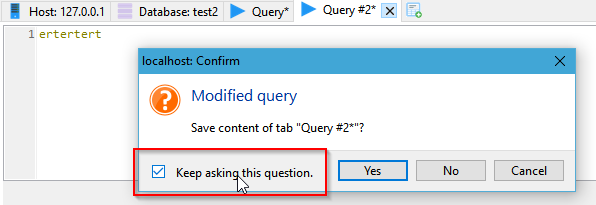
Yes, when you close a tab, it should ask you. But this is the case, at least if you did not disable this prompt:
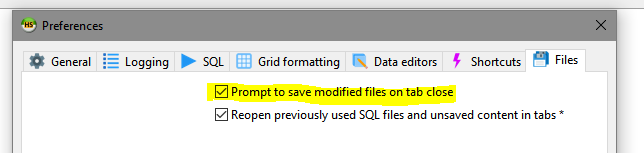
Is this not intuitive in some way? Or maybe because the user tends to disable the option?
ansgarbecker
on 30 Apr 2019
Ah, then I misunderstood that question. I assumed it meant specifically to "Keep asking this question" when closing the files in bulk (e.g. when closing/upgrading the application).
igitur
on 30 Apr 2019
I have that box ticked, and my application doesn't prompt me when I close a tab. I may have unticked Keep asking this question in the past, but that should just update Prompt to save modified files on tab close, yes?
Edit: No, you're right - its my settings!
3vcloud
on 30 Apr 2019
Still an issue, described in the forum: physically existing files loaded into a tab are restored even when the user closed them in the previous session.
ansgarbecker
on 3 Jun 2019
Just fixed that for the next build. Closed tabs with manually loaded files should no longer be restored in the next session.
ansgarbecker
on 3 Jun 2019
Can confirm the fix in build 10.1.0.5585.
 ilpssun
on 4 Jun 2019
ilpssun
on 4 Jun 2019
Should bound parameters also be restored?
 WesleyM77
on 24 Jun 2019
WesleyM77
on 24 Jun 2019
They are not currently, but I guess they should be, right? But please file another issue for solving that.
ansgarbecker
on 24 Jun 2019
Related issues
 UnicornsRock420
·
4Comments
UnicornsRock420
·
4Comments
 slaFFik
·
3Comments
slaFFik
·
3Comments
 andreybatalof
·
4Comments
andreybatalof
·
4Comments
 naoma123
·
3Comments
naoma123
·
3Comments
 chrysler5798
·
5Comments
chrysler5798
·
5Comments
Most helpful comment
This is one of the most and longest wish from many users, so it will be one of the next feature I am going to implement.