Heidisql: Upgrade autocompletion feature: Always show the autocomplete dropdown after typing table. or table_alias. (and continue to show as I type the column name)
Current state
When using autocompletion after an alias there is a delay of half a second before the autocomplete list appears.
Problem
This means you have to wait for the list to appear before typing the first few letters. Otherwise if you start typing the alias and a period and type straight away, the autocomplete will never appear (which can be an interruption to your typing flow).
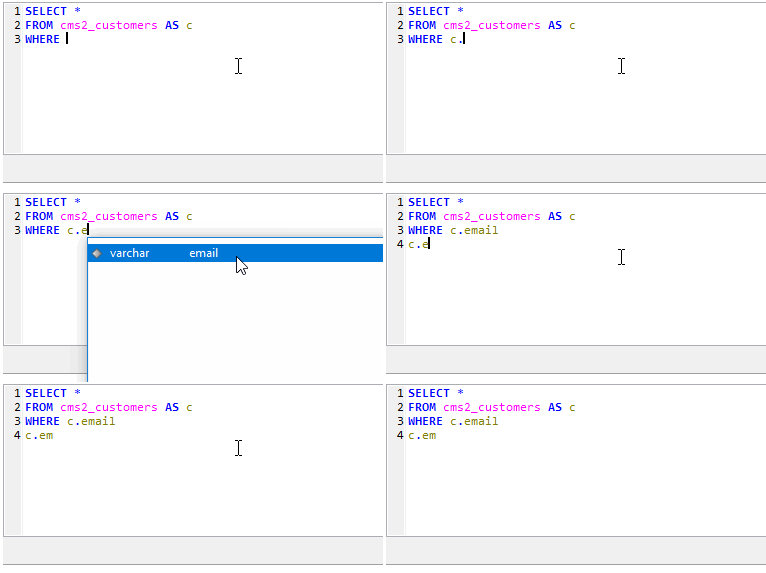
(Demo above: the first "c." shows the delay, the second, shows that the autocomplete list does not appear when you keep typing immediately)
Suggested solution
Allow the autocompletion TimerInterval to be customizable in the settings dialog.
Example setting text:
Autocompletion delay (ms): [ 500 ]
UPDATE from discussion below:
- Don't introduce another setting
- Instead, improve the feature that sits behind the existing
Enable autocompletionsetting
Updated feature should:
- Always show the autocomplete dropdown after typing
table.ortable_alias.(already exists but currently has 500ms delay). - Continue to show autocomplete dropdown as a user types ahead from
table.ortable_alias., filtering the results - If the autocomplete dropdown is dismissed (pressing ESC or clicking elsewhere), re-activate the dropdown automatically if another valid character is entered eg.
table.col> ESC >table.colu(should show dropdown again, filtered)
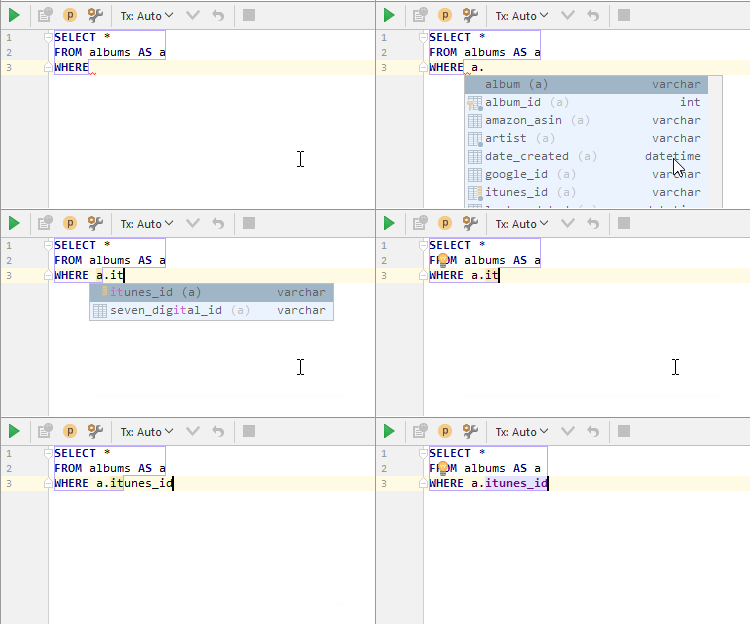
Demo of implemented feature in DataGrip
Issue origin: https://www.heidisql.com/forum.php?t=24719#p24726
 jaredlt
All 9 comments
You can always use Ctrl + Space to open the autocomplete manually (this works in many IDEs). Often you do not need to use mouse at all to select from the list: type a few distinctive letters, ctrl + space, enter.
Not sure that the timeout option is really needed.
 fifonik
on 12 Jan 2018
fifonik
on 12 Jan 2018
@fifonik I am aware that you can manually invoke the autocomplete dialog using CTRL + Space. However, what I'd like to control is _when_ the dialog appears automatically after a table alias and a period are typed.
Once you type a table alias and the period, there are only a set number of valid inputs that can proceed (ie. the table column names). HeidiSQL already knows this and presents the list of table names after you type the period. However, you have to wait half a second for the list to appear. For tables I use frequently, I often know the name of the column, I just want to use the autocomplete dialog as a type-ahead helper. I'd like to be able to keep typing immediately after the period and for the autocomplete list to appear and filter down to the remaining valid entries as I keep typing. Then as you say, I can hit enter and I'm done.
Having to invoke CTRL + Space every time is something I'd like to avoid. Especially when HeidiSQL actually already has the feature I want to use (just with a small delay that interrupts flow). It's a great productivity booster when you're using the tool all day.
@ansgarbecker perhaps the issue title is a bit solution-heavy. It's really all about "Option to always show the autocompletion dialog after a table alias and period" (although I'm guessing setting the TimerInterval to 0 will do just that).
As an aside, DataGrip is the only tool I've used that implements this feature well (however, I find HeidiSQL much more intuitive than DataGrip). Their implementation works well because even if you cancel out of the autocomplete dialog (after beginning to type part of the column name), if you type another letter it will again bring up the dialog with all remaining matches.
jaredlt
on 13 Jan 2018
I'm not saying that we do not need improvements in Heidi's autocomplete.
I said that the timeout before triggering autocomplete option looks very strange. And I do not like programs with hundreds of strange options because in this case it is hard to find across them useful...
I do not remember that I ever see such option (timeout before triggering autocomplete dropdown) anywhere. Not in Notepade++, VS (I don't use recent versions, it might be there), VS Code, Sublime, Notepad2, Akelpad or anything else I used before.
If I know the column name and I'd like to substitute it, I'm keying in 'table.co' and then pressing Ctrl + Space, Ctrl + Enter. Job's done (I have 'table.column' substituted). And I do not need to wait anything at all.
Instead of the timeout I'd prefer to see in Heidi the following changes related to autocomplete:
- Timeout changed to 0.2 - 0.3 sec
- Filtered autocomplete dropdown shown when timeout reached even if something else was keyed in after the dot. This allow you to continue type and not waiting for the dropdown when the dot is keyed in.
- Substitutes the first filtered autocomplete item with Tab key (as in many other editors).
However, nothing should be added to options in addition to existing 'enable auto-completion'.
fifonik
on 15 Jan 2018
@fifonik ok I'm with you now and I agree. In summary:
- Don't introduce another setting
- Instead, improve the feature that sits behind the existing
Enable autocompletionsetting
Updated feature should:
- Always show the autocomplete dropdown after typing
table.ortable_alias.(already exists but currently has 500ms delay). - Continue to show autocomplete dropdown as a user types ahead from
table.ortable_alias., filtering the results - If the autocomplete dropdown is dismissed (pressing ESC or clicking elsewhere), re-activate the dropdown automatically if another valid character is entered eg.
table.col> ESC >table.colu(should show dropdown again, filtered)
I've left out the TimeInterval change as it feels like an implementation detail.
NB. Pressing Tab from the autocomplete dropdown works for me.
jaredlt
on 15 Jan 2018
Well I'm afraid this is not some wish list here - I have to use what SynEdit offers here. I will see what I can do here.
 ansgarbecker
on 16 Jan 2018
ansgarbecker
on 16 Jan 2018
@ansgarbecker understood. Thanks 👍
jaredlt
on 16 Jan 2018
Workaround: identify any TABLE AS ALIAS (/(?<source>\w+)\s+AS\s+(?<alias>\w+)/) and display columns from it. It will not cover all scenarios, but will cover 90% of cases I guess.
 rentalhost
on 12 Feb 2018
rentalhost
on 12 Feb 2018
What I am interested is whether I can change the shortcut Ctrl + Space to Tab? Because Ctrl + Space is the default shortcut to switch between English mode and Chinese mode for "Chinese Pinyin Input Method Editor" on Windows 10.
 psychelzh
on 7 Dec 2018
psychelzh
on 7 Dec 2018
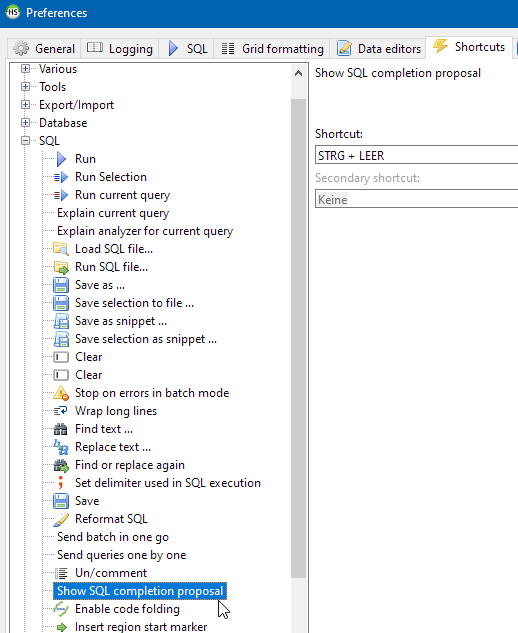
Please note that #972 is finished in v11.1, so now you can use a custom shortcut to trigger the code completion:
ansgarbecker
on 3 Dec 2020
Related issues
 rkmaier
·
5Comments
rkmaier
·
5Comments
 magnetik
·
4Comments
magnetik
·
4Comments
 cammudito
·
3Comments
cammudito
·
3Comments
 naoma123
·
3Comments
naoma123
·
3Comments
 slaFFik
·
3Comments
slaFFik
·
3Comments
Most helpful comment
What I am interested is whether I can change the shortcut Ctrl + Space to Tab? Because Ctrl + Space is the default shortcut to switch between English mode and Chinese mode for "Chinese Pinyin Input Method Editor" on Windows 10.