Handson-ml: User Warning: "Timeout or by a memory leak"
I run GridSearch on Surface Pro, and get a Userwarning: A worker stopped while some jobs were given to the executor. This can be caused by a too short worker timeout or by a memory leak. ". I tried reducing the number of parameters and it can work. Does that mean surface pro is not capable to this this kind of computing?
 Tigergree
All 9 comments
Probably. you should try the same code in another plataform just to be sure.
 r-ichi
on 4 Nov 2018
r-ichi
on 4 Nov 2018
Probably related to this issue https://github.com/joblib/joblib/issues/781
 sainathadapa
on 12 Dec 2018
sainathadapa
on 12 Dec 2018
I had similar challenge when doing a Gridsearch on my Ubuntu machine.
def Grid_Search_CV_RFR(X_train, y_train):
  #model
  model = XGBRegressor()
  #parameters
  param_grid = {
          "n_estimators" : [10,20,30, 50],
          'max_depth': [4, 5, 6],
          'min_child_weight': [11],
          }

  grid = GridSearchCV(model, param_grid,
                      cv=KFold(n_splits=10, shuffle=True),
                      n_jobs = -1)

  grid.fit(df_X, df_y)
  return grid.best_estimator_, grid.best_score_ , grid.best_params_
It turns out the memory leak was because Gridsearch runs multiple parallel process and this use all my CPU. This infact is the reason for the memory leakage warning.
What i did was set the n_jobs to 1, meaning it should use only one processor at a time.
def Grid_Search_CV_RFR(X_train, y_train):
  #model
  model = XGBRegressor()
  #parameters
  param_grid = {
          "n_estimators" : [10,20,30, 50],
          'max_depth': [4, 5, 6],
          'min_child_weight': [11],
          }

  grid = GridSearchCV(model, param_grid,
                      cv=KFold(n_splits=10, shuffle=True),
                      n_jobs=1)

  grid.fit(df_X, df_y)
  return grid.best_estimator_, grid.best_score_ , grid.best_params_
Although this solves the problem of the warning, it increases the Gridsearch time and slows the output time. This may not be the best solution for big data or production environment.
What you can do in this case is to suppress the warning
import warnings
warnings.filterwarnings("ignore")
 kennedyCzar
on 25 Apr 2019
kennedyCzar
on 25 Apr 2019
same issue on mac 10.14.5
>>> print(tf.__version__)
1.13.1
>>> print(tf.keras.__version__)
2.2.4-tf
 robie2011
on 25 Jul 2019
robie2011
on 25 Jul 2019
Same issue Asus F556U:
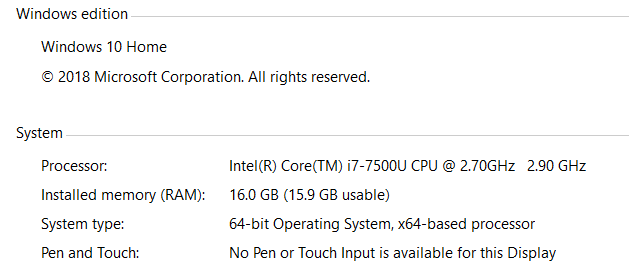
 dhernandezgt
on 10 Oct 2019
dhernandezgt
on 10 Oct 2019
Thank you all for your feedback. Memory errors are among the most frustrating errors you can get.
Since setting n_jobs=1 works around the problem, this bug seems related to parallelism. This joblib issue referenced by @sainathadapa (thanks for pointing it out) seems related, and it was closed as the root cause seemed to be within NumPy (see this NumPy issue). This NumPy issue was fixed in October 2018 so perhaps simply upgrading NumPy to the latest version may fix the problem.
Can you please try that and confirm that it works?
 ageron
on 14 Oct 2019
ageron
on 14 Oct 2019
My question is does this error stop the job? because I just got this error however the cell is still running. I don't know if I should interrupt the kernel or let it keep running. I probably won't get an answer for this in time, but what the hell...
 mengeziml
on 11 Nov 2019
mengeziml
on 11 Nov 2019
Hi @mengeziml ,
I've never had this error, so it's hard for me to tell you whether or not the job is actually continuing or not, but if I were to bet I would say it's not going to end well, it's probably stuck in a deadlock. I would just interrupt it, reboot (whenever I get RAM issues, I prefer to reboot to be safe) and then try upgrading NumPy (see my previous comment) and run the code again. But if you can afford to wait for 24 hours, you could just let it run and see what happens. If you're trying to run one of the notebooks in this project, then they should all run in less than 24 hours (except for the DQNs in chapter 18, which may take longer).
Hope this helps.
ageron
on 12 Nov 2019
@ageron thank you for your response. I did eventually just have the mind to restart the kernel and remove the N_jobs = -1 to be on the safe side.
mengeziml
on 12 Nov 2019
Related issues
 nitml
·
5Comments
nitml
·
5Comments
 eliaperantoni
·
3Comments
eliaperantoni
·
3Comments
 aishwaryashinde6
·
5Comments
nitml
·
3Comments
aishwaryashinde6
·
5Comments
nitml
·
3Comments
 tetsuyasu
·
3Comments
tetsuyasu
·
3Comments
Most helpful comment
I had similar challenge when doing a Gridsearch on my Ubuntu machine.
It turns out the memory leak was because Gridsearch runs multiple parallel process and this use all my CPU. This infact is the reason for the memory leakage warning.
What i did was set the n_jobs to 1, meaning it should use only one processor at a time.
Although this solves the problem of the warning, it increases the Gridsearch time and slows the output time. This may not be the best solution for big data or production environment.
What you can do in this case is to suppress the warning