Handbrake: Reproducible Error: Add Selection results in An Unknown Error has occurred.
Problem description:
When using HandBrake for a while by adding items to a queue, the attached error happens and persists. After a HandBrake restart, everything works well for a while again.
Another way to reproduce this issue is to add several items to the queue per "Add Selection", than add some items per "Add to Queue" and than retry to use "Add Selection". Most of the times, the below error appears reproducible.
I am not sure if the error only appears while the queue is running or if it does also appear if it is not started or paused. However, I can safely reproduce it.
Note:
The first item of the "Add Selection" items is always added to the queue.
HandBrake version (e.g., 1.3.0):
Nightly 20200429183216-bcf0c66-master (2020042901)
Operating system and version (e.g., Ubuntu 19.10, macOS 10.15 Catalina, Windows 10 1909):
Windows 10 x64 Enterprise most recent version, all current drivers and updates. No beta.
Error message text and/or screenshot:
An Unknown Error has occurred.
System.Reflection.TargetInvocationException: Exception has been thrown by the target of an invocation. ---> System.NullReferenceException: Object reference not set to an instance of an object.
at HandBrakeWPF.ViewModels.PictureSettingsViewModel.SetSource(Source source, Title title, Preset preset, EncodeTask task)
at HandBrakeWPF.ViewModels.MainViewModel.SetupTabs()
at HandBrakeWPF.ViewModels.MainViewModel.set_SelectedTitle(Title value)
at HandBrakeWPF.ViewModels.MainViewModel.
at HandBrakeWPF.ViewModels.QueueSelectionViewModel.Add()
--- End of inner exception stack trace ---
at System.RuntimeMethodHandle.InvokeMethod(Object target, Object[] arguments, Signature sig, Boolean constructor)
at System.Reflection.RuntimeMethodInfo.UnsafeInvokeInternal(Object obj, Object[] parameters, Object[] arguments)
at System.Reflection.RuntimeMethodInfo.Invoke(Object obj, BindingFlags invokeAttr, Binder binder, Object[] parameters, CultureInfo culture)
at Caliburn.Micro.ActionMessage.<>c.<.cctor>b__33_0(ActionExecutionContext context)
at Caliburn.Micro.ActionMessage.Invoke(Object eventArgs)
at System.Windows.Interactivity.TriggerBase.InvokeActions(Object parameter)
at System.Windows.EventRoute.InvokeHandlersImpl(Object source, RoutedEventArgs args, Boolean reRaised)
at System.Windows.UIElement.RaiseEventImpl(DependencyObject sender, RoutedEventArgs args)
at System.Windows.Controls.Primitives.ButtonBase.OnClick()
at System.Windows.Controls.Button.OnClick()
at System.Windows.Controls.Primitives.ButtonBase.OnMouseLeftButtonUp(MouseButtonEventArgs e)
at System.Windows.RoutedEventArgs.InvokeHandler(Delegate handler, Object target)
at System.Windows.RoutedEventHandlerInfo.InvokeHandler(Object target, RoutedEventArgs routedEventArgs)
at System.Windows.EventRoute.InvokeHandlersImpl(Object source, RoutedEventArgs args, Boolean reRaised)
at System.Windows.UIElement.ReRaiseEventAs(DependencyObject sender, RoutedEventArgs args, RoutedEvent newEvent)
at System.Windows.UIElement.OnMouseUpThunk(Object sender, MouseButtonEventArgs e)
at System.Windows.RoutedEventArgs.InvokeHandler(Delegate handler, Object target)
at System.Windows.RoutedEventHandlerInfo.InvokeHandler(Object target, RoutedEventArgs routedEventArgs)
at System.Windows.EventRoute.InvokeHandlersImpl(Object source, RoutedEventArgs args, Boolean reRaised)
at System.Windows.UIElement.RaiseEventImpl(DependencyObject sender, RoutedEventArgs args)
at System.Windows.UIElement.RaiseTrustedEvent(RoutedEventArgs args)
at System.Windows.Input.InputManager.ProcessStagingArea()
at System.Windows.Input.InputManager.ProcessInput(InputEventArgs input)
at System.Windows.Input.InputProviderSite.ReportInput(InputReport inputReport)
at System.Windows.Interop.HwndMouseInputProvider.ReportInput(IntPtr hwnd, InputMode mode, Int32 timestamp, RawMouseActions actions, Int32 x, Int32 y, Int32 wheel)
at System.Windows.Interop.HwndMouseInputProvider.FilterMessage(IntPtr hwnd, WindowMessage msg, IntPtr wParam, IntPtr lParam, Boolean& handled)
at System.Windows.Interop.HwndSource.InputFilterMessage(IntPtr hwnd, Int32 msg, IntPtr wParam, IntPtr lParam, Boolean& handled)
at MS.Win32.HwndWrapper.WndProc(IntPtr hwnd, Int32 msg, IntPtr wParam, IntPtr lParam, Boolean& handled)
at MS.Win32.HwndSubclass.DispatcherCallbackOperation(Object o)
at System.Windows.Threading.ExceptionWrapper.InternalRealCall(Delegate callback, Object args, Int32 numArgs)
at System.Windows.Threading.ExceptionWrapper.TryCatchWhen(Object source, Delegate callback, Object args, Int32 numArgs, Delegate catchHandler)
HandBrake Activity Log:
An Activity Log is required for support. Please read https://handbrake.fr/docs/en/latest/help/activity-log.html for more information.
I removed names and folders of the handraked-files and exchanged them with SOURCEDIRECTORY, A_MOVIE and A_SERIES. All file names shouldn't be the issue since everything works as expected if Handbrake is restarted.
 ischilling
All 41 comments
Any chance you can side-copy your presets.json file and see if the problem still persist?
Usually stored in %appdata%/HandBrake
 sr55
on 21 May 2020
sr55
on 21 May 2020
Sure, your wish is my pleasure :)
I was btw. able to reproduce the issue with the most recent HandBrake release (same settings/presets) as well as with Nightly 20200519184926-900b07e0f-master (2020051901)
ischilling
on 22 May 2020
Not something I've been able to reproduce so it must be something about the source that triggers it. I'll need to add some debugging code in to allow one to export the data of a scan to see if that will allow me to import/reproduce.
sr55
on 23 May 2020
A new build should be up within 15 minutes that has a debug menu. If you can scan a source set, and use the export option and share the produced json file, that would be awsome.
It includes all the scan data about the source which I can import to try and emulate what you've done.
Also, step by step instructions after you've exported to reproduce just so I can confirm I'm doing the same thing.
Cheers
sr55
on 23 May 2020
Okidoki, I'll download and install it, as soon as it fails again, I'll attach the JSON and tell you what I did.
I now installed HandBrake-20200523-b652a7e1b_x86_64-Win_GUI.msi, (Nightly 20200523123425-b652a7e1b-master (2020052301)) since I didn't write down the name of DVDs/BlueRays which 'produced' the error, I'll now go on ripping and hopefully get the error asap again.
I did also clear the complete logfiles to be able to deliver the complete history from now to than.
ischilling
on 23 May 2020
exception_log38168.txt
activity_log.38168.txt
Since I didn't find the Debug-Menu, I attached the latest log-files ... You might to give me a link or at least a hint where I can find the HandBrake version with the Debug- Menu?
ischilling
on 24 May 2020
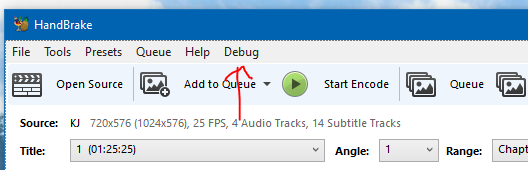
Sounds like you've still got an older build if you don't have that.
sr55
on 24 May 2020

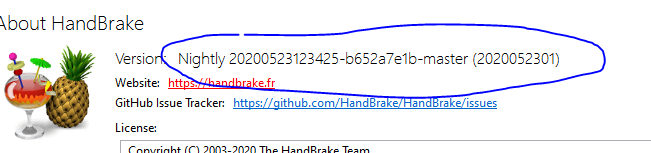
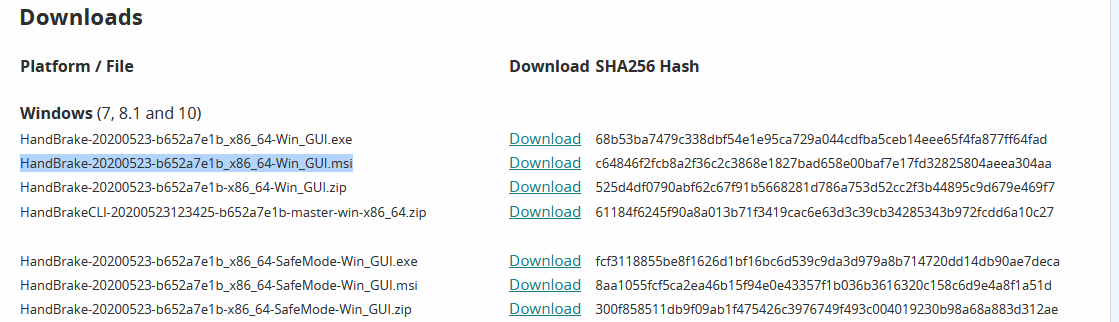 ischilling
on 24 May 2020
ischilling
on 24 May 2020
Something very strange is going on on your machine. Can you uninstall this and make sure the install directory (default: C:\Program Files\HandBrake) is completely empty.
Then re-install and if the debug menu doesn't appear, grab the SHA-1 hash of the handbrake.exe file in the install dir
sr55
on 24 May 2020
I cleaned up everything, I found a number of handbrake installations (could it be that nightly builds do not remove / update all entries before installing themselve?) I did by now just install them instead of uninstalling the earlier version. 2nd I wonder why nightly builds do at least not install into seperate folders site by site to a full version...
I'll start working and come back to you asap.
In other words, the Debug menu is now existing ;)
ischilling
on 24 May 2020
could it be that nightly builds do not remove / update all entries before installing themselve?
Depends on your selection. 😀
2nd I wonder why nightly builds do at least not install into seperate folders site by site to a full version...
They do - to %Program Files%\HandBrake Nightly
I'm running both versions side by side without issues.
Sidenote:
I updated from last months Nightly without any issues and I'm able to see the Debug menu.
 Dendraspis
on 24 May 2020
Dendraspis
on 24 May 2020
Well, than something wents wrong here on my system, because even after I did now uninstall everything, removed all registry entries, ... it - the nightly - installed into C:\Program Files\HandBrake and is running from there.
I'll install a entirely new Windows in a VM and cross check this there since I wonder why something like this should happen... course it shouldn't.
ischilling
on 24 May 2020
Note, the new MSI installer doesn't have the concept of nightly vs release yet so it's defaulting to /Handbrake. As such won't support side by side installs.
If you haven't removed all the prior exe based installs, it might explain what's going on.
sr55
on 24 May 2020
Oh, good to know! 😮 I only use the EXEs - maybe that's the difference?!
Dendraspis
on 24 May 2020
You said above you downloaded the installer with the .msi extension.
Now while both install the same software, the msi installer is experimental and incomplete (#522 ) so if you've installed that, it may have corrupted the install.
So I'd clear down all installs, and wipe any installed files left over. Then install either installer from fresh.
sr55
on 24 May 2020
I decided to go for a clean Windows install - since the software I am currently writing is very system near, I feel I've potentially screwed up something more: I am sure the bug here isn't related to what I am doing, however, I think it is time to start from scratch for clear results results.
Luckily I've WDS and SCCM running ;)
Do not expect further results before tomorrow from me.
ischilling
on 24 May 2020
...and consider installing from EXE to also be able to use the benefit of parallel instalations.
Dendraspis
on 24 May 2020
I've now working parallel installation and directly found a number of bugs which I'll report after I am able to verify them.
The bug here didn't yet appear, I'll keep working on the reproduction and post than everything in here.
ischilling
on 26 May 2020
Well, here's (finally) the debug-scan.
I did use handbrake for about 10 BD discs and 5 DVD from which I've choosen only the file suggested by using "Add to Queue", with this DVD, I choose "Add Selection" and selected a view but not all files.
BTW, the first file of the DVD was successfully added to the running queue.
After stopping and starting HandBrake again, added the tracks of the DVD works as expected.
As said, it is reproducible, but kind of erratic to do so.
ischilling
on 28 May 2020
As an addition, for what I found is that if you de-select something from the "Add Selection" list, the error happens more likely than if you just add all files, e.g. as if you click "Add All".
However, this doesn't mean it does not appear at all if you just add all via "Add Selection", I started making a tally sheet and right now it is about 4 times crashing when I am clicking something away from the list and two times when I am doing nothing here. Both out of currently 20 discs.
ischilling
on 28 May 2020
HandBrake_Error.txt
debug.scan_output (3).json.zip
debug.scan_output. (2).json.zip
Just some more log files...
ischilling
on 28 May 2020
An Unknown Error has occurred.
System.Reflection.TargetInvocationException: Exception has been thrown by the target of an invocation. ---> System.NullReferenceException: Object reference not set to an instance of an object.
at HandBrakeWPF.ViewModels.PictureSettingsViewModel.SetSource(Source source, Title title, Preset preset, EncodeTask task)
at HandBrakeWPF.ViewModels.MainViewModel.SetupTabs()
at HandBrakeWPF.ViewModels.MainViewModel.set_SelectedTitle(Title value)
at HandBrakeWPF.ViewModels.MainViewModel.
at HandBrakeWPF.ViewModels.QueueSelectionViewModel.Add()
--- End of inner exception stack trace ---
at System.RuntimeMethodHandle.InvokeMethod(Object target, Object[] arguments, Signature sig, Boolean constructor)
at System.Reflection.RuntimeMethodInfo.UnsafeInvokeInternal(Object obj, Object[] parameters, Object[] arguments)
at System.Reflection.RuntimeMethodInfo.Invoke(Object obj, BindingFlags invokeAttr, Binder binder, Object[] parameters, CultureInfo culture)
at Caliburn.Micro.ActionMessage.<>c.<.cctor>b__33_0(ActionExecutionContext context)
at Caliburn.Micro.ActionMessage.Invoke(Object eventArgs)
at System.Windows.Interactivity.TriggerBase.InvokeActions(Object parameter)
at System.Windows.EventRoute.InvokeHandlersImpl(Object source, RoutedEventArgs args, Boolean reRaised)
at System.Windows.UIElement.RaiseEventImpl(DependencyObject sender, RoutedEventArgs args)
at System.Windows.Controls.Primitives.ButtonBase.OnClick()
at System.Windows.Controls.Button.OnClick()
at System.Windows.Controls.Primitives.ButtonBase.OnMouseLeftButtonUp(MouseButtonEventArgs e)
at System.Windows.RoutedEventArgs.InvokeHandler(Delegate handler, Object target)
at System.Windows.RoutedEventHandlerInfo.InvokeHandler(Object target, RoutedEventArgs routedEventArgs)
at System.Windows.EventRoute.InvokeHandlersImpl(Object source, RoutedEventArgs args, Boolean reRaised)
at System.Windows.UIElement.ReRaiseEventAs(DependencyObject sender, RoutedEventArgs args, RoutedEvent newEvent)
at System.Windows.UIElement.OnMouseUpThunk(Object sender, MouseButtonEventArgs e)
at System.Windows.RoutedEventArgs.InvokeHandler(Delegate handler, Object target)
at System.Windows.RoutedEventHandlerInfo.InvokeHandler(Object target, RoutedEventArgs routedEventArgs)
at System.Windows.EventRoute.InvokeHandlersImpl(Object source, RoutedEventArgs args, Boolean reRaised)
at System.Windows.UIElement.RaiseEventImpl(DependencyObject sender, RoutedEventArgs args)
at System.Windows.UIElement.RaiseTrustedEvent(RoutedEventArgs args)
at System.Windows.Input.InputManager.ProcessStagingArea()
at System.Windows.Input.InputManager.ProcessInput(InputEventArgs input)
at System.Windows.Input.InputProviderSite.ReportInput(InputReport inputReport)
at System.Windows.Interop.HwndMouseInputProvider.ReportInput(IntPtr hwnd, InputMode mode, Int32 timestamp, RawMouseActions actions, Int32 x, Int32 y, Int32 wheel)
at System.Windows.Interop.HwndMouseInputProvider.FilterMessage(IntPtr hwnd, WindowMessage msg, IntPtr wParam, IntPtr lParam, Boolean& handled)
at System.Windows.Interop.HwndSource.InputFilterMessage(IntPtr hwnd, Int32 msg, IntPtr wParam, IntPtr lParam, Boolean& handled)
at MS.Win32.HwndWrapper.WndProc(IntPtr hwnd, Int32 msg, IntPtr wParam, IntPtr lParam, Boolean& handled)
at MS.Win32.HwndSubclass.DispatcherCallbackOperation(Object o)
at System.Windows.Threading.ExceptionWrapper.InternalRealCall(Delegate callback, Object args, Int32 numArgs)
at System.Windows.Threading.ExceptionWrapper.TryCatchWhen(Object source, Delegate callback, Object args, Int32 numArgs, Delegate catchHandler)
debug.scan_output (4).json.zip
Should I go on in uploading files and errors?
ischilling
on 28 May 2020
Is this the MSI installed version?
If it is, can you take the portable version (zip file - Just extract and run), and run that. I don't think the MSI version includes debug symbols so I don't have enough context to see where this is throwing the error.
sr55
on 28 May 2020
I already wondered why / if this is enough to debug.
I'll switch to the portable version from the nightly build and come back soon.
ischilling
on 29 May 2020
Now taken from the Nightly Portable build:
2020-05-29 1918 Add Selection Error.txt
2020-05-29 1918 debug.scan_output.json.zip
I don't think that the logfile or the error leads anywhere... maybe I am taken wrong. I'll, during the next days, run HandBrake directly in VS2019 in Debugmode and I'll try to debug the issue - except you say this is leading you to the problem.
What I wonder though is that I've the strong feeling it's just me having this problem :)
ischilling
on 29 May 2020
Interesting that the line numbers are out of alignment. I suspect this is cropping issue but if you can run VS per my comment in the other thread and see if you can pinpoint it.
sr55
on 29 May 2020
I'll do so, I don't think that there is another way to pin that down in a timely fashion. Though I don't know the source code well, I hope I can at least get you a clearer hint on were to look into it.
ischilling
on 29 May 2020
I just want to see the exact line so I'm not chasing down rabit holes.
sr55
on 29 May 2020
Per your other post. We now that that the preset is null. This makes sense why your getting all these strange behaviours.
Question is, what is de-selecting the preset.
Did you by chance delete a preset, or do anything related to selection of or changing presets?
Does this still occur if you hide the preset panel?
sr55
on 30 May 2020
Can you add:
if (value == null)
{
this.errorService.ShowError("Null Preset", null, Environment.StackTrace.ToString());
}
to Selected Preset, like:
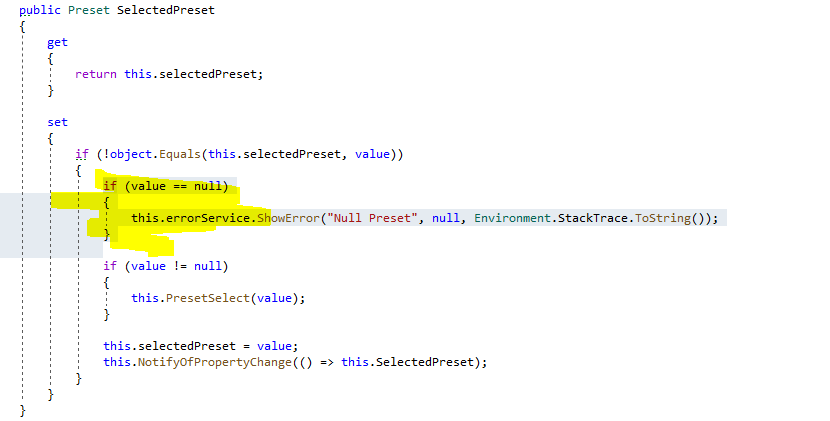
inside MainViewModel.cs
This will capture whatever is setting it to null. If you provide the text output, hopefully this exposes the root cause of all these issues your seeing.
sr55
on 30 May 2020
I'll do so (bow)
ischilling
on 30 May 2020
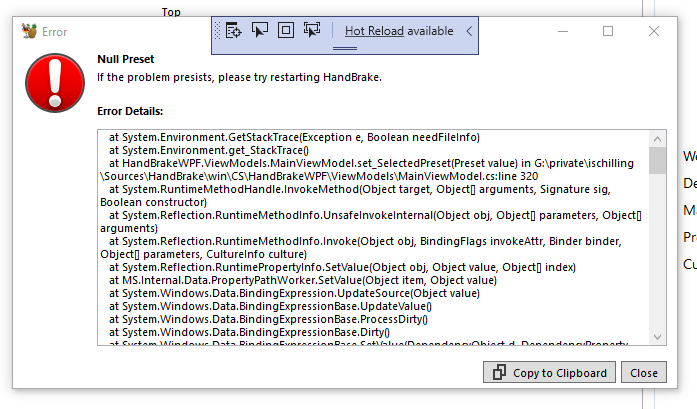
Null Preset
at System.Environment.GetStackTrace(Exception e, Boolean needFileInfo)
at System.Environment.get_StackTrace()
at HandBrakeWPF.ViewModels.MainViewModel.set_SelectedPreset(Preset value) in G:\private\ischilling\Sources\HandBrake\win\CS\HandBrakeWPF\ViewModels\MainViewModel.cs:line 320
at System.RuntimeMethodHandle.InvokeMethod(Object target, Object[] arguments, Signature sig, Boolean constructor)
at System.Reflection.RuntimeMethodInfo.UnsafeInvokeInternal(Object obj, Object[] parameters, Object[] arguments)
at System.Reflection.RuntimeMethodInfo.Invoke(Object obj, BindingFlags invokeAttr, Binder binder, Object[] parameters, CultureInfo culture)
at System.Reflection.RuntimePropertyInfo.SetValue(Object obj, Object value, Object[] index)
at MS.Internal.Data.PropertyPathWorker.SetValue(Object item, Object value)
at System.Windows.Data.BindingExpression.UpdateSource(Object value)
at System.Windows.Data.BindingExpressionBase.UpdateValue()
at System.Windows.Data.BindingExpressionBase.ProcessDirty()
at System.Windows.Data.BindingExpressionBase.Dirty()
at System.Windows.Data.BindingExpressionBase.SetValue(DependencyObject d, DependencyProperty dp, Object value)
at System.Windows.DependencyObject.SetValueCommon(DependencyProperty dp, Object value, PropertyMetadata metadata, Boolean coerceWithDeferredReference, Boolean coerceWithCurrentValue, OperationType operationType, Boolean isInternal)
at System.Windows.DependencyObject.SetValue(DependencyProperty dp, Object value)
at HandBrakeWPF.Helpers.TreeViewHelper.SetTreeViewSelectedItem(DependencyObject obj, Object value) in G:\private\ischilling\Sources\HandBrake\win\CS\HandBrakeWPF\Helpers\TreeViewHelper.cs:line 24
at HandBrakeWPF.Helpers.TreeViewHelper.TreeView_SelectedItemChanged(Object sender, RoutedPropertyChangedEventArgs`1 e) in G:\private\ischilling\Sources\HandBrake\win\CS\HandBrakeWPF\Helpers\TreeViewHelper.cs:line 60
at System.Windows.RoutedEventArgs.InvokeHandler(Delegate handler, Object target)
at System.Windows.RoutedEventHandlerInfo.InvokeHandler(Object target, RoutedEventArgs routedEventArgs)
at System.Windows.EventRoute.InvokeHandlersImpl(Object source, RoutedEventArgs args, Boolean reRaised)
at System.Windows.UIElement.RaiseEventImpl(DependencyObject sender, RoutedEventArgs args)
at System.Windows.Controls.TreeView.ChangeSelection(Object data, TreeViewItem container, Boolean selected)
at System.Windows.Controls.TreeViewItem.Select(Boolean selected)
at System.Windows.Controls.TreeViewItem.OnIsSelectedChanged(DependencyObject d, DependencyPropertyChangedEventArgs e)
at System.Windows.DependencyObject.OnPropertyChanged(DependencyPropertyChangedEventArgs e)
at System.Windows.FrameworkElement.OnPropertyChanged(DependencyPropertyChangedEventArgs e)
at System.Windows.DependencyObject.NotifyPropertyChange(DependencyPropertyChangedEventArgs args)
at System.Windows.DependencyObject.UpdateEffectiveValue(EntryIndex entryIndex, DependencyProperty dp, PropertyMetadata metadata, EffectiveValueEntry oldEntry, EffectiveValueEntry& newEntry, Boolean coerceWithDeferredReference, Boolean coerceWithCurrentValue, OperationType operationType)
at System.Windows.DependencyObject.SetValueCommon(DependencyProperty dp, Object value, PropertyMetadata metadata, Boolean coerceWithDeferredReference, Boolean coerceWithCurrentValue, OperationType operationType, Boolean isInternal)
at System.Windows.DependencyObject.SetValue(DependencyProperty dp, Object value)
at System.Windows.Controls.TreeViewItem.set_IsSelected(Boolean value)
at HandBrakeWPF.Views.MainView.PresetTreeviewItemCollasped(Object sender, RoutedEventArgs e) in G:\private\ischilling\Sources\HandBrake\win\CS\HandBrakeWPF\Views\MainView.xaml.cs:line 121
at System.Windows.EventRoute.InvokeHandlersImpl(Object source, RoutedEventArgs args, Boolean reRaised)
at System.Windows.UIElement.RaiseEventImpl(DependencyObject sender, RoutedEventArgs args)
at System.Windows.Controls.TreeViewItem.OnIsExpandedChanged(DependencyObject d, DependencyPropertyChangedEventArgs e)
at System.Windows.DependencyObject.OnPropertyChanged(DependencyPropertyChangedEventArgs e)
at System.Windows.FrameworkElement.OnPropertyChanged(DependencyPropertyChangedEventArgs e)
at System.Windows.DependencyObject.NotifyPropertyChange(DependencyPropertyChangedEventArgs args)
at System.Windows.DependencyObject.UpdateEffectiveValue(EntryIndex entryIndex, DependencyProperty dp, PropertyMetadata metadata, EffectiveValueEntry oldEntry, EffectiveValueEntry& newEntry, Boolean coerceWithDeferredReference, Boolean coerceWithCurrentValue, OperationType operationType)
at System.Windows.DependencyObject.SetValueCommon(DependencyProperty dp, Object value, PropertyMetadata metadata, Boolean coerceWithDeferredReference, Boolean coerceWithCurrentValue, OperationType operationType, Boolean isInternal)
at System.Windows.DependencyObject.SetCurrentValueInternal(DependencyProperty dp, Object value)
at System.Windows.Controls.TreeViewItem.OnMouseLeftButtonDown(MouseButtonEventArgs e)
at System.Windows.RoutedEventArgs.InvokeHandler(Delegate handler, Object target)
at System.Windows.RoutedEventHandlerInfo.InvokeHandler(Object target, RoutedEventArgs routedEventArgs)
at System.Windows.EventRoute.InvokeHandlersImpl(Object source, RoutedEventArgs args, Boolean reRaised)
at System.Windows.UIElement.ReRaiseEventAs(DependencyObject sender, RoutedEventArgs args, RoutedEvent newEvent)
at System.Windows.UIElement.OnMouseDownThunk(Object sender, MouseButtonEventArgs e)
at System.Windows.RoutedEventArgs.InvokeHandler(Delegate handler, Object target)
at System.Windows.RoutedEventHandlerInfo.InvokeHandler(Object target, RoutedEventArgs routedEventArgs)
at System.Windows.EventRoute.InvokeHandlersImpl(Object source, RoutedEventArgs args, Boolean reRaised)
at System.Windows.UIElement.RaiseEventImpl(DependencyObject sender, RoutedEventArgs args)
at System.Windows.UIElement.RaiseTrustedEvent(RoutedEventArgs args)
at System.Windows.Input.InputManager.ProcessStagingArea()
at System.Windows.Input.InputManager.ProcessInput(InputEventArgs input)
at System.Windows.Input.InputProviderSite.ReportInput(InputReport inputReport)
at System.Windows.Interop.HwndMouseInputProvider.ReportInput(IntPtr hwnd, InputMode mode, Int32 timestamp, RawMouseActions actions, Int32 x, Int32 y, Int32 wheel)
at System.Windows.Interop.HwndMouseInputProvider.FilterMessage(IntPtr hwnd, WindowMessage msg, IntPtr wParam, IntPtr lParam, Boolean& handled)
at System.Windows.Interop.HwndSource.InputFilterMessage(IntPtr hwnd, Int32 msg, IntPtr wParam, IntPtr lParam, Boolean& handled)
at MS.Win32.HwndWrapper.WndProc(IntPtr hwnd, Int32 msg, IntPtr wParam, IntPtr lParam, Boolean& handled)
at MS.Win32.HwndSubclass.DispatcherCallbackOperation(Object o)
at System.Windows.Threading.ExceptionWrapper.InternalRealCall(Delegate callback, Object args, Int32 numArgs)
at System.Windows.Threading.ExceptionWrapper.TryCatchWhen(Object source, Delegate callback, Object args, Int32 numArgs, Delegate catchHandler)
at System.Windows.Threading.Dispatcher.LegacyInvokeImpl(DispatcherPriority priority, TimeSpan timeout, Delegate method, Object args, Int32 numArgs)
at MS.Win32.HwndSubclass.SubclassWndProc(IntPtr hwnd, Int32 msg, IntPtr wParam, IntPtr lParam)
at MS.Win32.UnsafeNativeMethods.DispatchMessage(MSG& msg)
at MS.Win32.UnsafeNativeMethods.DispatchMessage(MSG& msg)
at System.Windows.Threading.Dispatcher.PushFrameImpl(DispatcherFrame frame)
at System.Windows.Application.RunDispatcher(Object ignore)
at System.Windows.Application.RunInternal(Window window)
at HandBrakeWPF.App.Main()
Happens after switching from Custom Presets for BD to DVD and consequently loading and selecting several items from the DVD.
Unluckily, I somehow got no break in VS, so I haven't been able to debug from / to here as I wanted to... I don't see on first glance where you've your catch all invoked, can you tell me where it is?
ischilling
on 3 Jun 2020
That stack trace tells me that you collapsed a category on the preset panel with a left mouse click.
It does indeed trigger the preset to be nulled which would then have all these side effects.
I'm not sure how you'd trigger that from the Add Selection window though unless it was awkward mouse clicks above the same area.
sr55
on 3 Jun 2020
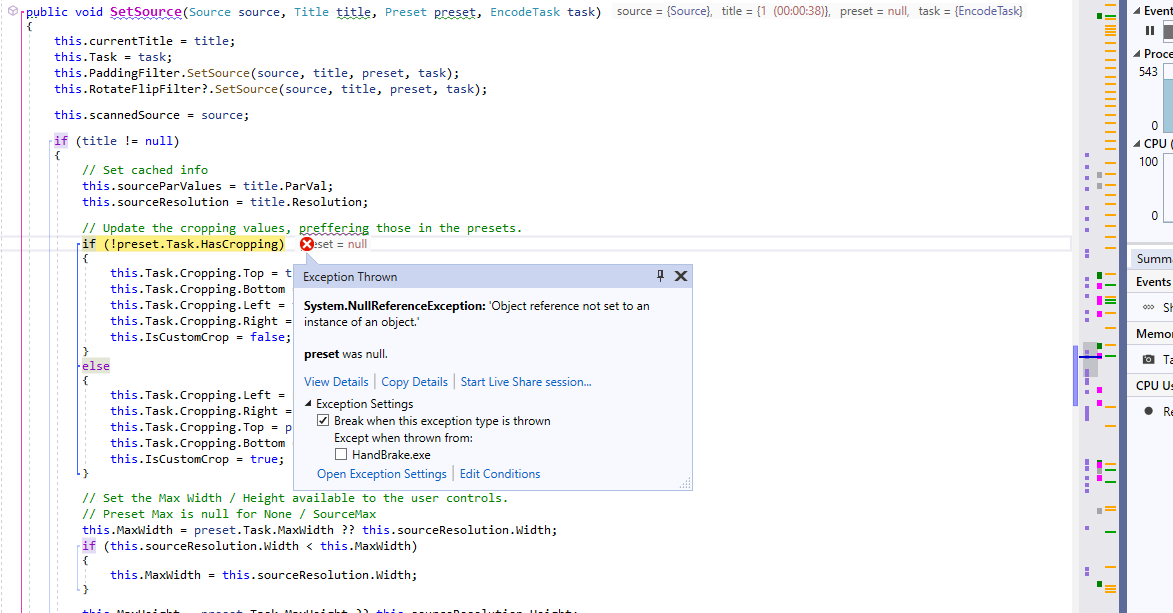
I just didn't stop the program after above issue but chosed "Add Selection" again and than decided to just add all titles to the queue - resulting in this issue.
ischilling
on 3 Jun 2020
Grab down the latest code from master and see if this is still repeatable.
It looks like the preset panel is responsible for de-selecting the preset, leaving it null, thus crashing the code in various ways.
sr55
on 3 Jun 2020
That stack trace tells me that you collapsed a category on the preset panel with a left mouse click.
It does indeed trigger the preset to be nulled which would then have all these side effects.I'm not sure how you'd trigger that from the Add Selection window though unless it was awkward mouse clicks above the same area.
Except I am drunken but don't know anything about this - a pitty so to say - I didn't.
I am currently getting my full DVD/BD/UHD archive digital, hence I am "handbraking" all sources into H.265 files.
Most of the series I do have and some movies are DVD based, especially with series I do not just take the complete disc but only the chapters in question for getting the series digital. Therefore I am using "Add Selection" whilst with movies I usually use Add to Queue since the selection of HandBrake is usually right.
That said, I have this two presets, one for DVD and one for the rest, my process is:
a) Open Source - drag and drop the source
b) choose the custom preset I want to use
c) since I found that from time to time the Preset isn't correctly accepted, I click on Dimensions, Filters, Video, Audio and Subtitles tab to a) verify the settings are what I expect and b) to verify I get the languages I am interested in and the subtitles are chosen as well right. Also, since some media is 'curious' I found it a good idea to at least check for Audio almost always.
d) I choose either Add to Queue for movies or Add Selection for Series. For the ladder I than remove all chapters I am not interested in and leave all others. Than I click add and usually, that's it.
Usually the Queue is meanwhile running due to the fact I have a fast computer and several, fast readers :)
ischilling
on 3 Jun 2020
Grab down the latest code from master and see if this is still repeatable.
It looks like the preset panel is responsible for de-selecting the preset, leaving it null, thus crashing the code in various ways.
Done. Let's see how it's going on ;)
ischilling
on 3 Jun 2020
Well, about 30 discs later, that's looks pretty stable... let's give it some more testing over the next two days if you don't mind. If it is stable, I'll than close this.
ischilling
on 4 Jun 2020
To me it looks, after another 30 discs, that this bug can be closed since it didn't appear again.
Which I herewith do.
ischilling
on 4 Jun 2020
Thanks for patiently helping us track this down! 😸
 bradleysepos
on 4 Jun 2020
bradleysepos
on 4 Jun 2020
I have to thank for such a great product with such dedicated support.
ischilling
on 4 Jun 2020
Related issues
 bohning
·
4Comments
bohning
·
4Comments
 Cagliostrooo
·
3Comments
Cagliostrooo
·
3Comments
 NiklasBr
·
3Comments
NiklasBr
·
3Comments
 rajibkhan
·
5Comments
rajibkhan
·
5Comments
 d4rkne55
·
5Comments
d4rkne55
·
5Comments