Description of the feature or enhancement you'd like to see in HandBrake:
Add option to automatically name audio tracks based on Mixdown selection.
I know that near midway last year you changed the behavior of audio track naming behavior. This threw me for a bit of a loop as my tracks now pass-through the name provided by the source track.
For example, my source has one audio track with DTS-HD MA 5.1 channel. I have Audio Selection Behavior set to make the first output track AAC mixed down to Stereo and the second output track Auto Passthru. With current behavior, both tracks are named "Surround 5.1". This is not readily apparent because the track name field is hidden by default. If I leave things as-is, the first, Stereo, track will have a misleading "Surround 5.1" name. I have to expand the first track's fields in order to see the name and to correct it.


Some players will ignore this field (Plex), but some use it for track selection (VLC).
An option in Preferences to name based on Mixdown selection would both make it less likely for the situation I described to result in confusion/error and aid automation through Selection Behavior. Making the name one of the default-showing fields would help as well.
What version of HandBrake are you currently running (e.g., 1.3.0)?
Nightly 20200120111227-063e587-master (2020012001)
What operating system and version are you running (e.g., Ubuntu 19.10, macOS 10.15 Catalina, Windows 10 1909)?
Windows 10 1909
 abrezovsky
All 9 comments
I am for this as a preference (seems to make more sense globally than preset-specific). I think it should be the default for source tracks with null/empty/whitespace names.
Perhaps we need a preference with three choices:
Automatically name audio and subtitle tracks:
- Only unnamed tracks (default)
- All tracks
- None
 bradleysepos
on 23 Jan 2020
bradleysepos
on 23 Jan 2020
Aside, I believe our mono mixdown is technically stereo (dual mono). Perhaps this could be clarified by changing the mixdown name to Dual Mono, since we don't provide single-channel (center only) mono (which I suspect nobody wants anyway).
bradleysepos
on 23 Jan 2020
Might need an extra option
Audio Track Naming:
[ ] Passthru from Source
Audio Automatic Naming Behaviour:
- Unnamed Tracks
- All
- None
As an added benefit, this allows "None at all". which also gives a workaround for wonky dlna servers :)
 sr55
on 27 Jan 2020
sr55
on 27 Jan 2020
I was thinking None would be passthru, but we could reword the control to approach from the opposite perspective.
DLNA. sigh
bradleysepos
on 27 Jan 2020
Comments from the PR that changed naming behavior that are relevant to the discussion.
https://github.com/HandBrake/HandBrake/pull/2213#issuecomment-517953119
https://github.com/HandBrake/HandBrake/pull/2213#issuecomment-520776278
My comment describing current behavior and some suggestions:
https://github.com/HandBrake/HandBrake/pull/2213#issuecomment-520916794
 jstebbins
on 27 Jan 2020
jstebbins
on 27 Jan 2020
Thanks for this post, as it matches my problem exactly. And thanks for all the hard work that has gone into Handbrake - it's an incredible piece of kit.
I'd like to add that currently, without the ability to name audio tracks based on mixdown, batch encoding cannot work properly when wanting to mix down an audio file from one format to another (e.g. 5.1 to Stereo), since all the files in the batch will end up with a stereo track that displays as "Surround 5.1". This has already been highlighted above, but is much worse a problem when wanting to use batch encoding to, say, encode an entire season of episodes. Instead of using the incredibly powerful/time-saving batch feature, one has to instead manually select the next track, expand the hidden fields on the audio row, paste in the previously-copied "Stereo" text and then manually hit 'Add to Queue' before repeating the whole process again. (Yesterday, I had to do this 22 times for each of the 6 seasons of The Clone Wars, which took a while, but was worth it in the end.)
I include pics of how this problem arose for me. I'm re-encoding swathes of films and episodes from my server, because my dad can't hear the dialogue when playing 5.1 audio through his stereo system (the middle frequencies, which include speech, get lost). I'm including the original 5.1 but also adding in a Stereo mix (with a moderate amount of DRC applied) so he can choose that audio track instead.
Here's what appears every time I (or the batch function) select(s) a new file:

And here's what I have to manually change it to each time (meaning I can't use the batch function):
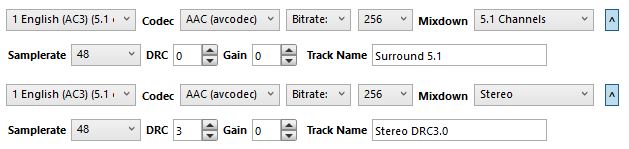
If I don't manually edit the name of the stereo track, then both the 5.1 and Stereo tracks show in VLC
as "Surround 5.1", which is not correct.
I notice that the default Track Name text is set automatically to "Surround 5.1" when the source track is 5.1, and it becomes "Stereo" when the source track is stereo, so it is clearly being set based on the input track name/type, but it would save an immense amount of time if I could choose whether the track name should be based on the source track name or the selected mixdown.
One way to address this would be for the user to have a choice (either in Preferences or Selection Behaviour) of whether to automatically base audio track names on the source track name or on mixdown selection. Would that not also deal with the problem of passthru? - If passthru were selected for a track, then the track name would be populated from the input name; but if passthru is not selected, then the user's choice of input name or mixdown name would used to populate the name field. That would seem to cover all the bases, I think, but I may be missing something.
 s0upy2015
on 4 Feb 2020
s0upy2015
on 4 Feb 2020
abrezovsky & s0upy2015 describe this issue perfectly (like s0upy2015 I'm also trying to make things easier on my dad who is hard of hearing). This feature improvement is well within the scope of Handbrake as without it it really does make batch rendering a pain staking process when it should be simple and I stress it WOULD be with this kind of update.
 Kentinator
on 19 Feb 2020
Kentinator
on 19 Feb 2020
Count me as yet another voice in favor of this change. Maybe some people don't care about audio track names, but others do very much because of their setup, so this isn't as small an issue as some might think.
It's extremely rare that the original audio track is labeled "director's commentary" or whatever - instead the vast majority of the time, they are labeled with technical specifications like "Surround 7.1." It doesn't make any sense to cater to the small minority of needs and make the majority hassle with custom audio track names (or make the majority have to ignore their badly-named audio tracks). Furthermore, if Handbrake were to give new names to each audio track by default (according to what the target format is), Handbrake would _never be wrong._ But the way it works right now, Handbrake will almost always be wrong since audio track names are almost always technically named on the original discs.
 ostinatofreak
on 5 Mar 2020
ostinatofreak
on 5 Mar 2020
Mod Note: Title changed to be more generic since this will likely grow in scope if we decide to do it.
Noting #2705 use of Language in the name.
sr55
on 22 Mar 2020
Related issues
 jeremymeyers
·
4Comments
jeremymeyers
·
4Comments
 alanorth
·
6Comments
alanorth
·
6Comments
 Cagliostrooo
·
3Comments
Cagliostrooo
·
3Comments
 iburunat
·
3Comments
iburunat
·
3Comments
 miopad
·
6Comments
miopad
·
6Comments
Most helpful comment
Count me as yet another voice in favor of this change. Maybe some people don't care about audio track names, but others do very much because of their setup, so this isn't as small an issue as some might think.
It's extremely rare that the original audio track is labeled "director's commentary" or whatever - instead the vast majority of the time, they are labeled with technical specifications like "Surround 7.1." It doesn't make any sense to cater to the small minority of needs and make the majority hassle with custom audio track names (or make the majority have to ignore their badly-named audio tracks). Furthermore, if Handbrake were to give new names to each audio track by default (according to what the target format is), Handbrake would _never be wrong._ But the way it works right now, Handbrake will almost always be wrong since audio track names are almost always technically named on the original discs.