Handbrake: [Feature request] "Same Path as Source" option
Description of problem or feature request
Hi, I use handbrake since a few years and it's really a nice soft.
There is something that annoys me, though:
When converting a file, I have ALWAYS to define the output name and directory.
I know about the Output Files section of the preferences, which allows to define a default path.
It's nice for certain things, but most of the times, I want to default output files where my source is located.
What I would suggest is that to have a second option next to Default Path; which would be "Same Path as Source".
What do you think ?
HandBrake version
Handbrake 1.1.0
Operating system and version
Windows 10
Screenshot

 gordielachance
All 12 comments
This idea has been rejected may times for the GUI, because the GUI tries to protect users from stupid stuff.
It is quite possible to overwrite your source file if your destination is the same path as the source.
 woodstockathbf
on 9 May 2018
woodstockathbf
on 9 May 2018
Well, a simple warning would do the job..
"source and destination file cannot be the same" or something like that.
gordielachance
on 9 May 2018
Technically already supported but it's well hidden so that only users who know the consequences use it.
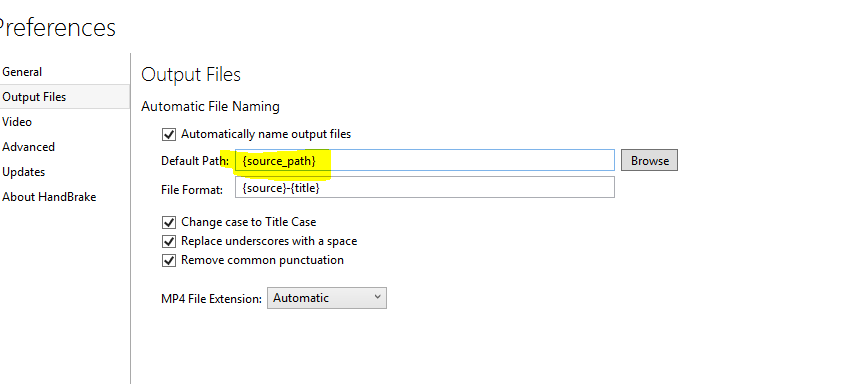
It will not however, stop you from deleting your entire collection if you set it up wrong.
No guarantee this wont' be removed in future releases though.
 sr55
on 9 May 2018
sr55
on 9 May 2018
I really think this is a mistake not to offer this.
There is a simple way to avoid overriding the source file... Add a default prefix (eg. _-recoded_).
It's a p* in the *ss to always have to set the output directory...
Anyway (thanks @sr55), I can achieve it using this setup. But having it natively would be better...
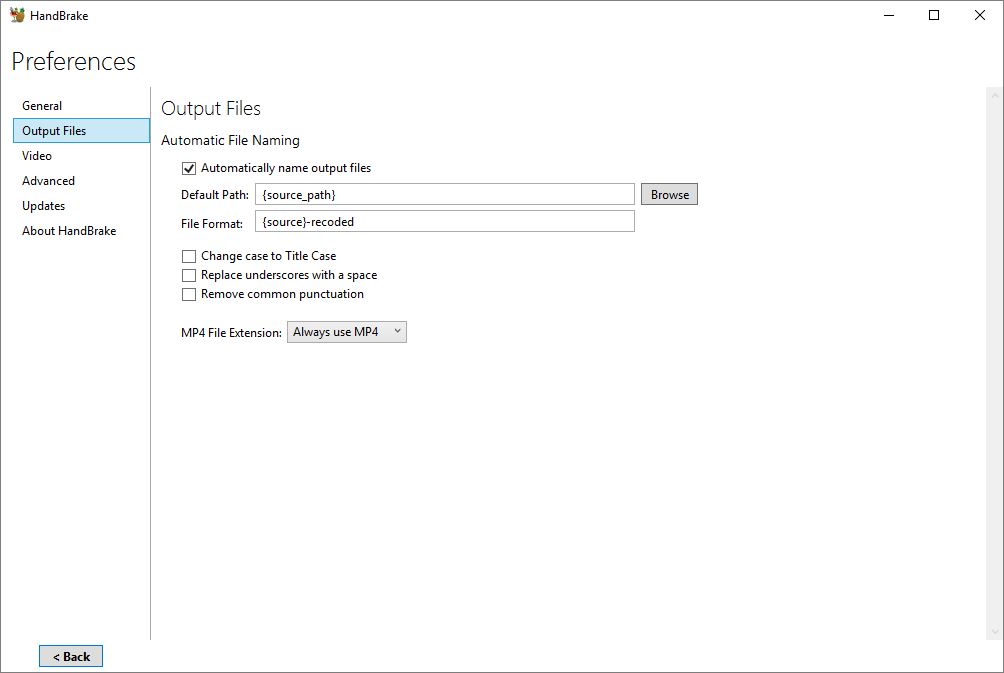
gordielachance
on 21 Jun 2018
Why are you saying "is a mistake not to offer this", when sr55 showed you that it does exist, if you're willing to take total responsibility for the possibility of wiping out your original files?
woodstockathbf
on 21 Jun 2018
Hi @woodstockathbf;
...Because @sr55 also said
No guarantee this wont' be removed in future releases though.
...And that it does not appears as available in the tooltip when hovering the file format input (so, who knows about this trick ?)
...And because implementing it correctly would remove any possible problems with this very, very useful concept.
The only thing to do would be to have a specific behaviour when the source and output path & filename are the same.
It could be:
- firing a popup that would abord the action (_You can't overwrite the source file, please change the name of the output file_)
- forcing a suffix on the output file (eg *-recoded)
- ...
That would make sure you don't wipe out your original file.
I use handbrake almost every day and this is a very annoying thing to always have to setup the path.
I'm sure every regular user would agree on this.
Thanks !
gordielachance
on 21 Jun 2018
And without saying that mac doesn't have the same options :/
gordielachance
on 26 Jul 2018
So how does one accomplish that on a Mac?
 henno
on 4 Aug 2019
henno
on 4 Aug 2019
Having it save to the last used folder, as it does now, is just plain annoying, and never useful.
The way it is now, you risk overwriting something from a previous project, because you forgot to change the output folder.
Overwriting the source file, simply shouldn't be allowed to even start, since it's not possible to complete anyway. If it can delete the source, because you try, then that's just bad design.
Making the output folder the same as the destination, is really the only useful way to do it (and therefore how most programs work).
All problems are solved, by just preventing overwriting of source, adding a suffix (as it can already do) and warning by default if the destination file already exists.
 oggologgo2
on 24 Oct 2019
oggologgo2
on 24 Oct 2019
Yes, I am still quite confused about the arguments against this. Create a default suffix / warning / allow to skip are all easy options to avoid catastrophe and some sort of user error. As I see it a shell script is the way to address this, but why make it so impossible to use the GUI for this?
e.g.
[SNIP]
input_file="$(basename "$input")"
output="$(dirname "$input")/${input_file/%.[^.]*/.mp4}" #.mp4
HandBrakeCLI "$handbrake_options" --input "\"$input\"" --output "\"$output\"" --r "$frame_rate" --cfr
[SNIP]
 brianlamb
on 18 Jun 2020
brianlamb
on 18 Jun 2020
Seconded. When one is doing a batch encode, it is extremely tiresome to juggle the directories, and more manual actions are considerably more error-prone than just saving the output beside the input.
The fact that the Mac doesn't offer the same option as Windows is also exceptionally annoying.
 niallrmurphy
on 28 Jun 2020
niallrmurphy
on 28 Jun 2020
Handbrake now has the option 'Filename collision behaviour'. So, implementing this shouldn't be a problem for anyone anymore.
 Shakil-Shahadat
on 28 Jun 2020
Shakil-Shahadat
on 28 Jun 2020
Related issues
 NiklasBr
·
3Comments
NiklasBr
·
3Comments
 AnotherDimension-Ex
·
4Comments
AnotherDimension-Ex
·
4Comments
 alanorth
·
6Comments
alanorth
·
6Comments
 bohning
·
4Comments
bohning
·
4Comments
 d4rkne55
·
5Comments
d4rkne55
·
5Comments
Most helpful comment
Hi @woodstockathbf;
...Because @sr55 also said
...And that it does not appears as available in the tooltip when hovering the file format input (so, who knows about this trick ?)
...And because implementing it correctly would remove any possible problems with this very, very useful concept.
The only thing to do would be to have a specific behaviour when the source and output path & filename are the same.
It could be:
That would make sure you don't wipe out your original file.
I use handbrake almost every day and this is a very annoying thing to always have to setup the path.
I'm sure every regular user would agree on this.
Thanks !