Initial List of Tasks
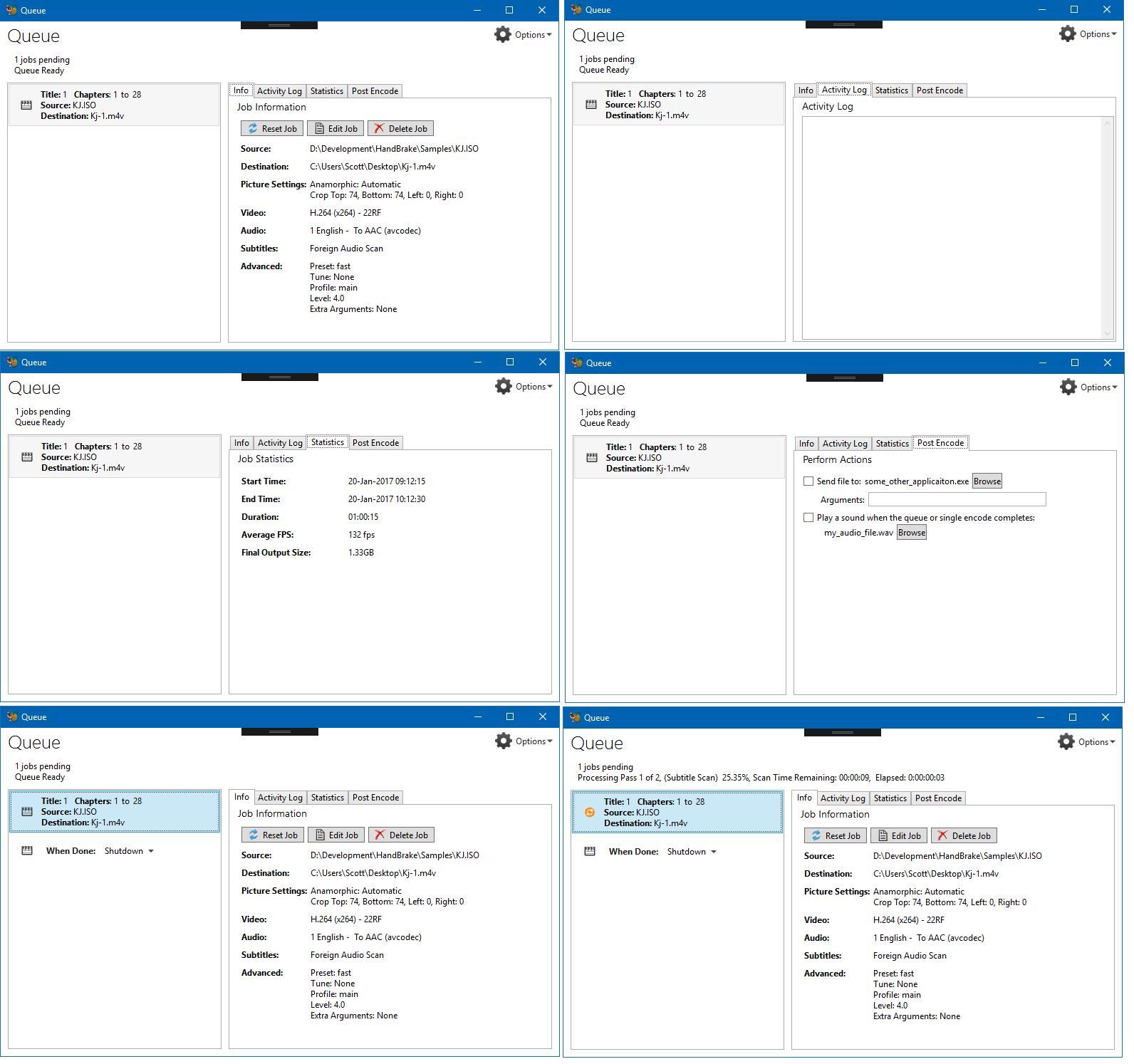
- [x] Add set of tabs to the queue display. ( Job Info | Activity Log | Statistics )
- [x] Job Information tab replaces the Tooltip / Large format listbox
- [x] Activity Log tab providing easy access to the logs for each encode. (both live and finished jobs)
- [x] Statistics Tab (Start Time, End Time, Duration, Average FPS, Final Output Size, Other?)
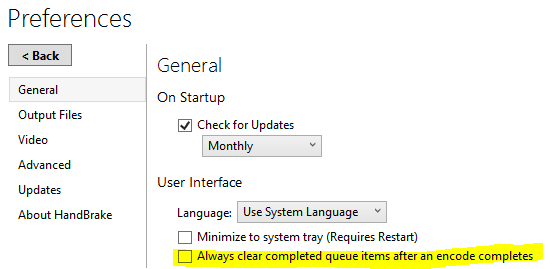
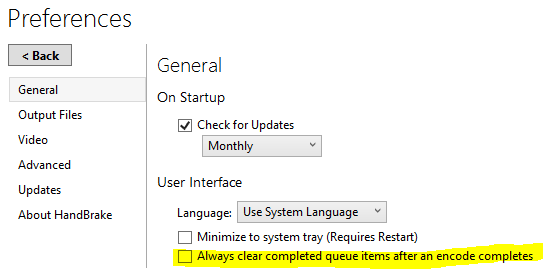
- [x] Clear Completed jobs.
Lets agree on what is to be done before any development is done.
Original Concept Art:
 *
*
*Post-Encode action thoughts can come in a later enhancement. This is just the main window re-design to better expose information and options we already have.
Updated Design (Jan 19):
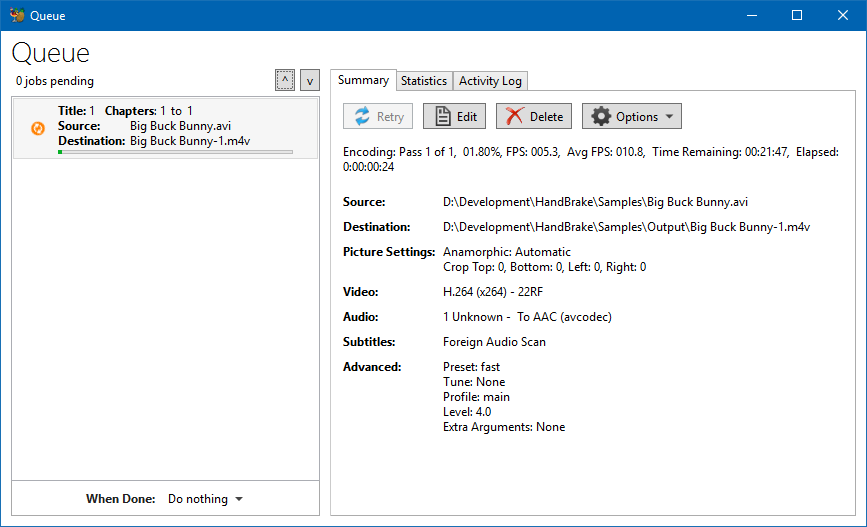
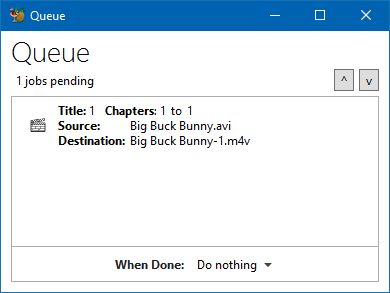
_Compact View:_
Auto scales to window size.
 sr55
sr55
All 40 comments
I like it! :)
Will there be controls for moving the entries up/down and adding the "When Done:" (Shutdown, Pause etc.) entry?
If so, I guess the should be vertically placed in between the queue and the tabs pane.
This way it should be possible to place a stop or shutdown "action" between any encoding to be done, not only the currently running or the last one.
For example:
Encoding Job #1
Encoding Job #2
<Stop|Shutdown>
Encoding Job #3
Encoding Job #4
Encoding Job #5
<Stop|Shutdown>
Encoding Job #4
...
 fiechr
on 9 Jan 2018
fiechr
on 9 Jan 2018
This is a huge move in the right direction.
I'm coming from VidCoder on windows. I'd recommend looking at their design.
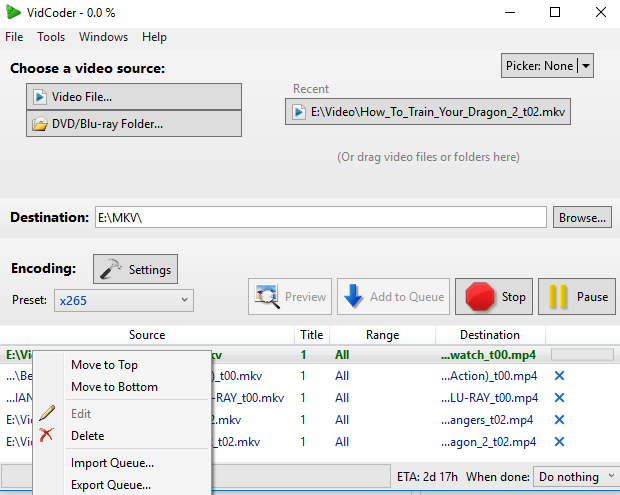
- Progress bar on active job
- Right click context menu
- Drag drop re-order
- (not shown) Second tab showing completed queue items
 jarrettv
on 9 Jan 2018
jarrettv
on 9 Jan 2018
@jarrettv
- Progress info is currently above. We'll need to see what the other UI's support in terms of in-line controls in listboxes before we decide if we want to add progress there. There is a goal of cross platform consistency here. As long as there are no limiting factors, we'll probably do something.
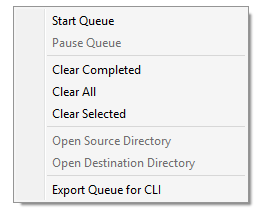
- There already exists a context menu. It'll probably have a few items added to it given that certain key actions are no longer always visible. (Edit, Delete, Reset for example. No harm in adding some Move options too I guess)
- Drag drop re-order already exists so will continue to.
- Handbrake currently has the option to clear completed, or leave them showing and can be manually cleared in bulk via the context menu.
@fiechr
Re-Order already exists in the form of drag/drop. We may add context menu items to better highlight that funcitonality is there but I wouldn't clutter the Ui with dedicated buttons as it's not something people do a that often.
For this task, we will not be changing the when-done functionality. It's too much in one go. Bottom left screenshot shows the When Done option in-line at the end of the queue. (Depending on platform listbox capabilities that may change but it'll be a single item.
You'll notice I've deliberately not shown the "Post Encode" tab. This is one area I've been thinking about a lot. The idea to When Done, at any point in the queue is on the table, not just for shutdown etc, but for any arbitrary task potentially. How that works out is a complicated topic as there are many pitfalls so we'll keep that to a separate enhancement request which will get raised at a later date.
sr55
on 9 Jan 2018
@sr55 have you explored something like electron for the front-end.
Wow, there is even a electron.NET out there which seems very promising to me (c#/web background).
jarrettv
on 11 Jan 2018
That's not for discussion here and certainly not something I'd expect to happen for a good few years. The current frameworks more than meet our needs.
sr55
on 11 Jan 2018
Feature requests:
- Keep queues separate when using multiple instances of handbrake so when opening a handbrake instance, allow importing a specific queue.
- Remember completed jobs in the queue when importing.
- When editing a job, allow its position to stay in the same queue position instead of moving it to the bottom.
- Allow selecting multiple jobs in a queue and change an encoding option for all of them, such as Denoising, Deinterlace/Decombing etc.
- Bring back importing of the queue after exporting.
- Annotate the exported queue's json file so options can be easily changed via a text editor and then imported back in. This might not be necessary if changing a option for multiple jobs in a queue existed.
- Allow option to make the queue display in a single line instead of multiple lines.
- Allow option to show the item that was just added to the end of the queue instead of keeping the queue static and not scrolling down to the just added item.
Thanks for taking on the process of the queue redesign. Just wanted to put my requests in.
 Ryushin
on 5 Apr 2018
Ryushin
on 5 Apr 2018
See also #1344.
 bradleysepos
on 17 May 2018
bradleysepos
on 17 May 2018
There was an idea mentioned about adding #1352 to the list of todo's here, just a head's up.
 ghost
on 3 Aug 2018
ghost
on 3 Aug 2018
Had some time to kill this evening so I've thrown together a working prototype. IT can be turned in via preferences -> general -> experimental features (down the bottom of the pane)
sr55
on 22 Sep 2018
If When Done options per encode is available, my request as to importing queue list #898 will be almost solved. As @fiechr mentioned in January, I just put stop code between the queues and just let HB go. No need to save queue list because HB can recover the remaining queues next time I run HB. So I hope this option to be implemented if importing queue function is not an option any time soon.
There is one thing to request to the new queue GUI. When resizing horizontally, it stretches only the right pane (Samarry/Statistics/Activity Log), but not the queue list pane. The trouble is... the progress bar on each job is not completely visible when the filename is long, and mines are mostly quite long. So I like to have slide bar to resize the left and right panes.
 taxen
on 26 Sep 2018
taxen
on 26 Sep 2018
Inline queue, the animation for the current in-progress encoding is a little bumpy, visible in this brief "recordit" gif: http://g.recordit.co/nIlOqAs6uW.gif . Not a big deal but a little distracting.
Windows 10 x64, latest nightly (as of this comment).
 toddZilla0130
on 2 Dec 2018
toddZilla0130
on 2 Dec 2018
@sr55 Perhaps time to revisit this issue since the new queue is now the default on Windows.
bradleysepos
on 5 Apr 2019
I've got a windows laptop handy so I can see the new queue in action. I'll have a look and start reworking the linux gui queue.
 jstebbins
on 5 Apr 2019
jstebbins
on 5 Apr 2019
@jstebbins @galad87 I'm not planning any major changes unless you guys have problems mimicking it, or have ideas to make it better.
I do have some more functionality I'd like to add but lets keep it simple to begin with for 1.3
sr55
on 18 Jun 2019
I'd like to see more info in queue like PAR and dimensions. Sometimes I want to check that stuff without reloading the job and then putting it back in the queue.
 CraigHB
on 18 Jun 2019
CraigHB
on 18 Jun 2019
Some thoughts:
- "Retry" feels more like it would reset and start again the job, but it does only reset it.
- There should be a way to pause an encode in the queue window.
- Maybe a single delete button is enough.
- Activity Logs are can contain logs from other libhb instances, I don't know if they are good enough to make them so visible.
- Statistics could be added at the top of the summary instead of keeping them in a separate tab.
 galad87
on 20 Jun 2019
galad87
on 20 Jun 2019
Good points @galad87.
Perhaps Retry could be renamed Reset Job.
bradleysepos
on 20 Jun 2019
In the queue list, can we reduce that to just destination name, i.e. drop title and source? I'm not sure they are contributing anything there.
jstebbins
on 20 Jun 2019
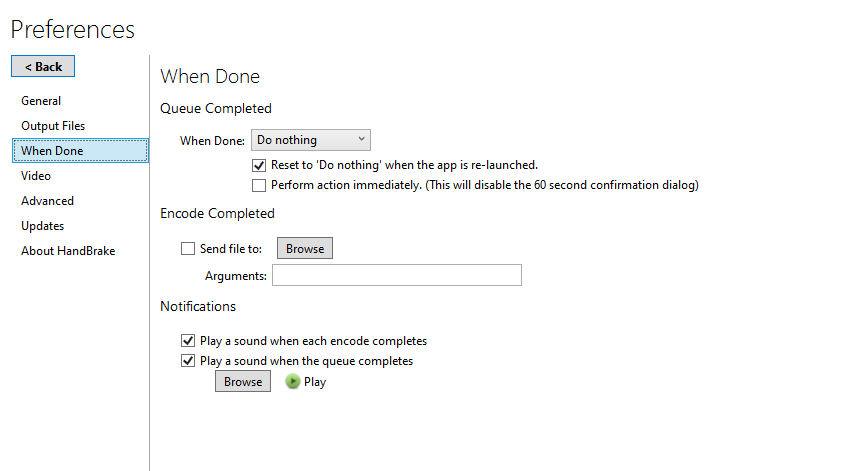
@sr55 did you remove "when complete" from preferences, or is it both in prefs and on queue window?
jstebbins
on 20 Jun 2019
When done is in preferences only. I’m not planning on making that change yet. Needs more thought. Will upload latest screenshots in 2 hrs when I’m back in
sr55
on 20 Jun 2019
On linux I have some queue buttons that apply to the entire queue rather than single queue items.
Reload All that marks all queue items as pending
Save Queue that exports the queue to a file
Load Queue that imports a saved queue
Do you have or plan to implement something similar? Where would you put these? My thought was they belong above the queue list, but the space is tight there. Maybe just have a global "Options" menu item that has these options in it above the queue list?
jstebbins
on 20 Jun 2019
... and what is currently in your "Options" button in the summary tab?
jstebbins
on 20 Jun 2019
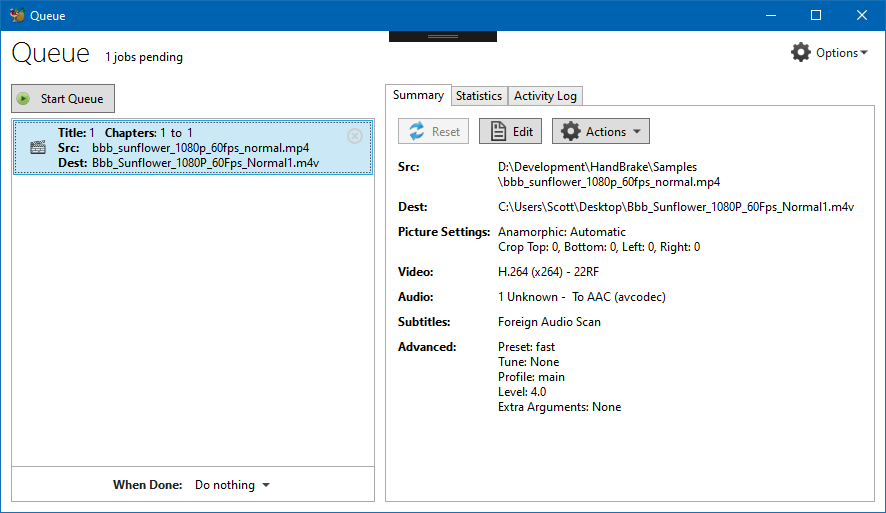
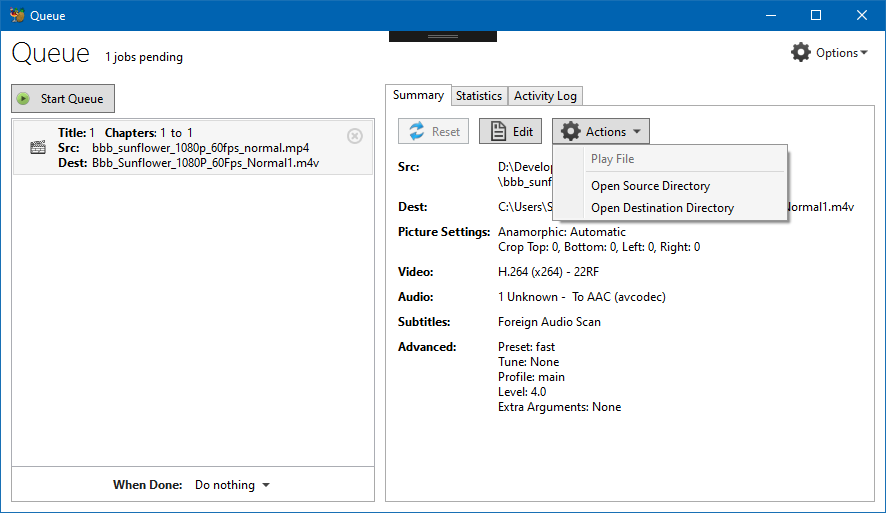
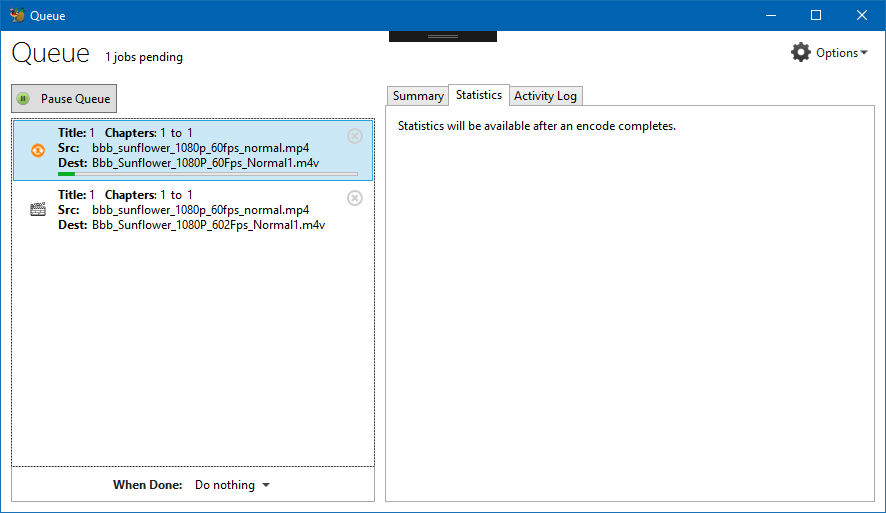
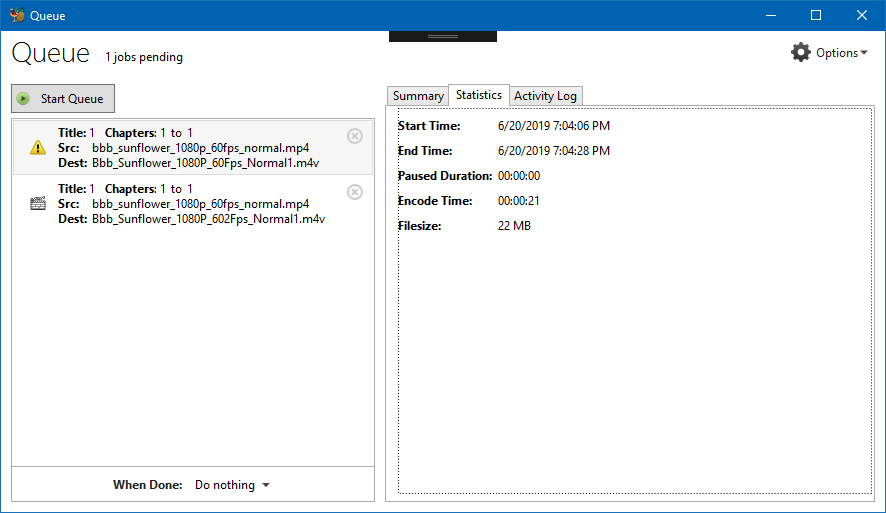
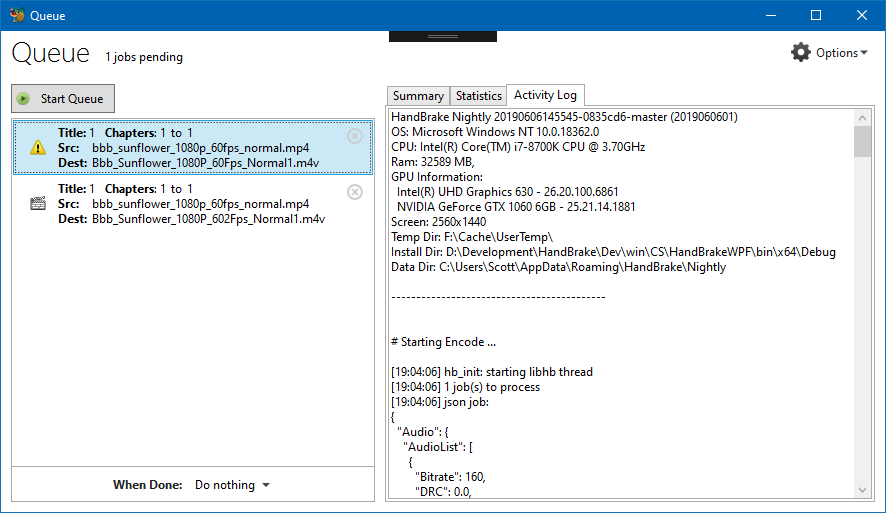
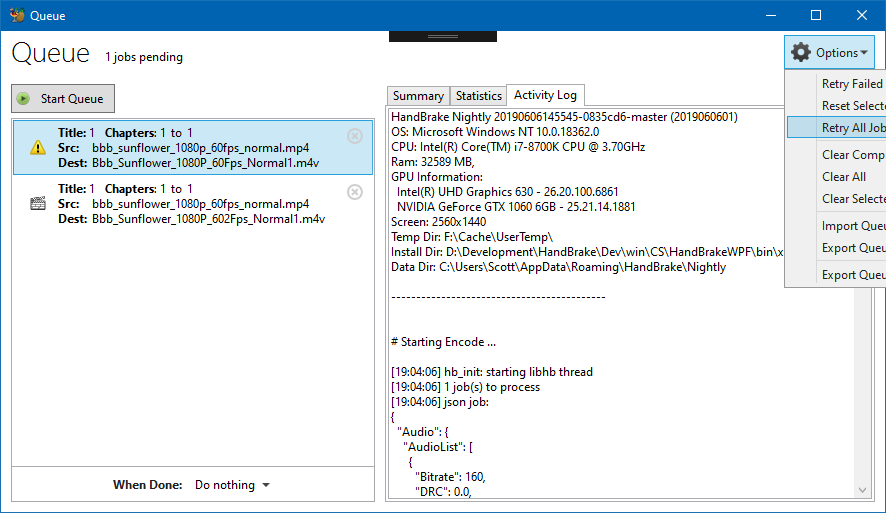
sr55
on 20 Jun 2019
I, for one, like the Statistics tab. Gives us some room to flush it out with more data if we so choose.
bradleysepos
on 20 Jun 2019
My summary tab is already a little cramp so yes, it;s maybe not the ideal place for it.
The reason I didn't do a "When Done" tab, was I realised it'd get kind awkward setting this for all jobs.
Also, how often is it you want different when done actions for each job.
Seems like the wrong place for it.
It's maybe something we'd want a "add" button to add "tasks" other than encodes to the main job list. I.e
- Pause until 22:00 etc
That said, I wanted to keep the redesign simple for now and we can extend later unless you guys want to push it further.
sr55
on 20 Jun 2019
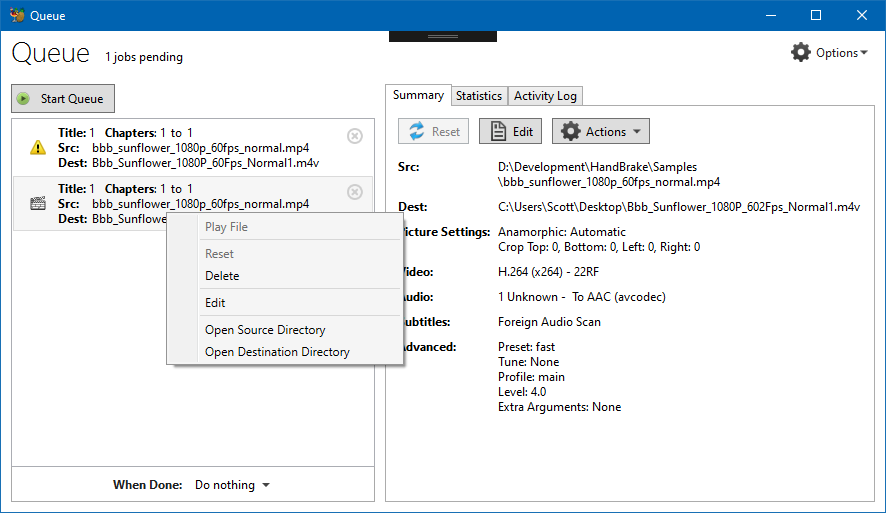
You removed the up/down buttons, so I assume reordering the queue is d-n-d only.
Do you plan to also add a 'Stop' button?
What does "Play File" do?
I assume "Open Source Directory" and "Open Destination Directory" launches the system file browser so you can do things like play/rename/copy/move the files? Can we remove "Play File" and just rely on the file browser for that functionality?
Do you update the activity log live while encoding? Is is just a snapshot or only available after encoding complete?
In my main activity window, I have a text widget that shows the path to the log on disk. Maybe add something like that above job activity logs?
You still have "When Done" under the queue list. Are you planning to remove that?
jstebbins
on 20 Jun 2019
Do you plan to also add a 'Stop' button?
Could do.
What does "Play File" do?
Launches the destination file in the system default player.
I assume "Open Source Directory" and "Open Destination Directory" launches the system file browser so you can do things like play/rename/copy/move the files? Can we remove "Play File" and just rely on the file browser for that functionality?
We could. It was just an easy thing to do to allow me to be lazy :P
Do you update the activity log live while encoding? Is is just a snapshot or only available after encoding complete?
Yes. (Note, scans can pollute that log, but when I get round to getting proper process isolation done for the WinUI, it won't be a problem).
If the other UI's can't do this, no worries, post would be an ok compromise.
In my main activity window, I have a text widget that shows the path to the log on disk. Maybe add something like that above job activity logs?
I think that's on my right click context menu to open the log directory. The main window has a button on a small toolbar. Could do something similar.
You still have "When Done" under the queue list. Are you planning to remove that?
Wasn't going to. It's useful for quick access.
sr55
on 20 Jun 2019
You still have "When Done" under the queue list. Are you planning to remove that?
Wasn't going to. It's useful for quick access.
That's why I asked earlier if it was also still in prefs. You replied that it was only in prefs.
jstebbins
on 20 Jun 2019
Sorry, I thought you were talking "Post encode" stuff.
Yes, WHen done is also a preference.
sr55
on 20 Jun 2019
sr55
on 20 Jun 2019
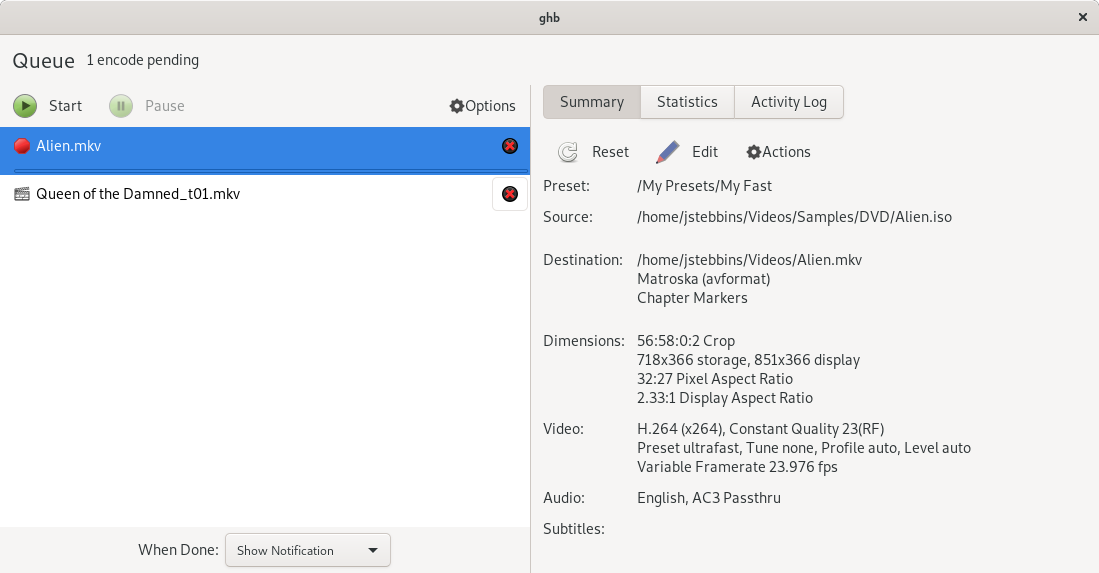
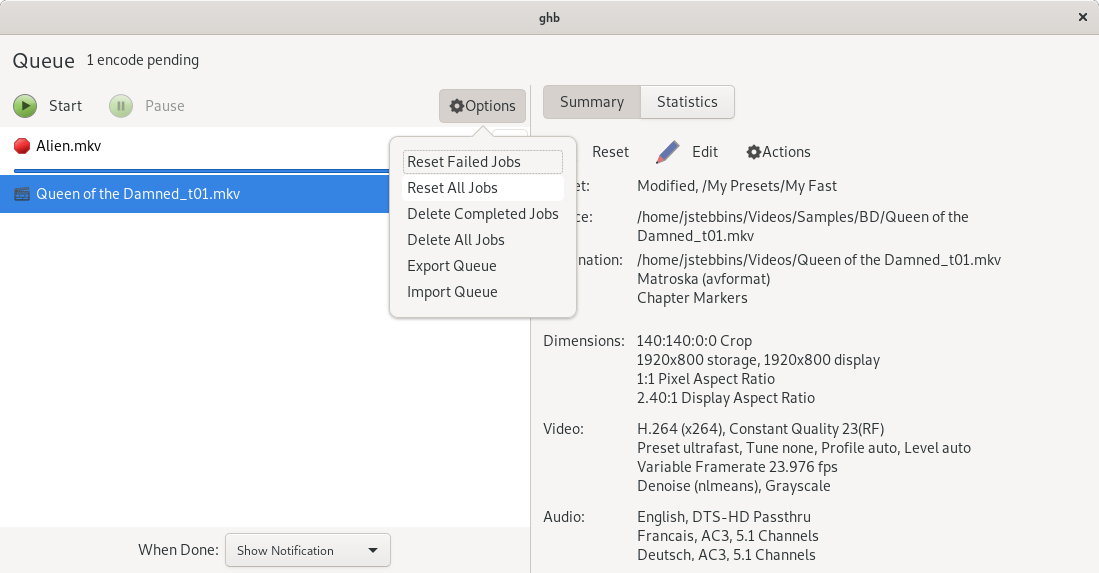
I haven't put anything in Statistics yet. But the rest is functional. I'm thinking about adding Duration to destination summary and p-to-p settings if they are set.
The window is resizable. The summary pane can scroll when it gets long (e.g. lots of audio and subtitle tracks). I allow the source and destination paths to wrap one line. If they are longer, I ellipsize in the middle. I've used a GtkPaned window to allow the widths of the 2 halves of the window to be adjusted (i.e. there's a grab anchor in the middle that lets you slide the middle line arround). Start and Pause buttons have the same behaviour as the main window.
jstebbins
on 24 Jun 2019
@jstebbins Looks good. Small comments:
Possible to baseline align "1 encode pending" to "Queue"?
Possible to vertically align Summary/Statistics to the Option button?
Perhaps we should stick with the convention "Preset Name (Modified)" as used in the other GUIs. I realize GTK uses "_Modified_", which would be fine also.
Can we move Import Queue before Export Queue per common convention?
Nice work!
bradleysepos
on 24 Jun 2019
Aside, I'm not sure I like Delete as a verb. Clear seems better, and avoids any confusion surrounding deleting output files.
bradleysepos
on 24 Jun 2019
Should probably roll this request in as well since windows UI already has it.
https://github.com/HandBrake/HandBrake/issues/1763
jstebbins
on 12 Jul 2019
Yeh, why not. Thinking it'll be a quick one.
sr55
on 13 Jul 2019
sr55
on 13 Jul 2019
MacGui queue should be mostly working now, but I have yet to implement some feature.
galad87
on 29 Jul 2019
@galad87 what's left?
sr55
on 31 Aug 2019
The activity log.
galad87
on 5 Sep 2019
This is now implemented in all three GUIs as of 1.3.0. Thanks everyone. Closing.
bradleysepos
on 14 Nov 2019
Related issues
 n2bisex4u
·
3Comments
n2bisex4u
·
3Comments
 AlexPasternak
·
5Comments
AlexPasternak
·
5Comments
 bohning
·
4Comments
bohning
·
4Comments
 d4rkne55
·
5Comments
d4rkne55
·
5Comments
 28598519a
·
4Comments
28598519a
·
4Comments