Halflife: [GoldSource] Download secondary progress bar doesn't work properly
You may notice this when you download a large file using FastDL.
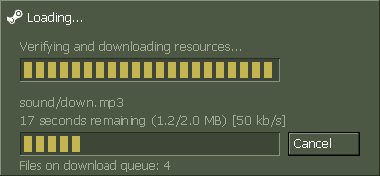
While download a file (e.g >= 100 MB) secondary progress bar always be 100 percent.

Issue is in the function DownloadManager::CheckActiveDownload


In my opinion, a fixes should be like this

Finally, we got the secondary progress bar working correctly

 s1lentq
All 12 comments
934 related
s1lentq
on 29 Mar 2019
@mikela-valve, please read this topic. Thank you!
 fl0werD
on 20 Apr 2019
fl0werD
on 20 Apr 2019
@mikela-valve Is there a possibility to add this feature request https://github.com/ValveSoftware/halflife/issues/934#issuecomment-23310086 , also if Multithreading is too much work then just should just use one progress bar with file size and download speed with the total amount of files that we will download.
Examples:


 oaus
on 26 Apr 2019
oaus
on 26 Apr 2019
also if Multithreading is too much work then just should just use one progress bar with file size and download speed with the total amount of files that we will download.
"Multithreading" is a thing since 2013. If you check active TCP connections you'll notice that 3 files are downloaded at same time (it seems it is set to 5 in the engine, not sure). It just needs to be updated to display them all at same time, or like you suggested, show how many files are being downloaded at that moment.
 R4to0
on 16 May 2019
R4to0
on 16 May 2019
good gif bb
 MatiasEsf
on 16 May 2019
MatiasEsf
on 16 May 2019
A fix to the progress bar not updating properly will be included in the next beta update. I won't be adding additional details to the dialog just yet but will consider it for the future and track work on it in #934 if I do.
 mikela-valve
on 16 May 2019
mikela-valve
on 16 May 2019
Fixed in beta 'Exe build: 11:12:36 May 21 2019 (8244)'.
mikela-valve
on 21 May 2019
now load bar disappeared
connection to server became very fast but without load bar.
i try connect to server with resourses which i don't have and i load all resourses with black screen, console and servers window
load bar exists with new game local server but disappears with internet servers
 Mistrick
on 21 May 2019
Mistrick
on 21 May 2019
Sorry, just reproduced this based on your info. Part of this request is serviced in Steam and it looks like I was getting a different response based on the version I was using. I'll update beta later with this working.
mikela-valve
on 21 May 2019
This regression should be fixed in the updated beta 'Exe build: 16:32:50 May 22 2019 (8245)'.
mikela-valve
on 23 May 2019
I can confirm that this issue is fixed in the current beta
s1lentq
on 23 May 2019
Closing as fixed.
mikela-valve
on 2 Jun 2019
Related issues
 afwn90cj93201nixr2e1re
·
48Comments
afwn90cj93201nixr2e1re
·
48Comments
 metita
·
57Comments
metita
·
57Comments
 barcasl3
·
33Comments
barcasl3
·
33Comments
 schoof
·
1694Comments
schoof
·
1694Comments
 jainil-shah
·
195Comments
jainil-shah
·
195Comments
Most helpful comment
@mikela-valve Is there a possibility to add this feature request https://github.com/ValveSoftware/halflife/issues/934#issuecomment-23310086 , also if Multithreading is too much work then just should just use one progress bar with file size and download speed with the total amount of files that we will download.
Examples:


