Habitica: challenges need a "Report" button to flag violations of the Community Guidelines
_In this issue "mod" means moderator or staff member. In the codebase, they can be identified by user.contributor.admin being set to true._
Players sometimes create Challenges that contain violations of the Community Guidelines. There needs to be a "Report" button for other players to flag such Challenges as needing attention from mods.
The "Report" button should appear when:
- seeing the Challenge in the My Challenges page
- seeing the Challenge in the Discover Challenges page
- viewing the individual Challenge's page (i.e., pages with links like this: habitica.com/challenges/2def5ee7-291b-4ec0-860e-33c2d3d09551)
The button should work in much the same way as it does for chat messages. When you click the button, a confirmation modal appears with two buttons, "Cancel" and "Report". If you click "Cancel", the modal closes and no flag is made. When you click "Report", a report is made (see below for details). When mods view that modal for a Challenge that has already been flagged, they see an additional button, "Reset Flag Count" (see below for details).
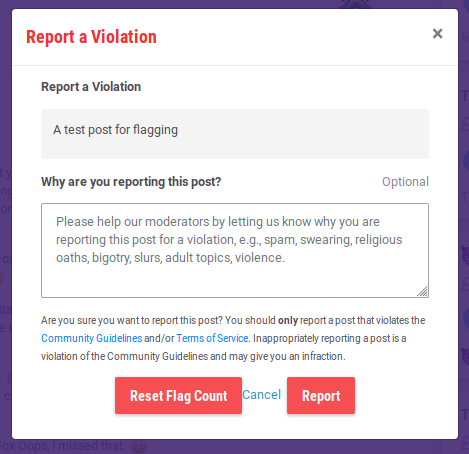
The screenshot at the bottom of this post shows the modal a mod sees when they click the "Report" button on a chat message. The chat report modal that a non-mod sees is identical except that the "Reset Flag Count" button is not there.
The modal for reporting a Challenge should look the same except:
- The text of the post ("A test post for flagging." in the screenshot) is replaced with the Challenge's name.
- The "Why are you reporting this post?" subheading should have every "post" changed to "Challenge".
- The "Please help our moderators..." sentence should have "post" changed to "Challenge".
- The "Are you sure..." paragraph should have every instance of "post" changed to "Challenge".
- The "Reset Flag Count" button should appear for only mods.
When the "Report" button is clicked, the following actions need to occur:
- an email is sent to the same recipients who receive notifications about flagged chat messages
- a message is sent to the moderator Slack channel, as is done for flagged chat messages
- the Challenge's document in the database is modified to contain details like these:
"flags": {
    "d904bd62-da08-416b-a816-ba797c9ee265": true,
    "3e595299-3d8a-4a10-bfe0-88f555e4aa0c": true
},
"flagCount": 2,
Those UUIDs are the User IDs (not Usernames!) of the people who have clicked the "Report" button. The flagCount increases by 1 for each non-mod who clicks the button. If a mod clicks the button, the flagCount is immediately set to 5. Those details are the same as for chat messages, so the contributor who works on this can copy what's in the chat schema and code.
When a Challenge has never been flagged, that data looks like below (again, this is the same as the default data for chat messages):
"flags": {},
"flagCount": 0,
When a mod clicks the "Reset Flag Count" button, these things must happen (they are all the same as is done when resetting flags on a chat message):
- an email is sent to the same recipients who receive notifications about un-flagged chat messages
- the Challenge's
flagCountis set to0 - if the mod's User ID is currently recorded as
truein theflagsobject, then it's changed tofalse - _no other changes are made to the
flagsobject_ - _no Slack notification is made for unflagging_
When a Challenge has a flagCount greater than zero, mods should see a message on the Challenge saying that it's been flagged (e.g., just the word "Flagged"). That message will never need to be seen by non-mod players so it doesn't really matter what it looks like as long as it's clearly visible (e.g., close to the challenge's name). I suggest red text, as is done for a similar message for mods on flagged chat messages. I'm happy for the contributor who works on this to make a decision about it and show us a screenshot in your PR. It's not worth spending time designing that carefully. The message should appear in these three places:
- seeing the Challenge in the My Challenges page
- seeing the Challenge in the Discover Challenges page
- viewing the individual Challenge's page (i.e., pages with links like this: habitica.com/challenges/2def5ee7-291b-4ec0-860e-33c2d3d09551)
For the first version of this feature, there is no need for flagged Challenges to be hidden from any players, however that is a desired feature and can be added later. See https://github.com/HabitRPG/habitica/issues/9725 for details. For simplicity and to get this feature done more quickly, I suggest that both issues are not worked on at the same time. ~_Previous text: If the contributor who wants to work on this feature also wants to work on that issue at the same time, that's fine, but this first issue is more important and the details of hiding challenges are still being sorted out so that other issue isn't currently ready to be actioned._~
On a local install, the contributor who works on this can turn one of their test accounts into an admin account by using the "Make Admin" button in the Debug menu in the footer of the website, then reload the website. Comment in this issue if that doesn't seem to do what you need - it's been a while since I used that Debug feature. :)
 Alys
Alys
All 7 comments
_edit by Alys 2017-12-17: ignore this comment. This requirement is being considered in https://github.com/HabitRPG/habitica/issues/9725_
Text for the owner of a flagged Challenge:
"This Challenge has been hidden by members of the community because it violates the Community Guidelines. Staff members or moderators will contact you shortly via email with instructions for how to restore your Challenge! If over 48 hours have passed and you have not heard from them, please email [email protected] for assistance."
 lemoness
on 6 Jul 2015
lemoness
on 6 Jul 2015
This is now ready for a contributor to start working on it.
However @Tressley will want to decide on the exact position of the "Report" icon in the three locations listed in the top post (My Challenges, Discover Challenges, individual challenge pages). Until that's done, the contributor who works on this issue could add it in any position to help them develop the other parts of the fix for this issue.
I've deleted some of the old comments, which were about how the issue should be on hold for the website redesign.
Alys
on 18 Dec 2017
I've updated the top post in this issue, deleted a now-irrelevant comment about previous work done on it, and marked it as help wanted.
Alys
on 11 Nov 2018
I'm down to take a look at this. I'll start working from #10230.
 alecbrick
on 2 Mar 2020
alecbrick
on 2 Mar 2020
@alecbrick Hi! Are you still interested in working on this? If so, just let us know!
 shanaqui
on 7 Apr 2020
shanaqui
on 7 Apr 2020
Hi @alecbrick! I've marked this as help wanted again, since you didn't reply, but if you're still interested then feel free to pick it back up.
shanaqui
on 14 Apr 2020
Sounds good. Sorry for not getting back to this earlier - I've been a bit busy with work, but I'll try and get back to this when I find the time.
alecbrick
on 16 Apr 2020
Related issues
Alys
·
3Comments
Alys
·
4Comments
 thebadwolfgirl
·
4Comments
Alys
·
3Comments
thebadwolfgirl
·
4Comments
Alys
·
3Comments
 aksteele
·
3Comments
aksteele
·
3Comments