Habitica: If you type @, it gets automatically filled in by the next username you mention
This one is tough to describe, so here is some test text:
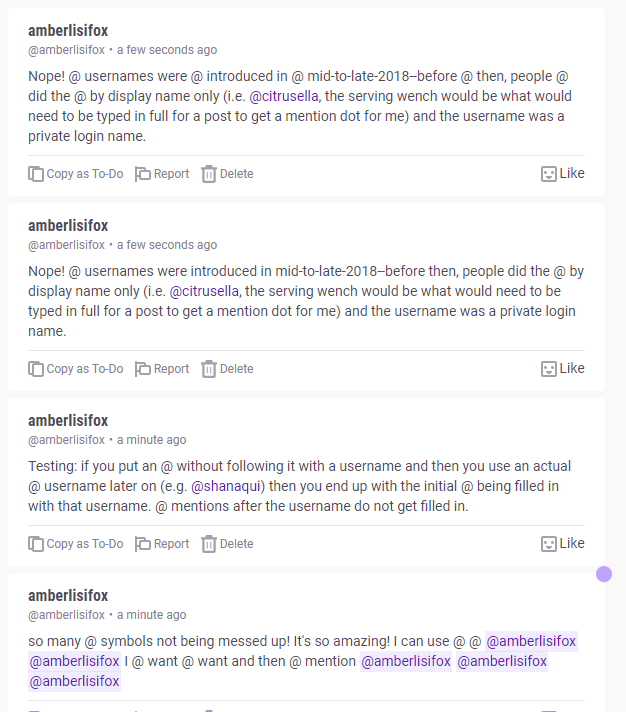
Testing: if you put an @ without following it with a username and then you use an actual @ username later on (e.g. @shanaqui) then you end up with the initial @ being filled in with that username. @ mentions after the username do not get filled in.
This produces the following results:

 shanaqui
All 16 comments
So entering a single '@' symbol, (no username) will be retroactively filled in with a username if you use the @ symbol to fill in a username somewhere else in the text?
 Amberlisi
on 5 Jun 2020
Amberlisi
on 5 Jun 2020
An @ symbol in isolation, with no text other than a space immediately after it, will be filled in with the next username that gets an @ symbol later in the text. There can be any number of isolated @ symbols before the "real" mention.
The original text (which I had seen the bug on after using the the Tavern) that I reported the bug with in RAB on Habitica was
Nope! @ usernames were introduced in mid-to-late-2018--before then, people did the @ by display name only (i.e. @citrusella, the serving wench would be what would need to be typed in full for a post to get a mention dot for me) and the username was a private login name.
which gave (because I'm too lazy to screenshot)
Nope! @citrusella were introduced in mid-to-late-2018--before then, people did the @citrusellay name only (i.e. @citrusella, the serving wench would be what would need to be typed in full for a post to get a mention dot for me) and the username was a private login name.
The number doesn't seem to be limited, as I just tried this:
Nope! @ usernames were @ introduced in @ mid-to-late-2018--before @ then, people @ did the @ by display name only (i.e. @citrusella, the serving wench would be what would need to be typed in full for a post to get a mention dot for me) and the username was a private login name.
and got
Nope! @citrusella were @citrusellad in @citrusellate-2018--before @citrusellaple @citrusella by display name only (i.e. @citrusella, the serving wench would be what would need to be typed in full for a post to get a mention dot for me) and the username was a private login name.
It seems to unpredictably "eat" parts of words following the @'s as well? 0_o The names that show from the "fake" mentions (@ in isolation) aren't linked (and don't appear to contribute toward any mention limits) but otherwise appear to function like regular mentions (i.e. name is purple, though if it's running into another word, the purpleness stops "mid-word"). Only the "real" mentions (i.e. @citrusella in this example) get the profile link. The "copy as to-do" function still gives the original code, in case that's relevant.
...Have I made this clearer or just more thoroughly confusing? XD
 citrusella
on 5 Jun 2020
citrusella
on 5 Jun 2020
I haven't delved into it, but it does appear to follow a predictable pattern.
Citrusella has 10 characters in the string.
Usernames has 9 characters in the string + 1 space, so Citrusella eats the whole string (@ usernames)
Introduced has 10 characters in the string + 1 space, so Citrusella eats all but the last character (@ introduced)
So basically it is replacing characters after the @ symbol, up to however many characters are in the username.
Amberlisi
on 5 Jun 2020
Can I pick this one up to start working on it?
Amberlisi
on 5 Jun 2020
@Amberlisi Please do! You seem to have a great understanding of what's going on already!
@citrusella Thanks for the extra details! They were helpful.
 Alys
on 6 Jun 2020
Alys
on 6 Jun 2020
@Alys Wanted to get some thoughts on the execution of this. It seems that it can be fixed by simply running a regex to check if a stranded @ symbol is in the message and then replacing it with an escaped @ symbol (\@). Code below is from the chat.vue file:
    async sendMessage () {
      const strandedMentionRegex = /@ /g;
      if (this.sending) return;
      this.sending = true;
      let response;

      try {
        response = await this.$store.dispatch('chat:postChat', {
          group: this.group,
          message: this.newMessage.replace(strandedMentionRegex, '\\$&'),
        });
      } catch (e) {
        // catch exception to allow function to continue
      }

      if (response) {
        this.group.chat.unshift(response.message);
        this.newMessage = '';
      }

      this.sending = false;

      // @TODO: I would like to not reload everytime we send. Why are we reloading?
      // The response has all the necessary data...
      const chat = await this.$store.dispatch('chat:getChat', { groupId: this.group._id });
      this.group.chat = chat;
    },
@Amberlisi thanks for the code! I think the issue might also be happening at the server level so we should try to fix it there so that it gets fixed for the mobile apps as well. The code that highlights the mentions is here https://github.com/HabitRPG/habitica/blob/develop/website/server/libs/highlightMentions.js and @benkelaar might have some inputs on where to start
 paglias
on 8 Jun 2020
paglias
on 8 Jun 2020
@Amberlisi Awesome that you picked this up!
I think it would be preferable to fix this in the code that is at fault instead of injecting escape characters beforehand (I'm also not sure if that will fix it). But the problem puzzles me. If I update the highlightMentions.test.js unit tests with preceding @'s it doesn't happen at all.
However I haven't looked at this exact case yet. I might have some time tomorrow evening to look at this more.
@citrusella does this happen on submit or could it be happening on autocomplete?
 benkelaar
on 8 Jun 2020
benkelaar
on 8 Jun 2020
@benkelaar You could test it yourself (with the test text I provided or your own) so that you can see how exactly it works, but the answer is that it only happens on submit. If you just paste in that exact text, from a plain text editor, the issue will still occur.
shanaqui
on 8 Jun 2020
@shanaqui Thank you. My apologies, I should have just taken the time to properly test it myself.
benkelaar
on 8 Jun 2020
@Amberlisi thanks for the code! I think the issue might also be happening at the server level so we should try to fix it there so that it gets fixed for the mobile apps as well. The code that highlights the mentions is here https://github.com/HabitRPG/habitica/blob/develop/website/server/libs/highlightMentions.js and @benkelaar might have some inputs on where to start
That makes sense! Let me take a look at the file you just mentioned and figure out a solution at the server level
Amberlisi
on 8 Jun 2020
So, I found the sanitizeText function that the API calls when posting to chat. Right now the sanitizeText function only trims messages longer than the max length. That function could be added to so that it would check for any \@ symbols that have a space after it and then escape that \@ symbol so that it's seen as a literal character.
// Sanitize an input message, separate from messageDefaults because
// it must run before mentions are highlighted
export function sanitizeText (msg) {
  const strandedMentionRegex = /@ /g;
  // Trim messages longer than the MAX_MESSAGE_LENGTH and escape any stranded @ mentions
  return msg.substring(0, shared.constants.MAX_MESSAGE_LENGTH).replace(strandedMentionRegex, '\\$&');
}
Also, the places I seen the bug happen is the party chat, tavern, guild, and also private messaging. Adding to the sanitizeText function appears to have fixed the problems in all of those locations.
Amberlisi
on 9 Jun 2020
@Amberlisi Awesome, that does look like an effective workaround for now! (I'm still not sure why it works, so extra kudos that you found that solution!)
Now that I've had some time to look at it it appears the problem is actually in the https://github.com/HabitRPG/habitica-markdown module, when rendering it in the frontend.
Ah, of course, the regular expression it uses to find the match searches the entire string for a match, not just the start of the string. 🤦 -> That means it finds the first following mention when a single @ has been found (and then when rendering overrides the following characters with that).
I created a fix for habitica-markdown in this pull-request: https://github.com/HabitRPG/habitica-markdown/pull/90/commits
Once that's been merged and released fixing this should be a matter of increasing the habitica-markdown dependency to 2.0.1 .
benkelaar
on 9 Jun 2020
@Amberlisi thanks for the investigation here! As mentioned in the last comment this was fixed by @benkelaar in the habitica-markdown library but I would be happy to award a contribution tier anyway for your help here, just post your Habitica username or UUID :)
paglias
on 10 Jun 2020
Thanks! Username is @Amberlisi same as on GitHub
Amberlisi
on 10 Jun 2020
tier awarded!
Note that further tiers require increasing amounts of work from one to the next, so Tier 2 may require a couple of PRs or a larger PR to attain. But keep helping out and we'll express our gratitude accordingly!
paglias
on 10 Jun 2020
Related issues
 aksteele
·
3Comments
aksteele
·
3Comments
 audiolion
·
4Comments
Alys
·
3Comments
audiolion
·
4Comments
Alys
·
3Comments
 kantamablade
·
4Comments
Alys
·
4Comments
kantamablade
·
4Comments
Alys
·
4Comments