Habitica: challenge participant progress page should not use grey for tasks
_EDIT: There's a partial PR at https://github.com/HabitRPG/habitica/pull/10973 which a contributor could build on if they didn't want to work on this issue from scratch._
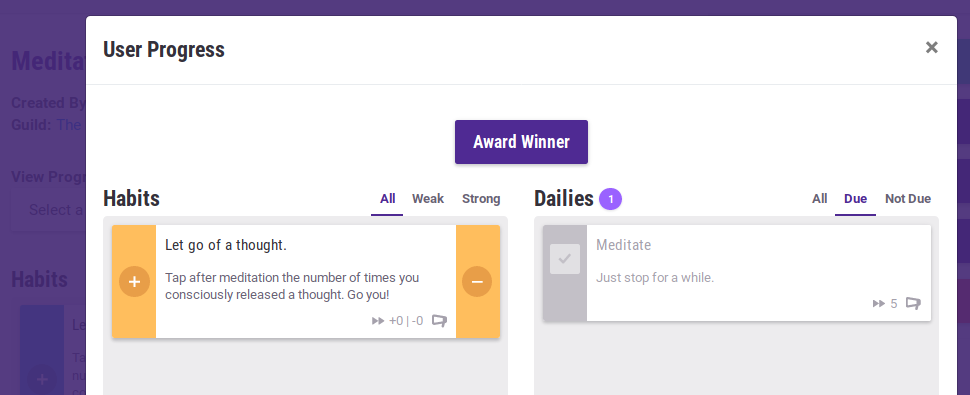
When you are looking at a challenge's page (e.g., a page such as https://habitica.com/challenges/6c565677-65fc-400f-b39e-52bd01e4cd7a) and you use the "View Progress Of" > "Select a Participant" menu to view the progress of a participant, completed Dailies and To-Dos should not be grey - they should show their red/orange/yellow/green/blue colour so that you can judge the participant's history of performing that task.
For example, in the screenshot below, the Daily should not be grey.
Whoever works on this issue should test that their change does not affect any tasks (including challenge tasks) in a player's own tasks list, or in the "Group Tasks List" screen of a guild or party with a Group Plan. For information about adding a Group Plan to a guild/party, see "Creating Test Data" in Using Your Local Install to Modify Habitica's Website and API
 Alys
Alys
All 10 comments
I'd like take on this one please!
 Mira-M
on 2 Feb 2019
Mira-M
on 2 Feb 2019
Thanks @Mira-M! I've changed the label to in progress.
Alys
on 3 Feb 2019
@Alys i believe this has been fixed ? i was just checking this issue , locally and it seemed fine.
 gautamz07
on 14 Jun 2019
gautamz07
on 14 Jun 2019
@gautamz07 Thanks for checking but it is still happening. You can see an example in https://habitica.com/challenges/3d599f05-8e14-4078-bf2c-718d6852edc4 when you look at the All tab for Dailies.
Alys
on 15 Jun 2019
I put in a PR back then, and changes were requested, but at the time I lost my local changes due to my computer dying and haven’t had the chance to pick it back up. The branch is still there with the unit tests if someone wants to pick it up. Thanks.
Mira-M
on 15 Jun 2019
@Mira-M Thanks for telling us! I'll mark this issue as help wanted again and the PR as "abandoned" but that's just the label we use when a PR is available to be taken up by someone else.
If you do want to work on it again or if you'd like advice about restoring your changes locally from what's in the PR, just let us know!
Alys
on 15 Jun 2019
@Alys will take this up . Let me know :)
gautamz07
on 18 Jun 2019
@gautamz07 Thank you! Please go ahead. :)
Alys
on 18 Jun 2019
@Alys , Thank you . the challenge link that you shared HERE , i can see that the dailies of other users not always show in grey when inspected see HERE , one is showing the progress correctly while one is in grey. Also i suppose this issue only happens in the ALL tab. I was unable to recreate this issue locally though , heres what i did.
- created two separate acounts locally.
- created a challenge from account A. Joined challenge
- joined challenge from account B.
- did not check/tick any of the dailies from A.
- Checked progress of A from account B.
Still none of the dailies show in grey. Could you give me a bit of insight into this. Iám a little new to habitica so sorry for the noob question.
Thank you.
gautamz07
on 19 Jun 2019
Dailies are grey when they've been completed (i.e., when they have a tick mark in their checkbox) or when they're not due. If you use one of your test accounts to complete a challenge Daily and then look at that account's progress from the challenge's screen, you should see that Daily appearing grey with a tick in the checkbox. Also you can edit the Daily's repeat settings (in the challenge's screen, not in your own copy of the Daily) so that the Daily is not due today (e.g., change it to only Mondays or set the Start Date to a day in the future). You should then see that it becomes grey in the challenge's own page.
Does that make sense? Post here again if it's not clear enough or if you need more pointers!
Alys
on 19 Jun 2019
Related issues
Alys
·
4Comments
Alys
·
4Comments
 keccy
·
4Comments
Alys
·
3Comments
Alys
·
4Comments
keccy
·
4Comments
Alys
·
3Comments
Alys
·
4Comments