Habitica: cron not running or failing part way through
We're getting reports of cron not running or partially running.
Lalaitha (7bdfa0b4-e06b-4a2f-b334-8011e9c03d95):
_"Cron issue: I had my Record Yesterday's Activity pop up, checked off things and clicked start my day. Some tasks became unticked, others not. Boss damage didn't get applied either._
_It seems like some of my dailies that are active Saturday have become active, so it sort of looks like cron ran halfway, but not for everything, if that makes sense._
_"I have not changed my Day Start Time."_
From Loggly:
{"method":"POST", "originalUrl":"/api/v4/cron", "headers":{"connection":"Keep-Alive", "content-type":"application/json", "accept":"application/json", "accept-encoding":"br,  gzip,  deflate", "accept-language":"da-dk", "host":"habitica.com", "max-forwards":"10", "user-agent":"Habitica/348 CFNetwork/974.2.1 Darwin/18.0.0", "x-api-user":"7bdfa0b4-e06b-4a2f-b334-8011e9c03d95", "x-client":"habitica-ios", "x-forwarded-proto":"https", "x-forwarded-port":"443", "x-original-host":"habitica.com", "x-original-url":"/api/v4/cron", "x-forwarded-for":".....", "x-arr-ssl":"2048|256|C=GB,  S=Greater Manchester,  L=Salford,  O=COMODO CA Limited,  CN=COMODO RSA Domain Validation Secure Server CA|OU=Domain Control Validated,  OU=EssentialSSL Wildcard,  CN=*.habitica.com", "x-arr-log-id":"bed7fdca-f98a-4a21-be01-8798447cfc23", "content-length":"0"}, "body":{},
"httpCode":500, "isHandledError":false,
"fullError":{"name":"MongoNetworkError", "errorLabels":["TransientTransactionError"]},
"timestamp":"2018-11-03T00:43:05.700Z", "level":"error",
"message":"Error: read ETIMEDOUT\n at TCP.onread (net.js:622:25)"}
 Alys
Alys
All 77 comments
Another case was reported in the Bug guild about 23 hours before the date of this comment so that should give pointers about which log records might be relevant:
jonasisawesome (230b7172-1936-437b-8f14-c188bbdb1975):
_"My damage is still pending after I logged in to habitica"_
Alys
on 3 Nov 2018
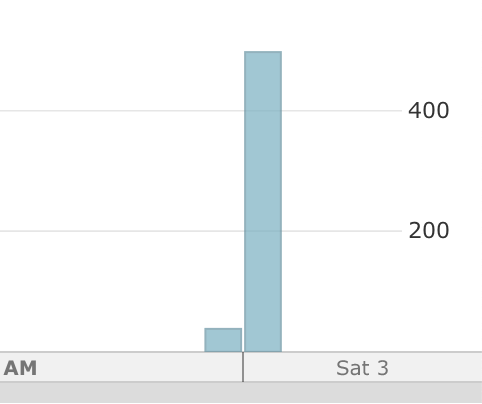
Looks like there was a brief database problem but there haven't been errors for a few hours now
 paglias
on 3 Nov 2018
paglias
on 3 Nov 2018
Another probable case from CinCrisis (faea8a98-ed8e-447d-8a32-b51500f1d706) who reported in a few messages the Bug guild that their damage from Skills wasn't applied to the boss when they logged in on 30 October.
Alys
on 3 Nov 2018
I'm not sure if this is another example or not. It was posted about 8 hours before now by Mu Guiying (011bc428-8be1-4f2c-b4c2-ed82630661f4):
_"Today my tasks stayed greyed out after yesterday. Even though I press synchronize nothing happens. The only difference from normal days is that I'm resting at the inn since yesterday and that I log in from Internet Explorer this time."_
There's nothing in Loggly. Amplitude shows that cron's been running. ~Their Dailies are currently marked as not complete so I've asked them if they manually unticked them. If it turns out they did NOT manually untick, then the bug was probably just IE showing cached data. I'll update this comment if I get an answer from them.~
Alys
on 3 Nov 2018
Ah, sorry, Mu Guiying posted a second message two hours after that one:
_"Update: this time when I logged in, only one task has stayed greyed out since yesterday, the rest are normal. The one that stayed greyed out was the one I missed to fill out yesterday, and filled in earlier today in the list of tasked from yesterday that showed up when I logged in the first time today."_
Sounds like something weird happened but I'm not sure what.
Alys
on 3 Nov 2018
Reported via email 18 hours ago:
My day isn’t refreshing. I’ve tried to change the custom start for the day. I’ve tried refreshing. I’ve closed the app and reopened it. I’ve even turned my phone completely off and back on.
Kalina
The following lines help us find and squash the Bug you encountered. Please do not delete/change them.
iOS Version: 12.0.1
Device: iPhone8,1
App Version: 2.0.8
User UUID: 73d3bff0-7db8-4ca6-80e2-8287f8323de3
 shanaqui
on 5 Nov 2018
shanaqui
on 5 Nov 2018
Reported via email 20 hours ago:
I can’t get my day to reset and start... HELP!!!
The following lines help us find and squash the Bug you encountered. Please do not delete/change them.
iOS Version: 12.1
Device: iPhone10,1
App Version: 2.0.8
User UUID: 62705ba8-aa61-4d14-9e54-ed12e4bbe168
shanaqui
on 6 Nov 2018
Also 20 hours ago:
Hi! When the new day starts, my dailies aren’t refreshing? I’ve refreshed the page, restarted the app, cleared my cache, tried online, and restarted my phone. Any help would be appreciated!
The following lines help us find and squash the Bug you encountered. Please do not delete/change them.
iOS Version: 12.1.1
Device: iPhone10,4
App Version: 2.0.8
User UUID: 706f01c6-bdc1-4bf2-95e7-d25a794c5f2c
shanaqui
on 6 Nov 2018
Are all the reports from iOS? It might be a mobile app problem, cc @phillipthelen
paglias
on 6 Nov 2018
That's part of what this thread is meant to figure out! We were doing it in Slack (see the channel for Report a Bug), but this was started as a better way of keeping track. Most of the reports are coming from iOS, but there have been a few reports that sound like this bug from Android (e.g. user 74ee65c1-2c52-4bdc-8280-80f5a3d221f6 reported something similar) or the web. Some we don't know which they were using at the exact time it happened.
shanaqui
on 6 Nov 2018
From above, Amplitude's best guess for the ones which we don't have recorded here:
7bdfa0b4-e06b-4a2f-b334-8011e9c03d95 -- iOS
230b7172-1936-437b-8f14-c188bbdb1975 -- Android
faea8a98-ed8e-447d-8a32-b51500f1d706 -- iOS
011bc428-8be1-4f2c-b4c2-ed82630661f4 -- web
(Although Amplitude seems to only hold one [the most recent?] access method, because it has me as web despite the fact I use Android too. Still, I thought it might make a start.)
shanaqui
on 6 Nov 2018
Via Report a Bug, reported around 17 hours ago:
Missneato (62705ba8-aa61-4d14-9e54-ed12e4bbe168)
I can’t get my day to reset With my tasks. So far I have: *closed the app *refreshed *restarted phone *checked in from web app (problem is the same there) * uninstalled app and reinstalled.
Amplitude says iOS, will ask the user to confirm.
shanaqui
on 6 Nov 2018
I have added more logging to the next build of the iOS app. If it is iOS related, that should help us get more insight. This issue might also be mixing two issues together. The initial report mentions that the dialog shows up but then doesn't check off the tasks correctly (which I'm not sure I've seen before as a report. Although it might also be that the dialog popped up again after cron already ran and the tasks the user then saw as being unchecked were the ones that they then checked off in the dialog?) And the following reports sound more like the dialog never pops up, which is an issue I've seen before but have not been able to reproduce and by looking at the code also have no idea how it could get into that state as long as the needsCron field is returned correctly.
 phillipthelen
on 6 Nov 2018
phillipthelen
on 6 Nov 2018
In Amplitude, most of these (I haven't checked all) are showing as never having cronned at all for that day, if I look them up.
According to Amplitude, the first report in the thread did cron on the 3rd (the day reported), didn't cron at all on the 4th (but does have actions logged for that day), did on the 5th, hasn't for the 6th (so far? could be a timezone thing in this case). When it's been checked against the database (only twice I think), Amplitude was correct.
There probably are multiple issues (including ye olde "too much task history"). We really need to figure out how to pick them apart in a way where even I can check up which one it is (since I am code-iliterate)...
shanaqui
on 6 Nov 2018
Just now reported:
eclare (1b830889-8ade-44e8-8562-7c25b92283c5)
@shanaqui I'm having the same bug as @Missneato. Both in my mobile app (iOS) and browser (Chrome). Thx for the fixit tip!
No cron appears in Amplitude for today.
shanaqui
on 6 Nov 2018
eclare adds that they went to the web first on the day their cron failed partway through. (Maybe worth checking them for the excessive task history bug -- I can't do that, though. @SabreCat?) They may also have had an early cron (on iOS) due to an unrelated time zone issue.
shanaqui
on 7 Nov 2018
Reported ~4 hours ago:
Waz McWaz (f24f4b94-325a-4d68-a166-a6106c966212)
My dailies haven’t reset at the start of the next day. I’m stuck with a single task left to be ticked off.Is this a bug?
Amplitude says iOS.
shanaqui
on 7 Nov 2018
iOS, reported 18 hours ago:
I am using an iphone for the use of the app but i find many things delade. The biggest one is that a new day has started but my dailies have not reset.
The following lines help us find and squash the Bug you encountered. Please do not delete/change them.
iOS Version: 12.0.1
Device: iPhone10,2
App Version: 2.0.8
User UUID: 5dc80507-c973-4426-a4c0-e0a484dd1c77
I think it looks like the web/Android ones might be some other weirdness, with iOS being the main culprit. Should I keep tracking people affected or have we got enough data on this one now?
shanaqui
on 8 Nov 2018
Just got one in that is probably not the same thing, from Android, but just in case it's related in any way...:
Device: gprimeltecan
Android Version: 22
AppVersion: Version 1.4.3 (1975)
User ID: b8194df4-a4c1-43ec-ad1d-95394210920a
Details:Hey there. After everyone was placed in the Inn so you could do programming I have been unable to resume my dalies. I've clicked on the button multiple times. Restarted the app and phone. Still nothing. Everyone else in my party has been able to resume their dailies though.
Amplitude confirms they've been logging in and does not have a cron listed since Oct 5th.
shanaqui
on 8 Nov 2018
Another report:
I'm WintryBeth, user ID 02f75389-c930-4ee3-a901-0531beb2ff8a
I'm using iOS 12.1 and Habitica version 2.0.8 (348)
shanaqui
on 12 Nov 2018
There's nothing obvious in the logs for WintryBeth (02f75389-c930-4ee3-a901-0531beb2ff8a). Cron has run since then.
For gprimeltecan (b8194df4-a4c1-43ec-ad1d-95394210920a), their most recent loggedin timestamp is 2018-10-05T07:13:26.183Z - i.e., they haven't cronned since early October. Amplitude shows they used Habitica up until 2018-11-12 (about three days ago) - I didn't check for hits on every day but I found enough to indicate they were using Habitica at the least on most days in the past month. There are no relevant errors in Loggly to explain the five weeks of failed crons.
Alys
on 15 Nov 2018
Report of cron failing from web (could be task history issue though):
Shoaling (52d07da8-722d-499e-896e-837b5a47309f)
Hi! I was supposed to cron during the night but I didn't. I'm not resting in the tavern. I haven't done any damage to the boss and my dailies haven't reset. It's now late afternoon, I've been using the site since around 8am this morning and my cron time is midnight, and I haven't changed my cron time in several months. Other members of my party have damaged the boss throughout the day, so the problem seems to just be me. I have tried refreshing the page, syncing, and closing and reopening the habitica tab in my browser on the computer. I have tried logging out and logging back in again. I have tried opening the app on my phone and selecting "refresh" from the menu, and that didn't work either.I have skimmed the recent posts and to me this looks like an instance of https://github.com/HabitRPG/habitica/issues/10806
Thank you for your help.
& then:
Shoaling (52d07da8-722d-499e-896e-837b5a47309f)
@shanaqui I think you did miss me because the github issue for my cron issue wasn't updated with my complaint. I have croned normally since then so it seems to have been a one-off issue, but maybe there is something in the logs that can help people narrow the bug down. The issue happened on the website (webbrowser: qutebrowser on archlinux), and then I tried the Android app, but cron didn't happen with that either.I don't need more help though, so good luck tracking it down.
Along with this from Chrome and Android:
tesska (52e5f7b2-48e5-4d39-80d0-b17be05caabc): "I logged in today and was supposed to have 140+ damage to the boss. But my damage wasn't added to my party. It doesn't even say I've attacked. I've tried logging out and logging back in, closing the browser and reopening, and logging on through the app."
Haven't checked Amplitude yet for the cron info on these though.
shanaqui
on 16 Nov 2018
webbie @webbie_at (03117605-1b3f-4b42-a0e2-a57b135f6457) posted this about 15 hours ago:
hi, i think i have another "cron not running or failing part way through" issue ( https://github.com/HabitRPG/habitica/issues/10806 ):
today, must have been about half past 10 a.m. (about 11 hours ago), after i checked off all of yesterday's dailies in the popup (it was the first perfect day for a long time, if that's important) and started my new day, "an unexpected error occurred." i refreshed the page and than looked at the party: the boss got no damage from me (i think i had the usual 30 to 40 points), not even a message appeared. i haven't noticed any other problems so far.
i'm on the webpage only (win7/opera). and i haven't changed my start of the day time for about a month (it's 1 a.m. now).
(and i just wanted to report that, no need to restore any points or something, thanks.)
addition to issue #10806:
just found out that one of my yesterday's dailies is not due - though it should be. this might be the one where the "unexpected error occurred", i clicked it off last before i started my new day and just before that error appeared. it's a challenge's daily, weekly and for every day of the week. (some other dailies with similar status but not from a challenge are due as they should be.)
Alys
on 17 Nov 2018
posted 22 hours ago by themonicabird @themonicabird (bee248f5-bde6-49db-9cb6-fb4dba3a3150)
I had over 800 damage pending in my quest but when I logged in this morning (my day resets at midnight), it wasn't there anymore and no damage hit the boss.
This player had a lot of entries in some task history arrays. I've cleared them in case that helps.
This error happened:
VersionError: No matching document found for id "813dc586-8a4e-4be8-a584-1ba8edfbf205" version 85 modifiedPaths "value, streak, history, nextDue"
https://habitica.loggly.com/search#terms=bee248f5-bde6-49db-9cb6-fb4dba3a3150&from=2018-10-01T00:00:00.000Z&until=2018-11-17T11:28:13.700Z&source_group=&event=b163d276-e9a0-11e8-80f8-0651554be0aa,1542373701091,137616665014948470
That task (813dc586...) wasn't one of the ones with a large history entry.
Alys
on 17 Nov 2018
webbie @webbie_at (03117605-1b3f-4b42-a0e2-a57b135f6457) reported:
_"hi, i think i have another "cron not running or failing part way through" issue ( https://github.com/HabitRPG/habitica/issues/10806 ):"_
_"today, must have been about half past 10 a.m. (about 11 hours ago), after i checked off all of yesterday's dailies in the popup (it was the first perfect day for a long time, if that's important) and started my new day, "an unexpected error occurred." i refreshed the page and than looked at the party: the boss got no damage from me (i think i had the usual 30 to 40 points), not even a message appeared. i haven't noticed any other problems so far."_
_"i'm on the webpage only (win7/opera). and i haven't changed my start of the day time for about a month (it's 1 a.m. now)."_
_"(and i just wanted to report that, no need to restore any points or something, thanks.)"_
From Loggly:
VersionError: No matching document found for id "b40ec89f-7418-49b1-b012-1435daa1a2df" version 843 modifiedPaths "value, streak, history, nextDue"
https://habitica.loggly.com/search#terms=03117605-1b3f-4b42-a0e2-a57b135f6457&from=2018-10-01T00:00:00.000Z&until=2018-11-18T06:11:08.586Z&source_group=&event=2f0b7e59-e982-11e8-8088-123ee2afbd8a,1542360597812,137616533979102809
There were about 190 entries in that Daily's history array; not unusually large in terms of what we used to look for when history entries were often causing a problem. webbie does have several tasks with 200+ history entries.
Alys
on 18 Nov 2018
@SabreCat @paglias Is it likely that history arrays are causing a problem again or not?
I haven't found evidence of that in all of the cron failure reports I've looked at so even if it's sometimes responsible, there'll be other causes as well.
Alys
on 18 Nov 2018
I don't think the history arrays are the cause but it could be. It seems that the reports in this issue are from many different problems, the initial ones were from a brief connection error, some seems to be related to the mobile apps, ...
paglias
on 18 Nov 2018
Yeah, it does feel like a few different issues. The only thing that ties them together is that they seem to be happening more often now than before a couple of weeks ago. We started recording them around then because they'd started to stand out as more common. :-/
Alys
on 18 Nov 2018
There is definitely something new wrong, or a very very unlikely
coincidence. These reports faded to nothing for a couple of months; now I'm
typically responding to at least one a day.
On Sun, 18 Nov 2018, 10:00 Alys <[email protected] wrote:
Yeah, it does feel like a few different issues. The only thing that ties
them together is that they seem to be happening more often now than before
a couple of weeks ago. We started recording them around then because they'd
started to stand out as more common. :-/—
You are receiving this because you were mentioned.
Reply to this email directly, view it on GitHub
https://github.com/HabitRPG/habitica/issues/10806#issuecomment-439680750,
or mute the thread
https://github.com/notifications/unsubscribe-auth/AHxHAIMsUMNANgu9Ygxb_u1fWPEV6vhmks5uwS-qgaJpZM4YMv8_
.
shanaqui
on 18 Nov 2018
Tbh I'm not sure I can still follow the current state of investigating this.
Do we have any reports where we know this is still happening with the most recent app versions (1.6 on android and 2.1.0 on iOS). And Do we know for for any of those cases, the issue was fixed/they cronned when they logged into the website? Originally it sounded like this was likely an iOS issue, but now it's sounding more like it might not be directly caused by the clients?
phillipthelen
on 18 Nov 2018
Yeah I agree that there are a lot of reports here, probably unrelated, some related issues:
- https://github.com/HabitRPG/habitica/issues/10711
- https://github.com/HabitRPG/habitica/issues/9169
- https://github.com/HabitRPG/habitica/issues/10553
As far as the VersionError and the large histories there should be no link between the two issues, VersionError(s) happen only when a document is saved concurrently in two different places which indicates two parallel requests that tries to save the same document at the same time
paglias
on 18 Nov 2018
We've been using this issue to collect reports while we try to work out what's going on. I'd be happy to help break them up into different issues but even when we do that, probably copying them here first will help until someone with database and log access can assess each one.
@phillipthelen To the best of my knowledge, the current state of investigating this is just everything written here. I don't know if anyone has been looking at the reports and posting findings elsewhere.
We can certainly start asking players about this:
Do we have any reports where we know this is still happening with the most recent app versions (1.6 on android and 2.1.0 on iOS). And Do we know for for any of those cases, the issue was fixed/they cronned when they logged into the website?
Are there any other questions that we could be asking? Knowing what sort of information to collect in addition to what we've already been collecting might help speed this up.
I don't think https://github.com/HabitRPG/habitica/issues/9169 can be related. That's about individual Dailies not appearing in the RYA screen, rather than cron not running at all or stopping part way through.
https://github.com/HabitRPG/habitica/issues/10553 (the new user account problem) might have been responsible for the reports from these three players:
73d3bff0-7db8-4ca6-80e2-8287f8323de3 | created: 2018-11-03 04:49 | kalinanav
f24f4b94-325a-4d68-a166-a6106c966212 | created: 2018-11-04 08:47 | WazMcWaz
5dc80507-c973-4426-a4c0-e0a484dd1c77 | created: 2018-11-07 08:50 | Ziggi1200
At a quick glance, the dates more or less line up, however to be certain someone could check on the exact dates and go through Amplitude to see if earlier crons had happened.
From now on, I'll mention the creation dates here when potentially relevant.
All other reports in this issue can't be from https://github.com/HabitRPG/habitica/issues/10553
Alys
on 18 Nov 2018
Hmmm. I don't have access to the database or to Loggly; I now have access to Amplitude, which is a big help in general, but doesn't let me differentiate between these potential bugs. Someone is always going to have to triage the reports into the right buckets, even if we identify separate problems. So is here still be the best place for me to copy them, even if we do split things up more into separate root causes?
shanaqui
on 20 Nov 2018
My feeling is that here is the best place to put them initially and then when I or other admins have collected data, we can copy them to any other issues that have been created for specific problems.
Alys
on 20 Nov 2018
For those three players that might have been candidates for #10553 (the new user account problem), it looks like they're not. Amplitude shows one or more crons happened before the missing one or that the cron wasn't missing (and therefore didn't run fully or the app didn't pick up the change to the Dailies).
"register" and "Cron" dates from Amplitude for each player and comments about their bug reports are below.
User ID: 73d3bff0-7db8-4ca6-80e2-8287f8323de3 | kalinanav
iOS Version: 12.0.1
Device: iPhone8,1
App Version: 2.0.8
November 2, 2018 6:49:12 pm UTC
register
November 3, 2018 2:30:12 pm UTC
Cron
cron bug report sent by email Nov 4, 4:30 pm UTC
"My day isn't refreshing. I've tried to change the custom start for the day. I've tried refreshing. I've closed the app and reopened it. I've even turned my phone completely off and back on."
November 5, 2018 1:18:47 pm UTC
Cron
No cron occured on November 4 according to Amplitude but one cron had occurred before that so it's not the new-user problem.
User ID: f24f4b94-325a-4d68-a166-a6106c966212 | WazMcWaz
iOS version 2.0.8 (data from Amplitude)
November 3, 2018 10:47:43 pm UTC
register
November 5, 2018 10:37:30 am UTC
Cron
November 5, 2018 1:08:26 pm UTC
Cron
November 7, 2018 5:28:34 am UTC
Cron
cron bug report in Report a Bug guild:
"My dailies haven't reset at the start of the next day. I'm stuck with a single task left to be ticked off."
"timestamp" : ISODate("2018-11-07T08:24:52.705Z") (Nov 7, 8:24 am UTC)
November 7, 2018 11:05:40 pm UTC
Cron
November 8, 2018 9:35:18 pm UTC
Cron
So that report was about three hours after cron did run (according to Amplitude), implying that either it had run partially (it hadn't reset some or all of the Dailies), or the app hadn't picked up the change.
User ID: 5dc80507-c973-4426-a4c0-e0a484dd1c77 | Ziggi1200
iOS Version: 12.0.1
Device: iPhone10,2
App Version: 2.0.8
November 6, 2018 10:50:32 pm UTC
register
November 7, 2018 9:18:24 pm UTC
Cron
missing cron report sent by email Nov 7, 9:30 pm UTC:
"I am using an iphone for the use of the app but i find many things delade. The biggest one is that a new day has started but my dailies have not reset."
November 8, 2018 8:54:18 pm UTC
Cron
So that report was just after cron did run (according to Amplitude), implying that either it had run partially (it hadn't reset some or all of the Dailies), or the app hadn't picked up the change.
Alys
on 20 Nov 2018
@phillipthelen From https://github.com/HabitRPG/habitica/issues/10806#issuecomment-436293458 :
I have added more logging to the next build of the iOS app...
Which version of the app is that? We can look out for reports from people using that version and ping you for them. Or do the logs go into Loggly where I can find them?
Alys
on 20 Nov 2018
The logging was added in 2.1.0. However there is an issue with linking the UserID that will be fixed with 2.1.1 that I'll release in the coming days.
phillipthelen
on 20 Nov 2018
Possibly not related, but:
Indigo PaperSnob @PaperSnob (d8d19eb3-2a2b-48da-9867-c63828176faf)
I am on the latest IOS version. When I croned, I got a something went wrong error.My dailies reset but the damage to the boss disappeared. I tried a web version to see if damage would happen but no luck.
shanaqui
on 21 Nov 2018
So I checked the errors for Indigo PaperSnob @PaperSnob (d8d19eb3-2a2b-48da-9867-c63828176faf) and they have two VersionError errors at 2018-11-20 08:54:26.618 and 2018-11-20 08:54:26.595 so two concurrent requests for /cron and tasks/redacted/score/up. The requests are both coming from iOS
The errors are one for the user document (in the score task request) and one for a task doc (in the cron request) but not the same task that failed due to a version error
paglias
on 21 Nov 2018
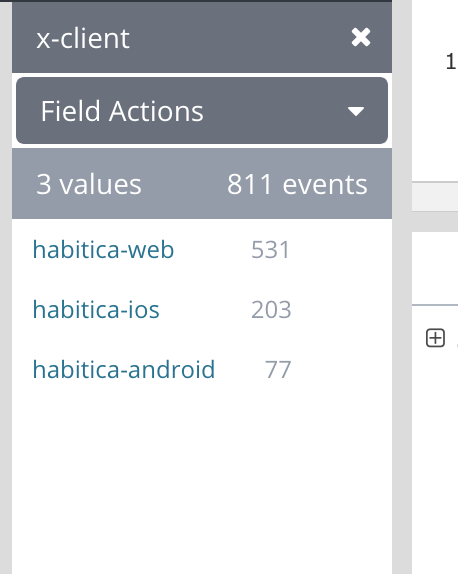
I also checked the distribution of cron errors during the last 7 days and it's not only iOS for sure
paglias
on 21 Nov 2018
If we haven't done so yet we should add, to web, ios and android, a block so that cron can't be called if a request is in progress, my guess is that people score a task and before the request is finished they try to start the day which can cause a versionerror
paglias
on 21 Nov 2018
Interesting! Not that I know what to do with anything, but eek.
Here's another iOS error:
Nick2142 @Nick2142 (2c67f2ba-2ffc-4737-be8c-f51c26ff5c15)
Hi! What should I do, if my cron has not rebooted? Updating by scrolling, logging out, logging on site does not help. In settings writes that I was nov. 20. iOS, app last version.
shanaqui
on 21 Nov 2018
Another one:
Please describe the bug you encountered: hello! I can’t start new day (cron) in app. My start time is 8:00 AM, but today it’s doesn’t work. I done some action in Habitica, but it’s useless. I have changed start time on 07:00 am, useless. Please, help me start new day in Habitica. Thank you.
The following lines help us find and squash the Bug you encountered. Please do not delete/change them.
iOS Version: 11.4.1
Device: iPhone 6
App Version: 2.1.0 (360)
User ID: 2c67f2ba-2ffc-4737-be8c-f51c26ff5c15
Level: 9
Class: warrior
Is in Inn: false
Uses Costume: false
Custom Day Start: 8
shanaqui
on 21 Nov 2018
From an email dated five hours ago:
"Hi! I haven't been able to get my dailies to properly reset today. I've tried off an on throughout the day, closed/opened the app, logged out/in. Same problem on both phone and iPad. Browser version is today's dailies but some things checked from yesterday (which reappear in iOS if I uncheck them on the browser)."
iOS Version: 12.1
Device: iPhone SE
App Version: 2.1.0 (360)
User ID: 838936c3-82c4-4998-9580-287f3c9bd4c2
Level: 170
Class: healer
Is in Inn: true
Uses Costume: true
Custom Day Start: 0
Loggly shows no errors.
Amplitude shows no cron since November 22, 2018 12:03:41 pm UTC (it's currently Nov 24 03:39 UTC).
However auth.timestamps.loggedin is about a day after that: "2018-11-23T12:00:15.658Z" implying that the cron process started then immediately halted.
Account is not new (created 2015).
No mismatch between preferences.timezoneOffset and preferences.timezoneOffsetAtLastCron.
I've asked for more details such as whether they started on the app or website (probably app given their wording), whether they saw RYA at all, whether they saw any errors.
I don't know if you want to add more data to the set that's collected (I LOVE the new additions there BTW) but if you're willing to then auth.timestamps.loggedin, preferences.timezoneOffset, and preferences.timezoneOffsetAtLastCron would help with cron problems.
Unrelated to that, preferences.disableClasses and flags.classSelected would help with class-change problems.
EDIT: They've provided these details:
"Thanks for getting back to me so quickly (and on a holiday weekend no less!). Luckily, the problem resolved this morning. But here's how yesterday went down: I loaded the app on my phone and the incomplete dailies list popped up. I usually have to refresh a second time to get the current day's dailies, so I did that and that's when nothing happened. I think maybe somewhere along the way I got a little red error at the bottom, but I don't remember what it was (sorry!). I forgot to say yesterday I was checked into the Inn, if that makes a difference in bug hunting."
The "little red error at the bottom" could have been a 502 as for the report from loverofbooks in the comment just below this one.
From memory, we're deliberately not reporting them in Loggly, but would it help if we did?
Alys
on 24 Nov 2018
Another case like the previous one, reported in the Report a Bug guild 6 hours ago from Benjamin, the Avid Reader @loverofbooks (fc6bd8d5-94a2-462b-ac7f-9b03bc446d45):
"My Cron didn't run this morning and none of my dailies have reset. How can I fix this?"
Not a new account, no timezone offset mismatch, auth.timestamps.loggedin is 2018-11-24T00:00:31.498Z but Amplitude shows the most recent cron being November 23, 2018 12:47:39 am UTC, therefore today's cron started then immediately halted.
Nothing in Loggly around that missed cron time.
Later, loverofbooks posted some more information:
"@Alys If it helps any with the troubleshooting: When I checked in, the "Record Yesterday's Activity" box did pop up. I checked the dailies I had done. When I pressed "Start my new day", however, it threw a 502 error, meaning it probably had some sort of miscommunication with the server.
Since it did log that my cron had run and didn't ask me to record yesterday's activity when I refreshed the page, it probably means that the server is logging that the cron has run before getting a response about what the results were. I think that's probably where the best results will lie.
Now, I don't know how the code deals with the cron, etc., but I think that that is the closest that I can get you before you troubleshoot.
Thanks for your help!"
Note that even though loverofbooks saw a 502 error, there's nothing in Loggly.
Alys
on 24 Nov 2018
Regarding 502s errors, the reason they don't appear in Loggly is because they are produced directly by our cloud provider when the server isn't reachable and since loggly is setup on the server they don't get reported.
But 502s aren't errors like 500s, it's more of a "could not complete the request because the server was unreachable", they're not produced by bugs or anything else but more likely from trying to hit a VM that is down or still waking up
paglias
on 26 Nov 2018
A cron error where Amplitude records the cron but there's no quest progress message in party chat (I confirmed that there should have been). This was from a VersionError so we could move this one to an issue of its own and develop a fix for it.
@Meakuel (4382653f-4dbe-4f0f-84dd-6127c8a6b466):
_"Today my damage didn´t count for the Party Boss. I had 495 pending damage. With the new day it was 0 pending damage, but my damage of the day before didn´t count to Boss HP. There wasn´t a "Meakuel attacks The Dread Yarnghetti for xx damage. The Dread Yarnghetti attacks party for xx damage.", too. It´s not the first time, I was "forgotten", so I thought, I should report it. Beside that, I took damage. I didn´t caused the damage myself und the only quest member, who counted for the Boss Quest at this time didn´t caused group damage. Beside that, my day started normal."_
_" I started the day with the Website version."_
Amplitude event for that cron: https://analytics.amplitude.com/habitica/project/132025/search/4382653f-4dbe-4f0f-84dd-6127c8a6b466?eventFilter=Cron&sessionHandle=WdH%252BShc_WdH%252BR7t_YS4wNY_gO5_20aaf83e-84aa-4d17-94d2-a8783b924844&eventId=d324fdd2-f03e-11e8-bab1-0257369837da
VersionError: No matching document found for id "32fbb42d-fdb7-441e-9567-ef55d6ed587a" version 106 modifiedPaths "value, streak, history, nextDue"
    at VersionError.MongooseError [as constructor] (/usr/src/habitrpg/node_modules/mongoose/lib/error/mongooseError.js:13:11)
    at new VersionError (/usr/src/habitrpg/node_modules/mongoose/lib/error/version.js:18:17)
    at generateVersionError (/usr/src/habitrpg/node_modules/mongoose/lib/model.js:347:10)
    at model.Model.save (/usr/src/habitrpg/node_modules/mongoose/lib/model.js:407:27)
    at tasks.forEach.task (/usr/src/habitrpg/website/transpiled-babel/middlewares/cron.js:119:47)
    at Array.forEach (<anonymous>)
    at cronAsync (/usr/src/habitrpg/website/transpiled-babel/middlewares/cron.js:118:11)
    at <anonymous>
    at process._tickDomainCallback (internal/process/next_tick.js:229:7)
method:POST
originalUrl:/api/v4/cron
timestamp:2018-11-24T23:15:2
Logged in the bug guild 29 hours ago by @CaptainMarc (74da075e-85ea-4f5b-b778-fc31477d886a):
_"Logged in on my phone app (Android) this morning. The "did you do these yesterday" list popped up and I clicked those I'd not checked off but done the day before. So far so good. A bit later I checked into my party, again on my phone app, and although we were on a Quest by damage to the boss was not reported. A bit later than that I logged back into Habitica and the "did you do these tasks yesterday?" list reappeared. I checked them off again. This time when I went into party chat the damage to the Quest boss was reported in the chat thread. Now tonight I just logged into Habitica from my computer. And I am down 17 out of 50 health when I checked off almost all my dailies and some other tasks yesterday (and in the reminder qeue this morning). This all feels a bit not quite right to me. I've had some trouble in the past with the phone app and my account accessed through my laptop don't play very well together. Thank goodness for health potions."_
Not a new account, no timezoneoffset mismatch, not sleeping, lastCron and auth.timestamps.loggedin and Amplitude all show the same time for cron: 2018-11-24 21:22. Party chat shows that too (below) so the fact that it didn't appear straight away must have been an app slowness/sync issue.
    "text": "`CaptainMarc attacks Vice, the Shadow Wyrm for 80.5 damage.` `Vice, the Shadow Wyrm attacks party for 5.2 damage.`",
    "timestamp": "2018-11-24T21:22:37.956Z",
CaptainMarc's report contains two events:
- Logging in to the Android app, going through RYA, and then maybe or maybe not going through cron.
- Getting RYA a second time and then maybe or maybe not going through cron.
The various logs show only one cron happened so one of those RYA events must not have ended with cron.
CaptainMarc can't remember how long ago each of those two events were so we can't correlate them with the log file / Amplitude / party chat records.
Alys
on 26 Nov 2018
My dailies do not reset. When I open the app in the morning and get the check off prior Day dailies screen, it fails to reset dailies to the new day.
The following lines help us find and squash the Bug you encountered. Please do not delete/change them.
iOS Version: 12.1
Device: iPhone 6s
App Version: 2.1.1 (362)
User ID: c92fbfd2-b359-49f5-9a4d-152934674cfc
Level: 92
Class: mage
Is in Inn: false
Uses Costume: true
Custom Day Start: 0
This one came in via email and has been left in the inbox for now. Amplitude seems to have cron running okay. Asked them if it's been happening a lot or just once or twice.
EDIT: this is happening persistently for them.
_EDIT BY ALYS 2018-12-12:_
Extra details from a later email:
It seems to happen each time I log in in the morning, and the prior day dailies reminded pops up. It's been consistent each day I have logged in.
There's no errors for that player (none at ALL of any kind, which is unusual). Amplitude shows that cron is running only every second or third day. I've asked the player if they're using Habitica every day.
shanaqui
on 27 Nov 2018
Re: the timing on CaptainMarc's issue:
@Alys, @CaptainMarc, @AnneLine.... folloing up on Alys' question about timing on @Captain Marc's bug report (THANK YOU!), @Aerilita, wrote an interesting followup comment:
@CaptainMarc @AnneLine the unclear timestamp ("a day ago") shows a bubble with the exact date and time (in your local time zone) on mouseover, if you're on the website.
Based on THAT, I went to my own PM chat, and was able to get these time references for what Marc had mentioned to me... you may be able to track it down further with this info:
in a PM to AnneLine, @CaptainMarc wrote 2 relevant PMs:Sat Nov 24 2018 06:58:39 GMT-8 (Pacific Standard Time) Well that's interesting I can't see the whole message field as I type and out doesn't scroll past a certain point.
Sat Nov 24 2018 20:56:59 GMT-8 (Pacific Standard Time) I'm having buggy problems again.
===========
Maybe those times will be helpful, but thanks for putting the whole thing on GitHub, @Alys!
shanaqui
on 27 Nov 2018
Via email:
I completed my daily activities yesterday. I cannot complete them today, because the app still has the list crossed off.
The following lines help us find and squash the Bug you encountered. Please do not delete/change them.
iOS Version: 11.1.1
Device: iPhone 6
App Version: 2.1.1 (362)
User ID: d069e560-3145-4061-86ae-7b2c76b4e966
Level: 5
Class: warrior
Is in Inn: false
Uses Costume: false
Custom Day Start: 0
_EDIT BY ALYS 2018-12-12:_
I can't see any errors or any indication from Amplitude or the quest progress messages that cron didn't occur. I think this one was the app not updating itself to show that the Dailies had been reset.
shanaqui
on 29 Nov 2018
@MrTea (30a44365-cc12-4d54-9a43-ac93ee3e3c6a) reported that cron failed to apply progress to the quest. This was due to a database timeout. From Loggly:
2018-12-07 09:59:01.447
httpCode:500
isHandledError:false
message:MongoNetworkError: connection 17 to ds013393-a1.mlab.com:13393 timed out
    at Socket.<anonymous> (/usr/src/habitrpg/node_modules/mongodb-core/lib/connection/connection.js:259:7)
Are we any nearer to deciding how to divide these up/dig deeper into them/etc? Most of my recent reports don't seem to have been dug into any deeper -- should I still post new ones that come in, or do we have enough?
shanaqui
on 10 Dec 2018
Ah heck, sorry. Those came in when I was in a really busy period so I left them alone but was planning to come back to them if no one else investigated but forgot to add that to my todo list. I'll look into them in a couple of days if no one else gets to them first.
I still want us to keep logging reports and having them investigated. There's clearly something(s) wrong and we need to track it/them down. I think posting here is still the best place for all the initial reports because it's difficult or impossible to judge where each problem lies until logs have been examined.
Alys
on 11 Dec 2018
From RaB 3 hours ago - Cideby @Cideby (4caf06e6-377c-404a-9dd6-7d23121e1549):
I got an 'unexpected error' while logging in, now I have:
no perfect day while I completed and clicked all
pending damage one minute after logging in and clicking nothing (10.4 dealt (0.9 damage) and 10.6 pending).
PS, there is no daily that got a streak reset to 0.
this Loggly error occurred at the time that their cron ran:
httpCode:500
isHandledError:false
level:error
message: VersionError: No matching document found for id "18013617-1abe-4c94-b630-f8fd8471e36c" version 53 modifiedPaths "value, streak, completed, history, isDue, nextDue"
I've confirmed that VersionError comes from one of their Dailies.
Alys
on 11 Dec 2018
If you want to keep logging issues that's fine but imho as long as they're version errors I think we have enough data already. Then it looks like there are several different problems and logging them in the same issue is a bit confusing
paglias
on 11 Dec 2018
@paglias See my comment in the report-a-bug section on Slack for discussing the logistics on that. We'll need to figure something out since I don't have access to Loggly and can't separate the versionerror issues out, so I figured we could talk logistics there.
shanaqui
on 12 Dec 2018
New report from Report a Bug, ~10 minutes before I'm posting this:
_Zebriny @zebriny (e2224ae2-05be-4601-9742-edb8de2c69d9): "When I logged in today, I got the "What dailies did you complete yesterday?" pop-up like normal, but the day did not reset. My damage to a boss was not applied. My completed dailies from yesterday are still ticked. I have both manually refreshed the page and pressed the sync button. I have tried on both the web version and the android version. This looks like the same problem mentioned in a Github Issue."_
shanaqui
on 12 Dec 2018
I can't find a reason for Zebriny's cron problem. lastCron and auth.timestamps.loggedin are both 2018-12-12T13:52:54.352Z and that's the same time that Amplitude shows cron running. There's no quest progress message but I've confirmed that there should be. There's no errors in Loggly for Zebriny's User ID or for the party's ID. Zebriny has no large history arrays.
Alys
on 13 Dec 2018
Reported on Friday 14th Dec:
Hello,
I'm enjoying Habitica very much so far, but I am having an issue with the days starting. Some mornings it asks me if I finished unchecked dailies and then begins my day, but some times (maybe a third of the time, but that's just my perception because I haven't been keeping track) it will stay on the same day for 2 or even 3 days. I set up reminders for some of my dailies and, even though it sends me the correct reminder for the actual day as though it knows it is a new day, it does not reset the checklist of items for habits or dailies. I try refreshing, but that has not worked.
Anyway, thought I'd bring it to your attention in case it is due to an error on your part or, if it is something I can solve from my end, please advise how.
Thanks!
GwenDevice: starqltesq
Android Version: 26
AppVersion: Version 1.6.1 (2040)
User ID: bb4a9785-82e4-49f2-a7fc-23022650e704
Details:
shanaqui
on 17 Dec 2018
For that report from Gwen (bb4a9785-82e4-49f2-a7fc-23022650e704), the data is significantly unusual and shows a clear problem. All times below are in UTC.
Account created: 2018-12-03 14:05
Cron times from Amplitude:
December 4, 2018 2:07:10 pm
December 7, 2018 2:24:29 pm
December 10, 2018 3:39:42 pm
December 11, 2018 2:26:46 pm
December 12, 2018 2:16:52 pm
December 13, 2018 10:07:21 pm
December 17, 2018 2:21:45 am
no crons after that (current time is December 18, 2018 10:08 pm)
Amplitude shows "task score" and "dropped item" activity on days when cron did not run (i.e., cron should have run on those days). For example here are just some of those dates:
December 5, 2018 1:01:12 am UTC - task score
December 6, 2018 1:22:01 am UTC - task score
December 8, 2018 5:53:06 pm UTC - task score
December 16, 2018 1:30:23 am UTC - dropped item
NB task score is not recorded after the first seven days; "dropped item" events can only come from task scoring.
There are no errors in Loggly.
Gwen does not have significant task history and is not currently in a party (never has been according to the achievements), so there's nothing that would be expected to cause an incomplete cron from VersionErrors.
All cron, task score, and dropped item events (not just those listed above) occurred on Android with the app version 1.6.1.
I want to look into this one more closely, even if that's just watching auth.timestamps.loggedin and lastCron over the next few days. A discrepancy in those values would indicate an incomplete cron, although from what Gwen has said and what I've seen so far cron and RYA aren't even trying to start on some days.
@phillipthelen I don't have a good understanding of how the Android app and cron interacts. Can you explain briefly? E.g., does the app make call to the server to see if RYA and cron are needed when the app is started? Or when the user takes ANY action on the app? Or just some actions? Which call is it? Or does something else occur in the app to trigger RYA/cron? If you'd like to just point me at the file that contains the relevant code I could work through it myself and then ask questions if I can't find the answers I'm wanting to help me understand what happens.
@shanaqui Good job on reporting this one especially. It's of interest!
Alys
on 18 Dec 2018
This report from @macha33 (e7533444-4b4d-4aa1-92b7-e24fc97d9b48) on the Android app indicates that macha33 was using the app for some time in the morning before cron ran. Amplitude shows no activity at all that day before cron. I'm wondering if some of these cron problems are due to the app simply not registering actions that the players are taking.
"I think, we (my party of two members) have a bug, but not sure... the other member of my party "casts Tools of the Trade for the party" today, AFTER my first connexion of the day = after my cron . But i haven't received the buff... :-((( what do you think about? (i apologize for my very poor english... i hope you understand me ;-)"
[a reply from me indicating that cron ran after the buff was cast and asking if cron might have run later than it should]
"on the morning I am always on android app. I always connect first on the morning at breakfast and I did this morning too - I was on my phone about 8:30 UTC then I remember that about 11:30 UTC I did connect and check tasks (on android too) Now, after your message, that I did connect first at 11:37 I am not 100% sure that I did connect before 10:49 :-(( ... only 90% ;-)
Alys
on 25 Dec 2018
Below is from magisfederal @thaiserds (991f4330-d1d0-4c68-8c19-dfe0e0ad9134). I've confirmed that their cron didn't run on 2018-12-22 but it's been okay since then. No task history problems. I can't check in Loggly because it's not working for me today (from the console logs, it's either some kind of code/dependency error at their end or the rather strict firewall at the place I"m staying at blocking wss; I'll try again later to find logs).
"Hello! My cron is not resetting since friday. I changed the time of cron and since then my dailies didn't reset. It's the same if I use on the computer or on the cellphone's app. I already tried to reload many times. It doesn't work. What should I do?"
[after my reply]
"I was using Android all day and tried the website too, when I realized that was a problem. The problem persisted in both platforms. After that day, the problem was solved, as you said, but only hours later after I send my message."
Alys
on 25 Dec 2018
New report:
"Zyldrynn Ashedoerr @TheSpunkyGnome (6dded101-e694-42af-ab03-d0dd341ce92c) [web]
I've tried logging in on both the website and the app, and my cron won't occur, even though it is 7:20 am and my custom day start is 2 am. Thanks!"
No sign of cron via Amplitude.
_Edit by Alys 8 hours later (2019-01-03 22:42 UTC):_
There's nothing in Loggly either.
lastCron and auth.timestamps.loggedin are both 2019-01-03T12:01:25.811Z which is usually a sign that cron did NOT stop immediately after starting, although exactly as shanaqui says there's no Amplitude record for this one (the previous cron in Amplitude is about 24 hours earlier).
There's no chance this was caused by too much task history.
shanaqui
on 3 Jan 2019
Device: sperry
Android Version: 25
AppVersion: Version 1.6.1 (2040)
User ID: 031b2e9f-e37b-4324-a839-2bae68dc74eb
Details:my days aren't resetting. I tried changing the time, refreshing, & going on the website.
Their last cron was 6th January; Amplitude shows no cron since, although they have been completing tasks and using the site.
_edit by Alys 2019-01-10 00:45:_
for 031b2e9f-e37b-4324-a839-2bae68dc74eb, they've cronned twice on 9 January (far enough apart to not be an error) but those were the first since 6 January. I can't find any errors in loggly to explain it. This one is a solid mystery. :(
shanaqui
on 8 Jan 2019
@phillipthelen I don't have a good understanding of how the Android and iOS apps and cron interact. Can you explain briefly? E.g., does the app make call to the server to see if RYA and cron are needed when the app is started? Or when the user takes ANY action on the app? Or just some actions? Which call is it? Or does something else occur in the app to trigger RYA/cron? If you'd like to just point me at the files that contain the relevant code I could work through it myself and then ask questions if I can't find the answers I'm wanting to help me understand what happens.
Alys
on 10 Jan 2019
Natasha @Natashaannan (911690dc-0c9f-4974-8754-293f1a7a2075) [android]:
"Hello, I was wondering why my dalies don't show up. I'm trying to refresh but still nothing. Did I maybe mess up with my custom day start? I really don't know"
Current time is 2019-01-10T10:45 UTC.
{
    "_id": "911690dc-0c9f-4974-8754-293f1a7a2075",
    "auth": {
        "timestamps": {
            "created": "2019-01-02T10:23:18.784Z",
            "loggedin": "2019-01-09T07:01:18.139Z"
        }
    },
    "party": {
        "quest": {
            "progress": {
                "up": 27.975601999688287
            }
        },
        "_id": "54e41f26-0c13-4239-a4b0-d864469aa065"
    },
    "preferences": {
        "dayStart": 0,
        "timezoneOffset": -60,
        "sleep": false,
        "timezoneOffsetAtLastCron": -60
    },
    "_cronSignature": "NOT_RUNNING",
    "lastCron": "2019-01-09T23:22:44.661Z"
}
That shows cron started but didn't end correctly (lastCron and loggedin are different).
Amplitude doesn't have a cron record for today.
Nothing in Loggly. No large task history. Nothing to explain this.
I've reset their lastCron to be the same as loggedin which should give cron another chance to run.
Amplitude does show that all actions since the previous cron were done on Android (except for some challenge actions that had platform "Unknown") so this might be from an Android app bug.
Alys
on 10 Jan 2019
@Alys Both apps function roughly the same. They are listening for changes to the user object in the local database. And everytime there is a change to that user object they check if certain actions are needed. One of the tests is to check if the user has needsCron set to true. If that is the case, they have checks to make sure the dialog is not already being displayed. If not, they pull the dailies that were due on the previous day for the user and check if the user has dailies that are unchecked or not. If there are no unchecked dailies, cron is run directly. If there are dailies, they are displayed in the dialog. While in theory any call can cause it to run, it's most likely a call that pulls the user object which is done when the app is opened (since p.e. task scoring does not return the needsCron field.). There are also some other calls that update that field that can happen at times other than when the app is opened.
Code where the described happens: Android iOS
phillipthelen
on 10 Jan 2019
Faelwyn the Rising Phoenix @Faelwyn (87c82b20-a762-4d27-81a5-f59bf37170bd):
_"Is there a way to force a CRON? I have not started today yet despite having my CRON set for 01:00 UTC -6. I've tried logging out of the app and back in, using the Reload Content in settings (App), deleting the cache, and refreshing the tasks screen multiple times."_
auth.timestamps.loggedin: 2019-01-21T07:21:54.630Z
lastCron: 2019-01-21T07:29:31.370Z
There's a delay of 8 minutes between those values as if cron was trying to process for all that time. I haven't seen that before that I recall.
There's nothing relevant in Loggly.
No Amplitude event was created.
Alys
on 22 Jan 2019
_@IceBlueMelody (54e27f4d-38ac-457a-8a86-5341bab75029): "Hii there.
Today my dailies did not reset. I have no custom day start and I tried to log in via a browser but that didn't helped.
Any more ideas how to reset them?"_
Amplitude has no cron data for 24th Jan.
shanaqui
on 24 Jan 2019
Device: poseidonlteatt
Android Version: 26
AppVersion: Version 1.7.1 (2066)
User ID: fb46b395-a175-42dd-b82b-89135335703f
Level: 3
Class: warrior
Is in Inn: false
Uses Costume: false
Custom Day Start: 6
Timezone Offset: 300
Details: neither the app or website have reset for the day. All my dailies are grey even though they should have reset for the day. I've logged out and back in both on the app and on the website. I've refreshed, synced, reset the day start time, you name it...
Amplitude has no cron data for 30th January, though other actions have been taken today.
shanaqui
on 30 Jan 2019
There's been other reports of this problem since shanaqui's previous post here but we haven't been recording them all since they often show similar details. There's one recent one though that clearly identifies a couple of problems that are fixable (not necessarily easily fixable though):
@AC (03a02bbb-d54d-48c6-96f9-117c804d8590) wrote: "... I'm pretty sure my [boss] damage wasn't logged because 1) the previous night when i went to sleep, I noted that the boss only had 4 healthpoints left. If I had caused 23 damage, the boss would have died when I logged in. However, after I logged in the boss still had 4 points left. The boss didn't die until a few hours later when my partymate logged in; 2) this partymate logged in after me, and their damage is listed in red in our party chat, but mine was not listed prior to theirs..."
Amplitude shows cron at Mar 8, 1:00:44 pm UTC
Loggly shows an error during cron with a timestamp of 2019-03-08T13:00:43.743Z:
httpCode: 500
isHandledError: false
level: error
VersionError: No matching document found for id "4a1bf1ac-258d-48bf-b407-6984b992e326" version 1788 modifiedPaths "value, streak, history, nextDue"
    at VersionError.MongooseError [as constructor] (/usr/src/habitrpg/node_modules/mongoose/lib/error/mongooseError.js:13:11)
    at new VersionError (/usr/src/habitrpg/node_modules/mongoose/lib/error/version.js:18:17)
    at generateVersionError (/usr/src/habitrpg/node_modules/mongoose/lib/model.js:398:10)
    at model.Model.save (/usr/src/habitrpg/node_modules/mongoose/lib/model.js:461:27)
    at tasks.forEach.task (/usr/src/habitrpg/website/transpiled-babel/middlewares/cron.js:119:47)
    at Array.forEach (<anonymous>)
    at cronAsync (/usr/src/habitrpg/website/transpiled-babel/middlewares/cron.js:118:11)
That task ID corresponds to a Daily with a history entry showing the task was completed at 2019-03-08 13:00:42 UTC, i.e., just before cron started, possibly because the player had clicked "start my day" immediately after completing that Daily - the kind of error that paglais suggested at https://github.com/HabitRPG/habitica/issues/10386#issuecomment-464438026
This kind of problem could be prevented by:
- the "start my day" button not being clickable while a sync is occuring: https://github.com/HabitRPG/habitica/issues/11058
- cron's code being adjusted so that when an error occurs, it's not fatal (e.g., cron tries to process a task a second time, or just skips the task): https://github.com/HabitRPG/habitica/issues/11059
It would also help if the sync bar was visible when the RYA modal was open: https://github.com/HabitRPG/habitica/issues/11057
Alys
on 10 Mar 2019
We're still getting reports of this but most don't have new details so I haven't been recording them. This one from @MaybeSteveRogers (767e5d92-0e13-4e30-acb1-d8bba62824fc) was a bit different because the website needed a shift-reload before RYA would appear:
"My Dailies didn't reset today (and soft syncing didn't do the trick). I've been logged into the website and had the tab open for the time my cron was going to run, but have viewed other tabs in the meantime. It is now an hour past my daytime reset, and the Dailies I checked yesterday were still grayed out. Reloading the page completely with F5 fixed it, but it seems odd to me that soft sync (neither via clicking the arrow, nor by switching to a different page in Habitica) didn't. I did not receive the RYA pop-up until after F5, and I had 2 undone Dailies from yesterday."
Alys
on 13 Apr 2019
A new cause of this problem has been identified: https://github.com/HabitRPG/habitica/issues/11231
Further investigation is needed to pin down exactly what's causing that but it's from a failure in one specific Daily, which is also what happens for some of the other causes that have been listed here (e.g., the Version Error bug).
If there was error handling in cron to identify when an error of any kind had occurred and to allow cron to proceed past the error, then individual failures like this would be less serious (e.g., cron could halt processing for only the task that caused the error, rather than cron itself ending premturely).
Alys
on 17 Jun 2019
Is this effectively a duplicate of #11059 now?
 SabreCat
on 1 Nov 2019
SabreCat
on 1 Nov 2019
No, many (most?) of these didn't have VersionError messages in Loggly.
I don't recall a lot of these in recent months. If you want to close it, we can reopen when we have a new report that can't be attributed to one of the other open issues.
Alys
on 2 Nov 2019
OK, sounds good!
SabreCat
on 5 Nov 2019
Related issues
 mamishka
·
176Comments
SabreCat
·
42Comments
mamishka
·
176Comments
SabreCat
·
42Comments
 bTackt
·
61Comments
bTackt
·
61Comments
 sporeball
·
35Comments
shanaqui
·
32Comments
sporeball
·
35Comments
shanaqui
·
32Comments
Most helpful comment
@Alys Both apps function roughly the same. They are listening for changes to the user object in the local database. And everytime there is a change to that user object they check if certain actions are needed. One of the tests is to check if the user has
needsCronset to true. If that is the case, they have checks to make sure the dialog is not already being displayed. If not, they pull the dailies that were due on the previous day for the user and check if the user has dailies that are unchecked or not. If there are no unchecked dailies, cron is run directly. If there are dailies, they are displayed in the dialog. While in theory any call can cause it to run, it's most likely a call that pulls the user object which is done when the app is opened (since p.e. task scoring does not return theneedsCronfield.). There are also some other calls that update that field that can happen at times other than when the app is opened.Code where the described happens: Android iOS