Habitica: Modal positioning wrong in specific cases
From Report a Bug:
Charlie (41fa2ec5-0f75-4b52-9038-4209eb9fe5ac)
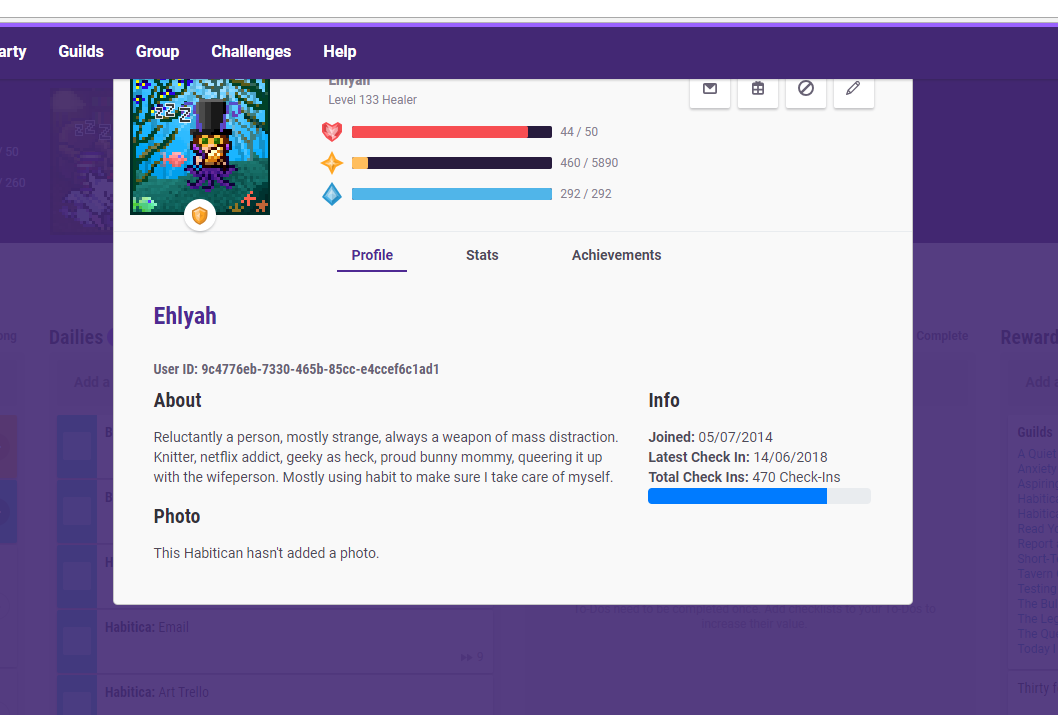
@shanaqui I worked out how to reliably reproduce the z-index issue. It looks like it is only caused by a certain set of steps. If I click help (https://habitica.com/static/faq) then the habitica logo on the menu bar then the modal always sits lower than the menu until I reload all assets (CSS, etc) with a Ctrl+F5/Ctrl+R Screenshot: https://imgur.com/a/0xa1Y88
I've confirmed this myself.
 shanaqui
All 20 comments
Yes some modals currently have a weird position.
The modal's top should be 48px from the bottom of the nav bar
 negue
on 2 Jul 2018
negue
on 2 Jul 2018
I can give it a try, waiting for the 'OK'. Thank you!
 vinmegamitensei
on 4 Jul 2018
vinmegamitensei
on 4 Jul 2018
@viniciusperuzza sure go ahead :) Let us know if you need any help with that issue
negue
on 7 Jul 2018
Hello @negue , I've managed to fix it, but I need some evaluation first.
This error happens with every modal: profile, message, configs, etc. That being said, I've looked for a general modal file/class so every modal get this "top: 45px" positioning.
As image01 shows, a pre-existing .modal class exists on bootstrap.
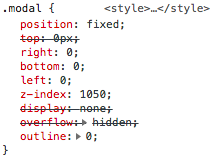
_image01_
I've added a .modal class to the modal.scss file with the top property as we desire.
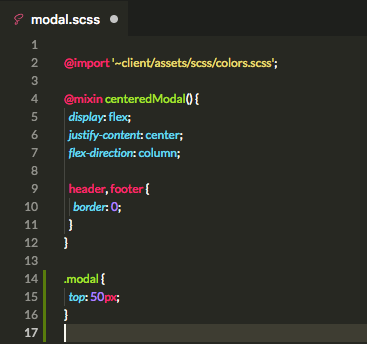
_image02_
It happens that: it works. But it gets this duplicated CSS class.
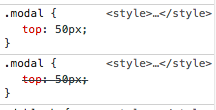
_image03_
I couldn't find a way to give this property to all modals without duplicating this CSS class, as the original one comes from Bootstrap. Checked if it gets duplicated on production environment, and it does too. This is the simplest solution I've found, but I'll be checking here to see if anyone has a better idea. Thank you.
Following this line of thought, this is what I'll do now:
I'll send it as a pull request, because solves the problem. But I'll be checking here until we've come to an agreement on how this should be done. I think this is an OK answer for this problem, but there may be a better answer that I'm missing. Thank you for checking this response.
vinmegamitensei
on 9 Jul 2018
Oh, and also: I've set it to 50px, because there were moments where the modal gets slightly overlayed by the main menu with 45px.

vinmegamitensei
on 9 Jul 2018
@viniciusperuzza I see it's been a bit of time since the PR was updated- are you still working on this issue? Please check in when you have a moment.
 beffymaroo
on 8 Aug 2018
beffymaroo
on 8 Aug 2018
@beffymaroo So, Tressley was pinged on the PR, but there's no response yet. In any case, I won't be able to solve this problem because it's beyond my capabilities. It's only partially solved with the answer I was able to reach. So I guess it's up to you guys on how we should proceed.
vinmegamitensei
on 9 Aug 2018
@viniciusperuzza Thanks for the update!
beffymaroo
on 17 Aug 2018
@beffymaroo Can this issue not be solved by simply applying a conservative top margin of say 100px across all modals?
 forresthatfield
on 18 Aug 2018
forresthatfield
on 18 Aug 2018
Just wanted to check in on this one. Is there an issue with the conservative top margin?
forresthatfield
on 24 Aug 2018
I think the issue was apply the css to all modals. I posted a follow up here: https://github.com/HabitRPG/habitica/pull/10513#issuecomment-413957814
Feel free to submit a PR with the conservative margin. It sounds similar to the previous solution and we'd be happy to review that.
 TheHollidayInn
on 24 Aug 2018
TheHollidayInn
on 24 Aug 2018
@TheHollidayInn Sweet, I actually have one ready to go - I'll submit a little later today
forresthatfield
on 25 Aug 2018
Hi!
I've inspected the problem in browser (Google Chrome) and found an interesting fact that I want to share.
The navigation bar (#app > div:nth-child(5) > nav) by default has classes
navbar ... navbar-z-index-normal
And when any modal shows up, it changes its classes
navbar ... navbar-z-index-modal
So, expected behavior:
1) Modal is shown => nav tag changes class from navbar-z-index-normal to navbar-z-index-modal
2) Modal is hidden => nav tag changes class from navbar-z-index-modal to navbar-z-index-normal
This behavior occurs when you normally enter habitica through link.
But, buggy behavior:
1) Modal is shown => nav tag keeps class navbar-z-index-normal
2) Modal is hidden => nav tag keeps class navbar-z-index-normal
This behavior occurs when you enter habitica through logo in help section (as described in Report a Bug)
I hope this will help in fixing the bug!
 kenzhemir
on 27 Aug 2018
kenzhemir
on 27 Aug 2018
Inspecting app in local environment, I noticed that the header menu modalStack is not getting updated when this.$root.$emit('bv::show::modal', 'profile') is called from userMenu profile. Also noticed that this occurs when switching from static pages.
 itssoso
on 14 Oct 2018
itssoso
on 14 Oct 2018
I'd like to give this a try please.
 wideawake42
on 15 Oct 2018
wideawake42
on 15 Oct 2018
@wideawake42 thanks! go ahead
 paglias
on 15 Oct 2018
paglias
on 15 Oct 2018
@shanaqui, I could not reproduce this bug. Does this issue still happening? If so, could you please attach a GIF with the steps you are following to reproduce this bug? Then, I could work on it if @negue agree :)
 bmasetto
on 30 Sep 2019
bmasetto
on 30 Sep 2019
The issue was reported by a user, so I have no insight into whether the bug is still occurring for them. :)
shanaqui
on 30 Sep 2019
Thanks for the quick answer, @shanaqui. In this case, should we close this issue, @negue?
bmasetto
on 1 Oct 2019
Yeah I think since the begin of this issue, the modals and the base (bootstrap-vue) was updated quite often, and should be all fixed by now :), if this issue ever occurs again, please re-open this.
Closing this until then.
negue
on 1 Oct 2019
Related issues
 mikean92
·
3Comments
mikean92
·
3Comments
 audiolion
·
4Comments
audiolion
·
4Comments
 Alys
·
4Comments
Alys
·
4Comments
 khipkin
·
3Comments
khipkin
·
3Comments
 kantamablade
·
4Comments
kantamablade
·
4Comments