Habitica: Tasks cannot be sorted by all/due/not due in group plan overview
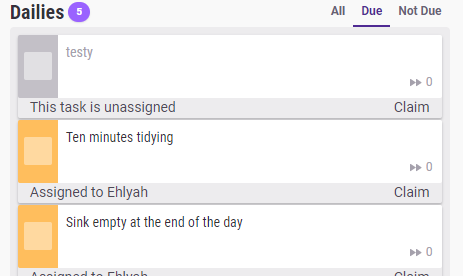
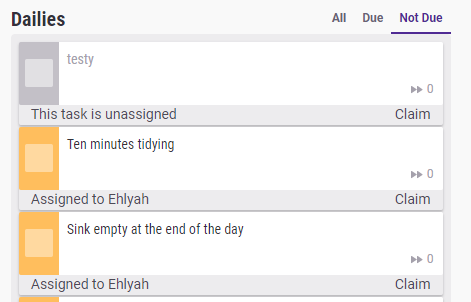
Reported in Report a Bug, confirmed by me. Trying to filter by due or not due doesn't change anything in the group plan task board.
 shanaqui
All 10 comments
Hi! Can I take this?
 thefifthisa
on 1 Aug 2018
thefifthisa
on 1 Aug 2018
Please do!
 TheHollidayInn
on 1 Aug 2018
TheHollidayInn
on 1 Aug 2018
Oh just realized, how do I get past the payment method so I can simulate a group plan?
thefifthisa
on 1 Aug 2018
@thefifthisa for stripe you should be able to use these https://stripe.com/docs/testing#cards cards
 paglias
on 1 Aug 2018
paglias
on 1 Aug 2018
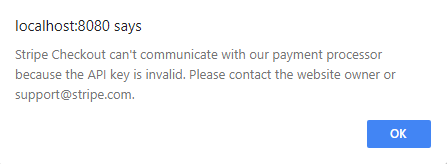
Stuck with this error though 😕
thefifthisa
on 1 Aug 2018
Hmm I guess you have to setup a stripe account and use the tests keys from it... Not sure how viable that is, but if you live in a country supported by stripe it should be pretty straightforward.
The other option is to edit the local db directly to give yourself a group plan
paglias
on 1 Aug 2018
@thefifthisa If you haven't already found it, see the Creating Test Data section in "Using Your Local Install to Modify Habitica's Website and API" for advice about the local database modification required.
 Alys
on 2 Aug 2018
Alys
on 2 Aug 2018
Thanks @Alys!
I may have run into a problem though, because I can't check off any tasks in the group board (unless the task is assigned to me, then I see them on my own board). Is this proper behavior? Also, what does it mean when a group task has no shared completion and "does not complete"? (Sorry, I've never worked with the group plan before 😓)
thefifthisa
on 7 Aug 2018
@thefifthisa this is correct. You don't complete tasks directly on the group board. The assigned user(s) complete them. You shouldn't need to complete for this task. Basically you should only filter dailies based on if they are due are not with respect to the isDue field.
does not complete is the default behavior for tasks. Basically it allows for tasks to never complete and be recurring. For example, habits and dailies to complete in the same way a task completes. If this is confusing, I agree, it is something Sabe and I are currently working through :P
TheHollidayInn
on 7 Aug 2018
Thanks @TheHollidayInn! Just opened a PR where the isDue filter works, but only on refresh for now.
I also noticed that the filter functions are different for users and groups. Is there a way to use the same one for both?
thefifthisa
on 8 Aug 2018
Related issues
Alys
·
4Comments
 omtigger
·
3Comments
Alys
·
4Comments
omtigger
·
3Comments
Alys
·
4Comments
 khipkin
·
3Comments
Alys
·
3Comments
khipkin
·
3Comments
Alys
·
3Comments