The favicon we're using is downloaded again any time you visit a new page, it should be cached
 paglias
All 14 comments
Does the current version has a favicon ?
The current website (habitica.com) does not seem to have one attached.
In my local environment on the latest development branch I also don´t see this file.
_(Btw. was looking for some small issue for getting started to contribute to habitica 👍 )_
Would it be fine to use a Webpack plugin/ some other 3rd party for this?
 jnes92
on 6 Nov 2017
jnes92
on 6 Nov 2017
@jnes92 hmm you're right...
the site shows a favicon for me
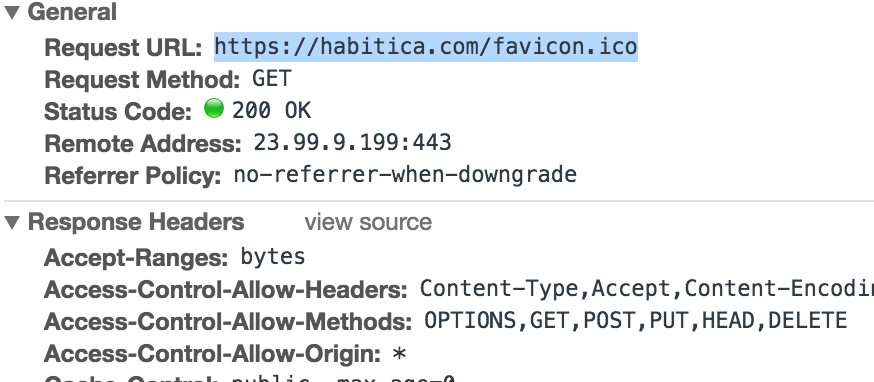
but if you go to that url the result is a 404 error and no file exists in git.
So yeah it looks like we should add the file, using a webpack plugin is fine but we already have some plugins setup for files in the /website/client/assets file that get automatically cached if they are loaded through webpack. In this case we might want to add the file directly in the index.html thought so that we don't have to wait for the JS to load before showing the icon, in that case our webpack setup is not yet setup to cache those files
I'll get the icons and get back to you
paglias
on 6 Nov 2017
A favicon PR has already been created here: https://github.com/HabitRPG/habitica/pull/9235
 librarianmage
on 6 Nov 2017
librarianmage
on 6 Nov 2017
Ah I missed that, in that case @jnes92 it would be better to wait for us to merge that PR then you can work on the cache part :)
paglias
on 6 Nov 2017
9235 has been merged. @jnes92 are you still interested in working on caching? If so, we'd love your help!
 Alys
on 24 Feb 2018
Alys
on 24 Feb 2018
@Alys Yes, I would like to work on this one ! Thanks for notifying me. I will start it on the next weekend 👍
jnes92
on 26 Feb 2018
@paglias @Alys Should this be marked as in progress?
librarianmage
on 7 Mar 2018
@jnes92 Any updates on your work on this issue? Let us know when you have a chance. Thank you!
 beffymaroo
on 4 May 2018
beffymaroo
on 4 May 2018
@beffymaroo Does this issue still exist? I'm unable to reproduce locally.
 forresthatfield
on 22 Aug 2018
forresthatfield
on 22 Aug 2018
@BlkStormy can you post your network log to show the cached favicon?
 TheHollidayInn
on 22 Aug 2018
TheHollidayInn
on 22 Aug 2018
@TheHollidayInn My bad on this, I realized that it wasn't actually caching when looking into it further. I'm trying to see if I can pin this one down.
forresthatfield
on 24 Aug 2018
@TheHollidayInn Opening up a pull request on this now
forresthatfield
on 31 Aug 2018
This is still desired. Hopefully the closed PR offers a helpful way forward to accelerate development on a solution.
 veeeeeee
on 7 Jul 2020
veeeeeee
on 7 Jul 2020
Actually I just realized this has been fixed by a previous PR, it's not perfect but now the favicon is handled like all the other static files and cached for at least 1 week
paglias
on 7 Jul 2020
Related issues
Alys
·
3Comments
 mikean92
·
3Comments
mikean92
·
3Comments
 evanostroski
·
4Comments
Alys
·
4Comments
evanostroski
·
4Comments
Alys
·
4Comments
 thebadwolfgirl
·
4Comments
thebadwolfgirl
·
4Comments
Most helpful comment
Ah I missed that, in that case @jnes92 it would be better to wait for us to merge that PR then you can work on the cache part :)