Ha-bridge: Timeouts with Sonos Bridge / TTS
Hi,
I've ha-bridge running on synology as well as node-sonos-http-api.
One device is a macro called kettle. This switches lights on etc, has timers and issues voice prompts via node-sonos sayall or clipall command to prompt when the kettle has boiled etc. This is called from node-sonos running on my lan. I've another macro with the same problem that also calls an external internet based URL and it behaves the same way.
If I run the scripts without the external URL calls, everything is fine, Alexa responds as expected, if I have the external URL calls in the macro, then Alexa either responds with "Something went wrong" or "the device is not responding" but ha-bridge will run the macro, often two or three times and with node-sonos it often won't reset the volumes and resume the playlist it was playing ( if recreate the macro with direct url calls outside of ha-bridge, node-sonos works ok.
After some mucking about, the problem appears to be linked to ha-bridge macros that call an external URL in the macro.
Rather than post the entire macro :
This works :
http://192.168.0.4:5005/clipall/timeouttest.mp3/100
This fails with Alexa reporting an error :
[{"item":"http://192.168.0.4:5005/clipall/1_kettle_on.mp3/100"}]
I've validated the json on jsonlint, I'm running 1.0.1 of ha-bridge, java jdk 1.8, anything obvious I have missed ?
Any suggestions appreciated. Do you have a donate option somewhere? I've spent days on ha-bridge setting things up and it only seems right I get to repay you for your fantastic work.
Thanks
 rodders99
All 28 comments
How long does the external call take? Alexa has a timeout for it's call to the hue api and it is pretty short, maybe 5 seconds.
 bwssytems
on 30 Dec 2016
bwssytems
on 30 Dec 2016
Hi, it's a single command, that pings the instruction to a local server. I'm not sure it's an external issue, because the same command works when not wrapped in json.
This works :
http://192.168.0.4:5005/clipall/timeouttest.mp3/100
This fails with Alexa reporting an error :
[{"item":"http://192.168.0.4:5005/clipall/timeouttest.mp3/100"}]
Rods
rodders99
on 30 Dec 2016
I will also add, it's regardless of the system being called, it happens on two different external URL calls. It doesn't seem to affect the UDP calls,
rodders99
on 30 Dec 2016
I've just run time on the external commands through curl and tested everything again with mp3's of predefined durations. You are correct it appears to be a timeout issue.
Anything over 5 seconds reports an error, regardless of whether it's in json format.
Is there any way of extending the timeout period? or is this hard coded in Alexa ?
Thanks again.
R
rodders99
on 30 Dec 2016
What version of the ha-bridge are you running?
bwssytems
on 30 Dec 2016
3.5.1
rodders99
on 30 Dec 2016
And again thinking about it, the morning wakeup script lasts about five minutes with delays and it has no prompts and Alexa also reports "the device is not responding" when that macro runs after being invoked from Alexa. No error is reported when using test in the ha-bridge interface.
rodders99
on 30 Dec 2016
So this is weird, either case should work the same in you URL definition.
Also, the ha-bridge interface to do the test actually calls the bridge's hue api just like the echo would.
bwssytems
on 30 Dec 2016
I'm UK based if that makes any difference.
rodders99
on 30 Dec 2016
The ha-bridge has no bigotry....
bwssytems
on 30 Dec 2016
Lol, no but Alexa does.
I'm thinking of running these longer macros as shell scripts instead. Any pointers or am I likely to encounter the same issues ?
Rods
rodders99
on 30 Dec 2016
If it runs too long, Alexa just says "something went wrong" as she did not get a success reply in the timeout window. The actual call works as you have noticed. It is just annoying.
bwssytems
on 30 Dec 2016
While yes, true it runs, it runs twice, I think there's a rety as well, so I am getting to sets of voice prompts.
Can I fake an ok response to ha-bridge in a shell script ?
R
rodders99
on 30 Dec 2016
Unfortunately, you can't in your script, it is internal in the ha-bridge for all calls. Didn't know Alexa had a retry capability...cool!??!
bwssytems
on 30 Dec 2016
If it helps I just ran into this issue last week. Have some API calls that happen via Alexa/ha-bridge that can take up to 10 seconds to complete. What I found was that Alexa was sending the command again because an immediate HTTP 200 wasn't returned and that caused the API call to be made multiple times. I got around this by refactoring my code at the endpoint to return HTTP 200 to ha-bridge immediately then run the script. Worked like a charm.
 jasondharper
on 30 Dec 2016
jasondharper
on 30 Dec 2016
That is the best thing to do for long running calls. I wouldn't want to send off the calls in the bridge all the time and not return a valid result if it wasn't going to work so as to give true status back to the echo or other device. Maybe I can look into adding an async flag to the items so it can be done on an individual basis,
bwssytems
on 30 Dec 2016
Is it possible to send that http 200 from ha-bridge or via s script to Alexa so it doesn't retry or announce a failure ?
rodders99
on 30 Dec 2016
I have a script that serves as an intermediate. So ha-bridge calls my script and my script calls the action. Having my script in the middle allows me to control what gets returned to the bridge (and therefore Alexa). It has worked out great for me. There might be better ways but this seems to work just fine.
jasondharper
on 30 Dec 2016
so are you sending http 200 back to ha-bridge first ? You appear to have solved the problem I've encountered, care to share the method?
Thanks
rodders99
on 30 Dec 2016
Yeah sure, no problem. My code is in PHP so hopefully this will help you. I essentially look to see if the source of the call is the habridge (I include a source identifier in my post values), then I execute my logic:
if ($source == 'habridge')
{
ignore_user_abort(true);
set_time_limit(0);
ob_start();
header('Connection: close');
header('Content-Length: '.ob_get_length());
ob_end_flush();
ob_flush();
flush();
`//process your script actions here`
}
jasondharper
on 31 Dec 2016
hmm, I couldn't get that to work, however this on the PHP site on error handling nailed it :
ignore_user_abort(true);
header("Location: ".$redirectUrl, true);
header("Connection: close", true);
header("Content-Length: 0", true);
ob_end_flush();
flush();
fastcgi_finish_request(); // important when using php-fpm!
I knew it was something to do with closing out the session, but couldn't put my finger on the exact googling necessary to get the right answer.
Thanks to you I have it now !
rodders99
on 31 Dec 2016
@bwssytems Yes. I am waiting for async execution flag. Thank
 cykew
on 3 Jan 2017
cykew
on 3 Jan 2017
I have this same problem.
When adding multiple item lines to a Bridge device I sometimes need to add multiple delays in order for equipment to finish turning on before the next line starts. Doing this works great, but Amazon Echo freaks out when it doesn't receive a "close connection" with in 5 seconds and then verbally tells you the command failed (even though it still executes it, sometimes twice).
Please could somebody let me know how to make a script that sends the "close connection" command to the Echo so that the rest of the items in the list can then continue to run with all their delays
I'm running ha-bridge on a windows machine.
Can I create a .txt file and insert the following commands into it (and then rename the file with the correct extension)?? then insert the file into /data folder??
ignore_user_abort(true);
header("Location: ".$redirectUrl, true);
header("Connection: close", true);
header("Content-Length: 0", true);
ob_end_flush();
flush();
fastcgi_finish_request(); // important when using php-fpm!
What would the correct file extension be?? .sh ? .jar?
From the ha-bridge edit/copy device page, how would I then run this script file? Is it a command in the "Target Item" that i need to add?
If all that is incorrect, please could somebody guide me on the correct way to do it.
 Matttribal
on 6 Jun 2017
Matttribal
on 6 Jun 2017
I'm afraid it's not that simple. In the end I wrote a broker script that dealt with all the different call types that my HA kit uses : UDP, HTTP, or something directly from the command line.
That code you referenced is in this script. It's not something you can add to ha-bridge (As far as I am aware) So your options are 👍
Does your HA kit support moods or scenes ? can setting up one of those do the bulk of the heavy lifting leaving less for ha-bridge to process ?
Get a Raspberry Pi, learn bash and php and write your own broker (which is what I ended up doing)
Finding something on github that supports the HA kit you have and then using that in combination with bash scripts and calling the thing you found on bash (not very helpful sorry, you sort of need to be up a level or two in tech knowledge from where I think you are)
Using a hub like Smarthings and the script support that has, setting up the scripts you want in Smartthings and then calling those from Alexa.
Have you looked at Yonomi and Stringify ?
If I think of anything else I will let you know.
rodders99
on 6 Jun 2017
Thanks Rodders.
Through HA-bridge I command a Logitech Harmony (which controls home AV setup) and a few UDP commands to control lights.
The Harmony is able to do some of the work, but it is so clunky and very ridged in what it lets you program into it, I was hoping to use ha-bridge so that no matter what I end up programming I simply list the commands for it to do
The kind of simple scenario I'm looking to improve on is:
When I leave the lounge at the end of the evening I say "Alexa turn everything off". The system then turns off the TV then the AV-receiver then a power socket, then 1 set of lights and then finally another set of lights.
I can do all this already, but if I'm standing in the room when I say the command it all goes off and gets dark very quick. So I'm hoping to add a 4 second delay between the last 2 light commands so they are staggered and I get some time to walk out the room.
I don't really want to buy more tech (like smartthings hub) and I have had a look at Yonomi and stringify but these are mainly App based. I was really hoping I could setup ha-bridge to do the dirty work, it seems like it is more then capable with the right programming.
Matttribal
on 6 Jun 2017
Another option I forgot was Openhab, Domocticz.
It sounds like you are starting out, so i'll share my journey with you.
My house has been voice activated for over 6 years. Originally controlled by a system I developed on Tasker using some plugins and google voice. I developed it, because within a short space of time after converting every socket and light in the house to be Smart,I realised that Smart as in "controlled by apps and remotes" was shit. WTF was I thinking, so I needed a solution. btw I am not a programmer.
The whole thing ran on a bunch of tablets, one in each room of the house, and apart from the whole experience being a bit SHOUTY, it really worked extremely well. It was just the whole shouting / microphone thing that let it down, and when alexa came out I was in heaven. Well I was until I ran across the problem you've discovered and it quickly became hell.
After a few false starts (things like domoticz, open hab) I realised that nothing existed to do what I wanted to do. Everything on the market had some sort of limitation, stupidly steep learning curve, obtuse languages, formats, devices not supported, or protocols not supported or some other dumb thing that meant I would end up with a wall of hubs if I wanted to do what I wanted.
To put this in perspective there are 111 devices with 219 states of on off or dim and 16 scripts (some of which run ten minutes or more) under control of my broker script. The ONE specific thing this script was written to do, was solve exactly the problem you are describing. Which is why you ended up on this thread because there aren't many of us coming up with this problem and you've been quite dedicated to solving the problem to get to this thread!
The problem is, this isn't ha-bridges "fault" it's working exactly the way it's supposed to, and neither is it alexa's it's also working exactly the way it was supposed to. A patch to either (make the timeout longer for example would not fix the problem and would probably break something else. The problem is the method that alexa uses to communicate is "synchronous" and until the underlying architecture is changed to asynchronous this problem won't go away. So this script is the smart hub that alexa is missing where ha-bridge can be that hub, with the limitation you have found.
So I spun up a Raspberry Pi, and wrote a broker that was effectively my HUB that controlled everything in my home, using a consistent method HTTP, everything can send a http get or post. The whole monstrosity is managed in a spreadsheet (open office).
It ain't pretty, I'll explain the basics if you want, but rather you worked it as much out yourself because when I think about fixing the problems in the spreadsheet (they don't affect the functionality, it's just a thing I have about organising big lumps of data that this thing doesn't fit, so it's ugly) it gives me a headache.
What it does do, is distil 6+ years of managing a fairly large smart home into a set of simple set of principle commands (and a big spreadsheet) that takes care of the 99% of things you could want to do with a Smart home (that I can think of anyway) These are "ON", "OFF", "DIM". That's it, anything else is a custom thing I can knock up a script to do. Examples include stateful detection of devices like TVs, amplifiers, Sonos etc. So when you say on or off, it does what you want, not what it thinks you want. What do I mean by that ? Turning on or off a device using IR is a gamble, but not if you know what the state of that device is first. So this example includes sending the IR command, but only if the device is not in the selected state. That sort of thing is beyond the broker script but not beyond the bash script capabilities of the Pi
All of the code was re written from googling the right questions and finding the answers on stack exchange/overflow. And since the obvious google answers to my questions often didn't work, what's in this script, works. More importantly, managing a BIG house like mine, in a user interface is slow, the command line is lot faster and managing the database of commands and scripts easier in a spreadsheet.
There is a cost, learning.
Specifically
Linux, Bash, php.
Is it worth it ? Let me answer it from my perspective of someone quite heavily embedded in the Smart Home world.
If you learn the above and take what I've stuck on github and learned how it works, (improved on it rewritten it and given it back the community even! because I am NOT a programmer and no doubt those of you who are will laugh at the code, you get your own HUB that uses one simple consist access method (HTTP) to turn on, off or set a dim state, for six common control home automation control methods (Denon, UDP, HTTP, Milight, Lightwaverf/UDP, bash) that works well, doesn't timeout alexa, doesn't use the cloud, phone home, brick itself, go out of business, get bought out and discontinued, cost a lot of money.
That makes using ha-bridge a lot simpler, encouraging a lot more exploration and creative thinking around Alexa's language limitations.
That's what you get from learning. Well worth it in my opinion.
I've 66 Alexa commands setup, controlling 111 devices and and will be using the broker to make using the IP filtering in ha-bridge a lot simpler to setup making Alexa even cooler than she already is in my home.
The level of complete and utter granular control it's given me had me cursing the time I spent dicking around in "Home automation systems" wishing I had spent it on the broker sooner, years sooner.
I recently wanted a "control panel", found node-red and added it to the ha-broker script in a few minutes. (logging all the commands being sent by alexa currently but if you look at node red, it can takeover (in time) the functions of my current script quite easily.
I'll post this script and spreadsheet on github if you want to use it as the basis of your own. I am guessing you have milight if you are after UDP control of lights ? I've given you on and off, if you want colour, go get learning!
OK, story over.
Now what this broker allows me to do with ha-bridge, is give it these commands (from my system) examples :
These are examples of calls to the different hubs or servers :
**Denon Amp**
http://192.168.55.65/MainZone/index.put.asp?cmd0=PutVolumeMute%2Fon&cmd1=aspMainZone_WebUpdateStatus%2F

**Sonos (Via echo-sonos-apr)**
http://192.168.55.54:5005/favorite/radio%20one

**UDP Call to LightwaveRF**
udp://255.255.255.255:9760/001,!R7D4F1|devices amp|On\n

**Milight**
is hardcoded in the main broker script since it's a simple set of calls (I only control on/off)

and HTTP.
As you can see, trying to keep that all in a manageable form to even begin entering it into ha-bridge for all the different states (219 for me anyway) was a nightmare.
However,calling the on command in the broker script from HTTP becomes :
http://192.168.55.54/ha-broker/tv.php?device=tvon&state=on
Want to put that in a script with lots of pauses ? Then there's a bash macro builder to do that in the sheet as well :
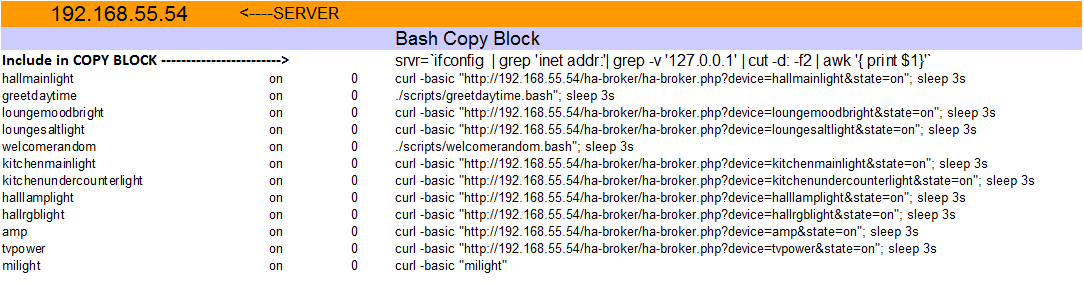
In the PHP Script, it's a huge block of AI (or IF statements) :
if ($device == 'amp') {if ($state == 'on') {$message = "001,!R7D4F1|devices amp|On";$type="LWRF";} elseif($state == 'off') {$message = "001,!R7D4F0|devices amp|OFF"  ; $type="LWRF"; } elseif($state == 'dim') {$message = "0"   ;$type="LWRF";}}
elseif ($device == 'arrive') {$message = "./scripts/arrive.bash";$type="BASH";$state="NA";$server_port="NA";}
elseif ($device == 'blanket') {if ($state == 'on') {$message = "001,!R7D5F1|devices blanket|On";$type="LWRF";} else if($state == 'off') {$message = "001,!R7D5F0|devices blanket|OFF"  ; $type="LWRF"; } else if($state == 'dim') {$message = "0"   ;$type="LWRF";}}
elseif ($device == 'blanketlock') {if ($state == 'on') {$message = "001,!R7D5Fl|devices blanket lock|On";$type="LWRF";} else if($state == 'off') {$message = "001,!R7D5Fu|devices blanket lock|OFF"  ; $type="LWRF"; } else if($state == 'dim') {$message = "0"   ;$type="LWRF";}}
And then the different servers are called at the end of the script, FINALLY! the bit bit of code you found, that this whole bloody story is about is at the end and what it does, are you ready ? What it does is, it tells Alexa the command finished, that's it! Genius eh ?
That's what the code you first came looking does, and the above is the context within which the answer you found, fits.
May your scripting-fu be with you.
I'll post the code and sheet shortly and update the readme.md thing to try to explain it a bit.
rodders99
on 6 Jun 2017
rodders99
on 7 Jun 2017
WOW! - thanks for such a detailed response, and WOW nice setup!
I have many questions, but I'll try all the things you have suggested and see how I go.
Thanks!!!
Matttribal
on 8 Jun 2017
Related issues
bwssytems
·
68Comments
 osenbruggen
·
41Comments
osenbruggen
·
41Comments
 Ulisus
·
52Comments
bwssytems
·
258Comments
Ulisus
·
52Comments
bwssytems
·
258Comments
 Dr-IK
·
43Comments
Dr-IK
·
43Comments