Gvr-unity-sdk: Single app UX for handling Daydream, Cardboard, and Magic Window
_This is a consolidation of the discussion in #700, #701, #702 which were focused on various possible workarounds of the inability to handle this UX._
Here's what I'm looking to accomplish: I'd like to have a single app that can seamlessly transition between VR and Magic Window modes that works for both Daydream View and Cardboard headsets, and maintains great orientation tracking in both modes. This isn't currently possible primarily due to the following UX issues / restrictions:
- Daydream View interstitial pops up when in Magic Window mode.
- GVR InputTracking data isn't available unless a VR device is loaded.
The latter means it's required to roll your own orientation tracking, but I've yet to find any gyro / accelerometer code that comes remotely close to the great tracking already available in GVR. It's just not exposed in all cases where you want to use it.
Has anyone managed to build this "Holy Grail Daydream + Cardboard + Magic Window" app? If so, how'd you do it? Otherwise, is it possible to modify GVR (ie. expose GVR sensor data even when a GVR device isn't loaded, allow the developer to disable the Daydream View interstitial) in future versions to better support this UX?
Thanks,
Dustin
 dustinkerstein
All 26 comments
@dustinkerstein Would you mind posting this question on Stack Overflow, which is a better place to advice and how-to's?
Please leave a link to your question in this issue.
 fredsa
on 26 Aug 2017
fredsa
on 26 Aug 2017
I can certainly do that, though I do feel like this is supposed to be a supported UX, but is blocked by various parts of the current design. Do you feel the above is not a supported UX?
dustinkerstein
on 26 Aug 2017
"Magic Window" mode is not currently a supported feature, so marking this issue as a "feature request" as the SDK is currently focused on provided the best stereo / VR experience. Magic Window mode can, however, be made to work without too much effort. The question of what's the best way to do that (there's more than one option) is most appropriate for Stack Overflow.
fredsa
on 26 Aug 2017
Interesting. I thought it actually was a supported feature. IMO it needs to be. If here is not the right place, where would be the most appropriate place to actually request this?
I truly believe it's crucial for developers building Daydream / Cardboard apps to have a seamless VR <-> Magic Window UX. And yes, while it can be made to work, there are either UX issues (unavoidable overlay when using the Daydream View headset in Magic Window mode) or sub-par orientation tracking (when not using GVR) that make it much less usable than it should be.
dustinkerstein
on 27 Aug 2017
Interesting. I thought it actually was a supported feature. IMO it needs to be.
Magic Window was a supported feature in the early days of the Cardboard SDK, before the native integration with Unity. The native integration effort is focused creating the best possible VR experience.
If here is not the right place, where would be the most appropriate place to actually request this?
Bugs and Feature Requests are best recorded in this issue tracker. I've marked this bug a "feature request".
I truly believe it's crucial for developers building Daydream / Cardboard apps to have a seamless VR <-> Magic Window UX. And yes, while it can be made to work, there are either UX issues (unavoidable overlay when using the Daydream View headset in Magic Window mode) or sub-par orientation tracking (when not using GVR) that make it much less usable than it should be.
Magic Window doesn't require special VR features such as asynchronous reprojection, and can be implemented using a non-VR Unity camera, driven by Unity's Input.gyro. Stack Overflow is the best place to discuss and share opinions around implementation details and design goals.
Please leave a link to your Stack Overflow question here.
fredsa
on 28 Aug 2017
Thanks for the background.
Magic Window doesn't require special VR features such as asynchronous reprojection, and can be implemented using a non-VR Unity camera, driven by Unity's Input.gyro. Stack Overflow is the best place to discuss and share opinions around implementation details and design goals.
That is entirely possible to do, but none of the Input.gyro scripts (ones I've written myself, found on the Unity forums, and even a sensor fusion one I've found on Google) come remotely close to the tracking accuracy and latency of the GVR head tracking system. It's just that much better. Rolling my own solution that's more closely on par with GVR honestly just feels like reinventing the wheel. That's why having access to the GVR head tracking system (as an opt-in feature) when the VR device isn't loaded would be extremely beneficial to people trying to tackle this same issue - which I guarantee there will be many of.
dustinkerstein
on 28 Aug 2017
@dustinkerstein working on same issues here, although not with Input.gyro : have you tried InputTracking.GetLocalRotation(VRNode.Head) ? (still a bit jittering tho)
 Marchelune
on 6 Sep 2017
Marchelune
on 6 Sep 2017
@Marchelune When you use VRNode.head you are in fact using the GVR tracking system, which is only available when a VRDevice is loaded (other than "None"). Jittering may just be due to your phone's actual sensors. You have a VRDevice loaded, correct?
dustinkerstein
on 6 Sep 2017
@dustinkerstein yes, with VRSettings.enabled equals false
Marchelune
on 6 Sep 2017
Note, when you're not in VR mode (VRSettings.enabled=false), _asynchronous reprojection_ will be disabled. Because of this, tracking will _feel_ less good, even if you're app is using the same sensor fusion algorithm, sensor sample rate, etc.
This is because asynchronous reprojection is designed to hide the perceivable delay between the time at which the IMU sensor measurements are made and the time at which the updated frame is first displayed on the device screen.
fredsa
on 6 Sep 2017
FWIW, I'm going through the Daydream approval process right now and my app was initially rejected because I was allowing users Daydream View users to toggle into Magic Window mode. This apparently isn't allowed. So now, for users that have VRDevice.model == "Google, Inc. - Daydream View" I am disallowing the VR toggle and also instructing them, if they'd like to use Magic Window, to first switch to one of the "Cardboard" headsets in the VR settings, and then to quit and reopen the app (quitting is necessary due to bug #704). Given the above, it almost seems like the better approach is to create two separate apps (Daydream only / Cardboard and Magic Window), but I'm still trying to avoid that. The current situation just creates a very poor UX if the user, who has previously associated their phone to a Daydream View, wants to use the app in Magic Window mode. I'm asking them to jump through a few too many hoops.
dustinkerstein
on 13 Sep 2017
@dustinkerstein Is the feedback you received around the requirement is that the "app never goes to 2D unexpectedly" (UX-D9)? If so, have you made sure that "Daydream" is listed first (before "None"), so that when you app is launched from Daydream home, the phone stays in VR mode the entire time?
Building hybrid 2D (incl. magic window) / VR apps should be fine. It's important though that the app launch and stay in VR mode when launched from (the Daydream home) VR environment, and that the app doesn't switch to 2D unexpectedly. Giving the user the option to switch to 2D is fine. In fact, UX-D9 shows what the user experience should look like.
fredsa
on 13 Sep 2017
@fredsa, yeah it's that requirement that they cited, and I do have Daydream listed first, then None, and finally Cardboard.
UX-wise, I had a "Toggle VR" button that was visible to all users (Daydream view and others) which allowed switching back and forth. It was a relatively seamless transition, but it wasn't for accepting permissions, logging in, or any of the listed D9 use cases. I was just toggling Magic Window and VR. However, based on the D9 guidelines, I would have thought what I was doing should be allowed. What do you think? I'd be happy to share an APK if you'd like.
Regarding knowing whether the app was launched from Daydream Home, do you know if this is currently possible to detect from within Unity directly, or possibly through a Java call?
[Update] - I was also allowing the user to shake their phone to toggle VR. Though it did require a 2nd shake to double confirm. Here is what Google said:
"When in VR, your app should never display any 2D images. The app goes into 2D unexpectedly when you select the toggle vr button and when you shake the phone enough. For more information and examples, please see the Daydream App Quality Requirements."
dustinkerstein
on 13 Sep 2017
Sounds like two part problem:
- Your button was a 2D on top of a stereo VR daydream view, which is problem for users in stereo
- The 'shake to switch' means that some users will unexpectedly transition to 2D.
Suggest you remove the 2D button in the stereo view. It's okay to have a 'switch to VR' mode button in the 2D view, but you don't want a 2D button to be visible over the stereo image.
You could allow users to exit Daydream/VR mode:
- when the users clicks 'X' in the top left
- when the user uses the Android back button (after swiping from edge to reveal back button)
- using some sort of diegetic UI within the VR world which gives users the option to transition to VR, much like they would if you had a 2D permissions dialog
fredsa
on 13 Sep 2017
The VR Toggle was in fact a diegetic button within the VR world. Sorry if that wasn't clear. Here's a screenshot of the VR UI:
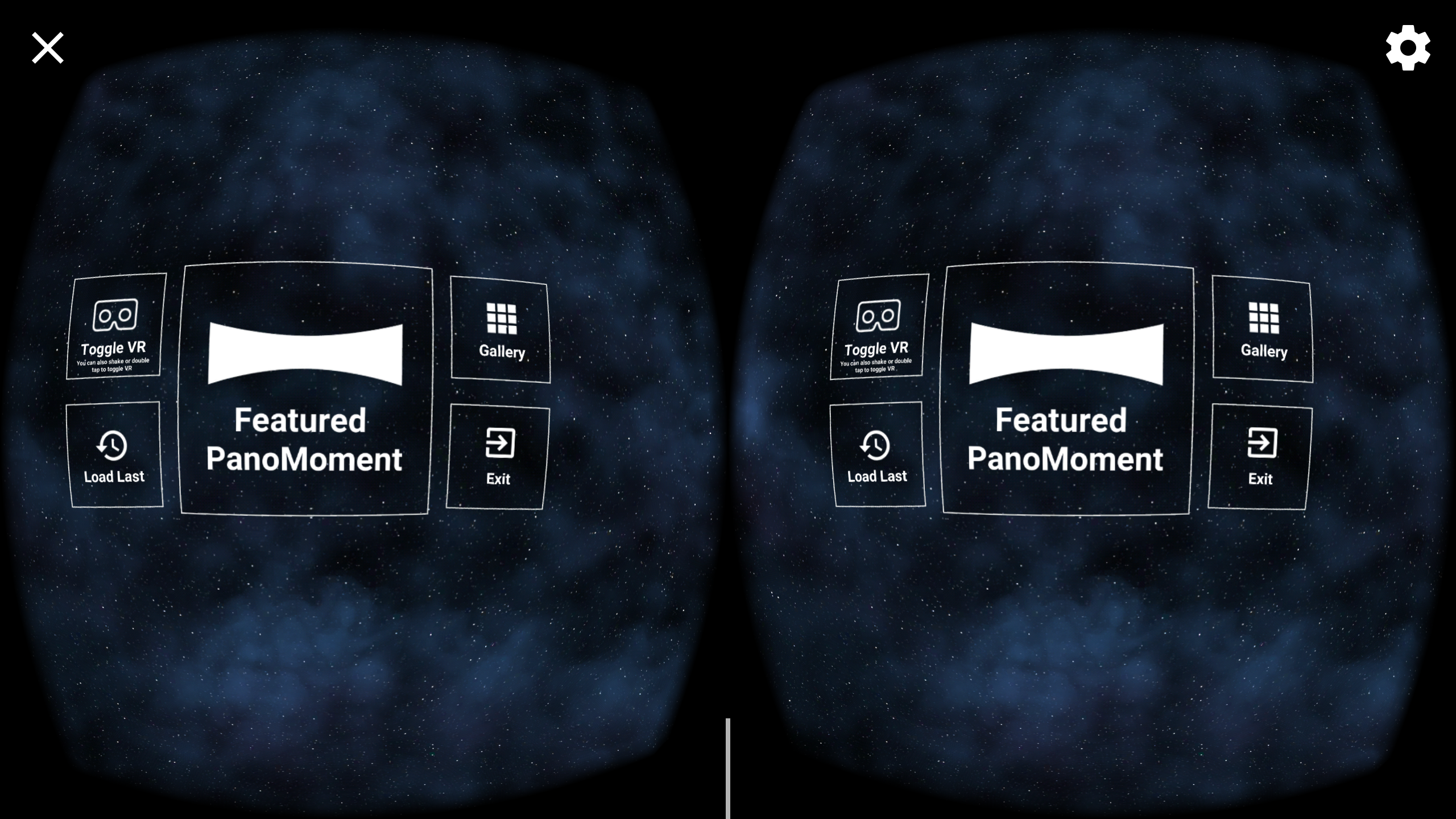
And Magic Window version:
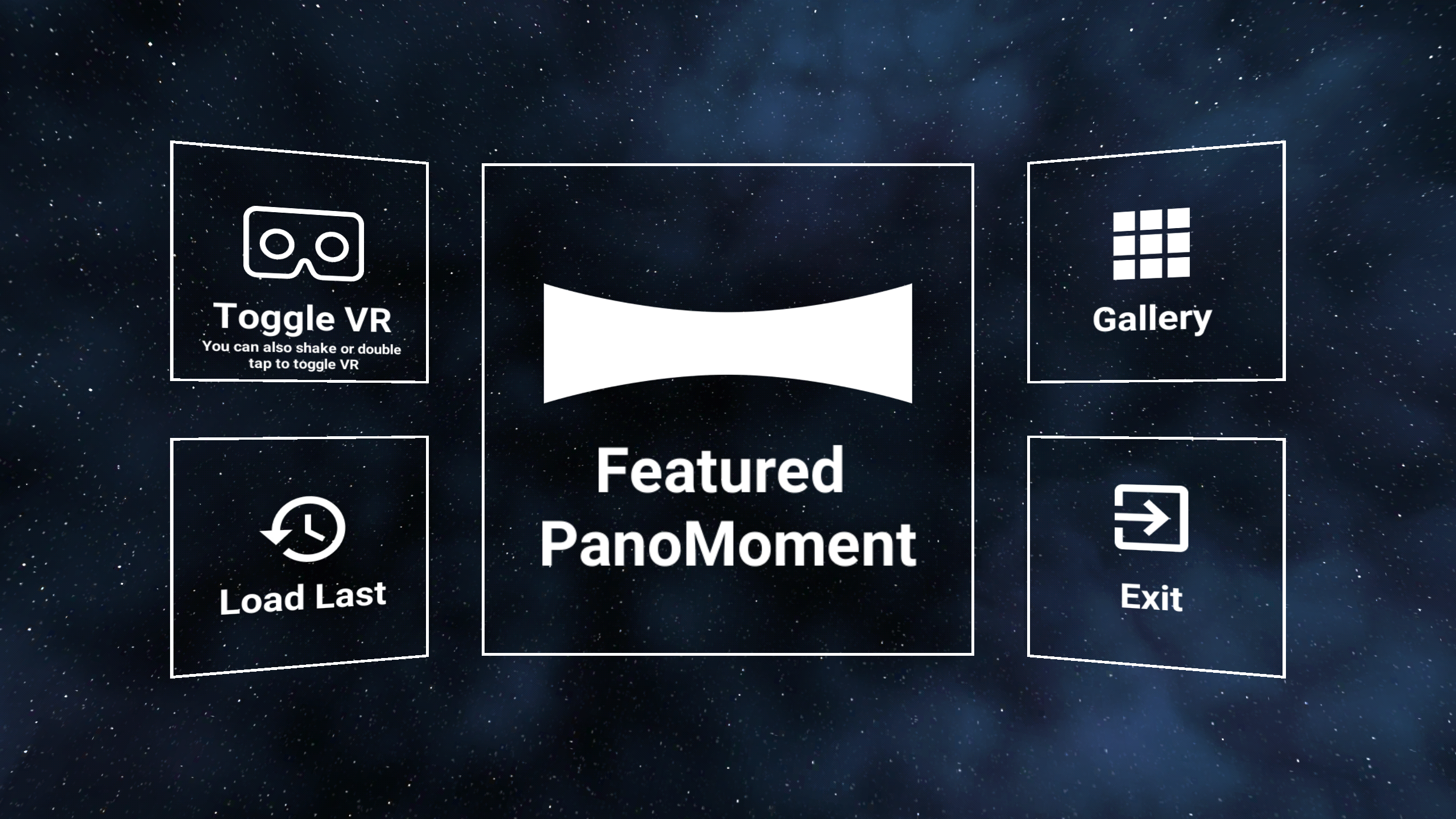
I do understand how the shake could have been an issue, but you would have to 1 - shake very hard with the headset on which is unlikely since it's uncomfortable, and 2 - Double confirm with a second shake after seeing a diegetic popup asking you to shake to confirm.
Regardless of the shake, the Google employee did reference my VR toggle button as being part of the problem which I don't understand. I might try again but this time with a warning that pops up after clicking the VR toggle asking the user to remove their phone from the headset. That's where my UX differs from their hybrid UX demo - I just immediately toggled, which I still do feel is fine since it is an explicit user action to disable VR, but we'll see...
dustinkerstein
on 13 Sep 2017
@fredsa, I just wanted to follow up on this specific question from above:
Regarding knowing whether the app was launched from Daydream Home, do you know if this is currently possible to detect from within Unity directly, or possibly through a Java call?
Since the VR device load order is fixed at build time, it doesn't seem like it would be possible to build a hybrid Daydream app with Unity. In order to successfully build a truly hybrid Daydream app, I'd need to be able to know where the application was launched from (Daydream Home, Chrome, Android Launcher etc.) and whether or not the previous app was in VR mode, and then decide which VR device to load. I feel like this is something that's likely possible with a native Java app, but not currently with Unity. Does that sound correct?
dustinkerstein
on 14 Sep 2017
Hybrid apps are certainly possible.
fredsa
on 14 Sep 2017
Awesome! I will give that a shot. Thanks.
dustinkerstein
on 14 Sep 2017
@fredsa That definitely helps, but I still run into that other issue where the Daydream View interstitial is shown when I load the "daydream" or "cardboard" device with VRSettings.enabled = false. So it seems like it's possible to create that hybrid Daydream UX in Unity, but only if you're not using Magic Window mode.
dustinkerstein
on 14 Sep 2017
Note that that behavior of the app will be different based on:
- Daydream ready phone vs. non-Daydream (Cardboard only) phone.
- What headset viewer (Daydream vs. Cardboard) the phone is configured for in VR Settings (which you access from the top right gear icon in VR mode), or from the Daydream app's settings.
- Which VR devices you've added, and in what order.
Unity tries to load the first supported VR device, from the list of devices you specify.
You can include any subset of"Daydream","Cardboard", and"None"(and also other VR devices Unity supports).
fredsa
on 14 Sep 2017
Yeah, I'm specifically trying to address users who have Daydream phones paired with Daydream View headsets. I'd like for those users to be able to launch the app in 2D Magic Window mode when they either don't have their headsets/controllers nearby, or just would prefer to use the app in 2D mode. The hybrid UX with Magic Window support isn't currently possible for these particular (and important) users.
dustinkerstein
on 14 Sep 2017
You'll probably be most productive if you attempt to implement the behavior you want using the Android SDK first. See https://github.com/googlevr/gvr-android-sdk/blob/master/samples/sdk-treasurehunt/src/main/java/com/google/vr/sdk/samples/treasurehunt/TreasureHuntActivity.java as a starting point.
Once you have the basic interaction working, you can then work on translating your customizations to a Unity app.
fredsa
on 14 Sep 2017
What I'm looking to do just isn't possible if I want to utilize the GVR head tracking in the Magic Window mode. My choices are:
- Don't use the GVR head tracking for the 2D mode and implement my own gyro/accel tracking solution. This would allow me to create a true hybrid app that starts in 2D and can transition into VR for all headsets (including the Daydream View). However, the big downside is that the available tracking code I've found/written is far inferior to the GVR head tracking code. Some of the tracking code available works well on some devices, but not others (see my Twitter message - that was tested on a Moto Z), and also just isn't nearly as accurate or responsive as GVR tracking.
- If I use the GVR head tracking (requires loading a VR device) I am stuck with a very poor user experience for folks who have Daydream phones + Daydream View headsets (as soon as the VR device is loaded the Daydream View interstitial pops up - even though I'm in 2D mode). There is no current way to build an app that starts in 2D mode for these particular users if I use the GVR head tracking. I'd love to be proven wrong though :)
My current ugly workaround (sort of a 2a) is to use GVR head tracking but force users who have Daydream View headsets configured to always launch into VR mode, and ask them politely to switch their headset setting and relaunch the app (due to #704) if they'd like to use 2D mode. Though I really don't like this solution. It's a very bad UX for these important and valuable Daydream users.
dustinkerstein
on 14 Sep 2017
@dustinkerstein, I think you are coming to realize why we encouraged you not to use GVR for magic window mode. Although, yes, DIY magic window code is not as good as the GVR tracking, I think you'll find it more than sufficient for magic window (which is much more forgiving) and you'll save yourself time and your users from bad UX if you go with #1.
 nathanmartz
on 17 Sep 2017
nathanmartz
on 17 Sep 2017
@nathanmartz Yeah, I'm just hoping that I, and maybe others, would be able make the case for the importance of well functioning hybrid VR / Magic Window UX that was able to fully utilize the remarkably good GVR tracking. There's just such a large gap between the performance and cross-device reliability between GVR tracking and DIY tracking that it's not even a question in my mind.
Side note - I'd also love to be able to utilize the other GVR Daydream tech (asynchronous reprojection, low persistence mode, etc.) as options exposed in Magic Window mode on Daydream devices. Certainly that wouldn't make sense in all use-cases, but for some, they'd be extremely beneficial.
dustinkerstein
on 17 Sep 2017
Closing old issues.
 chaosemer
on 13 Aug 2018
chaosemer
on 13 Aug 2018
Related issues
 asugar
·
7Comments
asugar
·
7Comments
 vinhui
·
6Comments
vinhui
·
6Comments
 RangerMauve
·
5Comments
RangerMauve
·
5Comments
 guneyozsan
·
6Comments
guneyozsan
·
6Comments
 pandailing
·
4Comments
pandailing
·
4Comments
Most helpful comment
@nathanmartz Yeah, I'm just hoping that I, and maybe others, would be able make the case for the importance of well functioning hybrid VR / Magic Window UX that was able to fully utilize the remarkably good GVR tracking. There's just such a large gap between the performance and cross-device reliability between GVR tracking and DIY tracking that it's not even a question in my mind.
Side note - I'd also love to be able to utilize the other GVR Daydream tech (asynchronous reprojection, low persistence mode, etc.) as options exposed in Magic Window mode on Daydream devices. Certainly that wouldn't make sense in all use-cases, but for some, they'd be extremely beneficial.