Gvr-unity-sdk: Odd distortion when VRSettings.enabled = false after leaving VR mode
Unity 5.6.1p2 + GVR 1.40
User can switch between monoscopic and stereoscopic views, with this code:
```using UnityEngine;
using UnityEngine.VR;
using System.Collections;
public class CardboardSwapper : MonoBehaviour {
void Start () {

    VRSettings.enabled = false;
// It should start as a normal scene
}

void Update () {
    this.gameObject.transform.Find("Canvas/CardboardButton").gameObject.SetActive(!VRSettings.enabled);
    if (GvrViewer.Instance.Tilted || GvrViewer.Instance.BackButtonPressed)
    {
        DisableVR();
    }

}

public void DisableVR ()
{
    VRSettings.enabled = false;
}

public void EnableVR ()
{
    VRSettings.enabled = true;
}
}
```
This is what's on screen on an Android device with the monoscopic view:
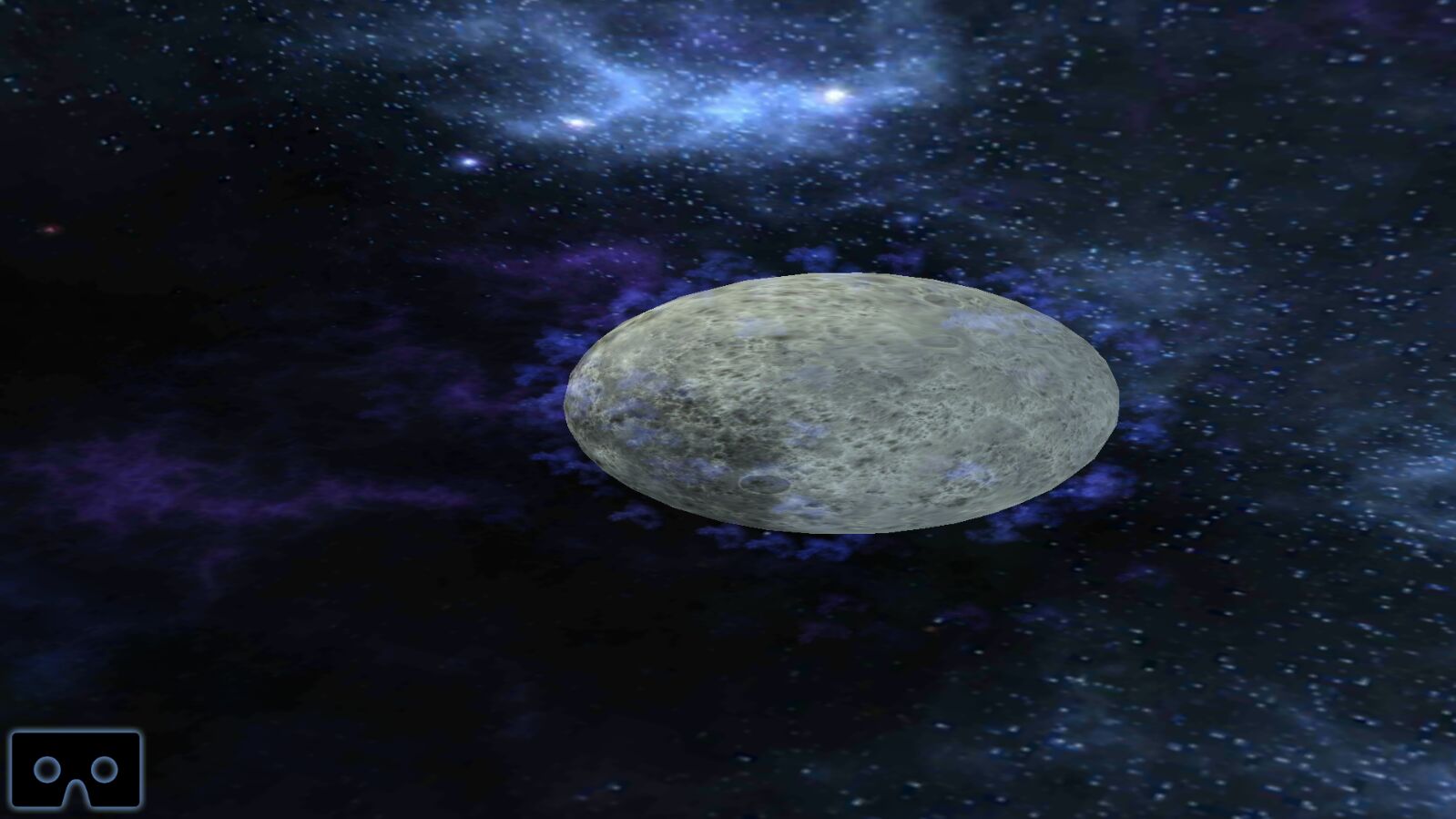
The planet should be spherical, not shaped like a rugby ball. The problem can also be seen when built on iOS.
For reference, this is what it looks like in the Unity emulator (no distortion):
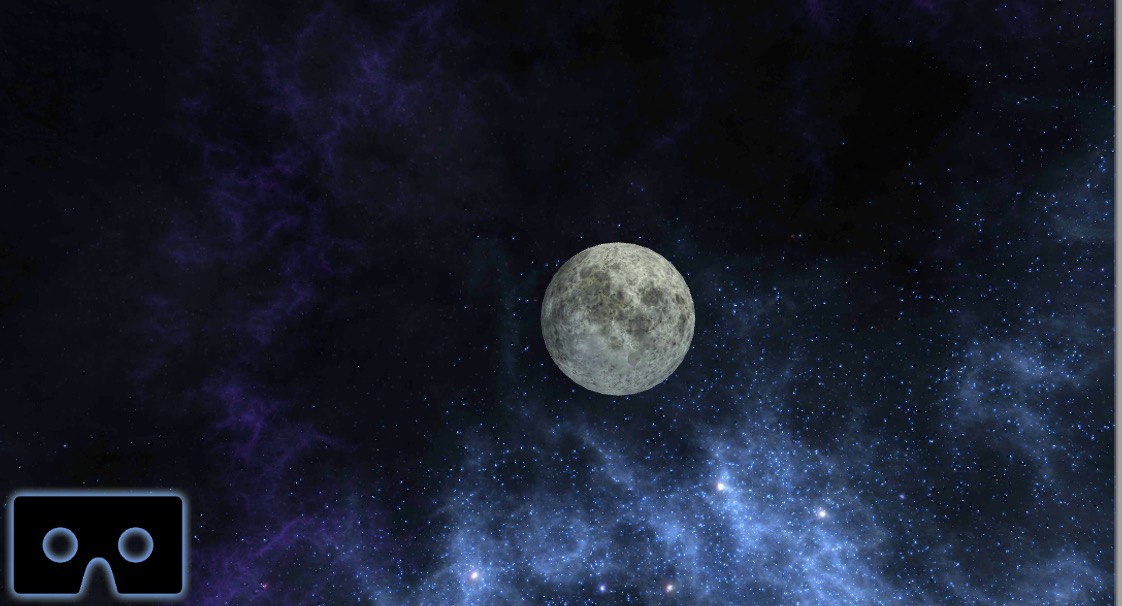
 AdrianaVecc
All 10 comments
I'm getting this too. I found a workaround that's annoying: set to orientation portrait and then back to orientation landscape left, with some time between the change, that fixes the distortion.
But that's sure a bug that needs to be fixed.
Anyone tested this on Unity 5.6.1p4 already?
UPDATE:
Just tried on 5.6.1p4 and the issue is not resolved :(
 antoniohof
on 21 Jun 2017
antoniohof
on 21 Jun 2017
@antoniohof thanks for the workaround though, I am going to experiment with that now. What's s the sweet spot in terms of delay during the change?
AdrianaVecc
on 22 Jun 2017
I also load the device with LoadDeviceByName, newDevice being Cardboard or None and both should be added in VR SDK's at Player Settings.
This is how I managed to switch between modes. I wait for a safety check + 5 frames to make the switch without random crashes or falling into that distorted screen. If you call this at start, LoadDeviceByName should also be delayed at least 1 frame. I also wait for extra 0.5 seconds after start which prevents random crashes.
    VRSettings.LoadDeviceByName(newDevice);

    while (!VRSettings.loadedDeviceName.Equals(newDevice))
    {
        yield return null;
    }

    for (int i = 0; i < 5; i++)
    {
        yield return null;
    }

    VRSettings.enabled = true;
 guneyozsan
on 22 Jun 2017
guneyozsan
on 22 Jun 2017
Confirming that @antoniohof's workaround to set ScreenOrientation to Portrait solves the distortion issue, but I'd rather not use it since the non-VR mode is meant to be in Landscape thus it creates some other UI issues
AdrianaVecc
on 22 Jun 2017
After disable VRSettings I had the same problem. The image was distorted in single mode. I'm using Unity 5.6.2. You should fix it via this simple line, after you disabled VR:
Camera.main.ResetAspect ();
That does the trick for me. If you don't use the main camera tag then just use your camera reference.
 noemis84
on 23 Jun 2017
noemis84
on 23 Jun 2017
Thanks, that worked!
antoniohof
on 23 Jun 2017
Worked for me as well :)
AdrianaVecc
on 25 Jun 2017
The correct fix here is to indeed call the Camera.ResetAspect() on all VR capable cameras.
- In a scene with only a main camera, calling
Camera.main.ResetAspect()after switching to non-VR (2D) mode is sufficient. - If your scene uses multiple cameras, you can loop through
Camera.allCamerasas illustrated in https://github.com/googlevr/gvr-unity-sdk/wiki/Switching-between-VR-and-non-VR-at-runtime
 fredsa
on 5 Aug 2017
fredsa
on 5 Aug 2017
Unity automatically adjusts both FOV (fieldOfView) and aspect ratio (aspect) when entering VR mode, but only restores FOV when exiting VR mode.
Having to call ResetAspect() on all VR capable cameras after leaving VR seems like an issue which would be best addressed by having Unity automatically restore the previous cameras' aspect ratios.
If you'd like to see this fixed, you can vote on Unity case 892084 here:
https://issuetracker.unity3d.com/issues/android-vrcardboard-aspect-ratio-not-preserved-when-switching-from-vr-cardboard-to-non-vr-vrsettings-dot-enabled-equals-false
fredsa
on 5 Aug 2017
This is fixed in:
- Unity 5.6.4p2 and later
- Unity 2017.1.2p3 and later
- Unity 2017.2.0p2 and later
This means that you should no longer have call ResetAspect() after switching out of VR.
fredsa
on 16 Nov 2017
Related issues
 nanweiqing
·
5Comments
nanweiqing
·
5Comments
 SelaO
·
4Comments
SelaO
·
4Comments
 qiaonifengxue
·
5Comments
qiaonifengxue
·
5Comments
 Claus79
·
4Comments
Claus79
·
4Comments
 linglonglinglong
·
6Comments
linglonglinglong
·
6Comments
Most helpful comment
After disable VRSettings I had the same problem. The image was distorted in single mode. I'm using Unity 5.6.2. You should fix it via this simple line, after you disabled VR:
Camera.main.ResetAspect ();That does the trick for me. If you don't use the main camera tag then just use your camera reference.