Gvr-unity-sdk: the issues of carboard on ios
Currently ios cardboard still has the following issues:
I'm using Unity2017.1.0b7 with GVR1.50.
1.When build to iphone, the VR view is distorted.
2.When "Enable Transition View" is set to false, it should not show an instruction splash screen. But Splash Screen appears even if enable tansition view is set to false.
3.Camera rendering has problems on ios carboard in vr mode when using2x and 4x or 8x MSAA.When released to the iphone, the screen is displayed as black and flashing.When I disable Anti Aliasing the rendering becomes normal.
 xiesi88
All 7 comments
I am having the same issues, I had to revert back to Unity 5.6.0f3 in order to even build to my iOS device without the odd distortion.
 ryandobby
on 31 May 2017
ryandobby
on 31 May 2017
Reporting issue 1 after migrating to Unity 5.6.1f1 + GoogleVR SDK 1.4
Please find screenshots of distorted VR stereoscopic view (on iPhone) vs. correct stereoscopic view (on Android):
iOS:
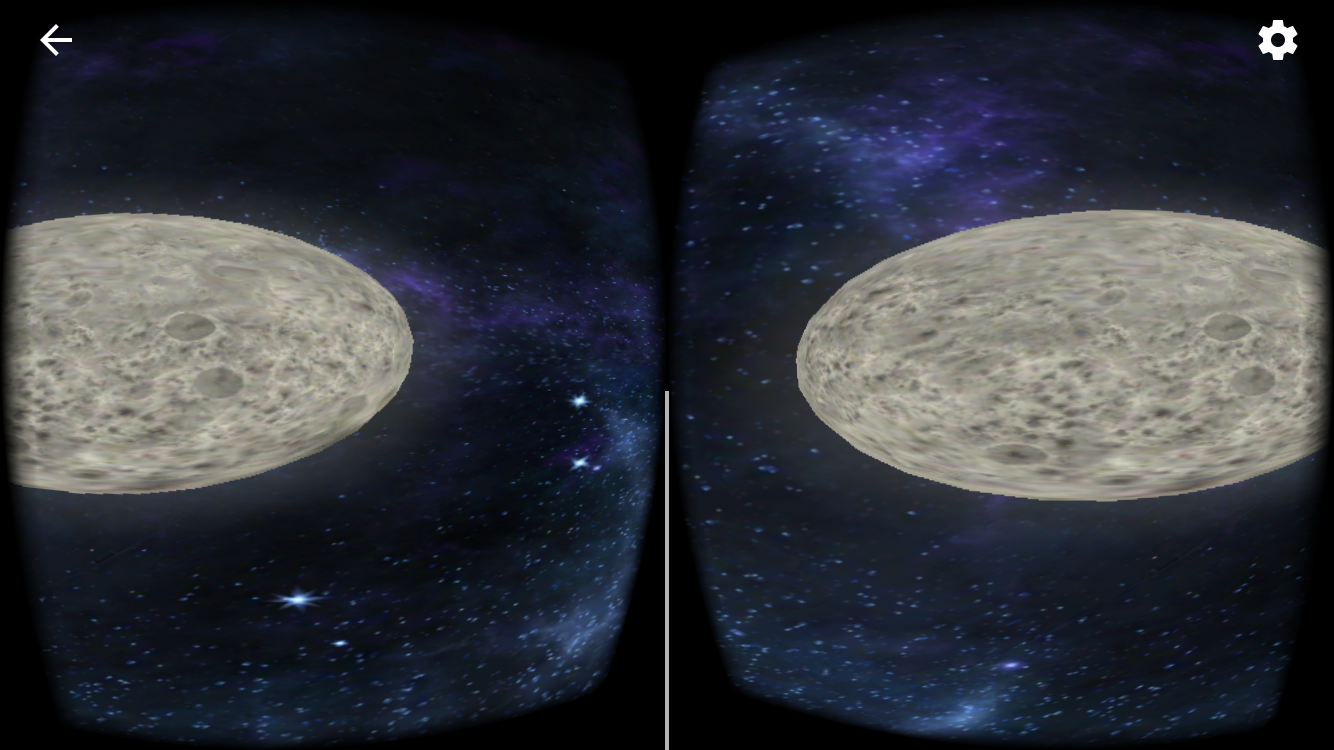
Android:

Thanks for your help
 AdrianaVecc
on 7 Jun 2017
AdrianaVecc
on 7 Jun 2017
Hey! The first issue is solved by upgrading to 5.6.1p2 https://unity3d.com/fr/unity/qa/patch-releases/5.6.1p2
AdrianaVecc
on 8 Jun 2017
I've run into an issue where GVR spatial audio works on the editor and Android but not iOS. I'm ending up with a silent game. Anyone else have any ideas why this may be? (5.6.1p3)
 jvergara92
on 16 Jun 2017
jvergara92
on 16 Jun 2017
@jvergara92 Thanks for filing issue #618 for your unrelated audio issue.
 fredsa
on 5 Aug 2017
fredsa
on 5 Aug 2017
- When build to iphone, the VR view is distorted
Hey! The first issue is solved by upgrading to 5.6.1p2 …
Closing as the main issue reported here is fixed according to @AdrianaVecc at least three others who gave their thumbs up.
fredsa
on 5 Aug 2017
2.When "Enable Transition View" is set to false, it should not show an instruction splash screen. But Splash Screen appears even if enable tansition view is set to false.
3.Camera rendering has problems on ios carboard in vr mode when using2x and 4x or 8x MSAA.When released to the iphone, the screen is displayed as black and flashing.When I disable Anti Aliasing the rendering becomes normal.
@xiesi88 Would you mind filing separate bugs for these two issues, so it's easier to track them individually?
fredsa
on 5 Aug 2017
Related issues
 FriskyBishop
·
3Comments
FriskyBishop
·
3Comments
 varumora
·
7Comments
varumora
·
7Comments
 synthercat
·
4Comments
synthercat
·
4Comments
 guneyozsan
·
6Comments
guneyozsan
·
6Comments
 vinhui
·
6Comments
vinhui
·
6Comments
Most helpful comment
Hey! The first issue is solved by upgrading to 5.6.1p2 https://unity3d.com/fr/unity/qa/patch-releases/5.6.1p2