Gutenberg: Show outlines of all blocks in select mode
Problem
Besides the fact, that there are some some justified complaints about the disabled outlines of a block being selected (see https://github.com/WordPress/gutenberg/issues/23892), I often miss the option to see EVERY outline at once, especially while building layouts.
Elementor for example always shows outlines:
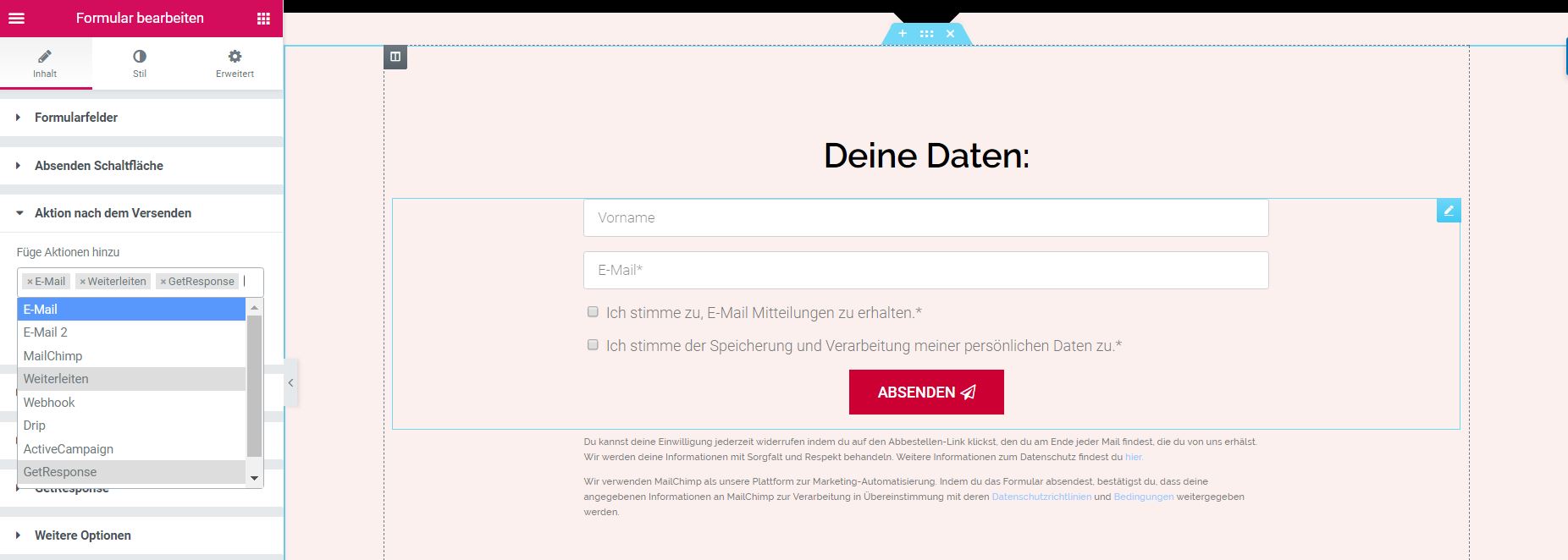
(Source)
Solution
As described in https://github.com/WordPress/gutenberg/issues/24751 I am aware of the balancing between a clean "focus on text" and a more page-builder-like "focus on blocks". As a compromise, I would like to propose the idea of showing outlines all the time in select mode:
- dotted, grey: default
- solid, grey: hover
- solid, blue: selected/focused

Since the select mode is designed to "select blocks", I think this goal might be improved a lot by this feature.
 mariohamann
All 16 comments
Updated the title to mention "all blocks," at first I thought this might be a duplicate of #23892 :)
To me, this kind of view could be very useful in the context of Global Styles and FSE, as we get closer to more fully realized design editor and site builder tool.
 noahtallen
on 11 Sep 2020
noahtallen
on 11 Sep 2020
Thank you for renaming and for your feedback!
mariohamann
on 11 Sep 2020
This makes sense to me. The inability to see all block outlines is something I've heard people used to page builders complain about all the time when they try to use Gutenberg. They consistently feel lost, being unable to tell where one container ends and another begins. I think showing the outlines of every block is helpful both for selecting blocks as well as for making block navigation clearer, which was the original intention of "Select" mode (originally "Navigation" mode). When you can see block outlines, you can more quickly tell where you'll be navigating to next.
 ZebulanStanphill
on 17 Sep 2020
ZebulanStanphill
on 17 Sep 2020
Really good thoughts. I, too, like seeing an outline when reviewing how each block relates to the others. Keeping this restricted to Select mode is important.
My initial concern is how this is done in relation to more complex layouts like using the Columns block or right/left alignments.

 mapk
on 18 Sep 2020
mapk
on 18 Sep 2020
I thought we already fixed the outlines for floated blocks? At least it seems that way with the existing interactions:

As for columns and multiple levels of groups... I mean, technically the borders are accurate. But perhaps we could consider adding extra padding to everything in Select mode?
ZebulanStanphill
on 18 Sep 2020
My initial concern is how this is done in relation to more complex layouts like using the Columns block or right/left alignments.
...perhaps we could consider adding extra padding to everything in Select mode?
In my opinion it is especially a great enhancement for more complex layouts – and combining them with padding would really help to make blocks of even deeper levels directly clickable.
Maybe adding some CSS transitions and it's getting sweet (quick draft on CodePen). 😄

mariohamann
on 18 Sep 2020
@mariohamann I like it! What do you think @afercia? Just making sure there's no accessibility downsides to this idea that we've failed to notice so far.
ZebulanStanphill
on 19 Sep 2020
Here is another example on CodePen (inheriting the code base of the example above):

mariohamann
on 20 Sep 2020
Just making sure there's no accessibility downsides to this idea that we've failed to notice so far.
Re: more padding? I don't think that would trigger a11y issues. Maybe more a design thing.
 afercia
on 21 Sep 2020
afercia
on 21 Sep 2020
Maybe adding some CSS transitions and it's getting sweet
I do like the addition of animation, but we'd need to make sure the animation can be turned off for people with motion sensitivity.
This is reminiscent of an older PR that was tried and reverted last year. https://github.com/WordPress/gutenberg/pull/14961
I'm cc-ing a few people involved in the last attempt to bring their insights and learnings here as well. @jasmussen @kjellr It could be that this affect limited to Select mode may work well.
mapk
on 21 Sep 2020
The addition of nesting borders and specifically expanding padding were tried, as Mark said, and reverted. The primary reason was that it did not scale at all to compact nesting situations, such as an Icon block inside a Social Icons block, or a Menu Item inside a Navigation Menu. We even tried the animation, but failed to get it performant on very long pages (try the Demo content). The 5.5 design was created in part to address all those issues, but ultimately I see the expanding padding as a failed experiment.
 jasmussen
on 23 Sep 2020
jasmussen
on 23 Sep 2020
I wrote a small Plugin to test it directly in Gutenberg: https://github.com/mariohamann/gutenberg-padding (just install and switch to Select mode).
Had no problems with performance (at least on my PC) until I pasted the Demo content about 25 times. After having pasted it for 100 times there was barely no transition, but still it worked – and in my opinion it felt like a great increase of usability in select mode.
Edit: One big problem I encoured was the changing position on screen because of the paddings. I tried it with overflow-anchor: auto; in Chrome, but unfortunately it didn't work.
mariohamann
on 23 Sep 2020
Padding or not, I think we should at least move forward with showing all block outlines in Select mode. Any objections to that?
ZebulanStanphill
on 23 Sep 2020
To elaborate, I think showing all block outlines in Select mode is still helpful for the original intent of the mode: block navigation via the keyboard.
The padding thing is only really being considered to try and make it double as, well, a mode for touch/mouse users to "select" blocks at various levels of nesting. But as @jasmussen points out, this approach has some notable downsides.
I think perhaps a better way to provide a "find and select blocks at various levels of nesting" mode would be to turn List View into another mode of the main editor canvas. Make a mode that doesn't even try to be WYSIWYG, but rather is designed specifically for the purpose of:
- seeing the block hierarchy
- being able to quickly select blocks in that hierarchy
- quickly moving blocks via up/down buttons and drag-and-drop across nesting levels (remember, you can't just add buttons to Select mode without messing up the original intent of fast keyboard navigation!)
How does that sound? Instead of trying to compromise between showing hierarchy and being WYSWIYG in Select mode, why not just add a whole new mode that doesn't even attempt to be WYSIWYG? If we had this mode, I think _maybe_ we could even remove the current List View, breadcrumb bar, and parent-selector toolbar button, as this "List Mode" could potentially cover all the same use cases and handle them better and more accessibly, in my opinion.
ZebulanStanphill
on 23 Sep 2020
@ZebulanStanphill As often mentioned I would love to see a mode between Select and Edit, e. g. Layout. This could be used to show e. g. the "Block actions" as described over here: https://github.com/WordPress/gutenberg/issues/25275 (And of course this issue is a perfect example to profit from it, too: https://github.com/WordPress/gutenberg/issues/24750) It seems that currently there are some concerns, but I have the feeling that it's so important to have this kind of mode. We are always struggling between not overloading select mode especially for a11y reasons and reducing the UI of Edit mode, to make it cleaner. But there is no mode to select an inner block without guessing which of the white areas is the right one. ;)
Mode switching for keyboard and mouse users could look like:
- Select mode →
Return→ Layout mode →Return→ Edit mode - Select mode →
Mouse click→ Layout mode →Mouse click→ Edit mode - Edit mode →
Esc→ Layout mode →Esc→ Select mode
(I have to add: Working with my plugin was irritatingly effective. I could select a column in a columns block without any problems – without needing to select the most inner block and checking the block breadcrumb at the button to select the column or clicking and clicking and clicking, hoping to get the right one.)
mariohamann
on 23 Sep 2020
Seems there are two different topics being discussed here 🙂
- Always show block outline in Select mode: I'd be totally in favor of this. +1
- Provide an additional editor "mode" to make the block-actions easier to use: this issue is also being discussed in #25275. I'd be totally in favor of exploring a new mode for this purpose as @ZebulanStanphill suggested above. However, instead of making the switching mechanism between Select and Edit mode more complicated, I'd recommend a more clear separation between the modes and a better switching mechanism. See also my comment on https://github.com/WordPress/gutenberg/issues/25275#issuecomment-698232520
afercia
on 24 Sep 2020
Related issues
 BE-Webdesign
·
3Comments
BE-Webdesign
·
3Comments
 youknowriad
·
3Comments
youknowriad
·
3Comments
 pfefferle
·
3Comments
pfefferle
·
3Comments
 mhenrylucero
·
3Comments
mhenrylucero
·
3Comments
 aaronjorbin
·
3Comments
aaronjorbin
·
3Comments