Gutenberg: Popup vs. popup with inline block inserter and toolbar block inserter
Describe the bug

In Gutenberg you can add blocks from the toolbar block inserter and also from a keyboard-shortcut when typing a /.
It's possible to have both inserters display at the same time, overlapping each other, which is confusing.
To reproduce
- Edit a page or post in block editor.
- Click in content are and type
/to bring up inline inserter. - Realise you have no clue what text to type to get the block you want, so mouse up to toolbar and click the big plus.
Expected behavior
There should only be one popup visible on screen at a time, and it should be focused. Or, the most recently opened one should be fully visible.
Screenshots
(Screenshot above)
Editor version (please complete the following information):
- WordPress version: 5.4.1
- Does the website has Gutenberg plugin installed, or is it using the block editor that comes by default?
default
Desktop (please complete the following information):
- OS: macOS
- Browser: Chrome
- Version: 81.0.4044.129
 haszari
All 2 comments
Thanks for this report @haszari! I was able to replicate this using just 5.4.1. Flagging this for the team! To be safe, I tested this with Gutenberg 8.1 RC (no experiments) and WordPress 5.4.1 only to find what seems to be an even worse duplication happening:
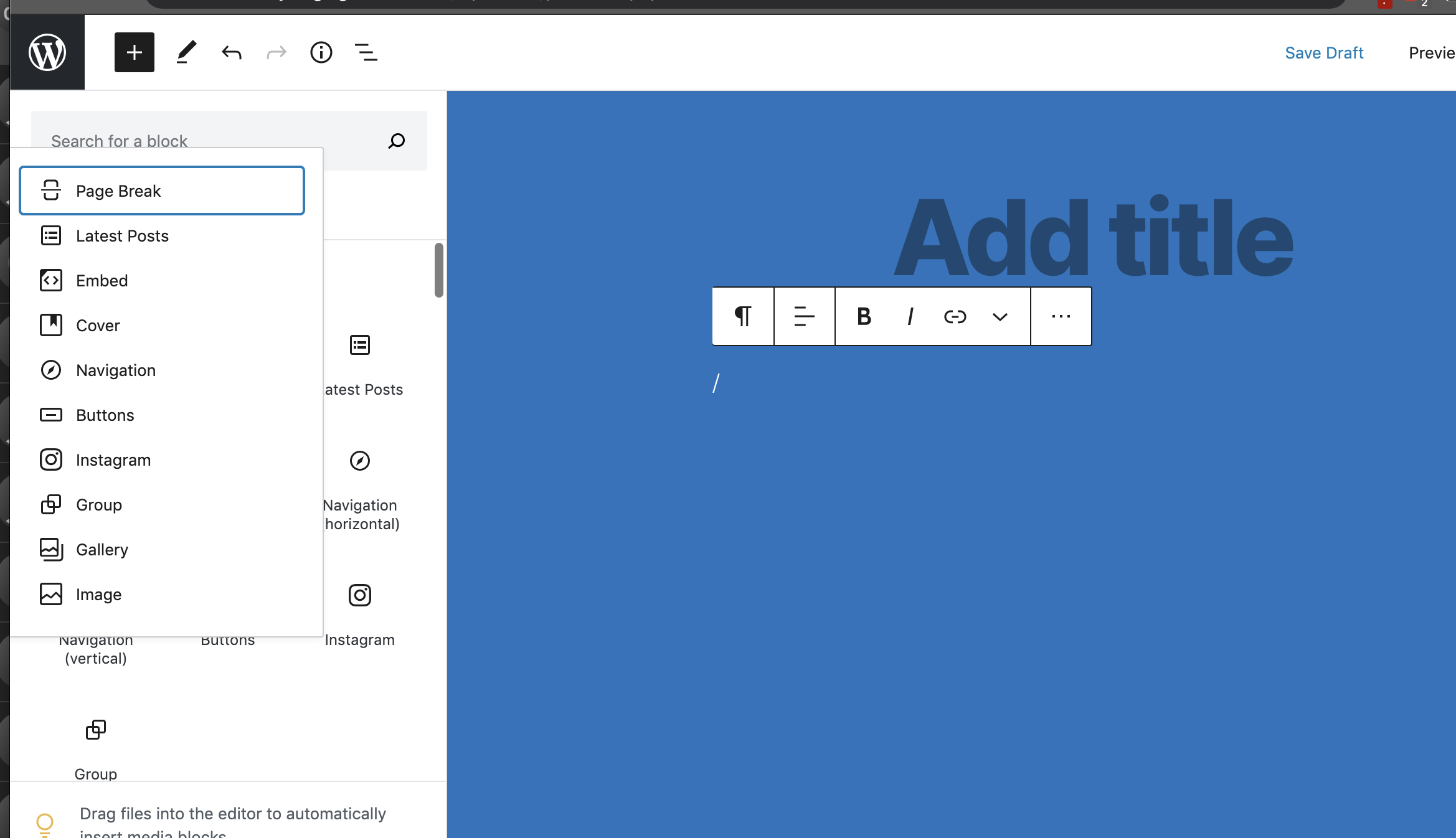
Here's a video: https://cloudup.com/cPQ3YL6U_Xh
 annezazu
on 12 May 2020
annezazu
on 12 May 2020
I think this is invalid now that the inserter shows up as a panel.
 youknowriad
on 2 Jul 2020
youknowriad
on 2 Jul 2020
Related issues
 jasmussen
·
3Comments
jasmussen
·
3Comments
 hedgefield
·
3Comments
hedgefield
·
3Comments
 davidsword
·
3Comments
davidsword
·
3Comments
 franz-josef-kaiser
·
3Comments
jasmussen
·
3Comments
franz-josef-kaiser
·
3Comments
jasmussen
·
3Comments
Most helpful comment
I think this is invalid now that the inserter shows up as a panel.