Gutenberg: Buttons Block: Give the user the option to use capital or lowercase letters
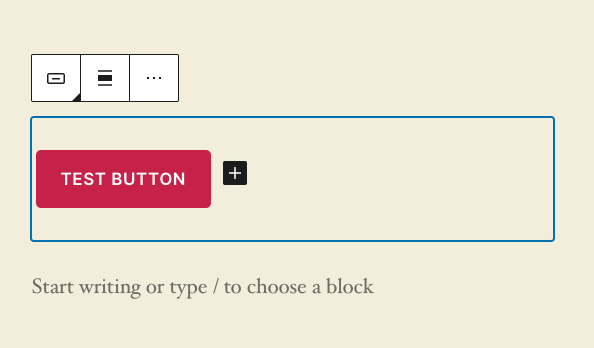
Today the buttons block uses all capital letters.
It would be nice to be able to change button text to lowercase letters.
Example Going from "TEST BUTTON" to "Test button".
If I want to use all capital letters then I can turn on the caps lock key and make all the letters capital letters. Right now I have no option to turn these off.
Fix. Turn off all caps. Give the user the option to use capital or lowercase letters.
 paaljoachim
All 4 comments
Today the buttons block uses all capital letters.
This is the theme forcing that display, not the button block:
 mtias
on 25 Mar 2020
mtias
on 25 Mar 2020
Ahhh so this is a Twenty Twenty theme issue.
I will close it and mention it in the core-themes channel.
Thanks Matias!
paaljoachim
on 25 Mar 2020
No worries! It's another example of how tricky it is to navigate what the theme does and what the block does, since user won't generally see any of those boundaries.
mtias
on 25 Mar 2020
Trac ticket for this issue: https://core.trac.wordpress.org/ticket/49710
 ianbelanger79
on 27 Mar 2020
ianbelanger79
on 27 Mar 2020
Related issues
 JohnPixle
·
3Comments
JohnPixle
·
3Comments
 spocke
·
3Comments
spocke
·
3Comments
 jasmussen
·
3Comments
jasmussen
·
3Comments
 pfefferle
·
3Comments
pfefferle
·
3Comments
 franz-josef-kaiser
·
3Comments
franz-josef-kaiser
·
3Comments