Gutenberg: Self-Referencing Reusable Block Crashes Blocks and Pages/Posts
Describe the bug
I'm not 100% sure how users are figuring this out, but I have figured out a way to replicate.
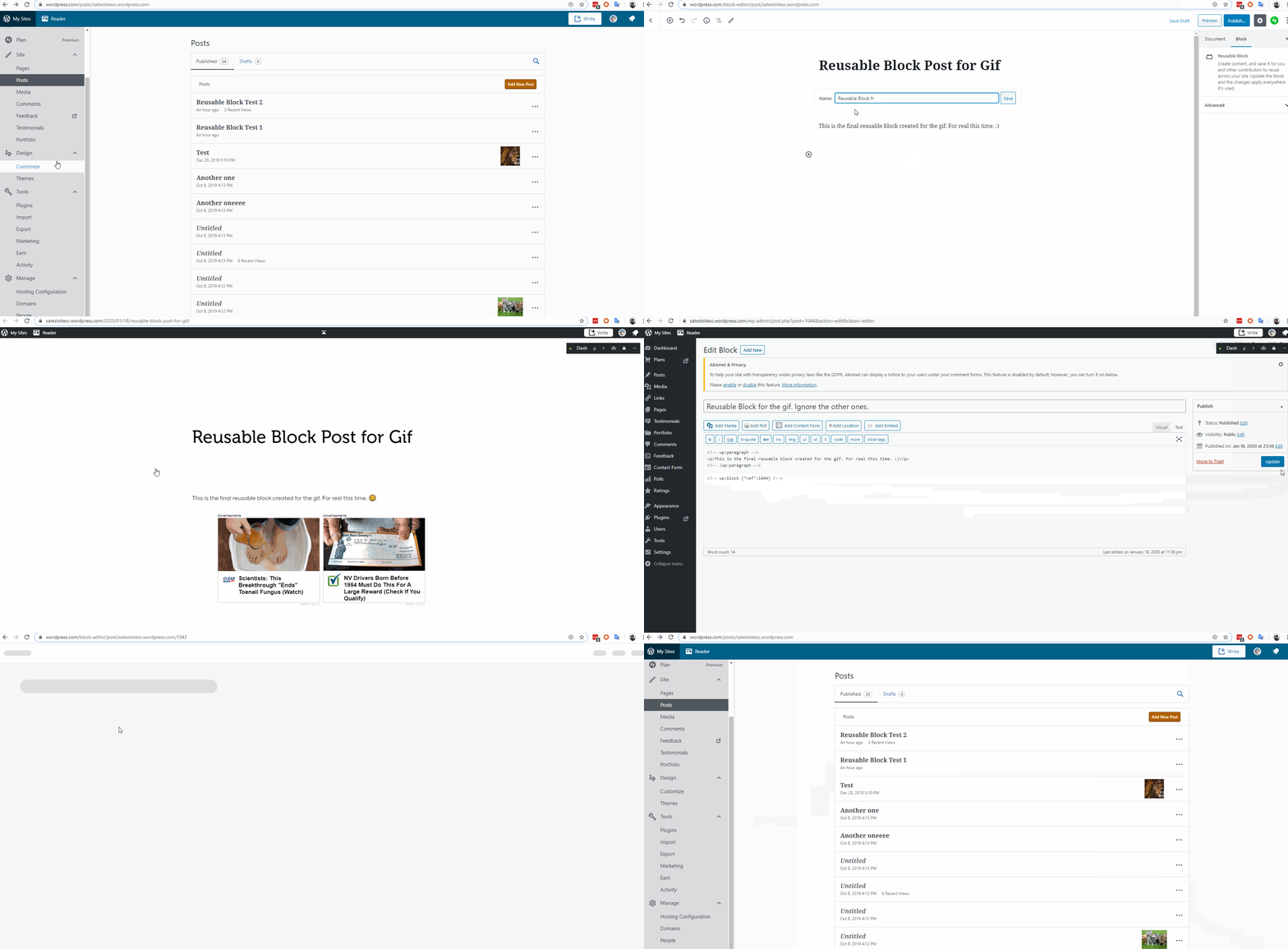
If a Reusable Block self-references, it will crash the post and the editor. This was originally found on a WordPress.com site, and can be replicated on WordPress.com. When tested on a core install, it was able to reproduced as well.
I also tested on a core install and was able to reproduce issues there, specifically fatal errors due to timeouts in /wp-includes/class-wp-block-parser.php on line 417 and /wp-includes/class-wp-block-parser.php on line 417.
The original bug report was filed in wp-calypso, here: https://github.com/Automattic/wp-calypso/issues/38929
It looks like this was also reported in 2018 (https://github.com/WordPress/gutenberg/issues/11206), but was closed. We've had a number of users somehow replicate this on .com, so reopening to see if this can be looked into again.
To reproduce
Steps to reproduce the behavior:
- Create a post. Add a Paragraph Block with some text in it.
- Make that block a Reusable Block. Give it a name (just to distinguish it). Save. Publish the post. Open the post in a new tab.
- Create a new post.
- Click to add a block, go to Reusable Blocks - Manage All Reusable Blocks. (At the moment on WordPress.com at least, you need to open this in a new tab. Opening it in the same window will fail. See https://github.com/Automattic/wp-calypso/issues/38928) It appears on core, this works as intended.
- Hover over the block you've created, and click Classic Editor.
- When editing the block in the classic editor, make the block refer to itself by adding:
<!-- wp:block {"ref":BLOCK-NUMBER-HERE} /--> - If you don't have the Classic Editor option, change from Visual Editor to Code Editor, and make the block refer to itself by adding:
<!-- wp:block {"ref":BLOCK-NUMBER-HERE} /--> - The Block Number can be found in the URL.
- Update the Block. You may get an error here, or it might update cleanly.
- Refresh the post this reusable block appears on. The post will be broken.
- The editor for the post may also fail to load, and the editor for the block could also fail to load.
- At least on WordPress.com, this would also make posts/pages disappear entirely until the Reusable Block that self-references is accessed and removed.
Expected behavior
The Reusable Block to not crash the editor and the pages.
Screenshots
This .gif was taken from the original report on a WordPress.com hosted site:
Desktop (please complete the following information):
This works on all desktops/browsers. Originally discovered on:
Windows 10
Chrome Version 80.0.3987.149 (Official Build) (64-bit)
Additional context
- Please add the version of Gutenberg you are using in the description.
Testing was done on WordPress Version 5.3.2
 scosgro
All 3 comments
@scosgro It looks like some of the instructions in your steps for reproduction are missing. Would be great if you could update that.
- When editing the block in the classic editor, make the block refer to itself by adding:
- If you don't have the Classic Editor option, change from Visual Editor to Code Editor, and make the block refer to itself by adding:
 talldan
on 25 Mar 2020
talldan
on 25 Mar 2020
Code was disappearing. Sorry about that. Fixed!
scosgro
on 25 Mar 2020
Duplicate of https://github.com/WordPress/gutenberg/issues/18704.
 noisysocks
on 21 Apr 2020
noisysocks
on 21 Apr 2020
Related issues
 BE-Webdesign
·
3Comments
BE-Webdesign
·
3Comments
 moorscode
·
3Comments
moorscode
·
3Comments
 davidsword
·
3Comments
davidsword
·
3Comments
 pfefferle
·
3Comments
pfefferle
·
3Comments
 hedgefield
·
3Comments
hedgefield
·
3Comments