Gutenberg: Cover block: Overlay setting is stuck inside the Cover setting in sidebar
Describe the bug
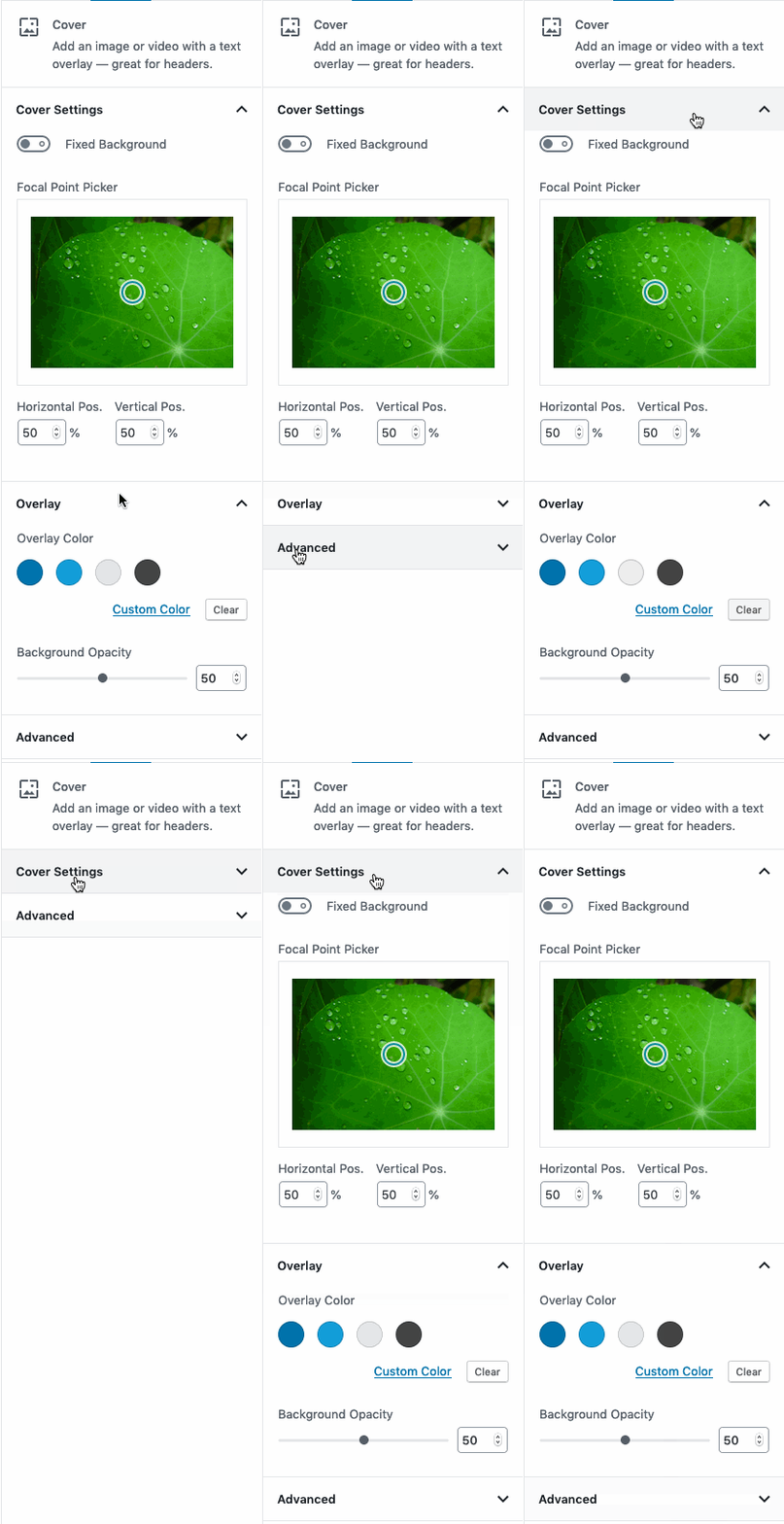
The "Overlay" settings is inside the "Cover Settings" panel. They both visually have the same hierarchy though. When closing the Cover Settings panel, the Overlay settings is no longer viewable. This is confusing.
To reproduce
Steps to reproduce the behavior:
- Add a Cover block.
- Add an image.
- View the Cover Settings panel and notice the Overlay panel below it, but at the same hierarchical level.
- Collapse the Cover Settings panel and observe the Overlay panel has disappeared.
Expected behavior
I expect the Overlay panel to stay visible when the Cover Settings panel is closed. They both have the same visual hierarchy.
Screenshots
Solution
I think the best solution here is to rename the "Cover Settings" panel as mentioned in @kjellr's comment here: https://github.com/WordPress/gutenberg/pull/17041#issuecomment-523591254 to "Media."
 mapk
mapk
All 2 comments
This kind of raises the issue of how to style nested accordions, or perhaps if nested accordions should even be used/recommended at all.
 ZebulanStanphill
on 22 Aug 2019
ZebulanStanphill
on 22 Aug 2019
there shouldn't be nested accordions, Color Panel is a separate panel, someone mistakenly put it under settings panel, it should be fixed in #17041
 senadir
on 22 Aug 2019
senadir
on 22 Aug 2019
Related issues
 jasmussen
·
3Comments
jasmussen
·
3Comments
 maddisondesigns
·
3Comments
maddisondesigns
·
3Comments
 moorscode
·
3Comments
moorscode
·
3Comments
 BE-Webdesign
·
3Comments
BE-Webdesign
·
3Comments
 spocke
·
3Comments
spocke
·
3Comments
Most helpful comment
there shouldn't be nested accordions, Color Panel is a separate panel, someone mistakenly put it under settings panel, it should be fixed in #17041