Gutenberg: Custom fields in custom post type not appearing
hi,
i was looking for a similar issue, but i found nothing. if there was already i apologize in advance.
Describe the bug
after creating a custom post type, i am not able to see the custom fields.
To reproduce
- fresh install
2.
function register_custom_post_types() {
    register_post_type('test', [
        'labels' => [
            'name' => __('test'),
        ],
        'public' => true,
        'supports' => [
            'title',
            'editor',
        ],
        'show_in_rest' => true,
    ]);
}
add_action('init', 'register_custom_post_types');
- create a new cpt post and try to activate the custom fields in the options modal
- (forced) refresh
- nothing appears and the custom fields checkbox still unchecked
Expected behavior
the custom fields appear a the bottom of the editing page of the custom post type.
Screenshots
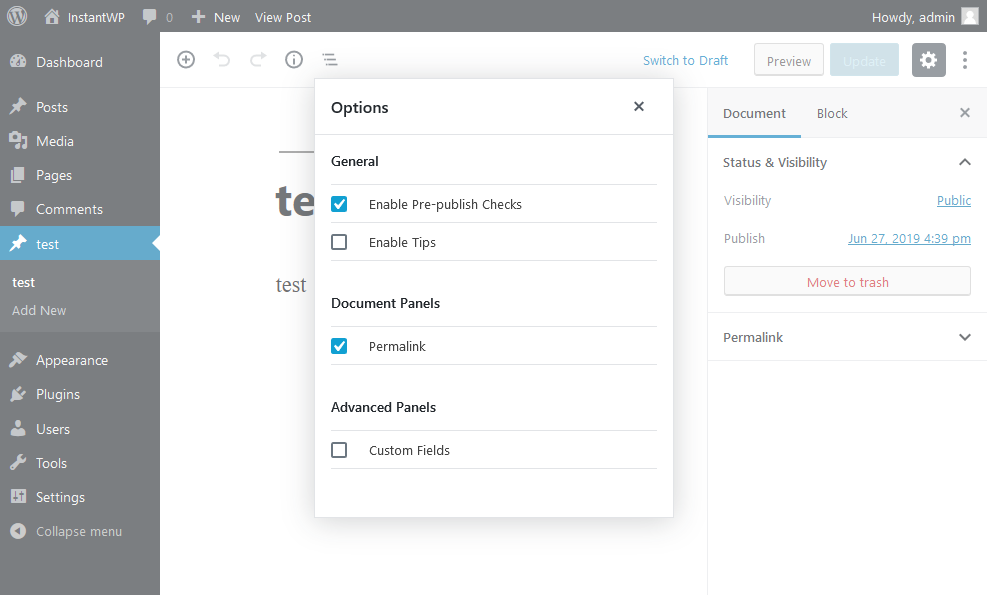
Desktop:
- OS: windows
- Browser firefox
- Version 67.0.4 and 68.0b13
Additional context
wordpress 5.2.2
 iannacone
All 4 comments
You need to add custom-fields to the supports array, see docs https://developer.wordpress.org/reference/functions/register_post_type
 Soean
on 27 Jun 2019
Soean
on 27 Jun 2019
We should only show this option, if the post type supports this feature.
Soean
on 27 Jun 2019
sorry for reporting a non bug. i did not notice about that in the documentation.
thank you for the answer.
is it anyway considered as bug because the custom fields checkbox should not appear at all, or i can close this issue?
iannacone
on 28 Jun 2019
Yes, it's a bug. The option should be not visible when the post type doesn't support this feature. I opened a PR #16338 with a solution. When it's merged we close this issue..
Soean
on 28 Jun 2019
Related issues
 maddisondesigns
·
3Comments
maddisondesigns
·
3Comments
 jasmussen
·
3Comments
jasmussen
·
3Comments
 moorscode
·
3Comments
moorscode
·
3Comments
 JohnPixle
·
3Comments
JohnPixle
·
3Comments
 wpalchemist
·
3Comments
wpalchemist
·
3Comments
Most helpful comment
Yes, it's a bug. The option should be not visible when the post type doesn't support this feature. I opened a PR #16338 with a solution. When it's merged we close this issue..