Gutenberg: Try adding left/right alignment controls to the spacer block
This was originally raised by @melchoyce in a DM. Squarespace has a spacer-type elmement that can be floated to the left or right. It may be interesting to try something like this out for Gutenberg too.
This feature can be helpful if a user wants to offset blocks and create non-standard layouts. These left/right spacers could theoretically be ignored on smalls screens, so the content would still be is full width there.
This is a super-rough hack, but to get the general idea across:

_(Ideally the right/left resize handles would only show up when the image is floated to the left or right though.)_
 kjellr
All 4 comments
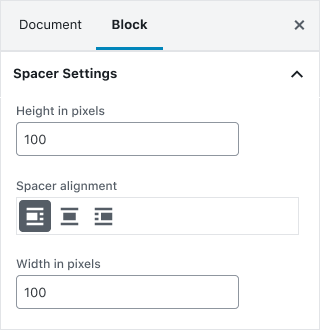
This looks awesome! For accessibility the right / left handles would need an extra input field in the panel to add values. Something like this:
 MariusKauer
on 20 Jun 2019
MariusKauer
on 20 Jun 2019
I'm torn actually, adding that UI and functionality is not difficult - but as a user, having to do each of those steps to add space left or right of another block seems a bit heavy.
Some thoughts/suggestions on this implementation that could lighten up the UX:
- Maybe the left/right handles shouldn't render unless the block is left or right
- Only the opposite handle should show (_as you'd probably not drag the left side of the spacer to the left if its aligned left_)
- And what's the responsive considerations (if any?)
 richtabor
on 9 Jul 2019
richtabor
on 9 Jul 2019
At its core, this issue is meant to easily create columns of content from existing content. As an alternate approach to this, I opened a "Transform to Columns" issue here: https://github.com/WordPress/gutenberg/issues/16504
It's not exactly the same, but does accomplish a similar goal: put stuff into columns.
kjellr
on 10 Jul 2019
After a discussion with the design team, we decided that the improvement of the Columns block with a drag capability, is the way to go here.
 thanasakleas
on 21 Jan 2020
thanasakleas
on 21 Jan 2020
Related issues
 spocke
·
3Comments
spocke
·
3Comments
 ellatrix
·
3Comments
ellatrix
·
3Comments
 hedgefield
·
3Comments
hedgefield
·
3Comments
 jasmussen
·
3Comments
jasmussen
·
3Comments
 maddisondesigns
·
3Comments
maddisondesigns
·
3Comments
Most helpful comment
I'm torn actually, adding that UI and functionality is not difficult - but as a user, having to do each of those steps to add space left or right of another block seems a bit heavy.
Some thoughts/suggestions on this implementation that could lighten up the UX: