Gutenberg: Cannot add block for new post
Describe the bug
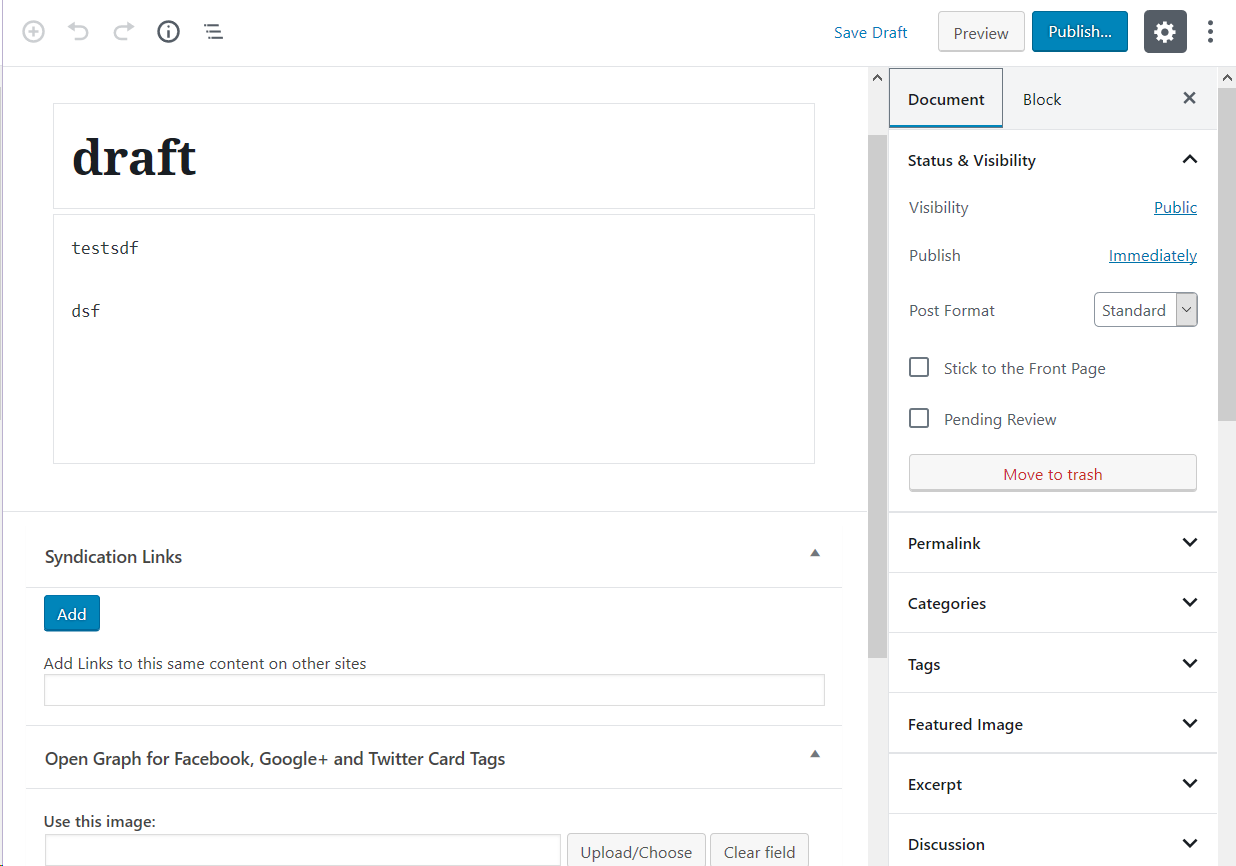
I'm not using gutenberg before. After upgrading wordpress to 5, I can only add a title block and content block for new post. The content block, which I think is a classic block, has no toolbar on it.
To Reproduce
Steps to reproduce the behavior:
- Create New Post
Expected behavior
I should be able add block. Instead I can only have the title block and a content block. The content block even has no toolbar on it.
Screenshots
Desktop (please complete the following information):
- OS: Windows 10
- Browser: Firefox 66 / Chrome 71
Additional context
The version of gutenberg is the one comes with wordpress 5.0.1. I do not find any javascript error in the devtool console. I suspect a plugin conflict here but really has no clue on what to start from:
### Must Use Plugins (1) ###

Health Check Troubleshooting Mode: Version 1.5.0

### Active Plugins (39) ###

Akismet Anti-Spam: Version 4.1 by Automattic
Bridgy: Version 1.4.2 by David Shanske
Classic Editor: Version 1.3 by WordPress Contributors
Clicky for WordPress: Version 1.6 by Team Yoast
Comment Meta Display: Version 1.1 by SparkWeb Interactive, Inc.
Date Pagination: Version 2.0.0 by keesiemijer
Delink Comment Author: Version 1.4 by Alex King
Disable Embeds: Version 1.3.0 by Pascal Birchler
Disable Emojis (GDPR friendly): Version 1.7.2 by Ryan Hellyer
Exclude Pages from Navigation: Version 1.92 by Simon Wheatley
Get The Image: Version 1.1.0 by Justin Tadlock
Get Tweets in PHP: Version 1.2 by Netgloo
Google XML Sitemaps: Version 4.0.9 by Arne Brachhold
Gravatar: Version 1.1 by Tom Werner
Health Check & Troubleshooting: Version 1.2.3 by The WordPress.org community
Import Export Posts as Text Files: Version 2.0.6 by Jacky See
IndieAuth: Version 3.1.11 by IndieWebCamp WordPress Outreach Club
IndieWeb: Version 3.3.14 by IndieWebCamp WordPress Outreach Club
Markdown on Save Improved: Version 2.5 by Matt Wiebe
Mass Format Conversion: Version 1.2.1 by Stephanie Leary
Medium: Version 1.4.0 by A Medium Corporation
Micropub: Version 2.0.5 by Ryan Barrett
Open Graph for Facebook, Google+ and Twitter Card Tags: Version 2.2.4.2 by Webdados
PHP Code Widget: Version 2.3 by Otto
Post-Plugin Library: Version 2.6.2.1 by Rob Marsh, SJ
Raw HTML: Version 1.5.1 by Janis Elsts
Semantic-Linkbacks: Version 3.9.2 by Matthias Pfefferle
Similar Posts: Version 3.0.1 by Shareaholic
Simple IP Ban: Version 1.3.0 by Sandor Kovacs
Simple Local Avatars: Version 2.1 by Jake Goldman, 10up
Simple Tags: Version 2.4.7 by Amaury BALMER
Stop XML-RPC Attack: Version 1.0.3 by alfreddatakillen
Syndication Links: Version 4.0.3 by David Shanske
Term Management Tools: Version 1.1.4 by scribu
Theme Switch: Version 0.9.0.3 by Nicolas Kuttler
Webmention: Version 3.8.8 by Matthias Pfefferle
Wordpress/Plugin Upgrade Time Out Plugin: Version 1.0 by Felix Ker
WordPress Database Backup: Version 2.3.3 by Austin Matzko
WP-Optimize: Version 2.2.6 by David Anderson, Ruhani Rabin, Team Updraft

### Server ###

Server architecture: Linux 2.6.32-042stab120.18 x86_64
PHP Version: 5.4.45 (Supports 64bit values)
PHP SAPI: cgi-fcgi
PHP max input variables: 1000
PHP time limit: 30
PHP memory limit: 128M
Max input time: 60
Upload max filesize: 100M
PHP post max size: 100M
cURL Version: 7.57.0 OpenSSL/1.0.1e
SUHOSIN installed: Yes
Is the Imagick library available: No
htaccess rules: Custom rules have been added to your htaccess file


### WordPress Constants ###

ABSPATH: [masked]
WP_HOME: Undefined
WP_SITEURL: Undefined
WP_DEBUG: Disabled
WP_MAX_MEMORY_LIMIT: 256M
WP_DEBUG_DISPLAY: Disabled
WP_DEBUG_LOG: Disabled
SCRIPT_DEBUG: Disabled
WP_CACHE: Disabled
CONCATENATE_SCRIPTS: Undefined
COMPRESS_SCRIPTS: Undefined
COMPRESS_CSS: Undefined
WP_LOCAL_DEV: Undefined
 jackysee
All 4 comments
have the same problem. You should turn on visual editor in user prorile.

 tarasamelin
on 14 Dec 2018
tarasamelin
on 14 Dec 2018
Closing since a resolution has been posted. If you're still having trouble after checking the setting mentioned, please re-open the issue!
 designsimply
on 14 Dec 2018
designsimply
on 14 Dec 2018
The visual editor is ON, but the editor is still the same that cannot add new block.
I'll reopen a new issue.
jackysee
on 14 Dec 2018
hello folks!
I just had the same problem, and to fix it I checked the ckeckbox, saved the config, and than unchecked the checkbox and saved again.
It worked for me!
Ty.
have the same problem. You should turn on visual editor in user prorile.
 fhkishida
on 10 Sep 2020
fhkishida
on 10 Sep 2020
Related issues
 jasmussen
·
3Comments
jasmussen
·
3Comments
 cr101
·
3Comments
cr101
·
3Comments
 aaronjorbin
·
3Comments
aaronjorbin
·
3Comments
 BE-Webdesign
·
3Comments
BE-Webdesign
·
3Comments
 davidsword
·
3Comments
davidsword
·
3Comments
Most helpful comment
have the same problem. You should turn on visual editor in user prorile.
