Gutenberg: Text selection with keyboard triggers blocks multi-selection unexpectedly
Tested on latest master 4.5.1.
Looks like selecting text with the keyboard works differently from selecting text with the mouse. At some point the blocks multi-selection kicks in and breaks the expected behavior.
Selecting text with Shift and Arrow keys is a pretty common expectation for all users, and it's also the only selection method for users who don't use the mouse.
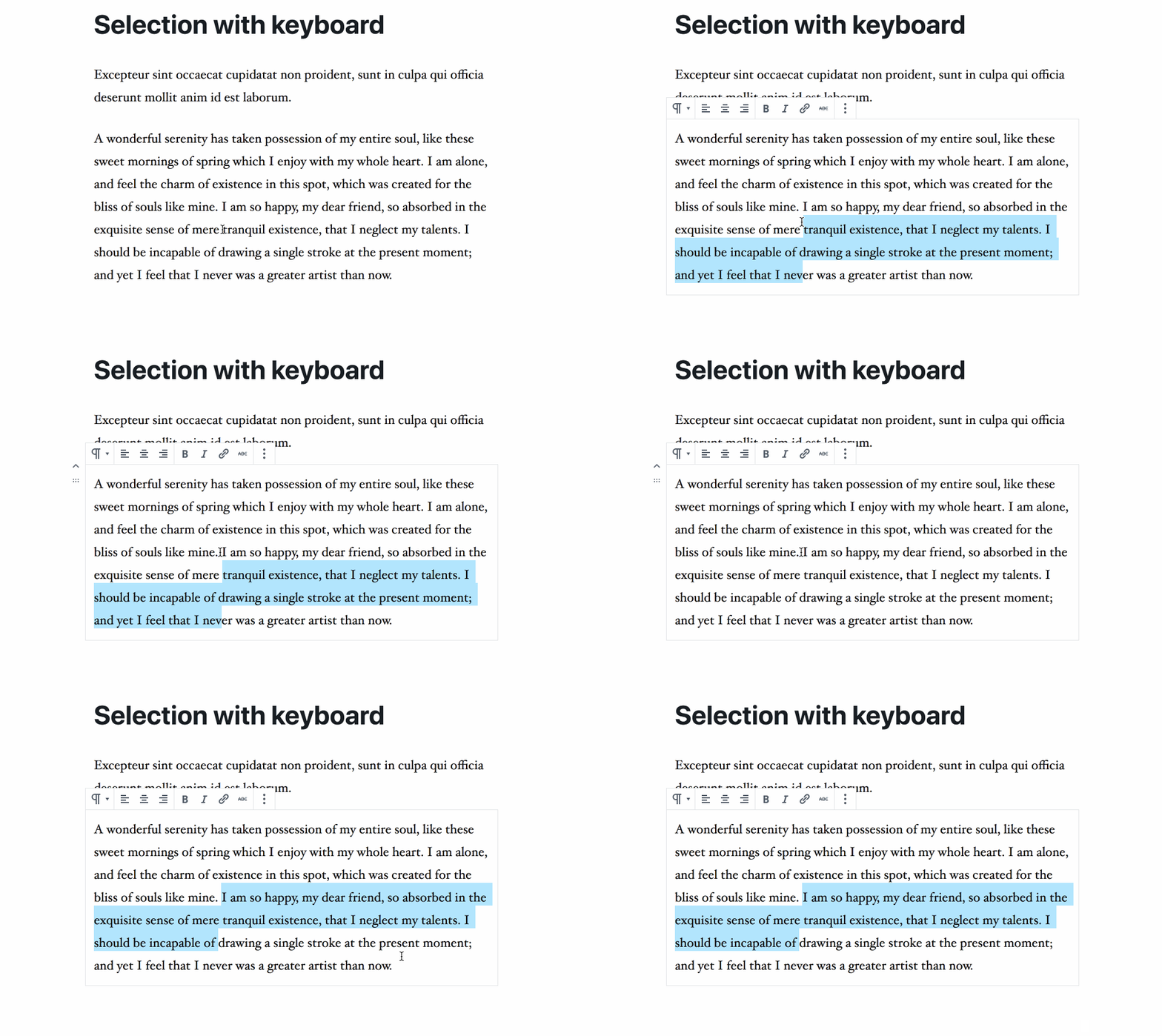
In the GIF below, I'm following 3 steps:
- mouse: selection on 4 lines works as expected
- keyboard: as soon as the selection reaches the 4th line, multi-selection kicks in and doesn't allow to complete the selection as desired
- keyboard on a shorter text: a bit surprisingly, seems the previous incorrect behavior doesn't happen when the selection spans on a shorter text, e.g. only 3 lines

Additionally, if the selection happens on the last block there's one more breaking behavior. In the GIF below:
- if the selection is on the last 3 lines, I'm able to reach the last line in the text
- if I start from the fourth line from the bottom, I'm unable to reach the last line:
A similar behavior happens when starting the selection from bottom to top in the first block.
 afercia
All 11 comments
Any chance to give this issue some higher priority? It's unfortunate simple text selection operations are broken when using a keyboard. /Cc @youknowriad
afercia
on 14 Jan 2019
Gonna take a look at this one with a group of people interested in contributing during a Hackathon on Monday!
 LukePettway
on 18 Jan 2019
LukePettway
on 18 Jan 2019
- keyboard: as soon as the selection reaches the 4th line, multi-selection kicks in and doesn't allow to complete the selection as desired
- keyboard on a shorter text: a bit surprisingly, seems the previous incorrect behavior doesn't happen when the selection spans on a shorter text, e.g. only 3 lines
On the implementation front, I think the culprit here may be specifically around this computation:
It's used as part of the implementation to determine whether the ArrowDown/ArrowUp should be interpreted as traversing outside the bounds of the current input (usually in the context of using arrows to navigate between paragraphs). I believe a "buffer" was added to give some flexibility where there were some false negatives without it. The problem is the buffer increases relative to the size of the entire selection, so for a multi-line selection, it may have the inverse effect of producing a false positive (i.e. indicating that bounds are exceeded, when they've not been).
I think ideally:
- The buffer doesn't exist because we improve the implementation where the buffer was introduced as a band-aid to account for what may otherwise be explained by factors like padding or line height
- Otherwise, considering the buffer as equal or relative to the _height of a single line of text_, rather than the entire selection.
Neither of these are easy, and I've tried (and failed) on multiple occasions to improve the logic of this function. I may like to revisit it soon, though would encourage others to as well.
(cc @ellatrix since I believe you're largely credited with original implementations of these functions)
 aduth
on 13 Mar 2019
aduth
on 13 Mar 2019
@geekychristine not sure if this helps or not. I remember you were working on this for a bit.
LukePettway
on 14 Mar 2019
@ellatrix mentioned in Slack earlier that she may be taking a look at this as well.
aduth
on 14 Mar 2019
Yes. I'll have a look right now. From your comment, it sounds like buffer was originally added for collapsed selections, and was never adjusted for uncollapsed selections.
 ellatrix
on 15 Mar 2019
ellatrix
on 15 Mar 2019
Thanks for working on this ❤️
However, the fix doesn't cover all the cases and it still breaks text selection with keyboard when trying to use arrow keys as one would normally do in a textarea. For example (testing on a mac):
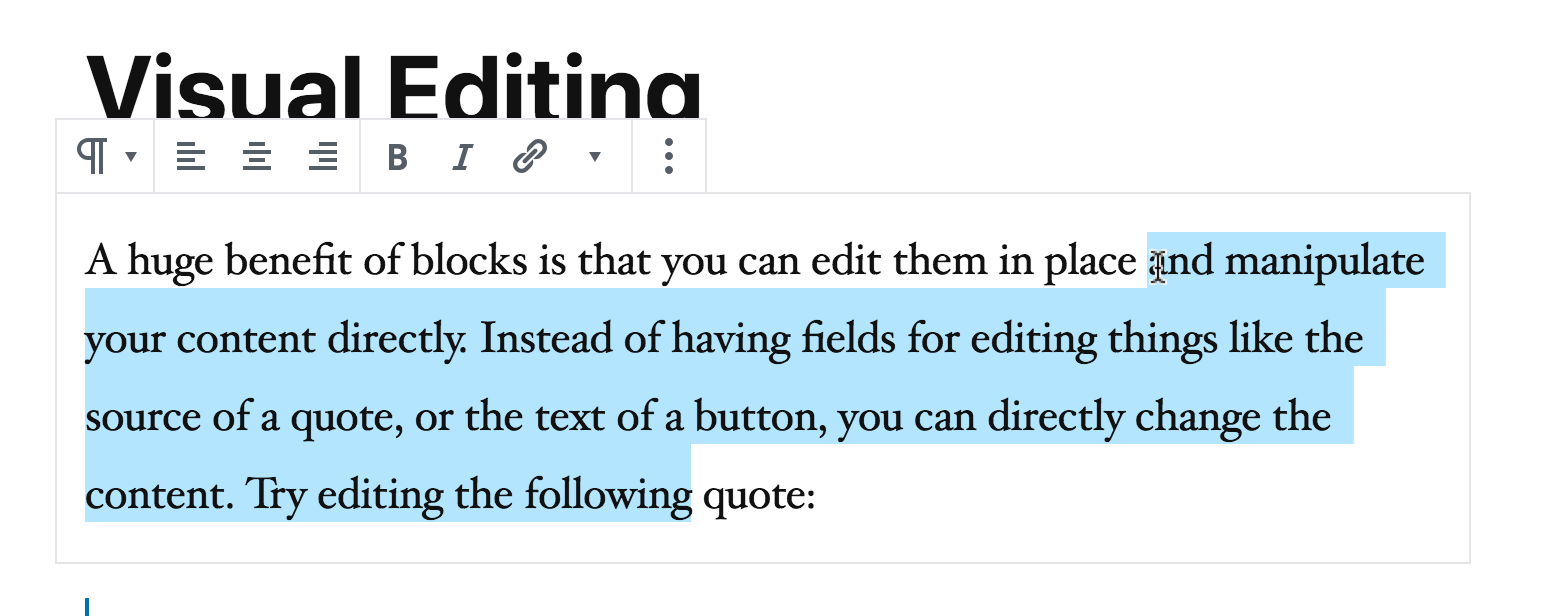
Use Shift + Down arrow to select a portion of text like in the screenshot below (demo content):
Once there:
- press Shift + Up arrow
- expected: the selection to reduce by one line
- actual: the whole block _and_ the previous block content are selected

There are probably more cases.
afercia
on 15 Mar 2019
@afercia There's a pending (approved) pull request to address the problem at #14450 .
Closing as duplicate of #6164 .
aduth
on 15 Mar 2019
@afercia Thanks! I'm aware of it. There's a fix which is about to be merged: #14450.
ellatrix
on 15 Mar 2019
I'm not entirely sure, but I think #6164 is slightly different. I have a fix for it here: #14453.
ellatrix
on 15 Mar 2019
Gotcha, it took me a few re-reads of the issue to understand the subtlety. https://github.com/WordPress/gutenberg/issues/12322#issuecomment-473293805 still seems a separate issue from what was originally reported here, but in absence of another issue let's reopen and associate your #14450 fix.
aduth
on 15 Mar 2019
Related issues
 hedgefield
·
3Comments
hedgefield
·
3Comments
 aaronjorbin
·
3Comments
aaronjorbin
·
3Comments
 cr101
·
3Comments
ellatrix
·
3Comments
cr101
·
3Comments
ellatrix
·
3Comments
 nylen
·
3Comments
nylen
·
3Comments
Most helpful comment
Gonna take a look at this one with a group of people interested in contributing during a Hackathon on Monday!