Gutenberg: After registering custom format type, the button is not showing up in the toolbar. Is there a step I'm missing?
I was able to successfully register a custom format in the editor, and I can confirm that it was registered successfully by running the code wp.richText.getFormatType in the console.
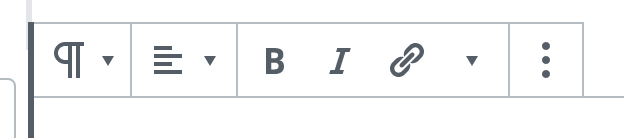
The formatting also works with the keyboard shortcut key I set it to, but unfortunately the button I've set for the formatting is not showing. Can you please provide like a brief process on how to register a format type and have it displayed as one of the formatting buttons on blocks? Am I missing any additional steps?
Below is the code I used to add my custom format type:
var name = "custom/link"

var customLink = {
    name : name,
    title : wp.i18n.__( 'Custom Link' ),
    match : {
        tagName: 'sup',
    },
    attributes: {
        url : 'href',
        target: 'target',
    },
    edit( editObj ) {

        var el       = wp.element.createElement,
            onToggle = function() {
                return editObj.onChange(
                    wp.richText.toggleFormat(
                        editObj.value,
                        { type : name }
                    )
                );
            };

        return el(
            wp.element.Fragment,
            null,
            el(
                editObj.Shortcut,
                {
                    type : "primary",
                    character : "l",
                    onUse : onToggle
                }
            ),
            el(
                editObj.ToolbarButton,
                {
                    name : "customLink",
                    icon : "editor-customchar",
                    title : wp.i18n.__( 'Custom Link' ),
                    onClick : onToggle,
                    isActive : editObj.isActive,
                    shortcutType : "primary",
                    shortcutCharacter : "l"
                }
            )
        );
    }
}

wp.richText.registerFormatType( name , customLink );
Also for the match setting, what are the other available properties to use aside from _tagName_?
 junixdev
All 9 comments
I help with testing and not code directly, and I could help test this if you can provide a bit more detail on the testing steps. For example, where would I add the code example and then how do I check that it does what it's supposed to (i.e. look in the paragraph block toolbar and expect to see a formatter for ?)?
 designsimply
on 6 Nov 2018
designsimply
on 6 Nov 2018
Thanks for the reply. I basically added that code in a custom JS file and enqueued it to the Gutenberg edit page.
junixdev
on 6 Nov 2018
@designsimply do you have an update for this? We would really appreciate any kind of help or answer regarding this so we can proceed with making our plugins work with the Gutenberg editor. Thanks!
junixdev
on 12 Nov 2018
Not yet, sorry! I am still learning. Let me also add one of the feedback labels to see if we can get additional help.
designsimply
on 13 Nov 2018
I think what needs to be done here is to add a way to filter the formattingControls prop of the rich text blocks. Is that possible right now?
junixdev
on 13 Nov 2018
Update:
the custom formatting button can be shown when you create a custom block. Below is my updated sample code for superscript custom format (wrote it with ES6 and JSX now):
const name = 'custom/superscript';
const superScript = {
name,
title: __( 'Superscript' ),
tagName: 'sup',
className: null,
edit( { isActive, value, onChange } ) {
const onToggle = () => onChange( toggleFormat( value, { type: name } ) );
return (
<Fragment>
<RichTextShortcut
type="primary"
character="l"
onUse={ onToggle }
/>
<RichTextToolbarButton
name="superscript"
icon="editor-customchar"
title={ __( 'Superscript' ) }
onClick={ onToggle }
isActive={ isActive }
shortcutType="primary"
shortcutCharacter="l"
/>
</Fragment>
);
},
};
registerFormatType( name , superScript );
and then on my custom block's edit callback, I returned:
<RichText
tagName="p"
formattingControls={ [ 'bold' , 'superscript' ] }
...
/>
Doing this successfully adds the button to the formatting toolbar. To conclude, I think we just need a way to filter the formattingControls of blocks that uses the RichText editor component, or the on the actual component itself if possible. Hope this helps.
junixdev
on 13 Nov 2018
Hi @junixdev. You might have seen my answer on the other issue, but I'll copy it over here as well for visibility:
I've had a test and managed to register a custom formatting control and get the button to appear. There's one little detail that might be catching you out - when you declare the ToolbarButton component in your custom format you must not specify a name prop. Not specifying a name prop ensures your button is rendered in a general purpose toolbarSlot for extending the toolbar which is outside the restrictions imposed by formattingControls. Here's the example code for my custom superscript format:
import { __ } from '@wordpress/i18n';
import { Fragment } from '@wordpress/element';
import { toggleFormat } from '@wordpress/rich-text';
import { RichTextToolbarButton, RichTextShortcut } from '@wordpress/editor';

const name = 'core/superscript';

export const superscript = {
    name,
    title: __( 'Superscript' ),
    tagName: 'sup',
    className: null,
    edit( { isActive, value, onChange } ) {
        const onToggle = () => onChange( toggleFormat( value, { type: name } ) );

        return (
            <Fragment>
                <RichTextShortcut
                    type="access"
                    character="n"
                    onUse={ onToggle }
                />
                <RichTextToolbarButton
                    icon="arrow-up"
                    title={ __( 'Superscript' ) }
                    onClick={ onToggle }
                    isActive={ isActive }
                    shortcutType="access"
                    shortcutCharacter="n"
                />
            </Fragment>
        );
    },
};
Here's a gif of it in use:

If it's ok with you I'll close this issue as resolved. Feel free to reply if you have any further questions.
 talldan
on 11 Dec 2018
talldan
on 11 Dec 2018
@talldan thanks for this. tested on my end and it works!
junixdev
on 11 Dec 2018
@talldan It doesn't actual anymore in wp 5.3.0
 mahnunchik
on 18 Nov 2019
mahnunchik
on 18 Nov 2019
Related issues
 moorscode
·
3Comments
moorscode
·
3Comments
 jasmussen
·
3Comments
jasmussen
·
3Comments
 davidsword
·
3Comments
davidsword
·
3Comments
 aduth
·
3Comments
aduth
·
3Comments
 cr101
·
3Comments
cr101
·
3Comments
Most helpful comment
Hi @junixdev. You might have seen my answer on the other issue, but I'll copy it over here as well for visibility:
I've had a test and managed to register a custom formatting control and get the button to appear. There's one little detail that might be catching you out - when you declare the
ToolbarButtoncomponent in your custom format you must not specify anameprop. Not specifying anameprop ensures your button is rendered in a general purpose toolbarSlotfor extending the toolbar which is outside the restrictions imposed byformattingControls. Here's the example code for my custom superscript format:Here's a gif of it in use:
If it's ok with you I'll close this issue as resolved. Feel free to reply if you have any further questions.